1. Pengenalan
Terima kasih kerana membeliasing the Sharp HT-SBW110 2.1 Bluetooth Soundbar System. This manual provides essential information for setting up, operating, and maintaining your soundbar system. Please read it thoroughly before use to ensure proper functionality and safety.
The HT-SBW110 is a powerful 2.1 channel soundbar system designed to enhance your audio experience, featuring 180W total RMS power, a dedicated wireless subwoofer, and versatile connectivity options including Bluetooth, HDMI ARC, Optical, and AUX inputs.

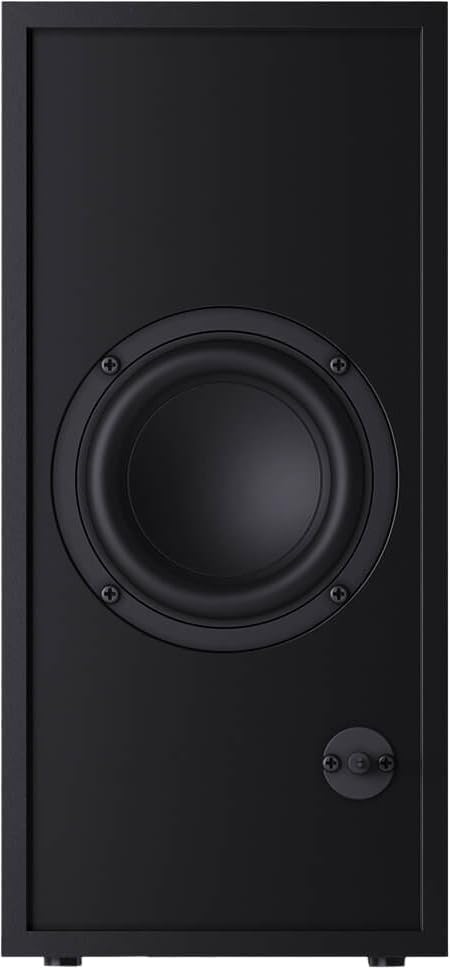
Figure 1.1: Sharp HT-SBW110 Soundbar and Subwoofer
This image displays the Sharp HT-SBW110 soundbar and its accompanying separate subwoofer, showcasinreka bentuk hitam mereka yang anggun.
2. Kandungan Pakej
Sila pastikan semua item ada dalam pakej:
- Sharp HT-SBW110 Soundbar
- Subwufer Tanpa Wayar
- Alat Kawalan Jauh
- Power Cable for Soundbar
- Power Cable for Subwoofer
- Manual Pengguna (dokumen ini)
- Batteries for Remote Control (1 x CR2)
3. Maklumat Keselamatan
Always follow basic safety precautions when using this product to reduce the risk of fire, electric shock, or injury:
- Jangan dedahkan perkakas ini kepada titisan atau percikan.
- Jangan letakkan objek yang diisi dengan cecair, seperti pasu, pada radas.
- Pastikan pengudaraan yang mencukupi. Jangan sekat sebarang bukaan pengudaraan.
- Do not place the soundbar or subwoofer near heat sources such as radiators, heat registers, stoves, or other apparatus (including amppenghidup) yang menghasilkan haba.
- Gunakan hanya lampiran/aksesori yang ditentukan oleh pengilang.
- Cabut plag radas ini semasa ribut petir atau apabila tidak digunakan untuk jangka masa yang lama.
- Rujuk semua servis kepada kakitangan perkhidmatan yang berkelayakan.
4. Persediaan
4.1 Penempatan
Bar bunyi: Place the soundbar on a flat, stable surface directly in front of your TV, centered for optimal sound dispersion. Ensure there are no obstructions in front of the soundbar's speakers.
subwufer: The wireless subwoofer can be placed anywhere in the room, ideally within 5-10 meters of the soundbar, for best bass response. Avoid placing it in enclosed spaces that might muffle the sound.
The soundbar is also wall-mountable. Refer to the included wall-mounting template (if provided) for proper installation.
4.2 Sambungan
Sambungkan bar bunyi anda ke TV atau sumber audio lain menggunakan salah satu kaedah berikut:

Figure 4.1: Soundbar Rear Panel Connections
This image shows the rear panel of the Sharp HT-SBW110 soundbar, highlighting the various input ports including HDMI ARC, Optical, and AUX.
- HDMI ARC (Disyorkan):
Connect an HDMI cable from the HDMI ARC port on your soundbar to the HDMI ARC port on your TV. This allows audio from your TV to be sent to the soundbar and enables control of the soundbar volume using your TV remote (if your TV supports HDMI CEC).
- Optik:
Connect an optical audio cable from the OPTICAL input on your soundbar to the optical digital audio output on your TV or other audio source.
- AUX:
Connect a 3.5mm audio cable from the AUX input on your soundbar to the headphone jack or audio output of your device (e.g., smartphone, MP3 player).
- Sambungan Kuasa:
Connect the power cables to the soundbar and subwoofer, then plug them into a wall outlet (AC 220-240V, 50Hz).
The subwoofer will automatically pair with the soundbar once both are powered on. A blue indicator light on the subwoofer will confirm a successful connection.
5. Arahan Operasi
5.1 Alat Kawalan Jauh Lebihview
Rajah 5.1: Alat Kawalan Jauh
This image displays the sleek, minimalist remote control for the Sharp HT-SBW110 soundbar, showing its various buttons for power, input selection, volume, bass, treble, and EQ modes.
The remote control allows you to manage all functions of your soundbar system. Insert the provided CR2 battery into the remote control before first use.
- Butang kuasa (⏷): Menghidupkan/Mematikan bar bunyi.
- Butang Input/Sumber (↵): Switches between HDMI ARC, Optical, AUX, and Bluetooth inputs.
- Kelantangan Naik/Turun (+/-): Melaraskan tahap kelantangan induk.
- Butang Redam (🔇): Membisukan atau menyahredamkan bunyi.
- Bes +/-: Adjusts the bass level of the subwoofer.
- Tiga kali ganda +/-: Melaraskan tahap treble.
- Butang EQ: Cycles through preset equalizer modes: Music, Film, Talk.
- Butang Bluetooth (Ⓘ): Memasuki mod pasangan Bluetooth.
5.2 Operasi Asas
- Hidupkan/Mati Kuasa: Press the Power button on the remote or on the soundbar's top panel.
- Pilih Input: Press the Input/Source button repeatedly to cycle through available inputs (HDMI ARC, Optical, AUX, Bluetooth). The LED indicator on the soundbar will change color to indicate the selected input.
- Laraskan Kelantangan: Use the Volume +/- buttons on the remote or the soundbar to adjust the listening level.
- Change EQ Mode: Press the EQ button to select between Music, Film, or Talk sound modes.
5.3 Berpasangan Bluetooth
- Press the Input/Source button on the soundbar or remote until the Bluetooth input is selected (usually indicated by a blue LED).
- The soundbar will automatically enter pairing mode, and the Bluetooth LED will flash.
- Pada peranti Bluetooth anda (telefon pintar, tablet, dll.), dayakan Bluetooth dan cari peranti yang tersedia.
- Select "SHARP HT-SBW110" from the list of devices.
- Once paired, the Bluetooth LED on the soundbar will stop flashing and remain solid blue. You can now play audio from your device through the soundbar.
6. Penyelenggaraan
- Pembersihan: Use a soft, dry cloth to clean the surfaces of the soundbar and subwoofer. Do not use liquid cleaners or aerosol sprays.
- Pengudaraan: Ensure that the ventilation openings on the soundbar and subwoofer are not blocked by dust or debris.
- Storan: Jika menyimpan unit untuk tempoh yang lama, cabut palamnya dari salur keluar kuasa dan simpan di tempat yang sejuk dan kering.
7. Penyelesaian masalah
| Masalah | Kemungkinan Punca | Penyelesaian |
|---|---|---|
| Tiada kuasa | Kabel kuasa tidak disambungkan; Soket kuasa tidak aktif. | Ensure power cables are securely connected to the soundbar, subwoofer, and wall outlet. Try a different outlet. |
| Tiada bunyi | Input salah dipilih; Kelantangan terlalu rendah; Kabel tidak disambungkan dengan betul. | Select the correct input source. Increase volume. Check all audio cable connections. Ensure TV audio output is set to external speakers. |
| Penggandingan Bluetooth gagal | Bar bunyi tidak dalam mod berpasangan; Peranti terlalu jauh; Gangguan. | Ensure soundbar is in Bluetooth pairing mode (flashing blue LED). Move device closer to soundbar. Avoid strong electromagnetic interference. Try unpairing and re-pairing. |
| Alat kawalan jauh tidak berfungsi | Bateri berkurangan; Halangan antara alat kawalan jauh dan bar bunyi. | Replace batteries. Ensure clear line of sight between remote and soundbar's IR receiver. |
Jika masalah berterusan, sila rujuk bahagian Waranti dan Sokongan untuk bantuan lanjut.
8. Spesifikasi
| Saluran Audio | 2.1 Saluran |
| Jumlah Kuasa RMS | 180 W |
| Soundbar RMS Power | 30 W |
| Subwoofer RMS Power | 30 W |
| Julat Kekerapan | 60 - 20000 Hz |
| Teknologi Ketersambungan | Berwayar & Tanpa Wayar |
| Versi Bluetooth | 4.2 |
| Port HDMI | 1 (ARC) |
| Input Audio Optik | 1 |
| Input AUX | ya |
| Input AC Voltage | 220 - 240 V |
| Kekerapan Input AC | 50 Hz |
| Penggunaan Kuasa Biasa | 30 W |
| Penggunaan Kuasa Siap Sedia | 0.5 W |
| Dimensi Bar Bunyi (L x P x T) | 800 x 60 x 60 mm (31.5 x 2.4 x 2.4 inci) |
| Berat Bar Bunyi | 1.3 kg (2.9 lbs) |
| Subwoofer Dimensions (W x D x H) | 150 x 320 x 220 mm (5.9 x 12.6 x 8.7 inci) |
| Berat Subwoofer | 2.7 kg (6 lbs) |
| warna | Hitam |
| Boleh Dipasang di Dinding | ya |
| Alat Kawalan Jauh | Termasuk |
| Pensijilan | CE (EMC), CB (Safety), ErP (Energy) |
9. Waranti dan Sokongan
This Sharp HT-SBW110 Soundbar System comes with a limited warranty. Please refer to the warranty card included in your package for specific terms and conditions.
Spare parts availability is guaranteed for 1 year from the date of purchase.
For technical support, troubleshooting beyond this manual, or warranty claims, please contact Sharp customer service or visit the official Sharp website for your region. Contact information can typically be found on the product packaging or Sharp's official webtapak.


