1. Pengenalan
This manual provides essential information for the safe and efficient operation of your AUXUS iRis AX32LSP01-SM 32-inch Smart Android LED TV. Please read these instructions thoroughly before using the product and retain them for future reference.
The AUXUS iRis AX32LSP01-SM features a 32-inch HD Ready LED display, integrated Android operating system for smart functionality, wireless display capabilities, and multiple connectivity options. It is designed to provide an immersive viewing and interactive experience.

Rajah 1.1: Depan view of the AUXUS iRis 32-inch Smart Android LED TV, showcasing paparannya.
2. Maklumat Keselamatan
Patuhi langkah berjaga-jaga keselamatan berikut untuk mengelakkan kerosakan pada TV dan memastikan keselamatan diri:
- Jangan dedahkan TV kepada hujan atau lembapan untuk mengelakkan kebakaran atau kejutan elektrik.
- Jangan buka TV casing. Rujuk semua servis kepada kakitangan yang berkelayakan.
- Pastikan pengudaraan yang betul. Jangan sekat bukaan pengudaraan.
- Letakkan TV pada permukaan yang stabil dan rata untuk mengelakkannya daripada jatuh.
- Lindungi kord kuasa daripada berjalan atau tersepit.
- Cabut palam TV semasa ribut petir atau apabila tidak digunakan untuk tempoh yang lama.
3. Kandungan Pakej
Sahkan bahawa semua item terdapat dalam pakej:
- 1 x AUXUS iRis 32-inch LED TV
- 1 x Table Top Stand (set)
- 1 x Manual Pengguna (dokumen ini)
- 1 x Kad Waranti
- 1 x Alat Kawalan Jauh
4. Persediaan
4.1 Membongkar
Carefully remove the TV and all accessories from the packaging. Retain the packaging materials for future transport or servicing.
4.2 Pemasangan Stand
If using the table-top stand, attach the stand bases to the bottom of the TV using the provided screws. Ensure the stand is securely fastened before placing the TV on a flat, stable surface.
4.3 Pemasangan Dinding
The TV supports VESA-compatible wall mounts (not included). Consult a professional for wall mounting to ensure proper installation and safety.
4.4 Menyambung Peranti
Refer to the back panel diagram for port locations. Ensure the TV is powered off before making any connections.
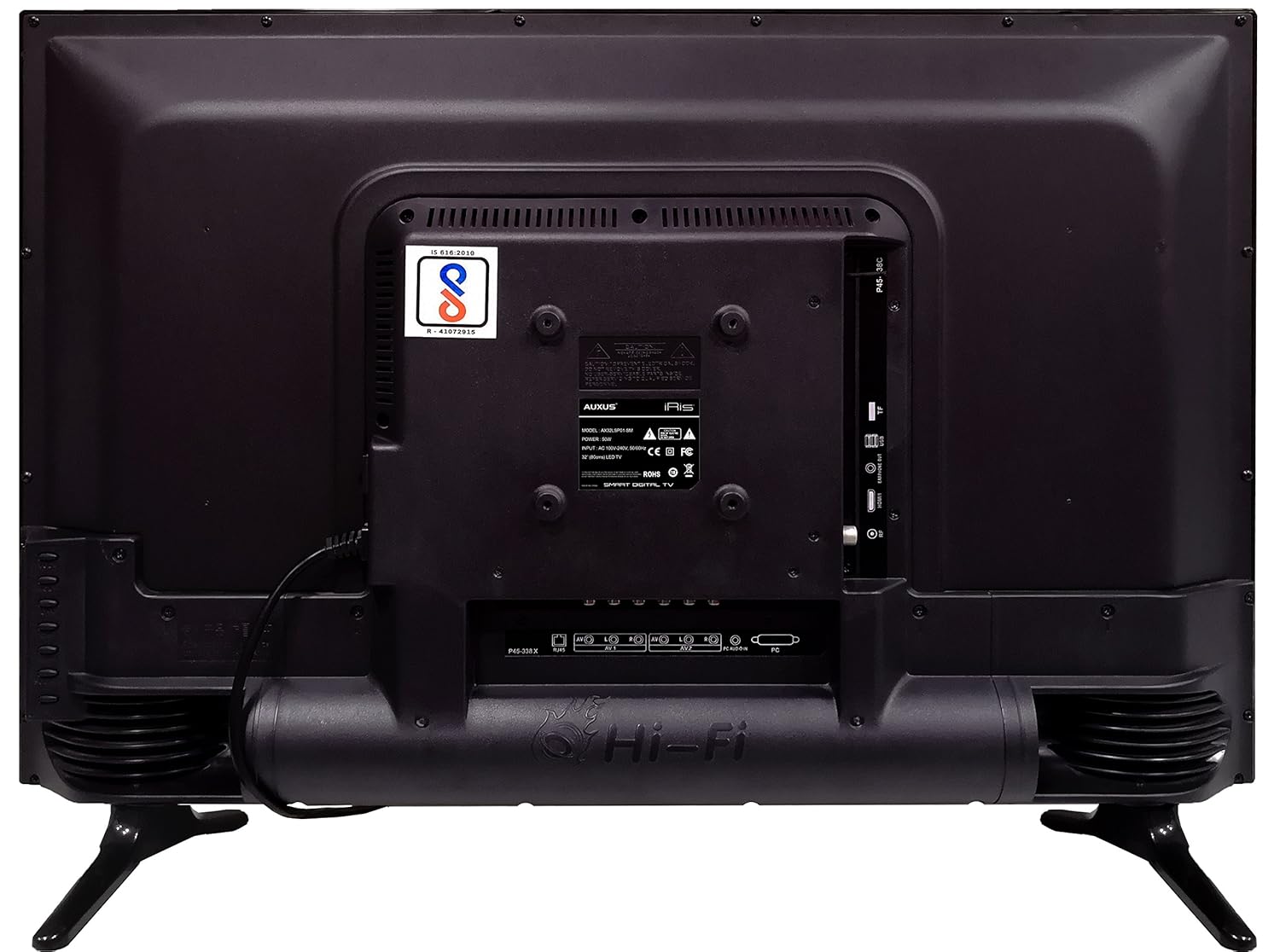
Figure 4.1: Rear panel of the TV with various input/output ports.

Rajah 4.2: Terperinci view of the bottom interface ports.

Figure 4.3: Icons representing multiple connectivity options.
- Kuasa: Sambungkan kord kuasa ke TV dan kemudian ke saluran keluar dinding.
- Antena/Kabel: Connect an antenna or cable TV signal to the RF port.
- USB: Insert USB drives for media playback or software updates into the USB ports. The TV has 2 USB ports.
- Ethernet (RJ45): Sambungkan kabel Ethernet untuk sambungan internet berwayar.
- AV (Audio/Video): Use RCA cables for older devices. The TV has AV1 and AV2 inputs.
- PC IN (VGA): Connect a computer using a VGA cable for video and a 3.5mm audio cable for sound (PC AUDIO IN).
- Fon kepala: Connect headphones to the 3.5mm jack for private listening.
5. Mengendalikan TV
5.1 Persediaan Kali Pertama
- After connecting the power, press the Power button on the remote control or TV.
- Follow the on-screen prompts to select your language, country, and time zone.
- Connect to your network: Choose Wi-Fi and enter your password, or ensure an Ethernet cable is connected.
- Complete the channel scan if connecting an antenna/cable.
5.2 Alat Kawalan Jauh
The remote control allows you to navigate menus, adjust volume, change channels, and access smart features. Familiarize yourself with its buttons for optimal use.
5.3 Ciri TV Pintar (OS Android)
Your TV runs on the Android operating system, providing access to a variety of applications and internet services.

Figure 5.1: TV displaying a smart interface, such as Netflix.
- Navigasi: Use the directional pad and 'OK' button on the remote to browse the Android interface.
- Paparan Tanpa Wayar: Utilize the built-in wireless display feature to mirror content from compatible smartphones or tablets to your TV.
- Internet Browsing & Apps: Connect to the internet to browse websites or download and use applications from the app store.
- Permainan: The Android platform supports various games, offering an adrenaline-pumping gaming experience.
5.4 Tetapan Gambar dan Bunyi
Access the TV's settings menu to customize picture and sound preferences.
- gambar: Adjust brightness, contrast, color, sharpness, and select picture modes (e.g., Standard, Dynamic, Movie).
- Bunyi: Optimize audio with settings for volume, balance, equalizer, and sound modes. The TV features 'Boomr Speakers' for enhanced audio output.
5.5 Pemilihan Sumber Input
Press the 'Source' or 'Input' button on your remote to switch between connected devices (HDMI 1, HDMI 2, AV 1, AV 2, PC, TV).
6. Penyelenggaraan
6.1 Membersihkan TV
- Sentiasa cabut plag TV sebelum membersihkan.
- Use a soft, dry cloth to wipe the screen and TV casing.
- For stubborn marks on the screen, use a screen cleaner specifically designed for LED displays, applied to the cloth, not directly to the screen.
- Elakkan daripada menggunakan pembersih yang melelas, lilin atau pelarut.
6.2 Kemas Kini Perisian
Semak kemas kini perisian secara berkala melalui menu tetapan TV untuk memastikan prestasi optimum dan akses kepada ciri terkini.
7. Penyelesaian masalah
Jika anda menghadapi masalah dengan TV anda, rujuk masalah dan penyelesaian biasa berikut:
| Masalah | Penyelesaian yang Mungkin |
|---|---|
| Tiada kuasa | Check if the power cord is securely connected and the power outlet is working. |
| Tiada gambar, tetapi bunyi hadir | Pastikan sumber input yang betul dipilih. Semak sambungan kabel ke peranti luaran. |
| Tiada bunyi, tetapi ada gambar | Periksa tahap kelantangan dan status bisu. Sahkan sambungan kabel audio. |
| Alat kawalan jauh tidak berfungsi | Gantikan bateri. Pastikan tiada halangan antara alat kawalan jauh dan TV. |
| Android system hangs or is slow | Restart the TV by unplugging it for a few minutes. Close unused applications. |
| Isu sambungan rangkaian | Check Wi-Fi password or Ethernet cable connection. Restart your router. |
8. Spesifikasi
| Ciri | Spesifikasi |
|---|---|
| Jenama | AUXUS |
| Nama Model | AX32LSP01-SM |
| Saiz Skrin | 32 Inci (82 cm) |
| Teknologi Paparan | LED, IPS Panel |
| Resolusi | Sedia HD (1366 x 768p) |
| Viewsudut | 178 Darjah |
| Sistem Operasi | Android |
| Kapasiti Storan Digital | 8 GB |
| RAM | 1 GB |
| Mod Keluaran Audio | Surround (Boomr Speakers) |
| Port HDMI | Berbilang |
| Port USB | 2 |
| Teknologi Ketersambungan | Ethernet, Wi-Fi (Wireless Display) |
| Pelabuhan Lain | AV (RCA), PC IN (VGA), PC Audio In, Headphone (3.5mm), RF (Antenna) |
| Jenis Pemasangan | Wall Mount / Table Top Stand |
| Dimensi Produk (LxWxH) | 84 x 13 x 59 cm |
| Berat Barang | 6.5 kg |
9. Waranti dan Sokongan
Your AUXUS iRis AX32LSP01-SM TV comes with a warranty. Please refer to the included Warranty Card for specific terms, conditions, and duration of the warranty coverage.
For technical support, service requests, or further inquiries, please contact AUXUS customer service. Contact details can typically be found on the warranty card or the official AUXUS webtapak.


