1. Pengenalan
The MOOER Micro Preamp M013 Matchbox is a compact digital preamp pedal designed to accurately recreate the sound and feel of a Matchless amplifier. It features dual channels (Clean and Gain), a 3-band EQ, and an integrated cabinet simulator, making it suitable for direct recording, practice, or integration into a pedalboard setup.
2. Maklumat Keselamatan
- Use only the specified 9V DC power adapter (center negative).
- Jangan dedahkan unit kepada air, kelembapan atau suhu yang melampau.
- Elakkan daripada menjatuhkan atau menundukkan pedal kepada hentaman kuat.
- Jangan cuba membuka atau mengubah suai unit.
- Jauhkan daripada kanak-kanak.
3. Produk Lebihview
The M013 Matchbox pedal features a robust metal casing and intuitive controls for shaping your tone.

Rajah 1: Atas-bawah view of the MOOER Micro Preamp M013 Matchbox pedal, illustrating the layout of controls and jacks.
Kawalan:
- VOL (Isipadu): Melaraskan tahap output keseluruhan saluran yang dipilih.
- TRE (Treble): Mengawal tindak balas frekuensi tinggi.
- MID (Middle): Mengawal tindak balas frekuensi pertengahan.
- BASS (Bass): Mengawal tindak balas frekuensi rendah.
- DAPATKAN: Adjusts the amount of overdrive/distortion for the selected channel.
- CH/CAB Switch: This toggle switch has two functions:
- In normal operation, it switches between the Clean and Gain channels.
- When holding down the footswitch, it toggles the cabinet simulator on/off.
- Suis kaki: Toggles between the two channels (Clean/Gain) or bypasses the pedal.
Sambungan:

Figure 2: Input Jack (left side)

Figure 3: Output Jack (right side)
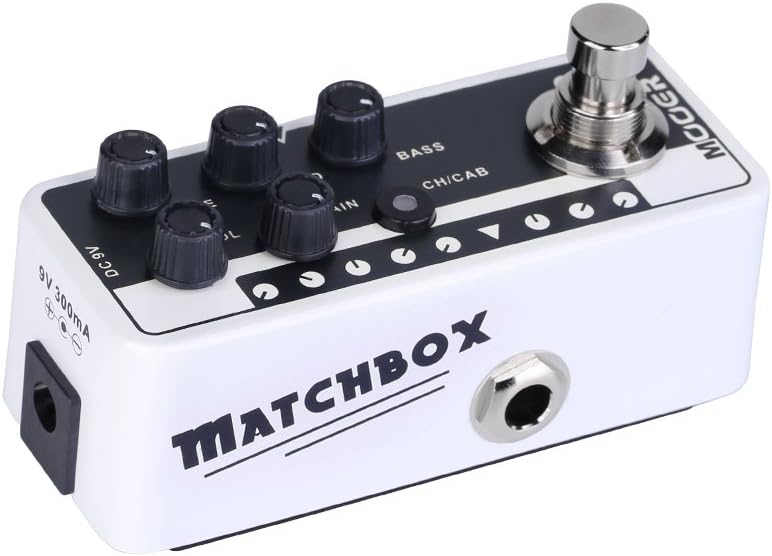
Figure 4: DC 9V Power Input
- Jack Input: Sambungkan gitar atau alat muzik anda yang lain di sini.
- Jack Output: Sambung ke anda amppenguat, pengadun atau antara muka audio.
- DC 9V: Power input for a 9V DC (center negative) power supply.
4. Persediaan
- Sambungkan gitar anda ke Bicu Input di sebelah kanan pedal.
- Sambungkan Jack Output on the left side of the pedal to your amplifier's input, a mixer, or an audio interface.
- Connect a 9V DC (center negative) power adapter to the DC 9V input.
- Pastikan semua sambungan selamat sebelum menghidupkan anda ampliifier atau sistem audio.
5. Arahan Operasi
Pemilihan Saluran:
The M013 Matchbox offers two distinct channels: Clean and Gain. Use the CH/CAB switch to toggle between these channels. The LED indicator will change color to show the active channel (typically blue for Clean, red for Gain).
Cabinet Simulator:
The integrated cabinet simulator can be toggled on or off. To activate or deactivate the cabinet simulator, press and hold the Tukar kaki for approximately 1 second. The LED will flash to indicate the change in status.
Pembentukan Nada:
Laraskan VOL, TRE, PERTENGAHAN, BASS, dan DAPATKAN knobs to achieve your desired tone for each channel. Experiment with different settings to explore the full range of sounds this pedal can produce.
Footswitch Functionality:
A quick press of the Tukar kaki will toggle between the currently selected channel and bypass mode. The LED will indicate whether the pedal is active or bypassed.
Video Demonstrasi:
Video 1: Official MOOER demonstration of the Micro Preamp M013 Matchbox, showcasing both Clean and Gain channels with and without cabinet simulation. This video provides examples of the pedal's tonal capabilities.
6. Penyelenggaraan
- Clean the pedal with a soft, dry cloth. Do not use abrasive cleaners or solvents.
- Store the pedal in a dry environment away from direct sunlight and extreme temperatures.
- Periksa sambungan kabel secara berkala untuk haus dan lusuh.
7. Penyelesaian masalah
Tiada Kuasa:
- Ensure the 9V DC power adapter is correctly connected and functioning.
- Sahkan bahawa soket kuasa aktif.
Tiada Bunyi:
- Periksa semua sambungan kabel (gitar ke input, output ke amp/pengadun).
- Ensure the pedal is not in bypass mode (check LED indicator).
- Sahkan bahawa tombol kelantangan pada pedal dan ampPenguat telah dinaikkan.
- Test with different cables and a different power supply if possible.
Bunyi/Dengungan yang Tidak Diingini:
- Ensure you are using a regulated 9V DC (center negative) power supply. Unregulated power supplies can introduce noise.
- Check for ground loops by trying different power outlets or isolating the pedal's power.
- Keep the pedal away from other electronic devices that may cause interference.
8. Spesifikasi
- Berat Barang: 5.8 auns (165 Gram)
- Dimensi Produk: 3.58 x 1.26 x 1.42 inci
- Sumber Kuasa: Elektrik Bertali
- Voltage: 9 Volt DC
- Output Wattage: 30 Watts (referring to the amp model it simulates, not the pedal's power output)
- Jenis Penyambung: Bicu 6.35mm
- Peranti Serasi: Gitar
- warna: Hitam
9. Waranti dan Sokongan
For warranty information and technical support, please refer to the official MOOER website or contact your local dealer. Keep your purchase receipt as proof of purchase for any warranty claims.


