1. Pengenalan
Terima kasih kerana membeliasing the Capello Play it All Bluetooth Wireless Home Stereo Speaker CI302. This device offers versatile audio playback options including Bluetooth wireless streaming, CD player functionality, and FM digital radio. This manual provides detailed instructions for setup, operation, maintenance, and troubleshooting to ensure optimal performance and longevity of your speaker system.
2. Maklumat Keselamatan Penting
- Baca semua arahan sebelum mengendalikan peranti.
- Simpan manual ini untuk rujukan masa hadapan.
- Jangan dedahkan unit kepada hujan atau lembapan untuk mengelakkan bahaya kebakaran atau kejutan.
- Pastikan pengudaraan yang betul; jangan sekat sebarang bukaan pengudaraan.
- Letakkan unit pada permukaan yang stabil dan rata.
- Gunakan hanya lampiran/aksesori yang ditentukan oleh pengilang.
- Cabut palam unit semasa ribut petir atau apabila tidak digunakan untuk tempoh yang lama.
- Rujuk semua servis kepada kakitangan perkhidmatan yang berkelayakan.
3. Kandungan Pakej
Sila pastikan semua item ada:
- Capello Play it All Bluetooth Wireless Home Stereo Speaker CI302
- Alat Kawalan Jauh
- Penyesuai Kuasa AC
- Manual Pengguna (dokumen ini)
4. Produk Lebihview
Familiarize yourself with the main components and controls of your Capello Play it All speaker.
Depan View

Rajah 4.1: Depan view of the Capello Play it All speaker, showing the speaker grille, digital clock display, and subtle branding.
Kawalan Panel Atas

Rajah 4.2: Top panel of the Capello Play it All speaker, illustrating the CD compartment, 'capello' logo, and various control buttons including PRESET, MODE, PAIRING, PROGRAM/CLOCK SET, SKIP, PLAY/PAUSE, STOP, REPEAT, and VOLUME.
- PRATETAP +/-: Navigate through saved FM radio stations.
- ARAHAN: Switch between Bluetooth, CD, FM Radio, and Line-In modes.
- BERPASANG: Mulakan mod gandingan Bluetooth.
- PROGRAM/CLOCK SET: Program CD tracks or set the clock.
- SKIP ◀◀ / ▶▶: Skip tracks on CD or adjust FM frequency.
- PLAY/PAUSE ▶▶: Play or pause CD playback.
- STOP ■: Stop CD playback.
- ULANGAN: Repeat current track or all tracks on CD.
- VOL +/-: Laraskan tahap kelantangan.
- BUKA TUTUP: Open or close the CD compartment.
- STANDBY: Hidupkan/matikan unit.
Rear Panel (Typical)
The rear panel typically includes the AC power input, FM antenna connection, and Line-In jack.
5. Persediaan
5.1 Sambungan Kuasa
- Connect the AC power adapter to the DC IN jack on the rear of the speaker.
- Palamkan hujung penyesuai yang satu lagi ke salur keluar dinding standard.
- The unit will enter standby mode, and the digital clock display will illuminate.
5.2 FM Antenna Setup
For optimal FM radio reception, extend the FM wire antenna fully and position it for the best signal. Avoid placing it near other electronic devices that may cause interference.
5.3 Menetapkan Jam
- Dalam mod siap sedia, tekan dan tahan butang PROGRAM/CLOCK SET butang.
- The hour digits will begin to flash. Use the SKIP ◀◀ / ▶▶ butang untuk melaraskan jam.
- Tekan PROGRAM/CLOCK SET sekali lagi untuk mengesahkan jam tersebut.
- The minute digits will flash. Use the SKIP ◀◀ / ▶▶ butang untuk melaraskan minit.
- Tekan PROGRAM/CLOCK SET one last time to save the setting.
6. Arahan Operasi
6.1 Kuasa Hidup/Mati dan Pemilihan Mod
- Tekan ke STANDBY button on the unit or the remote control to turn the speaker on or off.
- Tekan ke MODE button repeatedly to cycle through available modes: Bluetooth, CD, FM Radio, and Line-In.
6.2 Penstriman Tanpa Wayar Bluetooth
- Hidupkan pembesar suara dan pilih mod Bluetooth menggunakan MODE button. The display will show 'BT' and flash, indicating it's in pairing mode.
- Pada peranti berdaya Bluetooth anda (telefon pintar, tablet, komputer), dayakan Bluetooth dan cari peranti yang tersedia.
- Select 'Capello CI302' (or similar) from the list of devices.
- Once paired, the speaker will emit a confirmation tone, and 'BT' on the display will stop flashing.
- You can now play audio from your device through the speaker. Use your device or the speaker's controls for volume and track navigation.
6.3 Main Semula CD
- Tekan ke BUKA/TUTUP button to open the CD compartment.
- Carefully place an audio CD (CD, CD-R/-RW) with the label side facing up into the compartment.
- Close the CD compartment. The unit will read the disc.
- If not already in CD mode, press the MODE butang untuk memilih mod CD.
- Tekan ke MAIN/JEDA butang untuk memulakan main balik.
- guna SKIP ◀◀ / ▶▶ to skip tracks, BERHENTI ■ to stop, and ULIKAN to cycle through repeat options.
6.4 FM Digital Radio
- Tekan ke MODE button to select FM radio mode. The current frequency will be displayed.
- Imbasan Auto: Tekan dan tahan butang MAIN/JEDA button to automatically scan and save available FM stations as presets.
- Penalaan Manual: Tekan SKIP ◀◀ / ▶▶ briefly to fine-tune the frequency. Press and hold to scan for the next strong station.
- Mengakses Pratetap: Gunakan PRESET +/- butang untuk mengitar stesen yang disimpan.
6.5 Line-In Operation
- Connect an audio cable (not included) from the headphone jack or line-out of an external audio device to the LINE-IN jack on the speaker.
- Tekan ke MODE butang untuk memilih mod Line-In.
- Play audio from your connected device. Volume can be controlled via the speaker or the external device.
6.6 Pengecasan USB
The speaker features a USB port for charging compatible devices (e.g., smartphones, tablets). Connect your device's USB charging cable (not included) to the USB port on the speaker. The speaker does not need to be in a specific mode for USB charging to function.
6.7 Penggunaan Alat Kawalan Jauh
The included remote control provides convenient access to all functions. Ensure the remote has working batteries and is pointed towards the front of the speaker.
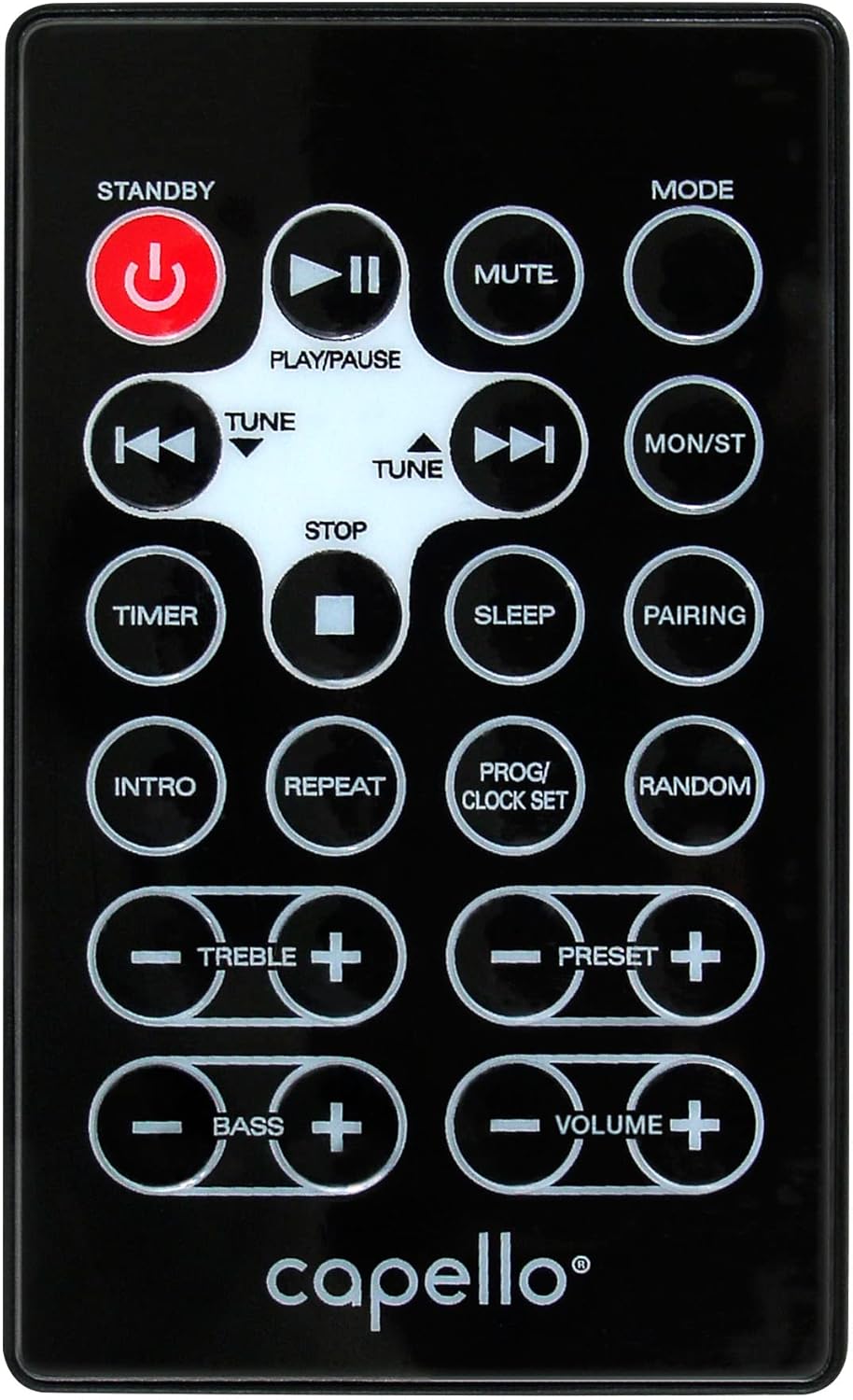
Rajah 6.1: Layout of the remote control for the Capello Play it All speaker, showing buttons for Standby, Play/Pause, Mute, Mode, Skip/Tune, Stop, Timer, Sleep, Pairing, Intro, Repeat, Program/Clock Set, Random, Treble, Bass, and Volume controls.
- STANDBY: Hidupkan / matikan.
- MAIN/JEDA: Mainkan atau jeda audio.
- MATI: Redamkan atau nyahredamkan audio.
- ARAHAN: Kitaran melalui mod input.
- SKIP/TUNE ◀◀ / ▶▶: Skip tracks or tune radio frequency.
- BERHENTI: Hentikan main balik.
- PEMASA: Tetapkan pemasa tidur.
- TIDUR: Activate sleep function.
- BERPASANG: Initiate Bluetooth pairing.
- PENGENALAN: Play the first few seconds of each CD track.
- ULANGAN: Ulang trek semasa atau semua trek.
- PROG/CLOCK SET: Program CD tracks or set clock.
- RANDOM: Play CD tracks in random order.
- TREBLE +/-: Laraskan tahap treble.
- BASS +/-: Laraskan tahap bes.
- JILID +/-: Laraskan kelantangan keseluruhan.
7. Penyelenggaraan
7.1 Pembersihan
- Sentiasa cabut plag unit daripada salur keluar kuasa sebelum membersihkan.
- Gunakan kain lembut dan kering untuk mengelap permukaan luar.
- Jangan gunakan pembersih, lilin atau pelarut yang melelas kerana ia boleh merosakkan kemasan.
- Untuk kanta CD, gunakan cakera pembersih kanta CD khusus.
7.2 Penyimpanan
If storing the unit for an extended period, unplug it from the power source and store it in a cool, dry place away from direct sunlight and extreme temperatures.
8. Penyelesaian masalah
| Masalah | Kemungkinan Punca | Penyelesaian |
|---|---|---|
| Tiada kuasa | Kord kuasa tidak disambungkan; soket tidak aktif. | Pastikan kord kuasa dipasang dengan selamat; cuba outlet lain. |
| Tiada bunyi | Volume too low; incorrect mode selected; external device muted. | Increase volume; select correct input mode; check external device volume/mute. |
| CD melangkau atau tidak dimainkan | Dirty or scratched CD; CD inserted incorrectly; dirty CD lens. | Clean or replace CD; insert CD label-side up; use a CD lens cleaner. |
| Penggandingan Bluetooth gagal | Device too far; Bluetooth not enabled on device; speaker not in pairing mode. | Move device closer; enable Bluetooth; ensure speaker is in BT pairing mode. |
| Penerimaan FM yang lemah | Antenna not extended; interference. | Fully extend and reposition FM antenna; move away from other electronics. |
| Alat kawalan jauh tidak berfungsi | Batteries depleted; obstruction; not pointed at sensor. | Replace batteries; remove obstructions; point remote directly at the unit. |
9. Spesifikasi
| Ciri | Spesifikasi |
|---|---|
| Jenama | Capello |
| Nombor Model | CI302 |
| Teknologi Ketersambungan | Bluetooth |
| Jenis Pembesar Suara | Stereo |
| Mod Keluaran Audio | Stereo |
| Format Audio yang Disokong | CD, MP3 |
| Kuasa Output Nominal Pembesar Suara | 10 Watt |
| Pembesar Suara Kuasa Output Maksimum | 10 Watt |
| Konfigurasi Saluran Bunyi Surround Speaker | 2.0 |
| Jenis Sumber Kuasa | Elektrik Bertali |
| Peranti Serasi | Komputer riba, Telefon Pintar, Tablet |
| Ciri Khas | Digital Display, Portable, USB Port |
| Jenis Bahan | plastik |
| Jenis Pemasangan | Atas Meja |
| Berat Barang | 2.57 Kilogram |
| Dimensi Pakej | 38.3 x 24.2 x 18.5 cm |
| Bateri Termasuk | Tidak |
| Bateri Diperlukan | Tidak |
10. Waranti dan Sokongan
This product is covered by a limited warranty. Please refer to the warranty card included in your package for specific terms and conditions. For technical support or customer service inquiries, please contact Capello customer support through their official webtapak atau maklumat hubungan yang diberikan bersama dokumentasi pembelian anda.


