1. Pengenalan
The Digitus DN-95117 is a high-performance 24-port 10G PoE+ Mid-Span hub, also known as a PoE injector. This device is designed to simplify network infrastructure by providing both data connectivity and electrical power to compatible devices over standard Ethernet cables. It features 24 input ports for data and 24 output ports that deliver both data and Power over Ethernet (PoE).
Each PoE output port supports devices compliant with IEEE802.3af (15.4 W) and IEEE802.3at (30 W) standards, making it suitable for powering various network devices such as PoE-enabled access points, IP phones, and IP cameras. The injector offers a robust maximum total power budget of 370 W across all ports, with a maximum of 30 W available per individual port.
2. Kandungan Pakej
Sila sahkan bahawa semua item yang disenaraikan di bawah disertakan dalam pakej anda. Jika ada item yang hilang atau rosak, sila hubungi vendor anda.
- 1 x 24-port 10G PoE+ Injector (Digitus DN-95117)
- 1 x Panduan Mula Pantas
- 1 x Kabel Kuasa
- Mounting Accessories (e.g., rack-mount brackets, screws, rubber feet)

Image 2.1: The Digitus DN-95117 PoE+ Injector shown with its power cable and mounting accessories.
3. Produk Lebihview
The Digitus DN-95117 is designed for efficient and reliable power and data delivery in network environments. Its robust construction and comprehensive features ensure stable operation for various applications.
3.1 Ciri-ciri Utama
- 24-Port 10G Ethernet PoE+ Injector: Provides 24 data input ports and 24 data+PoE output ports.
- Bajet Kuasa Tinggi: Offers a total power budget of 370 Watts, with up to 30 Watts per port.
- Pematuhan Standard: Fully compatible with IEEE802.3af and IEEE802.3at PoE standards.
- Pengesanan Automatik: Features auto-MDI/MDI-X for cable detection and auto-detection of full-duplex/half-duplex modes.
- Perlindungan lonjakan: Includes automatic surge protection for enhanced device safety.
- Operasi Cekap Tenaga: Designed for optimized power consumption.
- Pasang dan Main: Proses pemasangan yang mudah.

Imej 3.1: Selesaiview of the Digitus DN-95117 highlighting its key features such as 10 Gbps support, 100m transmission range, and 370 Watt PoE power budget.
3.2 Port Layout and Dimensions
The device features 24 data input ports and 24 data+PoE output ports on its front panel. The rear panel includes the power input socket and a power switch.
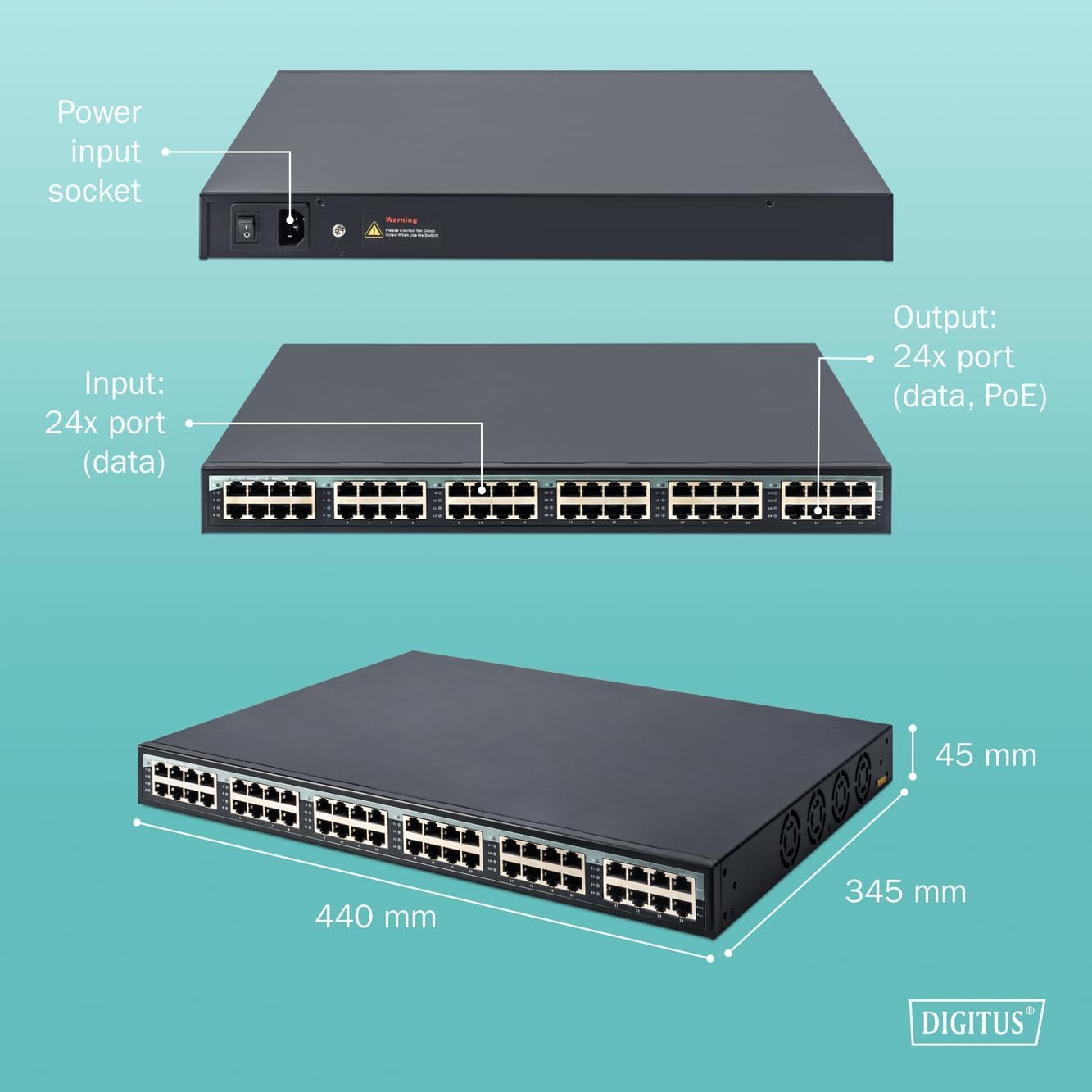
Imej 3.2: Terperinci view of the Digitus DN-95117, illustrating the front panel with 24 data input and 24 data+PoE output ports, the rear panel with the power input socket, and overall dimensions (440mm L x 345mm W x 45mm H).

Imej 3.3: Belakang view of the Digitus DN-95117 showing the power input socket and power switch.
4. Arahan Persediaan
Follow these steps to set up your Digitus DN-95117 PoE+ Injector:
- Buka bungkusan Peranti: Carefully remove the PoE+ injector and all accessories from the packaging.
- Pilih Lokasi: Select a stable, well-ventilated location for the injector. Ensure it is away from direct sunlight, heat sources, and moisture. The device can be rack-mounted using the included accessories or placed on a flat surface.
- Connect Data Input: Connect your non-PoE network switch or router to the 24 data input ports on the front panel using standard Ethernet cables.
- Connect PoE Output: Connect your PoE-enabled devices (e.g., IP cameras, wireless access points, VoIP phones) to the 24 data+PoE output ports on the front panel using Ethernet cables. These cables will carry both data and power to your devices.
- Sambungkan Kuasa: Connect the provided power cable to the power input socket on the rear panel of the injector, then plug the other end into a standard AC power outlet (100VAC ~ 240VAC).
- Hidupkan kuasa: Flip the power switch on the rear panel to the 'ON' position. The device will power on, and indicator lights on the front panel will illuminate to show status.
- Sahkan Sambungan: Check the status indicators for each connected port to ensure proper data and PoE connectivity to your devices.

Image 4.1: The Digitus DN-95117 can be integrated into various network setups, connecting a non-PoE switch to multiple PoE-powered devices.
5. Arahan Operasi
Once the Digitus DN-95117 is set up, its operation is largely automatic. The device functions as a transparent data and power injector.
- Automatic PoE Detection: The injector automatically detects if a connected device is PoE-compatible and provides the appropriate power (IEEE802.3af or IEEE802.3at).
- Penghantaran Data: Data is passed through the injector at Gigabit speeds (10/100/1000Mbps/2.5/10G) without modification.
- Petunjuk Status: Observe the LED indicators on the front panel for each port. These indicators typically show link status, activity, and PoE power status. Refer to the Quick Start Guide for specific LED behavior.
- Power Budget Management: The injector manages the total 370W power budget. If the total power demand from connected devices exceeds this budget, the injector may prioritize power delivery or shut down power to lower-priority ports. Ensure your total power consumption does not exceed 370W.

Image 5.1: The Digitus DN-95117 facilitates high-speed 10 Gbps data and power delivery to various network devices.
6. Penyelenggaraan
The Digitus DN-95117 is designed for minimal maintenance. Follow these guidelines to ensure optimal performance and longevity:
- Pembersihan: Pastikan peranti bersih dan bebas daripada habuk. Gunakan kain lembut dan kering untuk membersihkan. Jangan gunakan pembersih cecair atau aerosol.
- Pengudaraan: Pastikan bukaan pengudaraan tidak tersumbat. Aliran udara yang betul adalah penting untuk pelesapan haba.
- Pengurusan Kabel: Organize network cables to prevent strain on ports and ensure good airflow around the device.
- Kemas kini Firmware: Periksa Digitus secara berkala webtapak untuk sebarang kemas kini perisian tegar yang tersedia. Ikuti arahan yang diberikan dengan kemas kini dengan teliti.
7. Penyelesaian masalah
If you encounter issues with your Digitus DN-95117, refer to the following common troubleshooting steps:
- Tiada Kuasa:
- Ensure the power cable is securely connected to both the injector and the power outlet.
- Pastikan suis kuasa pada panel belakang berada dalam kedudukan 'ON'.
- Periksa salur keluar kuasa dengan peranti lain untuk mengesahkan ia berfungsi.
- Tiada Sambungan Data:
- Check all Ethernet cable connections between the source device, the injector's input ports, and the destination device.
- Ensure the Ethernet cables are not damaged and are correctly terminated.
- Verify the network devices connected to the injector are functioning correctly.
- No PoE Power to Device:
- Confirm the connected device is PoE-compatible (IEEE802.3af or IEEE802.3at).
- Check the PoE status LED for the specific port on the injector.
- Ensure the total power consumption of all connected PoE devices does not exceed the 370W budget. Disconnect some devices if necessary to test.
- Cuba kabel Ethernet yang berbeza.
- Kelajuan Rangkaian Perlahan:
- Ensure all connected devices and cables support Gigabit Ethernet speeds.
- Check for network congestion or issues with other network components.
If problems persist after following these steps, please contact Digitus technical support.
8. Spesifikasi
| Ciri | Penerangan |
|---|---|
| Nombor Model | DN-95117 |
| Jenama | DIGIT |
| Kadar Pemindahan Data | 10/100/1000Mbps/2.5/10G (Gigabit Ethernet) |
| Bilangan Pelabuhan | 24 (Data Input) + 24 (Data+PoE Output) |
| Standard PoE | IEEE802.3af, IEEE802.3at |
| Bekalan Kuasa PoE | PIN 1,2(V-) and PIN 3,6(V+) |
| Maximum Total PoE Power | 370 Watt |
| Kuasa Maksimum Setiap Port | 30 Watt |
| Piawaian Rangkaian | IEEE802.3, IEEE802.3u, IEEE802.3ab |
| Auto-Rundingan | Auto-MDI/MDI-X, Full-duplex/Half-duplex |
| Bekalan Kuasa | 100VAC ~ 240VAC |
| Suhu Operasi | 0 °C hingga 40 °C |
| Suhu Penyimpanan | -20 °C hingga 70 °C |
| Dimensi (L x W x H) | 440 mm x 345 mm x 45 mm |
| Berat Barang | 4.4 Kilogram |
| MTBF (Masa Purata Antara Kegagalan) | 100,000 jam |
| Penggunaan Kuasa | 20W (terbiar) |
| Ciri Khas | Penunjuk LED |
| Jenis Produk | 1U Rackmount |
| Jenis Antaramuka | RJ45 |
| Negara Asal | China |
9. Waranti dan Sokongan
DIGITUS products are known for their high quality and reliability. This product comes with a Waranti 1 tahun for spare parts availability.
For technical support, product information, or warranty claims, please visit the official DIGITUS website or contact your local distributor. You can find more solutions and information at the following link:

Image 9.1: DIGITUS brand information and link to solutions.


