pengenalan
This manual provides detailed instructions for the operation and maintenance of your BLU Tank Mega T570 cellphone. Designed for reliability and ease of use, this device features a compact form factor, a 2.4-inch display, and essential functionalities including a built-in flashlight and SOS button.
Sila baca manual ini dengan teliti untuk memastikan penggunaan yang betul dan untuk memaksimumkan jangka hayat peranti anda.
Kandungan Pakej
Upon opening your BLU Tank Mega T570 package, please verify that all items are present:
- BLU Tank Mega T570 Cellphone
- Kabel USB
- Bateri (dipasang atau berasingan)
- Panduan Mula Pantas (jika disertakan)
Persediaan
1. Memasukkan Kad SIM dan Bateri
The BLU Tank Mega T570 supports dual SIM cards. Ensure the phone is powered off before inserting or removing SIM cards or the battery.
- Tanggalkan penutup belakang telefon dengan berhati-hati.
- If the battery is not already installed, align the battery contacts with the terminals in the battery compartment and gently press down until it clicks into place.
- Locate the SIM card slot(s). Insert your GSM SIM card(s) into the designated slot(s) with the gold contacts facing down, ensuring they are fully seated.
- Replace the back cover, pressing firmly until it snaps into place.

Imej: Belakang view of the BLU Tank Mega T570 with the back cover removed, illustrating the battery and dual SIM card insertion points.
2. Mengecas Bateri
Before first use, fully charge the phone's battery. Use only the provided USB cable and a compatible power adapter.
- Connect the small end of the USB cable to the charging port on the phone (typically located at the top).
- Connect the large end of the USB cable to a power adapter, and then plug the adapter into a wall outlet.
- Penunjuk pengecasan pada skrin telefon akan menunjukkan status pengecasan.
- Setelah dicas sepenuhnya, cabut pengecas.

Imej: Atas view of the BLU Tank Mega T570, highlighting the USB charging port and 3.5mm audio jack.
Operating Your BLU Tank Mega T570
Fungsi Asas
- Hidupkan/Mati Kuasa: Press and hold the Power/End Call button.
- Membuat Panggilan: Enter the phone number using the keypad and press the Call button (green receiver icon).
- Menjawab Panggilan: Press the Call button when the phone rings.
- Panggilan Akhir: Press the Power/End Call button (red receiver icon).
- Navigasi: Use the directional pad (up, down, left, right) and the center selection button to navigate menus.
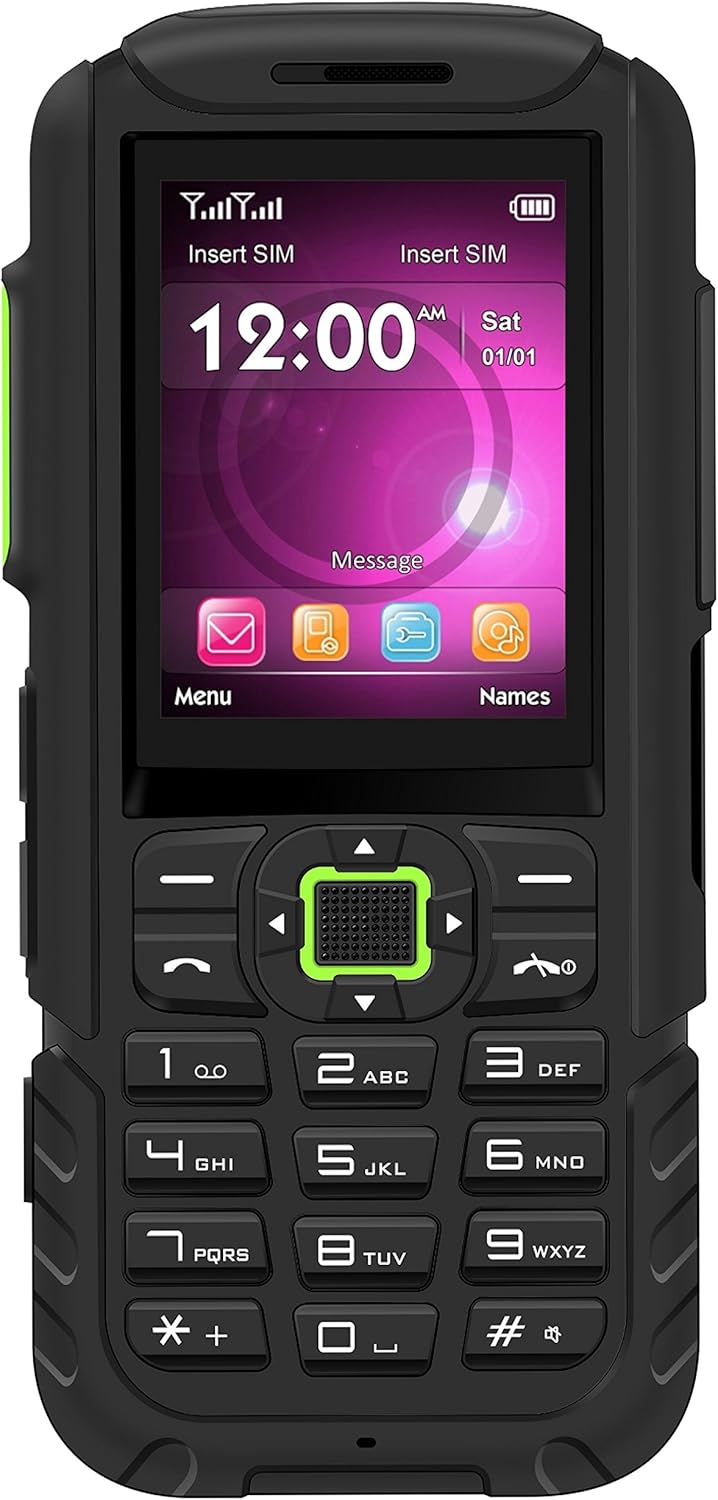
Imej: Depan view of the BLU Tank Mega T570, showing the 2.4-inch display, physical keypad, and navigation buttons.
Ciri Khas
- Super Flash Light: The phone includes a dedicated flashlight. Press the designated flashlight button (often on the side) for quick activation.
- Butang SOS: For emergencies, the SOS button can be configured to dial pre-set emergency contacts. Refer to the phone's settings for configuration.
- Radio FM: The built-in FM radio allows you to listen to local radio stations. A headset may be required to act as an antenna.
- kamera: The VGA standard camera allows for basic photo capture. Access it through the main menu.

Imej: Sisi view of the BLU Tank Mega T570, illustrating the volume control buttons and the dedicated flashlight button.

Imej: Bawah view of the BLU Tank Mega T570, highlighting the integrated flashlight LED.
Penyelenggaraan dan Penjagaan
- Pembersihan: Gunakan kain lembut dan kering untuk membersihkan permukaan telefon. Elakkan pencuci cecair atau bahan kasar.
- Penjagaan Bateri: Jangan dedahkan bateri kepada suhu yang melampau. Elakkan daripada mencas bateri sepenuhnya dengan kerap untuk memanjangkan jangka hayatnya.
- Storan: Simpan telefon di tempat yang sejuk dan kering, jauh daripada cahaya matahari langsung dan suhu yang melampau.
- Tahan Air: Peranti ini tidak kalis air. Elakkan pendedahan kepada cecair.
Menyelesaikan masalah
| Masalah | Penyelesaian yang Mungkin |
|---|---|
| Telefon tidak dihidupkan. | Ensure the battery is correctly installed and fully charged. Try charging the phone for at least 30 minutes. |
| Tidak boleh membuat atau menerima panggilan. | Check if the SIM card is properly inserted. Verify that you have network signal. Ensure your account is active with your carrier. Remember, this phone is GSM only and not compatible with CDMA carriers (Verizon, Sprint, Boost, PagePlus). |
| Kualiti panggilan yang lemah. | Move to an area with better network coverage. Check for any obstructions around the microphone or speaker. |
| Bateri cepat habis. | Reduce screen brightness. Close unused applications. Limit background activities. |
Spesifikasi
| Ciri | Perincian |
|---|---|
| Model | T570 |
| Paparan | TFT 2.4 inci, 240 x 320 piksel |
| Sistem Operasi | Hak milik |
| Memori Dalaman | 32MB |
| RAM | 32MB |
| Kamera | VGA Standard (Rear) |
| Keserasian Rangkaian | GSM 850/900/1800/1900 (2G). Not compatible with 3G only providers or CDMA carriers (e.g., AT&T 3G, T-Mobile 3G, Verizon, Sprint, Boost, PagePlus). |
| Ciri Khas | Super Flash Light (One Button Touch), SOS Button, Built-in FM Radio, Dual SIM |
| Jenis Bateri | Litium Ion (termasuk) |
| Kapasiti Bateri | 3600 mAh |
| Masa Bual Telefon | Sehingga 12 Jam |
| Dimensi | 2.17 x 0.47 x 5.04 inci |
| Berat Barang | 10.2 auns |
| Bicu Audio | 3.5 mm |
Video Berguna
Understanding Unlocked Phones
Video: An informational video explaining the concept and benefits of unlocked phones, which is relevant for understanding the BLU Tank Mega T570's compatibility.
Waranti dan Sokongan
For warranty information and technical support, please refer to the warranty card included in your product packaging or visit the official BLU webtapak. Simpan bukti pembelian anda untuk tuntutan waranti.
Sumber Dalam Talian:
- BLU Official Webtapak: www.bluproducts.com
- Product Support Page: (Refer to BLU website for specific model support)


