pengenalan
This manual provides comprehensive instructions for the safe and effective operation of your Dracast LED Fresnel 1000 Daylight LED Light. Please read this manual thoroughly before use and retain it for future reference. The Dracast Fresnel 1000 Daylight is a professional LED lighting fixture designed for studio and location use, offering a 5600K daylight-balanced output, adjustable beam angle, and DMX control capabilities.
Arahan Keselamatan
- Always ensure the power supply matches the specified voltage (100-240 VAC).
- Do not operate the light in wet or damp syarat.
- Elakkan pendedahan mata secara langsung kepada sumber cahaya LED.
- Pastikan pengudaraan yang betul di sekeliling lekapan untuk mengelakkan terlalu panas.
- Jangan cuba membuka atau mengubah suai unit. Rujuk semua servis kepada kakitangan yang berkelayakan.
- Securely mount the fixture using appropriate stands and clamps.
- Jauhkan daripada kanak-kanak.
Kandungan Pakej
Sahkan bahawa semua item terdapat dalam pakej:
- Dracast Fresnel Studio LED1000 Daylight LED Light
- 4-Way Barndoors
- Penyesuai Kuasa AC
Ciri-ciri Produk
- 7-inch Fresnel Lens
- Adjustable Beam Angle: 15-60 Degrees
- Daylight Balance: 5600K
- Indeks Rendering Warna (CRI): >95
- Yoke with 5/8-inch Receiver for stand mounting
- Equivalent to 1000W Tungsten Halogen output
- Onboard DMX512 control
- Power Options: 100-240 VAC Mains or 24 VDC Battery (battery not included)
- 0-100% Dimming capability
- Silent Passive Heat Sink Cooling System
Persediaan
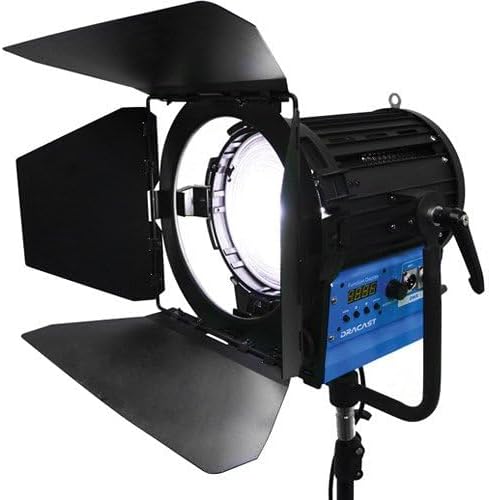
Rajah 1: The Dracast LED Fresnel 1000 Daylight LED Light, shown with its four-way barndoors open, mounted on a light stand. The blue control panel with a digital display and DMX ports is visible on the side of the fixture.
- Memasang Lekapan: Attach the light fixture's yoke to a compatible light stand using the 5/8-inch receiver. Ensure the fixture is securely tightened to prevent accidental movement.
- Attaching Barndoors: Slide the included 4-way barndoors onto the front of the Fresnel lens. Secure them in place using the integrated clips or locking mechanism.
- Sambungan Kuasa:
- Kuasa AC: Connect the AC power adapter to the fixture's power input and then plug it into a standard 100-240 VAC electrical outlet.
- DC Battery Power (Optional): If using a 24 VDC battery (not included), connect it to the appropriate DC input port on the fixture.
Arahan Operasi
- Hidupkan/Mati Kuasa: Locate the power switch on the control panel and toggle it to the 'ON' position. The digital display will illuminate.
- Adjusting Brightness (Dimming): Use the dedicated dimming knob or buttons on the control panel to adjust the light output from 0% to 100%. The current brightness level will be shown on the digital display.
- Adjusting Beam Angle (Spot/Flood): Rotate the knob or lever on the side of the fixture to adjust the beam angle between 15 degrees (spot) and 60 degrees (flood). This changes the spread and intensity of the light.
- Kawalan DMX:
- Connect a DMX controller to the fixture's DMX IN port using a standard DMX cable.
- If chaining multiple DMX fixtures, connect the DMX OUT of the first fixture to the DMX IN of the next.
- Set the DMX address on the fixture's control panel according to your DMX system's configuration. Refer to your DMX controller's manual for specific addressing instructions.
- The fixture supports DMX512 protocol for remote control of brightness and other functions.
- Using Barndoors: Adjust the individual leaves of the 4-way barndoors to shape the light beam and control spill.
Penyelenggaraan
- Pembersihan: Use a soft, dry cloth to clean the exterior of the fixture. For the Fresnel lens, use a lens cleaning solution and a microfiber cloth to avoid scratches. Do not use harsh chemicals or abrasive materials.
- Pengudaraan: Ensure the passive heat sink fins are free from dust and obstructions to maintain efficient cooling.
- Storan: Apabila tidak digunakan, simpan lampu di persekitaran yang kering dan bebas habuk, sebaik-baiknya di dalam pembungkusan asalnya atau bekas pelindung.
Menyelesaikan masalah
| Masalah | Kemungkinan Punca | Penyelesaian |
|---|---|---|
| Cahaya tidak menyala. | No power supply; faulty cable; power switch off. | Check power cable connection; ensure power outlet is functional; verify power switch is 'ON'. |
| Output cahaya tidak konsisten atau berkelip-kelip. | Loose power connection; DMX signal issue; faulty dimmer. | Secure power connections; check DMX cable and controller settings; test with local dimming. |
| Kawalan DMX tidak berfungsi. | Alamat DMX salah; kabel DMX rosak; isu pengawal DMX. | Sahkan tetapan alamat DMX; semak sambungan kabel DMX; uji dengan kabel atau pengawal DMX yang berbeza. |
| Fixture feels excessively hot. | Obstructed ventilation; prolonged use in high ambient temperatures. | Ensure heat sink fins are clear; operate in a well-ventilated area. The unit uses passive cooling and will generate heat during operation. |
Spesifikasi
| Model | Dracast Fresnel 1000 Daylight |
| Sumber Cahaya | LED |
| Suhu Warna | 5600K (Siang) |
| CRI | >95 |
| Sudut Rasuk | 15-60 Degrees (Adjustable) |
| Peredupan | 0-100% |
| Kawalan | Onboard, DMX512 |
| Input Kuasa | 100-240 VAC, 24 VDC |
| Menyejukkan | Passive Heat Sink (Silent) |
| Melekap | Yoke with 5/8-inch Receiver |
| Berat Barang | 28 paun |
| UPC | 683405283584 |
Maklumat Waranti
The Dracast LED Fresnel 1000 Daylight LED Light comes with a Limited 1-Year Warranty. Please retain your proof of purchase for warranty claims. For detailed terms and conditions, refer to the warranty card included with your product or contact Dracast customer support.
Sokongan
For technical assistance, troubleshooting beyond this manual, or warranty inquiries, please contact Dracast customer support. Contact information can typically be found on the manufacturer's webtapak atau pada pembungkusan produk.