pengenalan
Terima kasih kerana membeliasing the DigiTech Digital Rain Gauge with Temperature, Model XC0430. This advanced weather instrument provides accurate measurements of rainfall and temperature, along with historical data logging and various display modes. Designed for ease of use, it features a wireless self-emptying rain collector and a large backlit LCD display unit for convenient monitoring of your local weather conditions. Please read this manual thoroughly before setup and operation to ensure optimal performance and longevity of your device.

Image: The DigiTech Digital Rain Gauge system, showing the main display unit on the left and the wireless rain collector on the right.
Isi Kotak
Sila semak kandungan bungkusan anda untuk memastikan semua barang ada dan tidak rosak.
- 1 x LCD Screen (Main Display Unit)
- 1 x Rain Collector Gauge (Wireless Sensor)
- 1 x LCD Stand
- 1 x Gauge Mount
- 1 x Mounting Hardware Pack (screws, anchors)
- 1 x Manual Pengguna (dokumen ini)

Image: A visual representation of the box contents, including the main display unit, rain collector, stand, mount, and hardware.
Persediaan
1. Pemasangan Bateri
The main display unit and the rain collector require batteries (not included).
- Unit Paparan Utama: Locate the battery compartment on the back of the unit. Insert 2 x AA size 1.5V batteries, ensuring correct polarity (+/-).
- Rain Collector Gauge: Locate the battery compartment on the base of the collector. Insert the required batteries (refer to the collector's specific instructions, typically 2 x AA or AAA), ensuring correct polarity.
Penting: Always insert batteries into the rain collector first, then into the main display unit to ensure proper synchronization.
2. Rain Collector Placement
For accurate rainfall measurement, the rain collector should be placed in an open area, away from obstructions like trees, buildings, or fences that could block rain or cause splash-back.
- Ensure the collector is level to prevent inaccurate readings. Use a spirit level if necessary.
- Mount the collector securely using the provided gauge mount and hardware. It can be mounted on a post or flat surface.
- The maximum transmission range between the collector and the display unit is 150 meters (line of sight). Obstacles like walls or dense foliage will reduce this range.

Imej: A terperinci view of the wireless rain collector, showing its self-emptying mechanism and base.
3. Penempatan Unit Paparan Utama
The main display unit is designed for indoor use.
- Place the unit on a flat surface using the provided LCD stand, or mount it on a wall using the wall mounting hole.
- Ensure it is within the 150m transmission range of the rain collector.
- Avoid placing it near heat sources or direct sunlight, which could affect indoor temperature readings.

Imej: Depan dan belakang views of the display unit, highlighting various buttons and features for setup and operation.
Key Parts of Main Display Unit:
1. Butang Tunda / Cahaya
2. LCD Display with Backlight
3. Alert LED Indicator
4. Butang Sejarah
5. Since Button
6. Rain Button
7. Butang Memori
8. Paparan Jam
9. Butang Penggera
10. Butang Makluman
11. Wall Mounting Hole
12. Down / Up Buttons
13. Butang Tetapkan Semula
14. Petak Bateri
15. °C or °F Select Button
16. MM / In Select Button
17. Butang Imbas
Arahan Operasi
Initial Synchronization
After battery installation, the main display unit will automatically attempt to connect with the rain collector. This may take a few minutes. A signal icon on the display will indicate successful connection.
Display Modes and Functions
- Rainfall Display: The large LCD shows current rainfall data. Use the HUJAN button (6) to cycle through different rainfall views: Hourly, Daily, Weekly, Monthly, and Yearly totals.
- Graphical Histogram: The display includes a graphical histogram to visualize rainfall patterns over time.
- SINCE Function: Tekan ke SEJAK butang (5) ke view the total rainfall accumulated from a customized date. This function allows you to track rainfall for specific periods.
- Paparan suhu: The unit displays indoor temperature. Use the °C or °F Select button (15) to switch between Celsius and Fahrenheit.
- Paparan Jam: The real-time clock displays HH:MM and Weekday. It features an Atomic Radio Controlled function for accurate timekeeping.
- Fungsi Memori: Tekan ke MEMORI button (7) to access stored data. The unit logs and stores data for the past 24 hours, including current, minimum, and maximum values with timestamps.
- High/Low Alert: Set high and low alerts for temperature or rainfall. When a set threshold is met, the Alert LED Indicator (3) will flash, and an alarm may sound. Press the ALERT button (10) to configure these settings.
- Fungsi Penggera: The unit includes an alarm with an ice-alert function. Press the PENGGERA button (9) to set or disable the alarm.
- Lampu latar: Tekan ke SNOOZE / CAHAYA button (1) to activate the display backlight for better visibility in low light conditions.
- Sejarah: Tekan ke SEJARAH button (4) to review historical rainfall data.
- MM / In: Gunakan MM / In button (16) to switch between millimeters and inches for rainfall measurement.
Menetapkan Masa dan Tarikh
Refer to the detailed instructions in the full manual for setting the time, date, and atomic clock synchronization. Typically, you will use the BAWAH ATAS buttons (12) to adjust values and other function buttons to confirm.
Penyelenggaraan
- Pembersihan: Periodically clean the rain collector to ensure no debris (leaves, dirt) obstructs the funnel or the tipping bucket mechanism. Use a soft, damp cloth for the display unit. Do not use abrasive cleaners.
- Penggantian Bateri: Replace batteries in both units when the low battery indicator appears on the display. The unit features data retention during battery changes, but it's recommended to replace them promptly.
- Rain Collector Check: Ensure the rain collector is free from spiderwebs or insect nests, which can interfere with accurate readings.
- Semakan Tahap: Periodically verify that the rain collector remains level in its mounted position.
Menyelesaikan masalah
| Masalah | Kemungkinan Punca | Penyelesaian |
|---|---|---|
| Tiada paparan pada unit utama. | Bateri mati atau tidak dimasukkan dengan betul. | Periksa kekutuban bateri dan gantikan dengan bateri baru. |
| Rainfall data not updating or showing "---". | No connection between main unit and rain collector; collector batteries low; collector obstructed. |
|
| Bacaan hujan yang tidak tepat. | Rain collector is not level; funnel or tipping bucket is dirty/obstructed. |
|
| Masa/Tarikh salah. | Atomic clock signal weak or not received; manual setting required. |
|
Spesifikasi
| Dimensi Unit Utama | 155 (H) x 95 (W) x 23 (D) mm |
| Berat Unit Utama | 212g (tidak termasuk bateri) |
| Keperluan Bateri | 2 x AA size 1.5V batteries (Main Unit), Batteries for Rain Collector (refer to collector's manual) |
| Julat Penghantaran Tanpa Wayar | Sehingga 150m (garis penglihatan) |
| Julat Suhu Dalaman | -40°C hingga 70°C (-40°F hingga 158°F) |
| Indoor Temperature Resolution | 0.1°C atau 0.1°F |
| Indoor Temperature Accuracy | ±1°C or 2°F typical @ 25°C |
| Julat Kelembapan Dalaman | 20% hingga 90% RH |
| Indoor Humidity Accuracy | ±5% typical @ 25°C |
| Mod Paparan | Current, min/max, historical data for past 24 hours (rainfall, temperature) |
| Paparan Jam | HH:MM / Weekday (12hr AM/PM or 24hr format) |
| Paparan Kalendar | DD/MM/YR atau MM/DD/YR |
| Weekday Languages | English, French, German, Spanish, Italian, Dutch, Russian |
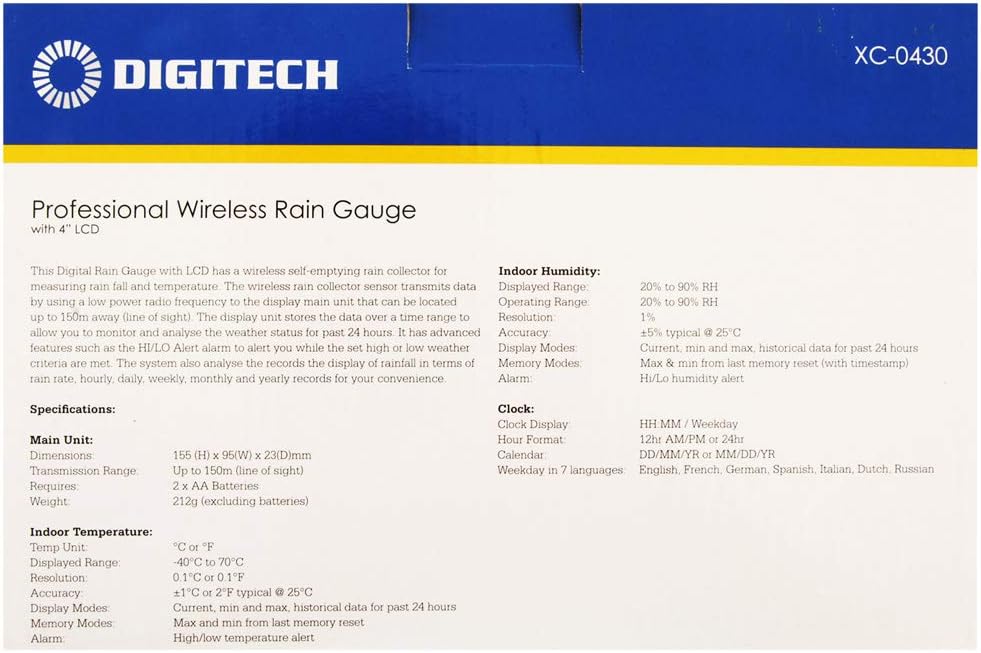
Image: A close-up of the product box detailing the technical specifications of the rain gauge system.
Waranti dan Sokongan
This product is covered by a standard manufacturer's warranty. For specific warranty terms and conditions, please refer to the documentation included with your purchase or contact DigiTech customer support.
For technical assistance, troubleshooting, or replacement parts, please contact your retailer or the manufacturer directly. Keep your purchase receipt as proof of purchase for warranty claims.


