1. Pengenalan
This manual provides essential information for the safe and correct installation, operation, and maintenance of the INSIGNIA NS-32D201NA14 6MY00320C0 Power Supply Board Unit. This component is designed as a replacement part for compatible Insignia television models, specifically the Insignia NS-32D201NA14.
Please read this manual thoroughly before attempting any installation or service to ensure proper function and to prevent damage to the unit or other components.
2. Maklumat Keselamatan
AMARAN: Electrical components can be hazardous. Installation should only be performed by qualified technicians. Failure to follow these safety instructions may result in electric shock, fire, or damage to the product or other property.
- Always disconnect the television from the main power outlet before beginning any installation or service.
- Ensure all power capacitors are fully discharged before handling the power supply board.
- Wear appropriate personal protective equipment, including anti-static gloves, to prevent electrostatic discharge (ESD) damage to sensitive electronic components.
- Do not attempt to repair a damaged power supply board. Replace it with a new or certified working unit.
- Keep the board away from moisture and extreme temperatures.
3. Produk Lebihview
The INSIGNIA 6MY00320C0 Power Supply Board is a critical internal component responsible for converting incoming AC power from the wall outlet into various DC voltagyang diperlukan oleh litar dalaman televisyen, termasuk papan utama, penyongsang lampu latar dan audio amplebih hidup.
This specific board is compatible with the Insignia NS-32D201NA14 television model. It is designed to restore power functionality to a TV experiencing issues related to a faulty power supply.
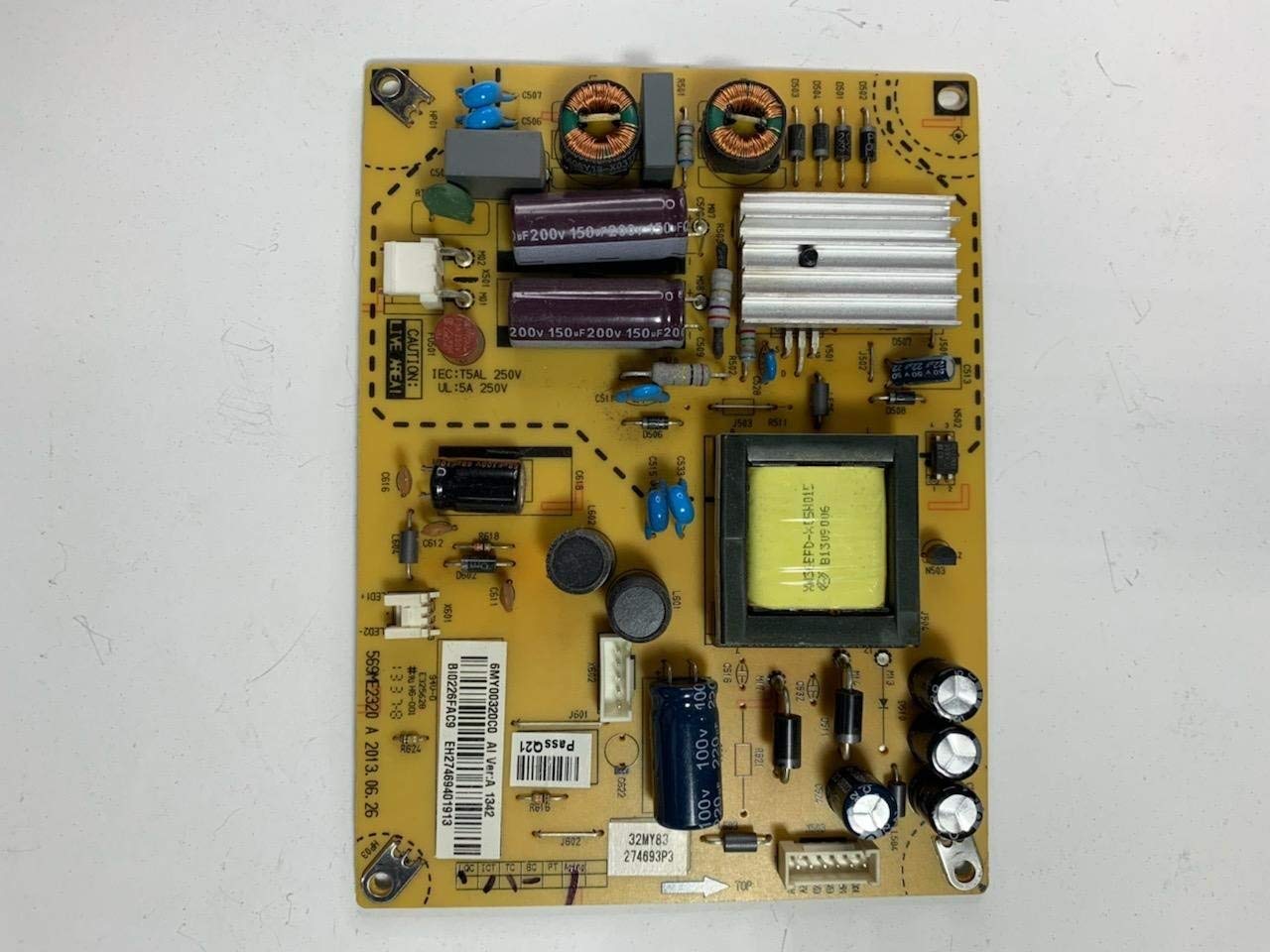
Figure 1: INSIGNIA 6MY00320C0 Power Supply Board Unit. This image displays the full power supply board with various connectors and components visible.
4. Persediaan dan Pemasangan
Installation of this power supply board requires technical expertise and should only be performed by a qualified technician. Incorrect installation can lead to further damage to the television or personal injury.
4.1 Alat yang Diperlukan
- Pemutar skru kepala Phillips
- Anti-static wrist strap or gloves
- Plastic prying tools (optional, for opening TV casing)
4.2 Langkah Pemasangan
- Pemutusan Kuasa: Ensure the television is completely unplugged from the wall outlet.
- Kapasitor Nyahcas: Allow sufficient time for any residual charge in the TV's capacitors to dissipate (typically 5-10 minutes). A qualified technician may use a discharge tool.
- Access TV Back Panel: Carefully place the TV face down on a soft, clean surface. Remove all screws securing the back panel of the television. Gently pry open and remove the back panel.
- Locate Old Power Supply Board: Identify the existing power supply board. It is typically the largest board connected directly to the AC power input.
- Putuskan Sambungan Kabel: Carefully disconnect all cables connected to the old power supply board. Note their positions or take photos for reassembly. These typically include cables to the main board, backlight inverter, and sometimes speakers.
- Keluarkan Papan Lama: Unscrew the mounting screws holding the old power supply board in place. Carefully lift and remove the old board.
- Pasang Papan Baharu: Position the new INSIGNIA 6MY00320C0 Power Supply Board in the same location. Secure it with the mounting screws. Do not overtighten.
- Sambung semula Kabel: Reconnect all cables to their corresponding ports on the new power supply board. Ensure all connections are firm and correctly oriented.
- Pasang semula TV: Replace the TV's back panel and secure it with all screws.
- Ujian Permulaan: Plug the television back into the power outlet. Attempt to power on the TV. Observe for normal operation, picture, and sound.
5. Mengendalikan Unit
The INSIGNIA 6MY00320C0 Power Supply Board is an internal component and does not have user-operable controls. Once correctly installed, it functions automatically as part of the television's power management system. The television should power on and operate as designed.
6. Penyelenggaraan
This power supply board requires no routine user maintenance. To ensure its longevity and proper function, consider the following:
- Pengudaraan: Ensure the television's ventilation openings are not blocked to allow for proper heat dissipation.
- Persekitaran: Operate the television in a clean, dry environment, away from excessive dust, humidity, and extreme temperatures.
- Pembersihan: If the TV's interior requires cleaning, disconnect power and use compressed air to gently remove dust from components, avoiding direct contact with the board.
7. Penyelesaian masalah
If the television does not function correctly after installing the new power supply board, consider the following troubleshooting steps. These steps are for diagnostic purposes and should be performed by a qualified technician.
| Masalah | Kemungkinan Punca | Penyelesaian |
|---|---|---|
| TV tidak dihidupkan. | Loose power cable connection, faulty power outlet, incorrect board installation, other faulty TV components. | Verify power cable is securely plugged in. Test the power outlet. Recheck all cable connections on the power supply board. Consult a technician to diagnose other TV components. |
| TV powers on but no picture/sound. | Backlight inverter issue, main board issue, T-con board issue, or incorrect cable connections. | Ensure all cables from the power supply board to other components (main board, backlight) are correctly connected. This issue may indicate a problem with a component other than the power supply. |
| TV turns off unexpectedly. | Overheating, intermittent connection, or other faulty components. | Ensure adequate ventilation. Recheck all connections. Professional diagnosis is recommended. |
If troubleshooting steps do not resolve the issue, it is recommended to seek assistance from a certified electronics repair technician.
8. Spesifikasi
- Nombor Model: NS-32D201NA14 6MY00320C0
- Jenama: INSIGNIA
- Compatible TV Model: Insignia NS-32D201NA14
- Jenis Komponen: Power Supply Board Unit
- Anggaran Berat Barang: 1 Paun (0.45 kg)
- UPC: 637776317065
9. Waranti dan Sokongan
Specific warranty information for this replacement part may vary depending on the seller and purchase date. Please refer to your purchase documentation or contact the seller directly for details regarding warranty coverage.
For technical support or further assistance, please contact the vendor from whom the power supply board was purchased. For general product information about Insignia televisions, you may visit the official Insignia website or refer to your television's original user manual.
Note: This power supply board is intended as a replacement component. Insignia may not provide direct support for individual component replacements outside of their authorized service network.


