pengenalan
This manual provides detailed instructions for the setup, operation, and maintenance of your KICKER Bullfrog BF100 Bluetooth Portable Outdoor Speaker. Please read this manual thoroughly to ensure proper use and to maximize the performance of your device. The Bullfrog BF100 is designed for robust outdoor use, featuring 360-degree sound, Bluetooth connectivity, and a durable waterproof and dustproof casing.
Produk Selesaiview
The KICKER Bullfrog BF100 delivers a 360-degree sound field through its unique driver design. It features two 1-5/8 inch full-range drivers and two 2-5/8 inch passive bass radiators, powered by a built-in 16-watt amplifier. The speaker is equipped with Bluetooth for wireless audio streaming and includes a built-in speakerphone for calls.
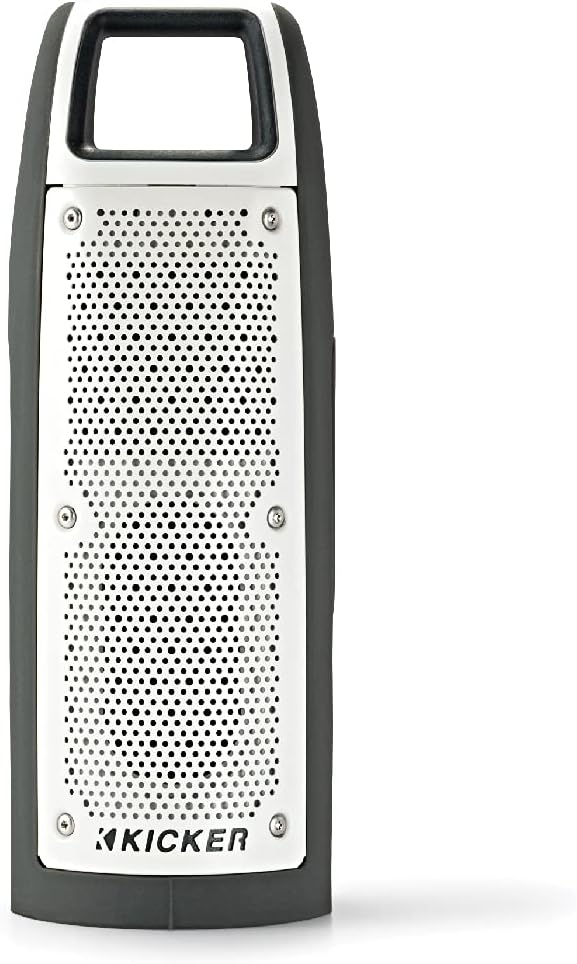
Rajah 1: Depan view of the KICKER Bullfrog BF100 speaker, showcasinreka bentuknya yang padat dan lasak.
Ciri-ciri Utama:
- Bunyi 360 Darjah: Drivers on both sides provide immersive audio.
- Kesambungan Bluetooth: Strim muzik secara wayarles daripada peranti yang serasi.
- Kalis Air & Habuk (Kadar IP66): Designed for outdoor environments, resistant to dust and water spray.
- Telefon pembesar suara terbina dalam: Answer calls directly from the speaker.
- KICKER Connect App: Customize sound with EQ presets, control volume, and check battery level.
- Gandingan Stereo: Wirelessly connect two BF100 speakers for enhanced stereo sound.
- Hayat Bateri yang Panjang: Up to 12 hours of portable operation.
Pengenalan Komponen:

Rajah 2: sebelah view of the Bullfrog BF100, showing the power, volume, and track control buttons.

Rajah 3: belakang view of the Bullfrog BF100, highlighting the AUX IN, CHARGE OUT, and CHARGE IN ports, along with the Reset button.
- Butang Kuasa: Menghidupkan atau mematikan pembesar suara.
- Butang Kelantangan / Turun Kelantangan: Melaraskan kelantangan output pembesar suara.
- Track Skip Buttons: Skips to the next or previous track during playback.
- Butang Main/Jeda: Controls music playback and answers/ends phone calls.
- Butang Berpasangan: Memulakan mod berpasangan Bluetooth.
- Butang Tetapkan Semula: Resets the speaker to factory settings (located near ports).
- Port AUX IN: For wired audio connection using a 3.5mm cable.
- CHARGE OUT Port: Port USB untuk mengecas peranti luaran.
- CHARGE IN Port: Micro-USB port for charging the speaker's internal battery.
Persediaan
Pengecasan Awal:
Before first use, fully charge your Bullfrog BF100 speaker. Connect the supplied USB charging cable to the CHARGE IN port on the speaker and to a USB power source (e.g., computer USB port or a USB wall adapter). The charging indicator light will show the charging status.
Rajah 4: Detail of the charging port on the Bullfrog BF100.
Pairing Bluetooth:
- Ensure the Bullfrog BF100 is powered on.
- Tekan dan tahan butang berpasangan button on the speaker until the Bluetooth indicator light begins to flash, indicating it is in pairing mode.
- Pada telefon pintar, tablet atau peranti lain yang didayakan Bluetooth anda, navigasi ke tetapan Bluetooth.
- Select "KICKER Bullfrog BF100" from the list of available devices.
- Setelah disambungkan, lampu penunjuk Bluetooth pada pembesar suara akan menjadi pekat.
KICKER Connect App Installation:
For enhanced control and customization, download the KICKER Connect App from your device's app store (iOS App Store or Google Play Store). The app allows you to adjust EQ settings, manage FM presets, control volume, and monitor battery life.

Rajah 5: The KICKER Connect App provides advanced control over your speaker settings.
Stereo Pairing (Two BF100 Speakers):
To create a two-channel stereo system, you can wirelessly connect two Bullfrog BF100 speakers. Refer to the KICKER Connect App for specific instructions on initiating stereo pairing mode between two units.
Arahan Operasi
Hidupkan/Mati Kuasa:
- Tekan dan tahan butang kuasa button for approximately 2 seconds to turn the speaker on or off.
- An audible tone will confirm the power status change.
Kawalan Kelantangan:
- Tekan ke Kelantangan Naik (+) butang untuk meningkatkan kelantangan.
- Tekan ke Perlahankan suara (-) butang untuk mengurangkan kelantangan.
Main Balik Muzik:
- Tekan ke Main/Jeda butang untuk memainkan atau menjeda audio.
- Tekan ke Next Track (>) butang untuk melangkau ke lagu seterusnya.
- Tekan ke Previous Track (<) button to go back to the beginning of the current song or to the previous song.
Panggilan Telefon:
- Apabila panggilan masuk, muzik akan berhenti seketika. Tekan butang Main/Jeda butang untuk menjawab panggilan.
- Untuk menamatkan panggilan, tekan butang Main/Jeda butang lagi.
- Untuk menolak panggilan masuk, tekan dan tahan Main/Jeda butang.
Using the KICKER Connect App:
Once connected via Bluetooth, open the KICKER Connect App on your device to access additional features:
- Pratetap EQ: Select from 5 predefined equalizer settings (Kicker / Outdoor / Voice / Treble / Flat) to optimize sound for different environments or preferences.
- Pratetap FM: Create and select your favorite FM radio stations (if FM feature is active).
- Kawalan Kelantangan: Adjust the speaker volume directly from the app.
- Tahap Bateri: Monitor the current battery charge level of your speaker.
Pengecasan dan Bateri
The Bullfrog BF100 is equipped with a rechargeable lithium polymer battery, providing up to 12 hours of playback on a single charge. To charge the speaker:
- Connect the small end of the supplied USB cable to the CHARGE IN port pada pembesar suara.
- Connect the large end of the USB cable to a standard USB power source (e.g., computer, USB wall adapter, or power bank).
- The charging indicator lights will illuminate to show the charging progress.
- The speaker can be used while charging.
The CHARGE OUT port can be used to provide power to other USB-powered devices, effectively turning your Bullfrog BF100 into a portable power bank.
Penyelenggaraan dan Penjagaan
Ciri-ciri kalis air dan habuk:
The Bullfrog BF100 has an IP66 rating, meaning it is protected against dust ingress and powerful water jets from any direction. This makes it suitable for use in various outdoor conditions, including near pools, at the beach, or during campdalam perjalanan.

Rajah 6: The Bullfrog BF100 is built to withstand outdoor elements.
Arahan Pembersihan:
- If the speaker gets dirty, it can be rinsed off with water. Ensure all port covers are securely closed before rinsing.
- Do not use harsh chemicals or abrasive cleaners, as these may damage the speaker's finish or seals.
- Wipe the speaker dry with a soft cloth after cleaning.
Penjagaan Am:
- Avoid exposing the speaker to extreme temperatures for prolonged periods.
- Simpan pembesar suara di tempat yang sejuk dan kering apabila tidak digunakan.
- Jangan cuba membuka atau membaiki pembesar suara sendiri, kerana ini akan membatalkan jaminan.
Menyelesaikan masalah
| Masalah | Kemungkinan Punca | Penyelesaian |
|---|---|---|
| Tiada kuasa | Bateri habis. | Cas pembesar suara menggunakan kabel USB yang dibekalkan. |
| Tidak boleh berpasangan melalui Bluetooth | Pembesar suara tidak dalam mod berpasangan; peranti terlalu jauh; gangguan. | Ensure speaker is in pairing mode (flashing light). Move device closer. Turn off other Bluetooth devices. Try resetting the speaker. |
| Tiada bunyi | Volume too low; device not connected; audio source issue. | Increase speaker and device volume. Re-establish Bluetooth connection. Check audio source playback. |
| Kualiti bunyi yang lemah | Low battery; device too far; audio file kualiti. | Charge the speaker. Move device closer. Use high-quality audio files. Adjust EQ settings via KICKER Connect App. |
| Speaker unresponsive | Gangguan perisian. | Cari Tetapkan semula button (refer to Figure 3) and use a small pointed object (like a paperclip) to press it. This will restart the speaker. |
If you encounter issues not listed here or if the suggested solutions do not resolve the problem, please contact KICKER customer support for further assistance.
Spesifikasi
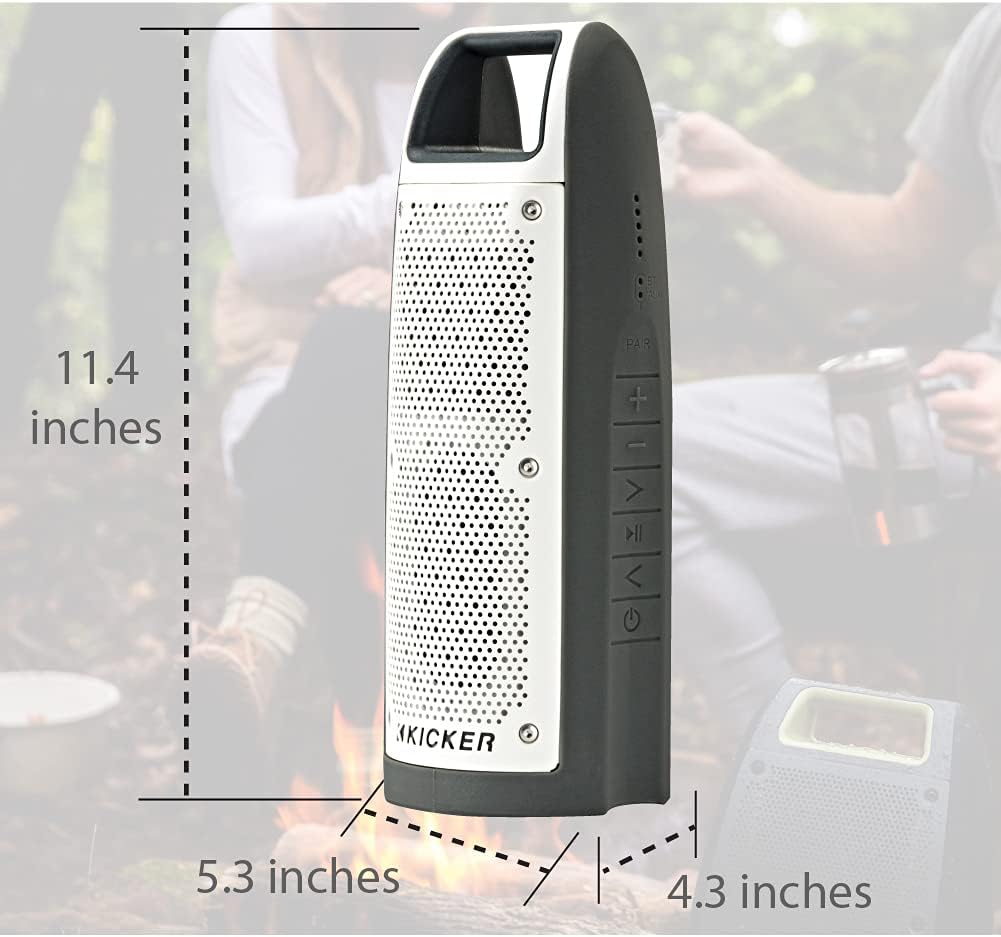
Rajah 7: Dimensions of the KICKER Bullfrog BF100 speaker.
| Ciri | Perincian |
|---|---|
| Nama Model | Bullfrog BF100 |
| Nombor Model Item | 44BF100GY |
| Dimensi (H x W x D) | 11.4 x 5.3 x 4.3 inci |
| Berat Barang | 1.81 paun |
| Jenis Pembesar Suara | Luaran, Pembesar Suara Bluetooth Mudah Alih |
| Mod Keluaran Audio | Stereo |
| Kuasa Output Maksimum Pembesar Suara | 16 Watt |
| Teknologi Komunikasi Tanpa Wayar | Bluetooth |
| Julat Bluetooth | 100 Kaki |
| Teknologi Ketersambungan | Bluetooth, Bantu (3.5mm) |
| Tahap Ketahanan Air | IP66 (kalis air dan habuk) |
| Sumber Kuasa | Dikuasakan Bateri (termasuk 1 bateri Polimer Litium) |
| Hayat Bateri | Sehingga 12 jam |
| Kaedah Kawalan | Buttons, App (KICKER Connect) |
| bahan | Plastik atau Logam |
Waranti dan Sokongan
Maklumat Waranti:
The KICKER Bullfrog BF100 comes with a Limited Warranty. Please refer to the official KICKER website or your purchase documentation for specific terms and conditions regarding warranty coverage, duration, and claims procedures.
Sokongan Pelanggan:
For technical assistance, troubleshooting, or warranty inquiries, please contact KICKER customer support. You can find contact information on the official KICKER webtapak: www.kicker.com