1. Pengenalan
This manual provides detailed instructions for the installation, operation, and maintenance of your Klip Xtreme KPM-300 Single Monitor Desk Mount. This mount is designed to support a single monitor, allowing for adjustable positioning to enhance ergonomic comfort and reclaim desktop space. It is compatible with screens ranging from 13 to 32 inches and weighing up to 17.6 lbs (8 kg).
The KPM-300 features a sturdy C-clamp base for secure attachment to a desk or table edge, and also supports grommet mounting. Its fully articulating arm allows for tilt, swivel, and rotation adjustments, providing flexibility in viewing angles. Integrated cable management clips help maintain an organized workspace.
2. Maklumat Keselamatan
- Kapasiti Berat: Do not exceed the maximum weight capacity of 17.6 lbs (8 kg). Overloading may result in instability and potential damage or injury.
- Saiz Skrin: This mount is designed for monitors between 13 and 32 inches. Ensure your monitor falls within this range.
- Keserasian VESA: Verify that your monitor has VESA mounting patterns of 75x75mm or 100x100mm. Attempting to mount a non-compatible monitor may cause damage.
- Ketebalan Meja: Ensure your desk surface is strong enough to support the combined weight of the mount and monitor. For C-clamp installation, the desk thickness must be within the specified range (refer to specifications).
- Pemasangan Selamat: Ensure all screws and bolts are securely tightened before use. Periodically check for tightness.
- Perhimpunan: Follow all assembly instructions carefully. If you encounter difficulties, seek professional assistance.
- Bahagian bergerak: Be aware of pinch points when adjusting the mount. Keep hands clear of moving parts.
3. Kandungan Pakej
Sila sahkan bahawa semua komponen ada dan tidak rosak sebelum meneruskan pemasangan.
- Perhimpunan Lengan Monitor
- Desk Pole
- C-Clamp Pangkalan
- Grommet Mount Components
- Plat VESA
- Hardware Kit (various screws, washers, Allen keys)
- Klip Pengurusan Kabel

Rajah 1: Berakhirview of the Klip Xtreme KPM-300 monitor desk mount, showing the articulating arm, pole, and C-clamp base. Small inset circles indicate both C-clamp and grommet mounting options are available.
4. Persediaan dan Pemasangan
4.1 Choose Mounting Method
The KPM-300 supports two installation methods: C-clamp atau pemasangan grommet. Pilih kaedah yang paling sesuai untuk meja anda.
4.1.1 C-Clamp Pemasangan
- Pasangkan C-clamp base to the bottom of the desk pole.
- Position the assembled clamp and pole at the desired location on your desk edge.
- Ketatkan C-clamp skru sehingga dudukan dipasang dengan kukuh pada meja. Pastikan ia stabil dan tidak goyah.
4.1.2 Pemasangan Grommet
- If your desk has an existing grommet hole, remove the cover. If not, drill a hole of appropriate diameter (refer to specifications for hole size).
- Insert the grommet bolt through the desk hole.
- Attach the grommet plate and nut from underneath the desk, tightening until the mount is secure.

Rajah 2: belakang view of the monitor mount's pole and C-clamp mechanism, illustrating how it attaches to the edge of a desk. This image highlights the stability provided by the clamp.
4.2 Assemble Arm and Attach to Pole
- Slide the monitor arm assembly onto the desk pole.
- Adjust the arm to the desired height and secure it using the provided locking mechanism or screw.
4.3 Pasang Plat VESA pada Monitor
- Remove the VESA plate from the monitor arm by loosening the quick-release screw.
- Sejajarkan plat VESA dengan lubang pemasangan di bahagian belakang monitor anda.
- Using the appropriate screws and washers from the hardware kit, securely attach the VESA plate to your monitor. Do not overtighten.

Rajah 3: A terperinci view of the articulating joint on the monitor arm and the VESA mounting plate. This illustrates the connection point for the monitor and the flexibility of the arm's movement.
4.4 Mount Monitor to Arm
- Carefully slide the monitor (with the attached VESA plate) onto the monitor arm's VESA bracket.
- Ensure the monitor is fully seated and secure the quick-release screw to lock it in place.
4.5 Pengurusan Kabel
Utilize the integrated cable management clips along the arm and pole to route your monitor cables neatly. This helps to reduce clutter and maintain a clean workspace.
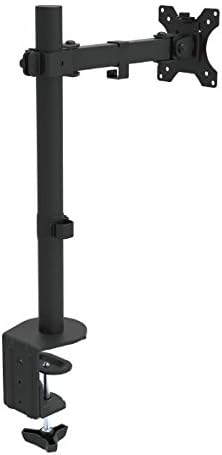
Rajah 4: Bersudut view of the fully assembled monitor desk mount, showing the pole, articulating arm, and VESA plate ready to receive a monitor. This image provides a perspective of the mount's overall structure.
5. Pengendalian dan Pelarasan
The KPM-300 offers various adjustment options to customize your viewpengalaman:
- Pelarasan Ketinggian: Loosen the locking mechanism on the pole to slide the arm up or down to your desired height. Re-tighten to secure.
- Pelarasan Kecondongan: The monitor can be tilted +45° to -45° (90° total range) to reduce glare and optimize viewing angles. Loosen the tilt knob on the VESA plate, adjust, and re-tighten.
- Pelarasan Pusing: The arm can swivel +90° to -90° (180° total range) at the pole and arm joints, allowing you to share your screen or change viewarah dalam.
- Pelarasan Putaran: The VESA plate allows for 360° rotation, enabling you to switch your monitor between landscape and portrait orientations without removing it.
- Pelarasan Ketegangan: Each joint can be tightened or loosened individually using the provided Allen keys. Adjust the tension to achieve the desired fluidity or stability of movement for your monitor's weight.
6. Penyelenggaraan
- Pembersihan: Bersihkan dudukan dengan kain lembut,amp kain. Elakkan pembersih atau pelarut yang melelas yang boleh merosakkan kemasan.
- Pemeriksaan Berkala: Periodically check all screws, bolts, and clamp mechanisms to ensure they remain tight and secure. Re-tighten as necessary to maintain stability.
- Pelinciran: No lubrication is typically required for the moving parts. If movement becomes stiff, check for debris or overtightened joints.
7. Penyelesaian masalah
7.1 Monitor Sags or Does Not Hold Position
- Semak Berat: Ensure your monitor's weight does not exceed the maximum capacity of 17.6 lbs (8 kg).
- Laraskan Ketegangan: Use the provided Allen keys to tighten the tension screws at the articulating joints, particularly the tilt and swivel points, until the monitor holds its position.
7.2 Mount is Unstable or Wobbles
- Cl selamatamp/Grommet: Ketatkan semula C-clamp or grommet bolt to ensure the base is firmly attached to the desk.
- Kestabilan Meja: Pastikan meja anda stabil dan tidak mudah goyang.
- Sambungan tiang: Verify that the arm assembly is securely fastened to the pole.
7.3 Difficulty Attaching Monitor to VESA Plate
- Keserasian VESA: Double-check that your monitor's VESA pattern is 75x75mm or 100x100mm.
- Panjang skru: Ensure you are using the correct length screws from the hardware kit. Screws that are too long can damage the monitor; too short will not secure it.
8. Spesifikasi
| Nombor Model | KPM-300 |
| Keserasian Saiz Skrin | 13 hingga 32 inci |
| Kapasiti Beban Maksimum | 17.6 paun (8 kg) |
| Keserasian VESA | 75x75mm, 100x100mm |
| Sudut Kecondongan | +45° to -45° (90° total) |
| Sudut Pusing | +90° to -90° (180° total) |
| Pelarasan Putaran | 360° |
| Ketinggian Maksimum | 21.5 inci |
| Jenis Pemasangan | C-Clamp, Tapak Grommet |
| bahan | Keluli dan Plastik |
| warna | Hitam |
| Dimensi Produk (LxWxH) | 4.4 x 13.5 x 21.5 inci (anggaran, dipasang) |
| Item Weight (with hardware) | 6.6 paun |
| UPC | 798302077874 |
9. Waranti dan Sokongan
The Klip Xtreme KPM-300 Monitor Desk Mount comes with a Waranti Seumur Hidup. For warranty claims or technical support, please refer to the contact information provided with your purchase documentation or visit the official Klip Xtreme webtapak.


