1. Pengenalan
This manual provides essential information for the safe and efficient operation of your Roadstar TSPK-990CDBT Portable Stereo System. Please read these instructions thoroughly before using the device and retain them for future reference. The TSPK-990CDBT is a versatile multimedia tower speaker featuring CD playback, FM radio, Bluetooth connectivity, USB playback, and an AUX-in port.
2. Maklumat Keselamatan
- Sumber Kuasa: Pastikan bekalan kuasa voltage sepadan dengan keperluan yang dinyatakan pada unit. Gunakan hanya penyesuai kuasa yang disediakan.
- Pengudaraan: Jangan sekat sebarang bukaan pengudaraan. Kekalkan ruang yang mencukupi di sekeliling unit untuk aliran udara yang betul.
- Air dan Kelembapan: Jangan dedahkan unit kepada hujan, lembapan atau cecair menitis/percikan. Jangan letakkan objek yang diisi dengan cecair, seperti pasu, pada unit.
- haba: Jauhkan unit daripada sumber haba seperti radiator, daftar haba, dapur, atau radas lain (termasuk amppenghidup) yang menghasilkan haba.
- Pembersihan: Cabut palam unit daripada salur keluar kuasa sebelum membersihkan. Gunakan kain lembut dan kering. Jangan gunakan pembersih cecair atau pembersih aerosol.
- Servis: Jangan cuba servis produk ini sendiri. Rujuk semua perkhidmatan kepada pegawai perkhidmatan yang berkelayakan.
- Pemain CD: This product utilizes a Class 1 laser. Do not open the CD compartment while a disc is playing.
3. Kandungan Pakej
Buka kotak dengan berhati-hati dan pastikan semua item ada dan dalam keadaan baik. Jika ada barang yang hilang atau rosak, hubungi peruncit anda.
- Roadstar TSPK-990CDBT Main Unit
- Alat Kawalan Jauh
- Penyesuai Kuasa AC
- Audio Cable (3.5mm to RCA)
- Mounting Screws for Base (if applicable)

Rajah 3.1: Included accessories: remote control, power adapter, and audio cable.
4. Produk Lebihview
4.1 Panel Hadapan dan Atas
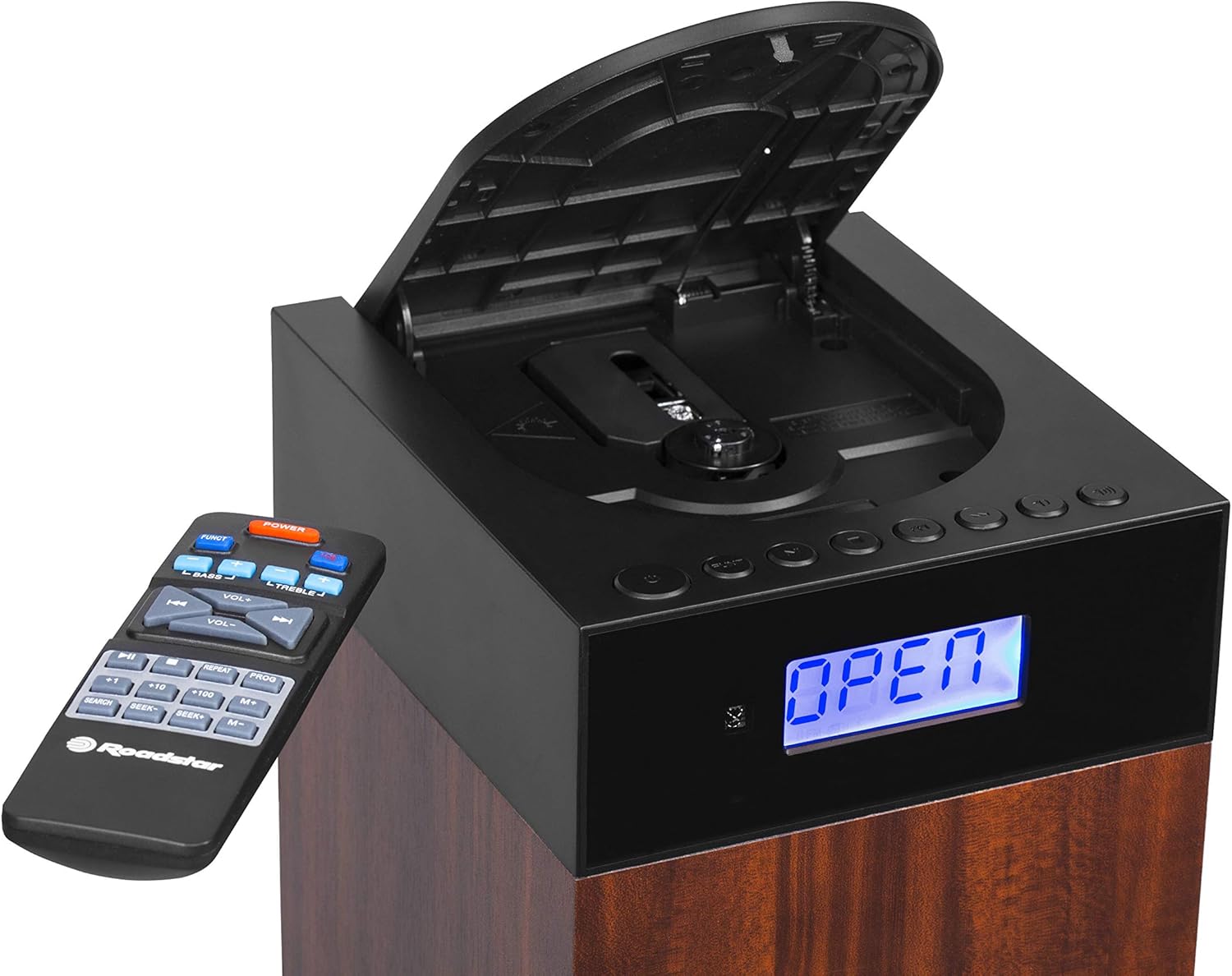
Rajah 4.1: Depan view showing the LCD display, control buttons, and open CD compartment.
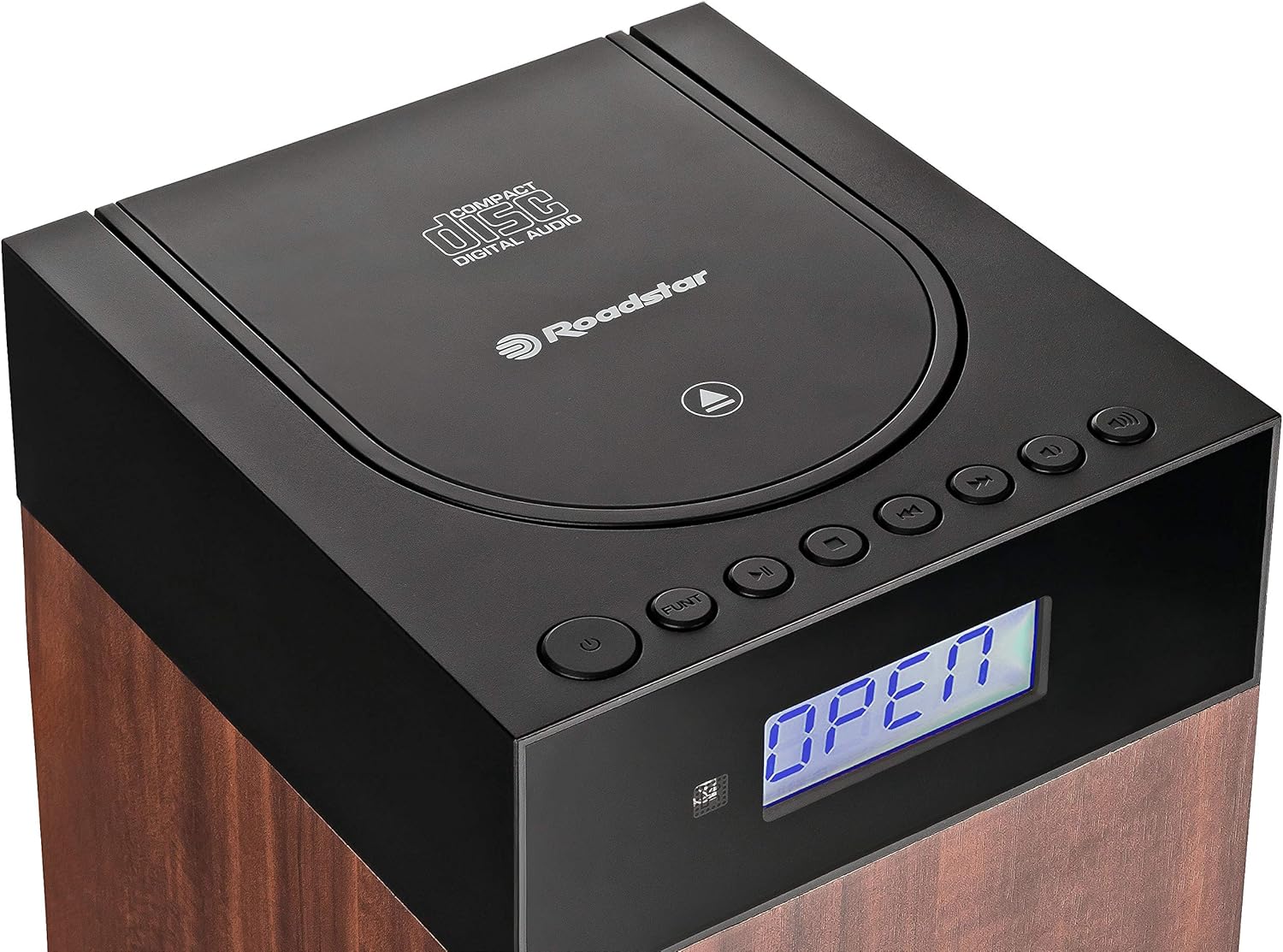
Rajah 4.2: Atas view showing the CD compartment lid and main controls.
The front panel features an LCD display for status information and mode indicators. The top section houses the CD player compartment and primary control buttons such as Power, Function, Play/Pause, Skip, and Volume.
4.2 Sambungan Panel Belakang

Rajah 4.3: Rear panel connections: DC IN, Power ON/OFF switch, USB port, and AUX IN.
The rear panel includes the DC IN port for power, a master ON/OFF switch, a USB port for media playback, and an AUX IN port for connecting external audio devices.
5. Persediaan
5.1 Membongkar dan Meletakkan
- Keluarkan unit dan semua aksesori daripada pembungkusan.
- Place the stereo system on a stable, flat surface. Ensure there is sufficient space around the unit for ventilation.
- Avoid placing the unit near heat sources, direct sunlight, or areas with high humidity or dust.
5.2 Sambungan Kuasa
- Connect the supplied AC power adapter to the DC IN port on the rear of the unit.
- Pasangkan hujung penyesuai kuasa yang satu lagi ke soket dinding standard.
- Ensure the master ON/OFF switch on the rear panel is in the 'ON' position.
5.3 Pemasangan Bateri Kawalan Jauh
- Buka penutup petak bateri di bahagian belakang alat kawalan jauh.
- Insert two AAA batteries (not included) according to the polarity markings (+ and -) inside the compartment.
- Tutup penutup petak bateri dengan selamat.
6. Arahan Operasi
6.1 Kuasa Hidup/Mati dan Pemilihan Mod
- Tekan ke KUASA butang pada unit atau alat kawalan jauh untuk menghidupkan atau mematikan sistem.
- Tekan ke FUNGSI button repeatedly to cycle through available modes: CD, FM, Bluetooth, USB, AUX. The selected mode will be displayed on the LCD.
6.2 Main Semula CD
- Tekan ke FUNGSI butang untuk memilih mod CD.
- Gently open the CD compartment lid on the top of the unit.
- Place a CD (CD-DA, CD-R, or CD-RW) with the label side facing up onto the spindle.
- Close the CD compartment lid. The unit will read the disc, and playback should begin automatically.
- Gunakan MAIN/JEDA butang untuk menjeda atau menyambung semula main semula.
- Tekan ke Langkau ke Hadapan or SKIP KE BELAKANG butang untuk menavigasi antara trek.
- Gunakan ULIKAN button to repeat the current track or the entire disc.
- Gunakan RANDOM button for shuffled playback.
6.3 Operasi Radio FM
- Tekan ke FUNGSI butang untuk memilih mod FM.
- For automatic station search, press and hold the MAIN/JEDA butang (atau IMBAS on remote). The radio will scan and save available stations.
- Untuk menala secara manual, gunakan Langkau ke Hadapan or SKIP KE BELAKANG buttons to adjust the frequency.
- To save a preset, tune to the desired station, then press the PROG butang, gunakan SKIP butang untuk memilih nombor pratetap, dan tekan PROG sekali lagi untuk mengesahkan.
- To recall a preset, use the M+ or M- butang pada alat kawalan jauh.
6.4 Sambungan Bluetooth

Rajah 6.1: Kesambungan Bluetooth untuk penstriman audio tanpa wayar.
- Tekan ke FUNGSI button to select Bluetooth mode. The LCD will display "BT" or a similar indicator, and the unit will enter pairing mode.
- Pada peranti berdaya Bluetooth anda (cth, telefon pintar), dayakan Bluetooth dan cari peranti yang tersedia.
- Select "TSPK-990CDBT" from the list of devices.
- Once paired, you can play audio from your device through the stereo system.
- Control playback (Play/Pause, Skip) using your connected device or the remote control.
6.5 Main Semula USB
- Insert a USB flash drive containing MP3, WMA, or WAV audio files ke dalam port USB pada panel belakang.
- Tekan ke FUNGSI butang untuk memilih mod USB.
- Playback should begin automatically. If not, use the MAIN/JEDA butang.
- Gunakan Langkau ke Hadapan or SKIP KE BELAKANG butang untuk menavigasi antara trek.
6.6 AUX-in Connection
- Connect one end of the supplied audio cable (or a standard 3.5mm audio cable) to the headphone jack or line-out port of your external audio device.
- Connect the other end of the cable to the AUX IN port on the rear panel of the stereo system.
- Tekan ke FUNGSI butang untuk memilih mod AUX.
- Play audio from your external device. The sound will be output through the stereo system.
6.7 Penggunaan Alat Kawalan Jauh
The remote control provides full functionality for the stereo system. Point the remote control towards the front of the main unit. Ensure there are no obstructions between the remote and the unit.
- KUASA: Menghidupkan / mematikan unit.
- FUNGSI: Selects the input source (CD, FM, BT, USB, AUX).
- VOL +/-: Melaraskan tahap kelantangan.
- BASS +/-: Melaraskan tahap bass.
- TREBLE+/-: Melaraskan tahap treble.
- MAIN/JEDA (►/−): Play/Pause for CD/USB/BT. Scan for FM.
- SKIP (◀◀/►►): Melangkau trek/files. Tunes FM frequency.
- BERHENTI (■): Menghentikan main balik CD/USB.
- ULANGAN: Mengulang trek semasa atau semua trek.
- PROG: Programs FM presets or CD playback order.
- M+/M-: Recalls saved FM presets.
- CARIAN: Initiates auto-scan for FM stations.
7. Penyelenggaraan
7.1 Membersihkan Unit
Lap bahagian luar unit dengan kain lembut dan kering. Jangan gunakan pembersih, lilin atau pelarut yang melelas kerana ia boleh merosakkan kemasan. Pastikan unit dicabut plag sebelum dibersihkan.
7.2 Penjagaan CD
Handle CDs by their edges. Keep them clean and free of scratches. If a CD is dirty, wipe it gently with a soft, lint-free cloth from the center outwards. Do not use harsh chemicals.
7.3 Penyimpanan
If the unit will not be used for an extended period, unplug it from the power outlet and store it in a cool, dry place, away from direct sunlight and extreme temperatures.
8. Penyelesaian masalah
If you encounter problems with your stereo system, refer to the following table for possible solutions.
| Masalah | Kemungkinan Punca | Penyelesaian |
|---|---|---|
| Tiada kuasa | Power adapter not connected; Master switch OFF; Power outlet faulty. | Check power adapter connection; Ensure master ON/OFF switch is ON; Try a different power outlet. |
| Tiada bunyi | Volume too low; Mute activated; Incorrect input mode selected. | Increase volume; Check if mute is active; Select the correct input mode (CD, FM, BT, USB, AUX). |
| CD tidak dimainkan | CD inserted incorrectly; CD dirty or scratched; CD compartment not closed. | Insert CD with label side up; Clean or replace CD; Ensure CD lid is fully closed. |
| Bluetooth tidak bersambung | Unit not in Bluetooth mode; Device not in pairing mode; Device too far. | Select Bluetooth mode on the unit; Ensure your device's Bluetooth is on and discoverable; Move device closer to the unit. |
| Penerimaan FM yang lemah | Antenna not extended or positioned correctly; Interference. | Adjust the position of the FM antenna wire; Move the unit away from other electronic devices. |
| Alat kawalan jauh tidak berfungsi | Bateri habis atau tidak dimasukkan dengan betul; Halangan antara alat kawalan jauh dan unit. | Replace batteries, ensuring correct polarity; Remove any obstructions; Point remote directly at the unit. |
9. Spesifikasi
| Ciri | Spesifikasi |
|---|---|
| Nombor Model | TSPK-990CDBT |
| Jenama | Roadstar |
| Dimensi (L x W x H) | 17 x 20 x 100 cm |
| Berat badan | 6.6 kg |
| Output Kuasa | 55 Watt |
| Ketersambungan | Bluetooth, USB, Auxiliary (3.5mm) |
| Jenis Pembesar Suara | Multimedia Tower |
| Sumber Kuasa | AC (Arus Ulang-alik) |
| Peranti Serasi | Smartphone, CD players, USB drives |
| CD Playback Formats | CD-DA, CD-R, CD-RW |
| USB Playback Formats | MP3, WMA, WAV |
| Penala Radio | Digital FM with PLL |
10. Waranti dan Sokongan
This product is covered by a manufacturer's warranty. Please refer to the warranty card included with your purchase or visit the official Roadstar website for detailed warranty terms and conditions. For technical support, service inquiries, or replacement parts, please contact Roadstar customer service through their official channels.
You can find more information and support on the official Roadstar webtapak: Roadstar Official Store


