1. Pengenalan
This manual provides detailed instructions for the installation, operation, and maintenance of your ZEROXCLUB Digital Wireless Backup Camera System Kit. This system is designed to enhance visibility and safety for various vehicles, including RVs, trucks, trailers, buses, campers, and 5th wheels.
2. Kandungan Pakej
Sila sahkan bahawa semua komponen yang disenaraikan di bawah disertakan dalam pakej anda:
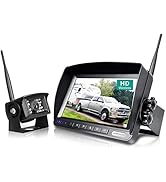
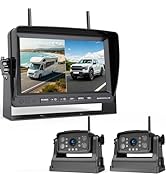
- 7-inch LCD Wireless Monitor
- Belakang Tanpa Wayar View Kamera
- Pendakap Tetap
- Sunshade for Monitor
- Kurungan Kamera
- Mount Piala Sedutan
- Power Cords (for monitor and camera)
- Installation Kits (screws, connectors)
- Antennas (for monitor and camera)
- Pengecas Kereta

3. Produk Lebihview
3.1 Ciri-ciri Utama
- Digital Wireless Signal: Provides stable and clear transmission up to 100ft and at speeds up to 85 mph, minimizing interference.
- HD 1080P 7-inch Monitor: Features a 1080P display with advanced IPS technology for fast response and clear images. Includes auto-dimming and a suction cup mount.
- Kamera Kalis Air IP69: Equipped with 18 infrared lights and a CCD sensor for superior night vision. The camera is IP69 rated for water and dust resistance, ensuring durability in various weather conditions.
- 149° Lebar View Sudut: Offers an expansive field of view to enhance safety during reversing and maneuvering.
- Aplikasi luas: Compatible with 12-24V DC power systems, suitable for RVs, semi-trailers, box trucks, 5th wheels, trailers, and buses.
3.2 Butiran Komponen


4. Panduan Pemasangan
4.1 Pemasangan Kamera
- Pilih Lokasi Pemasangan: Select a suitable location at the rear of your vehicle (RV, truck, trailer, etc.) that provides a clear view and allows for secure mounting. The camera can be mounted using either the vertical or horizontal bracket.
- Selamatkan Kamera: Use the provided screws and fixed bracket to securely attach the camera to the chosen location. Ensure the antenna is positioned for optimal signal transmission.
- Sambungan Kuasa:
- Option 1 (Reversing Activation): Connect the camera's red power wire to your vehicle's taillight or reversing light power source. Connect the black ground wire to a suitable ground point on the vehicle chassis. This method allows the camera to power on automatically when the vehicle is in reverse.
- Option 2 (Constant Power): Connect the camera's red power wire to a running light or an accessory power source that is always on when the vehicle is operating. Connect the black ground wire to a suitable ground point. This method keeps the camera continuously powered.

4.2 Pemasangan Monitor
- Pasang Monitor:
- Lekapan Cawan Sedutan: Attach the suction cup mount to a clean, smooth surface on your windshield. Secure the monitor to the mount.
- Pemasangan Papan Pemuka: Use the provided dashboard mount to place the monitor on your dashboard. Ensure it is stable and does not obstruct your view.
- Sambungan Kuasa: Plug the monitor's car charger into your vehicle's cigarette lighter socket. The monitor will power on automatically.

5. Arahan Operasi
5.1 Kuasa Permulaan
Once the camera and monitor are correctly installed and powered, the system should automatically establish a wireless connection. The camera's view akan muncul pada monitor.
5.2 Kawalan Monitor
The monitor features several buttons for control and adjustment:
- KUASA: Menghidupkan atau mematikan monitor.
- , Adjusts brightness or navigates menu options.
- CH: Switches between camera channels if multiple cameras are connected.
- MENU: Accesses the monitor's settings menu.
- SEL: Selects options within the menu.

5.3 Adjusting Camera View
The camera's bracket allows for 360-degree adjustment. Loosen the bracket screws, adjust the camera to the desired angle, and then tighten the screws to secure it.

6. Penyelenggaraan
- Pembersihan: Bersihkan kanta kamera dan skrin monitor secara berkala dengan kain lembutamp kain. Elakkan pembersih kasar yang boleh menggaru permukaan.
- Pemeriksaan Kabel: Periodically check all power connections and cables for signs of wear, damage, or loose connections. Ensure waterproof seals are intact.
- Kedudukan Antena: Ensure the antennas on both the camera and monitor are positioned upright and unobstructed for optimal signal reception.
- Storan: If the system will not be used for an extended period, disconnect it from power and store it in a dry, cool place.
7. Penyelesaian masalah
| Masalah | Kemungkinan Punca | Penyelesaian |
|---|---|---|
| Tiada isyarat pada monitor |
|
|
| Imej kabur atau herot |
|
|
| Monitor tidak dihidupkan |
|
|
8. Spesifikasi
| Ciri | Perincian |
|---|---|
| Nombor Model | W01 |
| Saiz Skrin | 7 Inci |
| Teknologi Paparan | LCD |
| Voltage | 12-24 Volt DC |
| Teknologi Penderia Optik | CCD |
| Jenis Kanta | Sudut Lebar |
| Sudut Sebenar daripada View | 149 Darjah |
| Penilaian Kalis Air | IP69 |
| Ketersambungan | Tanpa wayar |
| Product Dimensions (Monitor) | 5"L x 1.1"W x 3"H |
| Berat Barang | 2.65 paun (jumlah sistem) |
9. Sokongan Pelanggan dan Waranti
For technical assistance, product inquiries, or warranty information, please contact ZEROXCLUB customer support. You can typically find contact details in the product packaging or on the official ZEROXCLUB webtapak.
Based on available information, you can reach out via email for technical support: susanjiing@hotmail.com.
ZEROXCLUB is committed to providing reliable products and support. Please refer to your purchase documentation for specific warranty terms and conditions.