1. Produk Lebihview
The RapidX LunaX is a portable Bluetooth speaker designed for outdoor and indoor use, featuring an integrated LED light. It combines audio playback with illumination, making it suitable for various activities such as camping, hiking, picnics, and beach outings. The device is water-resistant (IPX5 rated) and designed for portability.
Kandungan Pakej:
- LunaX Portable Speaker with LED Lamp
- Kabel Pengecas USB Mikro
- Panduan Pengguna (dokumen ini)
2. Bermula (Persediaan)
2.1 Mengecas Speaker
Before initial use, fully charge the LunaX speaker. The charging port is located under the top cap of the device. Unscrew and remove the top cap to access the micro USB port.
- Unscrew and remove the top cap of the LunaX speaker.
- Connect the provided micro USB cable to the charging port on the speaker.
- Connect the other end of the USB cable to a standard USB power supply (e.g., wall adapter, computer USB port).
- The LED indicator light will blink red while charging and turn solid red once fully charged.
- Cas penuh biasanya mengambil masa beberapa jam.

Image: Micro USB charging port located under the top cap.
2.2 Menghidupkan/Mematikan
- Untuk menghidupkan: Tekan dan tahan butang Kuasa/Jeda button until the LED indicator lights up blue.
- Untuk mematikan kuasa: Tekan dan tahan butang Kuasa/Jeda button until the LED indicator turns off.
2.3 Berpasangan Bluetooth
After powering on, the LunaX speaker will automatically enter Bluetooth pairing mode, indicated by a blinking blue LED. It is ready to connect to your device.
- Ensure the LunaX speaker is powered on and in pairing mode (blinking blue LED).
- Pada telefon pintar atau tablet anda, navigasi ke tetapan Bluetooth.
- Cari untuk available devices and select "LunaX" from the list.
- Setelah disambungkan, penunjuk LED akan bertukar menjadi biru pejal, dan anda akan mendengar pengesahan yang boleh didengar.
3. Operating the LunaX Speaker
3.1 Butang Kawalan
The LunaX speaker features four control buttons located on the side, near the top. These buttons are marked with raised icons.
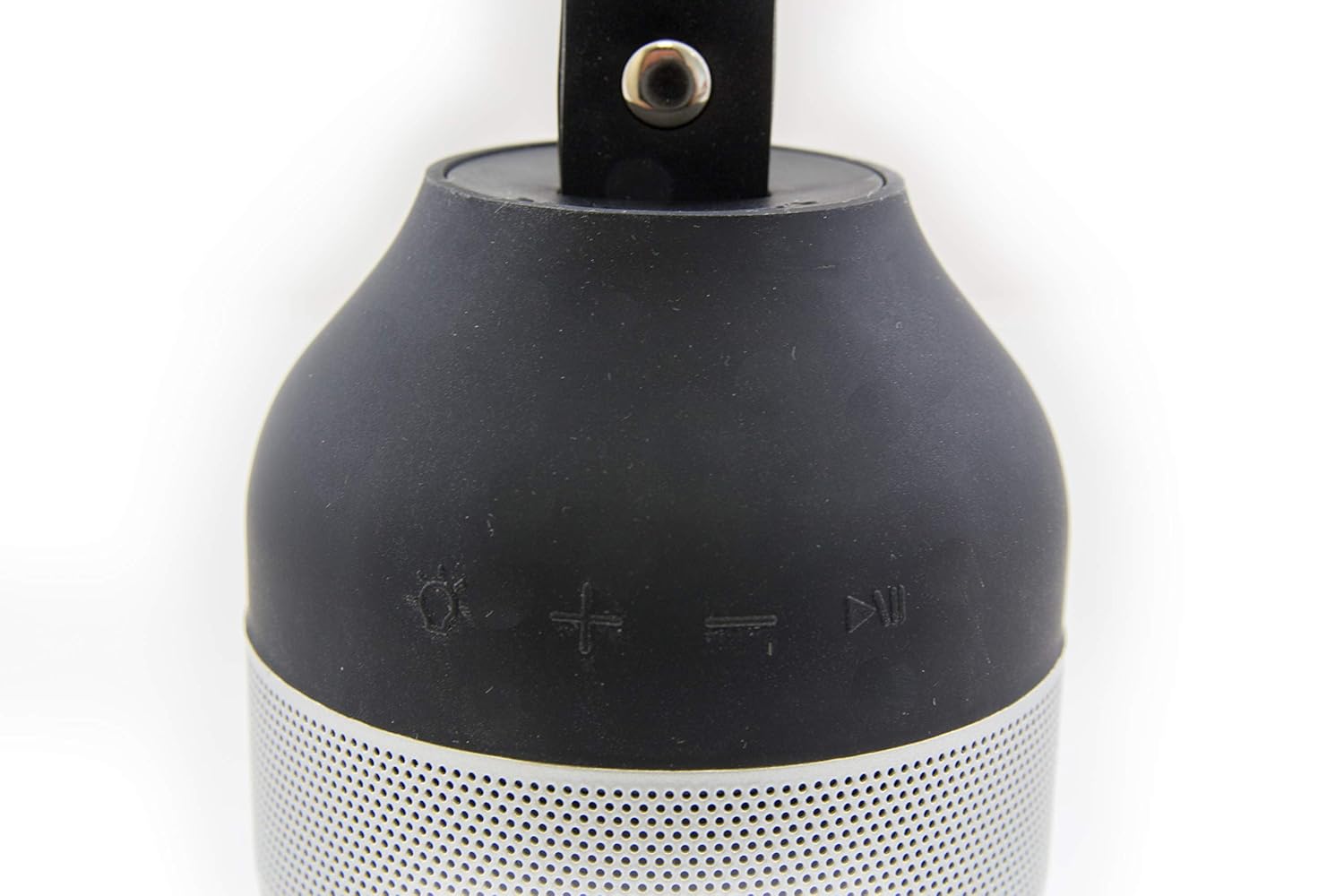
Image: Control buttons on the LunaX speaker.
- Light Button (Sun icon): Press to cycle through light brightness settings (Low, High, Off).
- Volume Up Button (+ icon): Tekan untuk menambah kelantangan.
- Volume Down Button (- icon): Tekan untuk mengurangkan kelantangan.
- Power/Pause Button (Play/Pause icon): Press and hold to power on/off. Press briefly to play or pause audio.
3.2 Main Balik Audio
Once paired with your device, you can stream audio wirelessly to the LunaX speaker. The speaker can play music at maximum volume for approximately 7 hours on a full charge.
3.3 Operasi Lampu LED
The integrated LED light provides white illumination with two brightness settings. The light can operate continuously for 12-24 hours, depending on the selected brightness level.
- Tekan ke Cahaya button to turn the light on at the low brightness setting.
- Tekan ke Cahaya button again to switch to the high brightness setting.
- Tekan ke Cahaya butang kali ketiga untuk mematikan lampu.
3.4 Portability and Water Resistance
The LunaX speaker is designed to fit in most standard-sized car and boat cup holders. It features an IPX5 water resistance rating, meaning it can withstand splashes and light rain, making it suitable for outdoor use. It is not designed for submersion in water.

Image: RapidX LunaX speaker with handle for portability.
4. Penyelenggaraan
4.1 Pembersihan
Lap pembesar suara dengan lembut, damp cloth. Do not use harsh chemicals or abrasive cleaners. Ensure the charging port is dry before connecting the charging cable.
4.2 Penjagaan Bateri
To prolong battery life, avoid fully discharging the battery frequently. Charge the speaker regularly, especially if it will not be used for an extended period.
5. Penyelesaian masalah
- Speaker tidak menghidupkan: Ensure the battery is charged. Connect the speaker to a power source using the micro USB cable and try again.
- Tidak boleh berpasangan dengan peranti Bluetooth:
- Pastikan pembesar suara berada dalam mod berpasangan (LED biru berkelip).
- Pastikan Bluetooth didayakan pada peranti anda.
- Gerakkan pembesar suara lebih dekat dengan peranti anda.
- Turn off and on both the speaker and your device, then attempt pairing again.
- Audio quality is poor or distorted:
- Pastikan pembesar suara berada dalam julat Bluetooth peranti anda.
- Reduce the volume on both the speaker and your device to prevent distortion.
- Periksa sebarang halangan antara pembesar suara dan peranti anda.
- Speaker disconnects frequently:
- Ensure the speaker is fully charged. Low battery can affect connection stability.
- Keep the speaker and your device within close proximity.
- Avoid environments with strong wireless interference.
- Buttons are difficult to see/locate: The control buttons are designed with raised icons on a black surface. Familiarize yourself with their positions by touch.
- LED indicator light is dim: The LED indicator is small. Observe it in lower light conditions if necessary to confirm its status.
6. Spesifikasi
| Nombor Model | RX-LUNAXBLK |
| Jenama | RapidX |
| Teknologi Ketersambungan | Bluetooth |
| Teknologi Komunikasi Tanpa Wayar | Bluetooth |
| Sumber Kuasa | Dikuasakan Bateri |
| Jenis Bateri | Lithium (Product Specific) |
| Purata Hayat Bateri | 12 Hours (Speaker), 12-24 Hours (Light) |
| Tahap Ketahanan Air | IPX5 (Tahan Air) |
| Kaedah Kawalan | Sentuh Butang |
| Kuasa Output Maksimum Pembesar Suara | 3 Watt |
| Berat Barang | 245 g |
| Dimensi Produk (LxWxH) | 7.62 x 7.62 x 14.92 cm |
| bahan | logam |
| UPC | 856690005807 |
7. Waranti dan Sokongan
For warranty information or technical support, please refer to the RapidX official webtapak atau hubungi perkhidmatan pelanggan mereka secara langsung. Simpan resit pembelian anda sebagai bukti pembelian.
Manufacturer: Rapidx


