pengenalan
This manual provides comprehensive instructions for the Elitech BT-3 Digital Hygrometer Thermometer. This device is designed to accurately monitor both indoor and outdoor temperature, as well as indoor humidity levels, offering essential environmental data for various settings.
Ciri-ciri Produk
- Digital Thermometer: Monitors indoor and outdoor temperature in both Fahrenheit (℉) and Celsius (℃). The measuring range is -58℉ to +158℉.
- Humidity Monitor: Measures indoor relative humidity (RH) within a range of 20% to 99%RH.
- MAX & MIN Records: Automatically stores and displays the maximum and minimum recorded values for indoor/outdoor temperature and indoor humidity.
- Clock Function and Alarming Function: Features a switchable 12 or 24-hour clock display and a settable alarm time.
- Three Mounting Options: Designed for versatility with tabletop, wall-mountable, and magnet-mountable options, allowing convenient placement.
- Penunjuk Keselesaan Udara: Displays the comfort level (DRY/COMFORT/WET) based on current indoor humidity, providing a quick assessment of air conditions.
Reka Letak Peranti
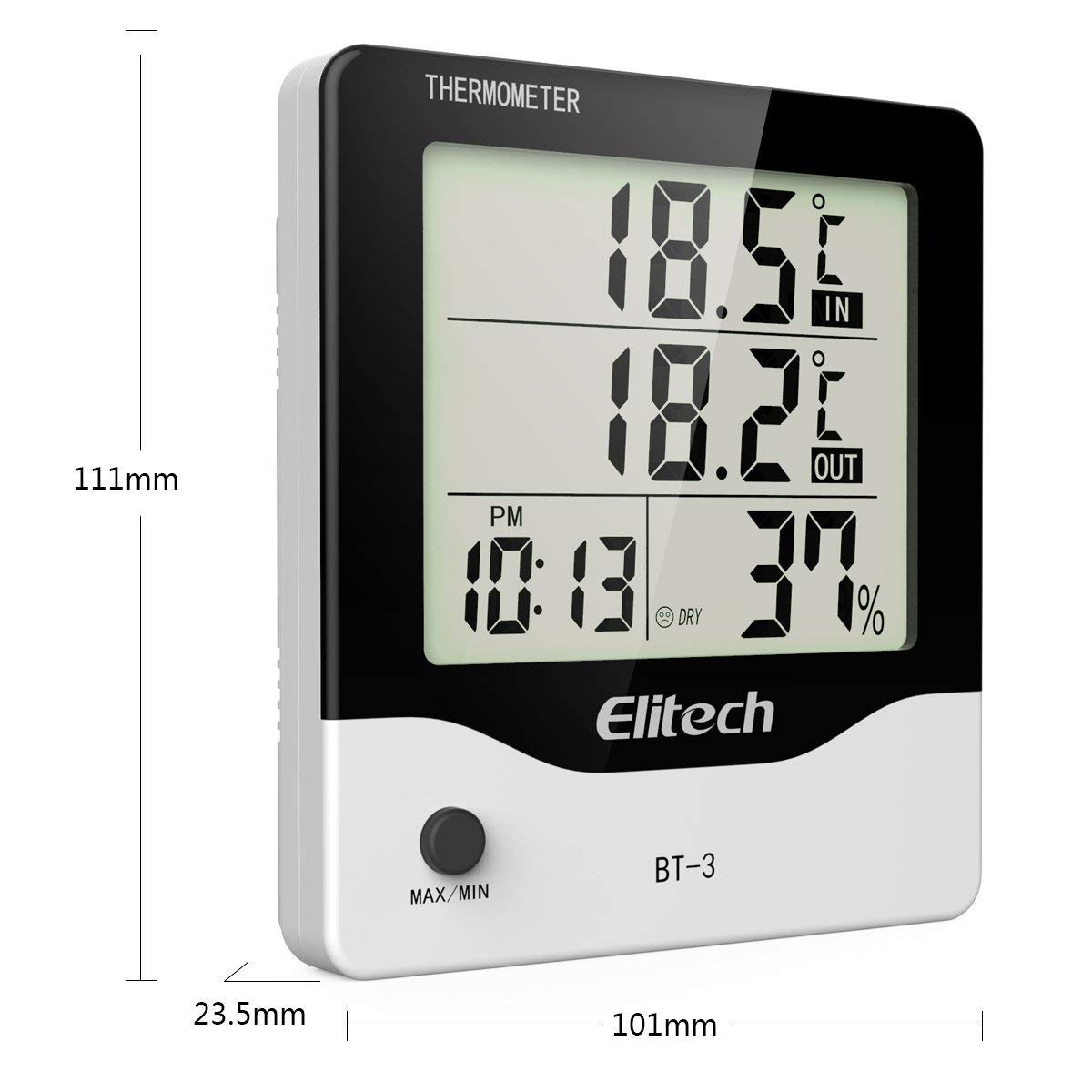
Rajah 1: Depan view of the Elitech BT-3 unit, showing the LCD display with indoor/outdoor temperature, time, and humidity readings. Dimensions are indicated as 111mm height, 101mm width, and 23.5mm depth. A "MAX/MIN" button is visible at the bottom.

Rajah 2: belakang view of the Elitech BT-3 unit, showing the battery compartment cover and control buttons: MODE, ADJ, CLEAR, RESET, and a ℃/℉ switch. A keyhole slot for wall mounting is also visible.

Rajah 3: belakang view of the Elitech BT-3 unit, illustrating the foldable kickstand for tabletop use and the attached outdoor temperature probe with its long cable.

Rajah 4: jarak dekat view of the open battery compartment on the back of the Elitech BT-3 unit, showing the slot for a AAA battery (not included).
Persediaan
Pemasangan Bateri
- Cari penutup petak bateri di bahagian belakang unit (rujuk Rajah 2).
- Slide the cover off to open the compartment (refer to Figure 4).
- Insert one AAA battery, ensuring the correct polarity (+/-) is observed. Note: Battery is not included.
- Gantikan penutup petak bateri dengan menggelongsorkannya semula ke tempatnya.
Penempatan Probe
The outdoor temperature probe is connected to the main unit via a long cable. For accurate outdoor temperature readings, place the probe outside in a location that is protected from direct sunlight, rain, and other extreme weather conditions. Ensure the cable is routed safely and does not interfere with windows or doors.
Pilihan Pemasangan
The BT-3 offers flexible placement options:
- Atas meja: Extend the foldable kickstand on the back of the unit (refer to Figure 3) to place it securely on any flat surface.
- Boleh Dilekap di Dinding: Utilize the keyhole slot on the back of the unit (refer to Figure 2) to hang it on a screw or nail on a wall.
- Magnet-Mountable: The unit features built-in magnets, allowing it to be conveniently attached to metallic surfaces such as refrigerators or metal cabinets.
Arahan Operasi
Hidupkan/Mati Kuasa
The unit powers on automatically once the battery is installed. There is no dedicated power button. To turn off, remove the battery.
Temperature Unit Selection (℃/℉)
On the back of the unit, locate the small switch labeled "℃/℉" (refer to Figure 2). Slide this switch to toggle between Celsius and Fahrenheit temperature displays.
Penetapan Masa
- Tekan ke MODE button (on the back) to cycle through display modes until the current time is shown.
- Tekan dan tahan butang MODE button until the hour digit begins to flash.
- Gunakan ADJ button (on the back) to adjust the hour.
- Tekan MODE again to move to the minute digit, then use ADJ untuk menyesuaikan minit.
- Teruskan menekan MODE to set the 12-hour (AM/PM) or 24-hour format.
- Tekan MODE one last time to confirm settings and exit time setting mode.
Tetapan Penggera
- Tekan ke MODE button until the alarm time is displayed (often indicated by an alarm clock icon).
- Tekan dan tahan butang MODE button until the alarm hour digit flashes.
- Gunakan ADJ butang untuk menyesuaikan jam penggera.
- Tekan MODE again to move to the alarm minute digit, then use ADJ untuk menyesuaikan minit.
- Tekan MODE one last time to confirm and exit alarm setting mode.
- Untuk mengaktifkan atau menyahaktifkan penggera, tekan ADJ button when the alarm time is displayed. An alarm icon will appear or disappear on the screen to indicate its status.
MAX/MIN Temperature and Humidity Records
Tekan ke MAX/MIN button (on the front of the unit) to view the maximum and minimum recorded indoor/outdoor temperatures and indoor humidity values.
- Tekan ke MAX/MIN button repeatedly to cycle through the current readings, maximum readings, and minimum readings.
- Untuk memadam rekod MAX/MIN, tekan dan tahan JELAS button (on the back of the unit) while the MAX/MIN readings are displayed.
Penunjuk Keselesaan Udara
The display includes an indicator that categorizes the indoor air comfort level based on humidity:
- KERING: Indicates that the indoor humidity level is low.
- KESELESAAN: Indicates that the indoor humidity level is within an optimal and comfortable range.
- BASAH: Indicates that the indoor humidity level is high.
Penyelenggaraan
- Pembersihan: Clean the unit with a soft, dry cloth. Do not use abrasive cleaners, solvents, or immerse the unit in water.
- Penggantian Bateri: Replace the AAA battery when the low battery indicator appears on the display to ensure continuous and accurate operation.
- Penjagaan Probe: Keep the outdoor probe clean and free from dirt, dust, and debris.
- Keadaan Persekitaran: Avoid exposing the unit to extreme temperatures, direct sunlight, or excessively high humidity for prolonged periods, as this can affect accuracy and lifespan.
Menyelesaikan masalah
Bacaan Tidak Tepat
- Penempatan Probe: Ensure the outdoor probe is correctly positioned and not exposed to direct sunlight, heat sources, or moisture, which can skew readings.
- Masa Penstabilan: Allow the unit sufficient time (up to 30 minutes) to stabilize and provide accurate readings after initial setup or if it has been moved to a new environment.
- Tahap Bateri: Check the battery level and replace it with a fresh AAA battery if the indicator shows low power.
Paparan Tidak Berfungsi
- Pemeriksaan Bateri: Verify that the battery is installed correctly with the proper polarity.
- Penggantian Bateri: Gantikan bateri dengan bateri AAA baharu.
- Tetapan semula kilang: If the display remains unresponsive, perform a factory reset by pressing the TETAP SEMULA button on the back of the unit. This may require a small pointed object like a paperclip.
Spesifikasi
| Spesifikasi | Perincian |
|---|---|
| Nombor Model | BT-3 |
| warna | putih |
| Jenama | Elitech |
| Berat Barang | 0.16 Kilogram (5.6 auns) |
| Jenis Bateri | 1 C battery required (Alkaline) |
| Penarafan Suhu Lebih Rendah | 32 Darjah Fahrenheit |
| Penarafan Suhu Atas | 122 Darjah Fahrenheit |
| Jenis Pemasangan | Atas Meja, Pemasangan Dinding |
| Voltage | 1.5 Volt |
| Ketepatan Suhu | 0.1 ℃ |
| Dimensi Produk | 4.25 x 5.82 x 1.1 inci |
Waranti dan Sokongan
Elitech is committed to providing excellent customer service. The product comes with 24/7 US Technician Support available via email and phone.
For warranty claims, technical assistance, or any product-related inquiries, please contact Elitech customer service directly. Refer to the Elitech official webtapak atau pembungkusan produk untuk maklumat hubungan terkini.
Elitech Company Overview
Video ini memberikan gambaran umumview of Elitech Technology Inc., its vision, and its range of HVAC/R tools and manufacturing capabilities. It is not specific to the BT-3 product operation but offers insight into the brand's commitment to innovation.
Video 1: Elitech AI HVAC/R Tools Create Green Future - An overview of Elitech's technology and manufacturing.


