1. Pengenalan
This manual provides detailed instructions for the setup, operation, and maintenance of your CHERRY DW 5100 Wireless Keyboard and Mouse Combo. Please read this manual thoroughly before using the product to ensure optimal performance and longevity.
Kandungan Pakej
The CHERRY DW 5100 package includes the following items:
- CHERRY DW 5100 Wireless Keyboard
- CHERRY DW 5100 Wireless Mouse
- Penerima USB
- 4 x AAA Batteries (2 for keyboard, 2 for mouse)
- Manual Arahan (dokumen ini)

Image 1.1: The CHERRY DW 5100 Wireless Keyboard and Mouse Combo. The image displays the full-size black keyboard with a numeric keypad and media keys, alongside the ergonomic black wireless mouse.
2. Persediaan
2.1 Pemasangan Bateri
The CHERRY DW 5100 keyboard and mouse require AAA batteries for operation. Two AAA batteries are needed for the keyboard and two for the mouse.
- Untuk Papan Kekunci: Locate the battery compartment on the underside of the keyboard. Open the cover, insert two AAA batteries, ensuring correct polarity (+/-), and close the cover.
- Untuk Tetikus: Locate the battery compartment on the underside of the mouse. Open the cover, insert two AAA batteries, ensuring correct polarity (+/-), and close the cover.

Image 2.1: The CHERRY DW 5100 Wireless Mouse shown with its USB receiver. The receiver is compact and designed to be plugged into a computer's USB port.
2.2 Menyambung Peranti
The keyboard and mouse connect wirelessly to your computer via a single USB receiver.
- Masukkan penerima USB ke dalam port USB yang tersedia pada komputer anda.
- Ensure the keyboard and mouse are powered on (check for an on/off switch, usually on the underside).
- Komputer anda sepatutnya mengesan dan memasang pemacu yang diperlukan secara automatik. Proses ini mungkin mengambil masa beberapa saat.
- Once drivers are installed, the keyboard and mouse are ready for use.
The wireless connection operates on a 2.4 GHz frequency, providing a range of up to 10 meters (approximately 33 feet).
3. Arahan Operasi
3.1 Fungsi Papan Kekunci
The CHERRY DW 5100 keyboard features a standard QWERTY layout with 10 additional keys for enhanced functionality.
Imej 3.1: Jarak dekat view of the CHERRY DW 5100 Wireless Keyboard. This image highlights the full QWERTY layout, numeric keypad, and the additional function keys located above the numeric pad and below the spacebar.
Kunci Tambahan:
- Kawalan Multimedia: Dedicated keys for volume up, volume down, mute, play/pause, previous track, and next track.
- Pintasan Aplikasi: Keys for launching common applications such as email, web browser, and calculator.
- Mod tidur: A key to put your computer into sleep mode.
Refer to your operating system's settings for potential customization of these additional keys.
3.2 Fungsi Tetikus
The CHERRY DW 5100 mouse is ergonomically designed for right-handed users and features multiple buttons for efficient navigation.

Imej 3.2: Atas view of the CHERRY DW 5100 Wireless Mouse. This image shows the left and right click buttons, the scroll wheel, and the DPI switch button located below the scroll wheel.
- Klik Kiri/Kanan: Butang tetikus standard.
- Roda Tatal: Untuk menatal menegak dan sebagai butang klik tengah.
- Suis DPI: Located below the scroll wheel, this button allows you to adjust the mouse's resolution (DPI) on the fly, changing cursor speed and precision. Press the button to cycle through available DPI settings.
- Butang Ibu Jari: Two side buttons located on the left side of the mouse, typically used for "back" and "forward" navigation in web pelayar dan file penjelajah.
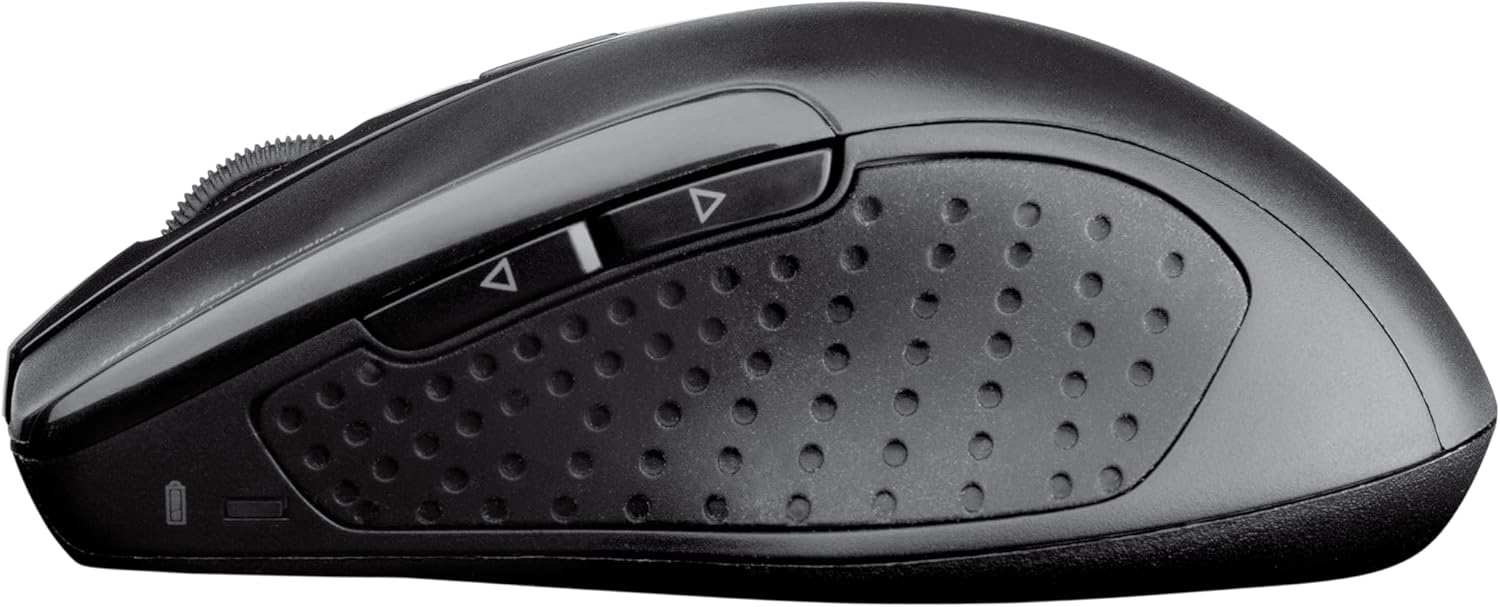
Imej 3.3: Sisi view of the CHERRY DW 5100 Wireless Mouse. This image clearly shows the two thumb buttons on the left side and the textured rubber grip for enhanced comfort and control.
4. Penyelenggaraan
4.1 Pembersihan
- Disconnect the USB receiver from your computer before cleaning.
- Gunakan kain lembut dan tidak berbulu sedikit dampened with water or a mild cleaning solution to wipe the surfaces of the keyboard and mouse.
- Avoid using harsh chemicals, abrasive cleaners, or solvents, as these can damage the product's finish.
- For cleaning between keyboard keys, use compressed air to remove dust and debris.
4.2 Penggantian Bateri
The CHERRY DW 5100 is designed for a long battery life of up to two years. When batteries are low, the performance may degrade, or the devices may stop responding.
- Replace batteries as described in Section 2.1.
- Always use fresh, high-quality AAA alkaline batteries.
- Buang bateri terpakai mengikut peraturan tempatan.
5. Penyelesaian masalah
| Masalah | Kemungkinan Punca | Penyelesaian |
|---|---|---|
| Papan kekunci/Tetikus tidak bertindak balas |
|
|
| Laggy or erratic mouse movement |
|
|
| Kekunci papan kekunci tidak didaftarkan |
|
|
6. Spesifikasi
| Ciri | Perincian |
|---|---|
| Nama Model | CHERRY DW 5100 |
| Nombor Model Item | JD-0520EU-2 |
| Teknologi Ketersambungan | Tanpa Wayar (2.4 GHz) |
| Julat Tanpa Wayar | Sehingga 10 meter (33 kaki) |
| Susun atur papan kekunci | EU Layout, QWERTY |
| Additional Keyboard Keys | 10 multimedia and application keys |
| Jenis Tetikus | Ergonomic, Right-handed, 6-button with DPI switch |
| Sumber Kuasa | Dikuasakan Bateri |
| Bateri Diperlukan | 4 x AAA (2 for keyboard, 2 for mouse) |
| Anggaran Hayat Bateri | Sehingga 2 tahun |
| Sistem Operasi yang Serasi | Windows 10, Windows 7, Windows 8 |
| Platform Perkakasan | PC, Laptop |
| warna | Hitam |
| Dimensi Produk (Papan Kekunci) | Kira-kira 18.43 x 6.7 x 0.87 inci (46.8 x 17 x 2.2 cm) |
| Berat Barang | Kira-kira 2.05 paun (0.93 kg) |
| Pengeluar | CHERRY |
7. Waranti dan Sokongan
Untuk maklumat jaminan dan sokongan teknikal, sila rujuk laman web rasmi Cherry website or contact their customer service department. Details can typically be found on the product packaging or on the manufacturer's webtapak.
Pengeluar: CHERRY
Webtapak: www.cherry.de/en/ (General Cherry weblaman web, pautan sokongan tertentu mungkin berbeza mengikut wilayah)


