pengenalan
This manual provides detailed instructions for the setup, operation, and maintenance of your Zebronics ZEB-BT6860RUCF 5.1 Channel Multimedia Speaker System. Please read this manual thoroughly before using the product to ensure proper functionality and to maximize your audio experience.
Kandungan Pakej
Sahkan bahawa semua item yang disenaraikan di bawah disertakan dalam pakej anda:
- 1 x Unit Subwufer
- 5 x Satellite Speaker Units
- 1 x Alat Kawalan Jauh
- Audio Cables (AUX, RCA)
- Manual Pengguna
Produk Selesaiview

Image: The complete Zebronics ZEB-BT6860RUCF 5.1 speaker system, including the subwoofer, five satellite speakers, and the remote control.

Image: Close-up of the subwoofer's front panel, illustrating the 'Input', 'Previous', 'Next', 'Play', 'Volume' controls, along with the SD/MMC card slot and USB port.
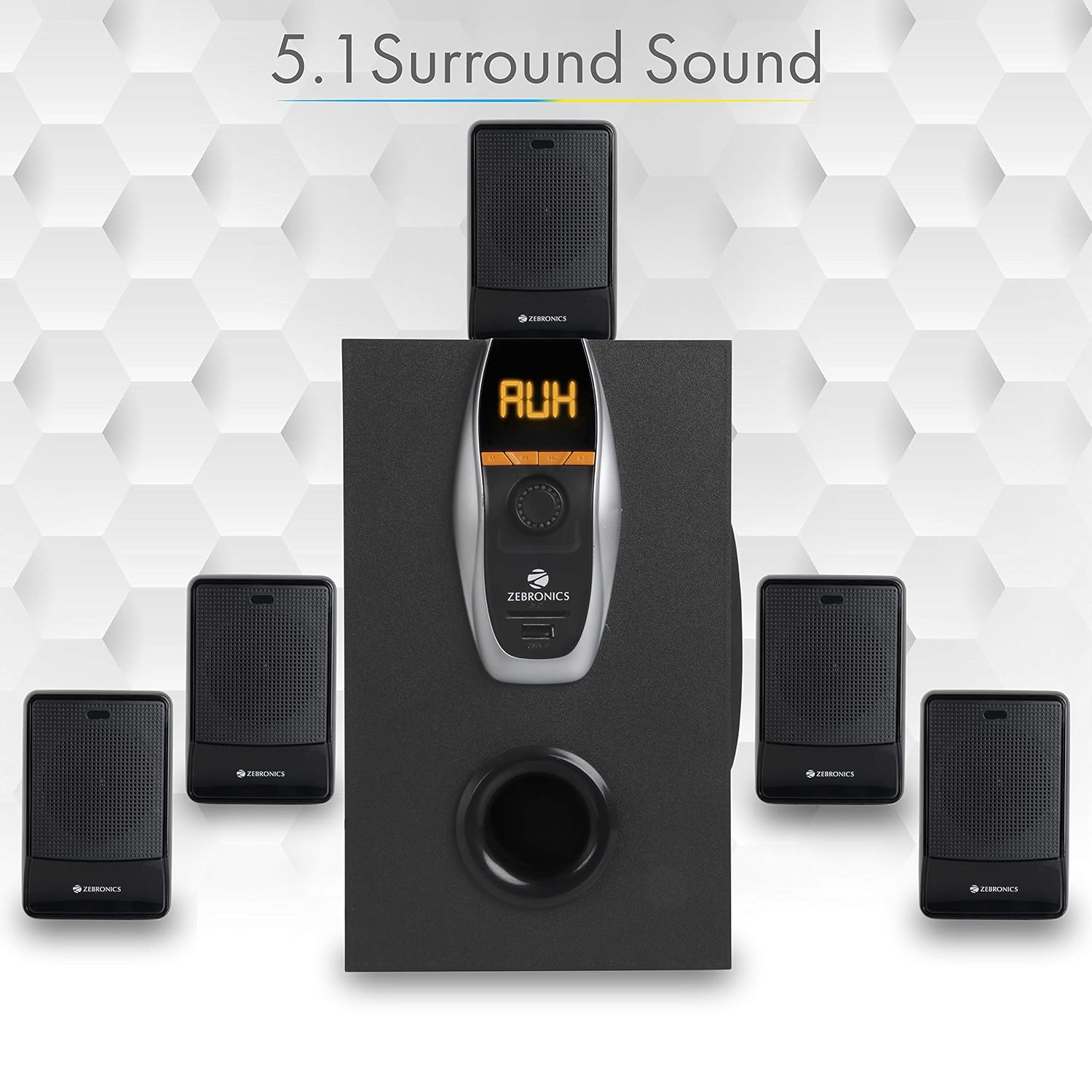
Image: A visual representation of the recommended 5.1 surround sound speaker setup, showing the central subwoofer and the five satellite speakers positioned for optimal audio distribution.

Imej: A terperinci view of the subwoofer, highlighting its wooden enclosure design, which contributes to sound quality.

Image: The rear panel of the subwoofer, showing the various input and output ports, including Stereo Input, 5.1 Input, Satellite Output terminals, and the main Power Switch.

Image: A diagram illustrating the physical dimensions of the subwoofer unit: 160 mm (Width), 240 mm (Depth), and 277 mm (Height).
Arahan Persediaan
- Penempatan pembesar suara: Position the subwoofer centrally. Place the five satellite speakers around your listening area for optimal 5.1 surround sound. Refer to the 5.1 Surround Sound Speaker Placement image for guidance.
- Sambungkan Pembesar Suara Satelit: Connect each of the five satellite speakers to the corresponding output terminals on the rear panel of the subwoofer. Ensure correct polarity (positive to positive, negative to negative).
- Sambungan Kuasa: Connect the power cable to the subwoofer and then plug it into a suitable power outlet.
- Sambungan Sumber Audio:
- For 5.1 Input: Use the provided RCA cables to connect your 5.1 channel audio source (e.g., DVD player, compatible TV) to the 5.1 Input ports on the subwoofer's rear panel.
- For Stereo/AUX Input: Use a 3.5mm to RCA cable to connect your stereo audio source (e.g., computer, laptop, MP3 player) to the Stereo Input (AUX) ports on the subwoofer's rear panel.
- Hidupkan kuasa: Flip the power switch on the rear panel of the subwoofer to the 'ON' position. The front display will illuminate.
Arahan Operasi
Kawalan Panel Hadapan
The subwoofer's front panel features controls for various functions:
- Input: Press to cycle through input modes (Bluetooth, USB, SD, AUX, FM).
- Sebelumnya: Short press for previous track/station. Long press for fast rewind (USB/SD).
- Seterusnya: Short press for next track/station. Long press for fast forward (USB/SD).
- Main/Jeda: Play or pause audio playback. In FM mode, long press to auto-scan and save stations.
- Tombol Kelantangan: Putar untuk melaraskan tahap kelantangan induk.
- Port USB: Insert a USB flash drive for MP3 playback.
- Slot Kad SD/MMC: Insert an SD or MMC card for MP3 playback.
Fungsi Kawalan Jauh
The included remote control provides convenient access to all speaker functions:
- Kuasa: Turn the speaker system On/Off.
- Mod: Select input source (BT/USB/SD/AUX/FM).
- Jilid +/-: Laraskan kelantangan induk.
- Redam: Redamkan atau nyahredamkan audio.
- Main/Jeda: Kawal main balik.
- Sebelumnya/Seterusnya: Navigate tracks or FM stations.
- EQ: Select equalizer presets (if available).
- Kekunci angka: Direct track selection (USB/SD) or FM station input.
Operasi Bluetooth
- Power on the speaker system.
- Press the 'Input' button on the front panel or 'Mode' button on the remote until 'BT' mode is selected. The display will show 'BT' and a pairing indicator will flash.
- Enable Bluetooth on your mobile device or computer and search for available devices.
- Select 'ZEB-BT6860RUCF' from the list of devices.
- Setelah dipasangkan, pembesar suara akan mengesahkan sambungan dan anda boleh mula memainkan audio daripada peranti anda.
Operasi Kad USB / SD
- Insert a USB flash drive or SD/MMC card (up to 32GB) containing MP3 audio files into the respective port/slot on the front panel.
- The speaker system will automatically switch to USB or SD mode and begin playing the first track. If not, press the 'Input' or 'Mode' button to select the correct source.
- Use the 'Previous', 'Next', and 'Play/Pause' buttons on the front panel or remote control to manage playback.
Operasi Input AUX
- Connect your audio source to the AUX input ports on the rear panel using an appropriate audio cable.
- Press the 'Input' button on the front panel or 'Mode' button on the remote until 'AUX' mode is selected.
- Mainkan audio daripada peranti anda yang disambungkan.
Operasi Radio FM
- Press the 'Input' button on the front panel or 'Mode' button on the remote until 'FM' mode is selected.
- To auto-scan and save available FM stations, long press the 'Play/Pause' button on the front panel or remote control. The system will scan and store stations automatically.
- Use the 'Previous' and 'Next' buttons to navigate through the saved FM stations.
Penyelenggaraan
- Pembersihan: Use a soft, dry cloth to clean the speaker surfaces. Do not use abrasive cleaners, waxes, or solvents.
- Pengudaraan: Pastikan subwoofer dan pembesar suara satelit mempunyai pengudaraan yang mencukupi. Jangan halang sebarang bukaan pengudaraan.
- Persekitaran: Avoid exposing the speaker system to direct sunlight, extreme temperatures, high humidity, or dusty environments.
- Matikan: Always power off the system and unplug it from the power outlet before cleaning or if it will be unused for an extended period.
Menyelesaikan masalah
| Masalah | Kemungkinan Punca | Penyelesaian |
|---|---|---|
| Tiada kuasa | Kabel kuasa tidak disambungkan; Suis kuasa dimatikan; Soket kuasa rosak. | Ensure power cable is securely connected. Turn the power switch ON. Test the power outlet with another device. |
| Tiada bunyi | Volume too low; Incorrect input mode; Audio cables loose/faulty; Mute activated. | Increase volume. Select correct input mode. Check audio cable connections. Deactivate mute function. |
| Bluetooth tidak bersambung | Speaker not in BT mode; Device Bluetooth off; Already connected to another device; Interference. | Ensure speaker is in BT mode. Turn on device Bluetooth. Disconnect from other devices. Move closer to the speaker. |
| Isu main balik USB/SD | tak betul file format; rosak files; USB/SD card not inserted correctly; Max memory size exceeded. | pastikan files are MP3 format. Check for corrupted files. Reinsert USB/SD card. Use cards up to 32GB. |
| Alat kawalan jauh tidak berfungsi | Bateri habis; Halangan; Penderia jauh disekat. | Replace remote control batteries. Remove any obstructions between remote and speaker. Ensure remote sensor on subwoofer is clear. |
| Penerimaan FM yang lemah | Weak signal; Antenna not extended. | Extend the FM antenna fully. Try repositioning the antenna or the speaker system for better signal. |
Spesifikasi
| Ciri | Spesifikasi |
|---|---|
| Total Output Power (RMS) | 70 Watt |
| Kuasa Output Subwoofer | 40 Watt |
| Kuasa Keluaran Satelit | 6 Watt x 5 |
| Respons Kekerapan | 35Hz - 20KHz |
| Sensitiviti | 600mV |
| Versi Bluetooth | 2.1 + EDR |
| USB/SD Max. Memory Size | 32GB |
| USB/SD File Sokongan Format | MP3 |
| Pilihan Kesambungan | Bluetooth, USB, SD/MMC, AUX, FM |
| Peranti Serasi | Desktop, Laptop, MP3 Player, DVD Players, Televisions |
| Dimensi Subwoofer (D x L x T) | 35D x 39W x 45H Centimeters (Product Dimensions) |
| Berat Barang | 5.4 kg |
| Penggunaan Kuasa | 45W |
| Kaedah Kawalan | Alat Kawalan Jauh, Butang pada unit |
| Negara Asal | China |
Waranti dan Sokongan
Your Zebronics ZEB-BT6860RUCF Multimedia Speaker System comes with a 1-year carry-in warranty to the service center from the date of purchase. Please retain your purchase receipt for warranty claims.
For technical support, service, or warranty inquiries, please contact Zebronics customer service. Refer to the official Zebronics webtapak atau pembungkusan produk anda untuk mendapatkan maklumat hubungan terkini.
Pengimport: ZEBRONICS INDIA PVT LTD, NO : 118, POONAMMALE HIGH ROAD , VEPERY


