pengenalan
This manual provides detailed instructions for the assembly, operation, and maintenance of your VASAGLE UOPS02B 2-Tier Mobile Printer Stand. Designed for both home and office environments, this heavy-duty industrial cart offers a practical solution for organizing your workspace by providing dedicated space for your printer and essential supplies.
Please read this manual thoroughly before assembly and use to ensure proper setup and to maximize the lifespan of your product.
Persediaan dan Perhimpunan
The VASAGLE UOPS02B printer stand is designed for straightforward assembly. All necessary tools and clear instructions are included to facilitate a quick and easy setup process.
Komponen yang Disertakan:
- Quality Particleboard Panels (for shelves)
- Sturdy Steel Frame components
- 4 Sturdy Wheels (2 with locking mechanisms)
- Perkakasan Pemasangan (skru, kunci Allen)
- Manual Arahan
Langkah Perhimpunan:
- Buka bungkusan semua komponen dan sahkannya dengan senarai bahagian dalam manual arahan yang disertakan.
- Attach the steel frame components to the particleboard shelves using the provided screws and Allen key. Ensure all connections are secure.
- Install the four wheels into the designated slots at the base of the stand. Two of these wheels feature locking mechanisms.
- Once assembled, place the stand in your desired location. Engage the locking mechanisms on the two wheels to secure the stand in position.

Figure 1: Components of the VASAGLE UOPS02B Printer Stand.

Figure 2: Assembly diagram for the VASAGLE UOPS02B Printer Stand.
Video Perhimpunan:
Video: Demonstrates the easy assembly and mobility of the printer stand, highlighting its space-saving design for home and office use.
Operasi dan Penggunaan
The VASAGLE UOPS02B printer stand is designed to enhance your workspace efficiency and organization. Its mobile design allows for flexible placement, while its sturdy construction ensures reliable support for your office equipment.
Ciri-ciri Utama:
- Reka Bentuk Mudah Alih: Equipped with four wheels, two of which are lockable, allowing for easy repositioning and secure placement.
- Pengoptimuman Ruang: Its compact height of 13.4 inches enables it to slide conveniently under most desks, freeing up valuable workspace.
- Ample Penyimpanan: Features a spacious top shelf for your printer or fax machine and a lower open shelf for storing paper reams, ink cartridges, folders, and other office supplies.
- Ketahanan: Constructed from quality particleboard and a robust steel frame, ensuring stability and long-term use.
Garis Panduan Penggunaan:
- Place your printer or other office equipment on the top shelf. Ensure the weight does not exceed the maximum load capacity of 99 lbs.
- Utilize the lower shelf for organizing additional supplies. The lower shelf supports up to 33 lbs.
- To move the stand, unlock the two locking wheels. To secure it in place, engage the locking mechanisms on the wheels.
- Position the stand under your desk to maximize floor space and keep your printer within easy reach.

Figure 3: The printer stand fits perfectly under a desk, optimizing workspace.

Figure 4: The stand helps boost work efficiency by keeping printer and office essentials within reach.

Figure 5: The stand features 360° swivel casters, with two lockable wheels for stability.
Video Operasi:
Video: Selesaiview of the industrial under-desk printer stand, showcasing its features for office and home use.
Video: Highlights the heavy-duty construction and locking wheels of the printer stand.
Penyelenggaraan
To ensure the longevity and appearance of your VASAGLE UOPS02B printer stand, follow these simple maintenance guidelines:
- Pembersihan: Lap permukaan dengan lembut, damp kain. Elakkan menggunakan bahan kimia yang keras atau pembersih yang kasar, kerana ini boleh merosakkan kemasan.
- Pemeriksaan: Periksa semua skru dan sambungan secara berkala untuk memastikan ia kekal ketat. Ketatkan semula jika perlu.
- Pengagihan Berat: Distribute weight evenly across the shelves to prevent strain on the frame.
Menyelesaikan masalah
If you encounter any issues with your VASAGLE UOPS02B printer stand, please refer to the following common solutions:
- Bergoyang-goyang: Ensure all screws are securely tightened. Check that the stand is placed on a level surface.
- Kesukaran Bergerak: Verify that the locking mechanisms on the wheels are disengaged. Clean any debris from the wheels.
- Bahagian yang hilang: If any parts are missing or damaged upon arrival, please contact customer support immediately for assistance.
For further assistance, please refer to the Support section below.
Spesifikasi
| Ciri | Perincian |
|---|---|
| Jenama | VASAGLE |
| Nombor Model | UOPS02B |
| warna | Hitam Eboni |
| Berat Barang | 10.8 paun |
| Dimensi Produk (L x W x H) | 18.9 x 15.7 x 13.4 inci |
| bahan | Papan partikel, Keluli |
| Kapasiti Beban Rak Atas | Sehingga 99 paun (45 kg) |
| Lower Shelf Load Capacity | Sehingga 33 paun (15 kg) |
| roda | 4 (2 with locking mechanisms) |
| Peranti Serasi | Pencetak |

Figure 6: Detailed dimensions and load capacities of the VASAGLE UOPS02B Printer Stand.
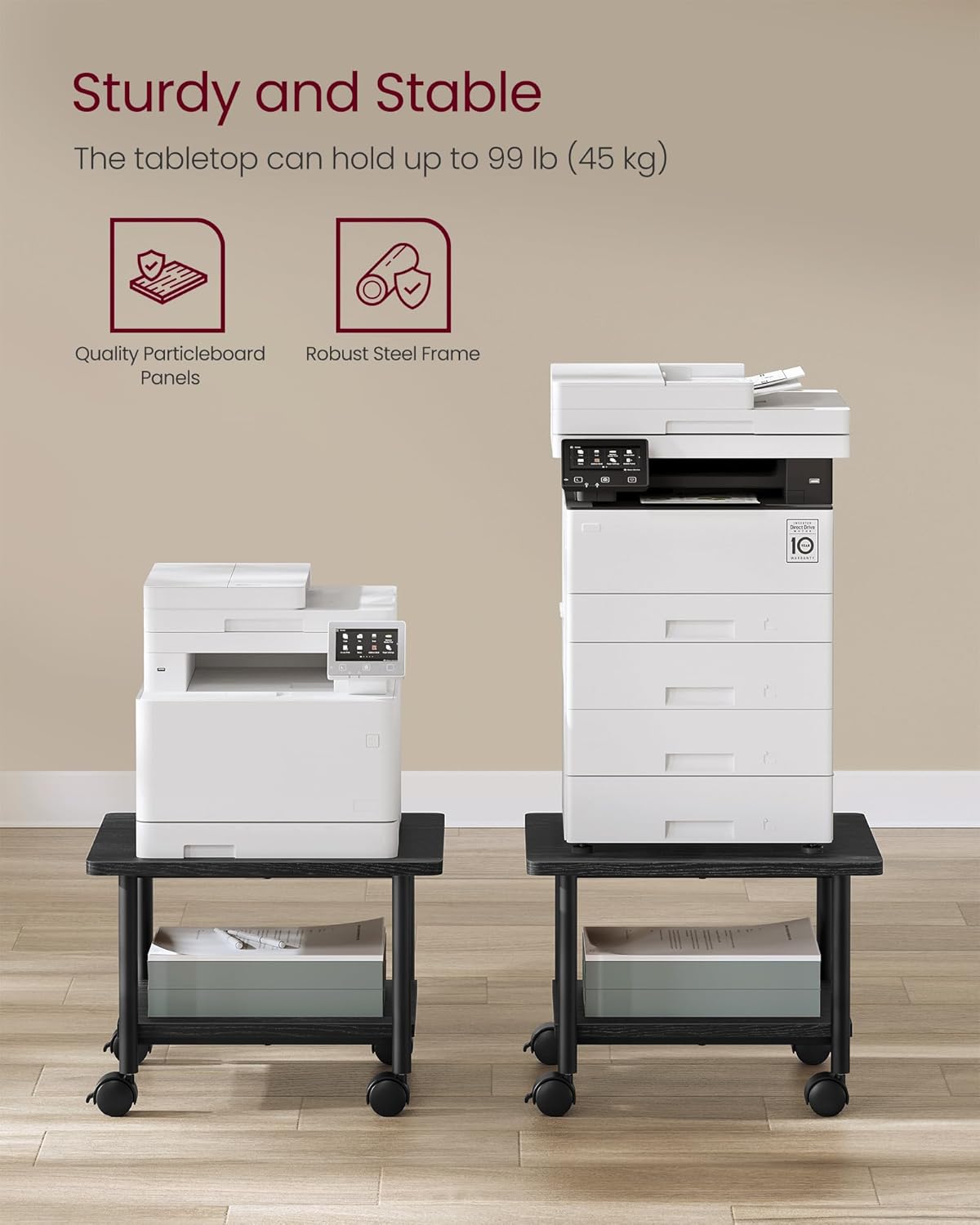
Figure 7: The stand's sturdy construction supports up to 99 lbs on the tabletop.
Waranti dan Sokongan
Untuk maklumat lanjut mengenai jaminan produk, sila rujuk dokumentasi yang disertakan dengan pembelian anda atau lawati laman web rasmi VASAGLE. website. If you have any questions, require assistance with assembly, or need to report a missing/damaged part, please contact VASAGLE customer support.
Maklumat Hubungan:
- Sokongan dalam talian: Lawati Kedai VASAGLE di Amazon untuk Soalan Lazim dan pilihan hubungan.
- E-mel/Telefon: Rujuk pembungkusan produk anda atau VASAGLE rasmi weblaman web untuk butiran perhubungan khidmat pelanggan tertentu.


