Produk Selesaiview
The SIMOLIO 2.4G Wireless TV Headsets are designed to provide clear and comfortable audio for television viewing, especially for seniors and the elderly. Utilizing advanced 2.4GHz FHSS technology, these headsets offer a stable, delay-free audio experience with extended range, allowing users to move freely around their home without losing connection. The system includes features for personalized sound adjustment and a personal sound amplifier function for enhanced communication.
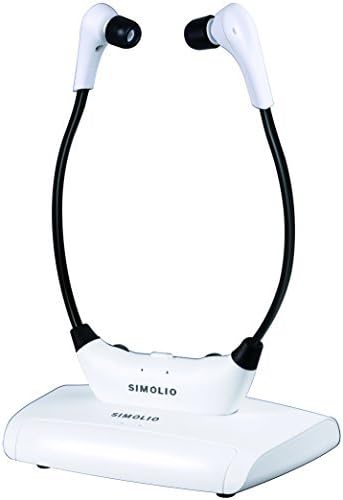
Figure 1: SIMOLIO 2.4G Wireless TV Headsets with charging base.
Apa yang ada dalam Kotak
Your SIMOLIO 2.4G Wireless TV Headsets package includes the following components:
- One Set of Headsets
- Pemancar
- Penyesuai Kuasa AC
- RCA Audio Cable, 3.5mm AUX Audio Cable
- User Instruction Manual, Quick Guide
Arahan Persediaan
Before setting up your SIMOLIO Wireless TV Headsets, please ensure your television or audio source has compatible audio output ports. These headsets are designed to work with TVs/TV boxes equipped with RCA or 3.5mm AUX Audio Outputs.
1. Check Audio Output Compatibility
Verify that your TV or audio source has the necessary audio output ports. The system supports RCA (red/white) jacks labeled "AUDIO OUT" or "OUTPUT" or "AV OUT", and 3.5mm AUX Audio Out. Digital optical, digital coaxial, and HDMI (ARC) audio outputs are not directly supported by this model.

Figure 2: Compatible (3.5mm AUX, RCA Audio Out) and Incompatible (Digital Optical, Digital Coaxial, HDMI ARC) Audio Output Ports.
Nota: If your TV only has a digital optical audio output, you will need an additional adapter (e.g., SIMOLIO SM-DAC01) or consider a digital model headset (e.g., SM-823D Pro/SM-824D1/SM-825D Pro).
2. Connect the Transmitter
- Connect one end of the provided RCA or 3.5mm AUX audio cable to the corresponding "AUDIO OUT" port on your TV or audio source.
- Connect the other end of the audio cable to the input port on the SIMOLIO transmitter.
- Plug the AC Power Adapter into the transmitter's power input and then into a wall outlet. The transmitter's indicator light should illuminate, indicating it is powered on.
3. Adjust TV Sound Output Settings (if necessary)
Some TVs require adjustment of their audio output settings to allow sound to be simultaneously played through both the TV speakers and an external device like the headset. Consult your TV's manual for specific instructions on how to enable "Internal speaker + External speaker" or "Headset" output mode.
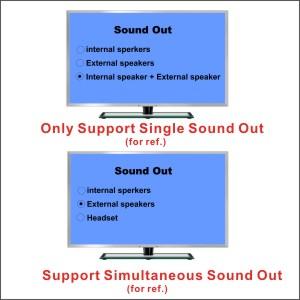
Gambar 3: Cthample of TV Sound Output Settings. Look for options that allow simultaneous output to internal speakers and external devices.
Arahan Operasi
1. Powering On and Initial Use
Once the transmitter is connected and powered, simply turn on the headset. The 2.4GHz automatic FHSS technology ensures instant connection without the need for manual pairing. You can walk around your home with the headset, as the strong signal can penetrate ceilings and walls, offering an effective range of up to 100 feet.

Figure 4: The 2.4GHz FHSS technology provides a long-range, stable connection without delays or interruptions.
2. Customizing Your Sound Experience
The SIMOLIO headsets offer several controls to tailor the audio to your personal preferences and hearing needs:
- Kawalan Kelantangan: Adjust the overall listening volume using the dedicated volume knob on the headset.
- Kawalan Baki: The balance control allows you to adjust the volume independently for the left and right ears, ensuring balanced sound if you have different hearing sensitivities in each ear.
- TONE Selection: Choose between Treble, Normal, or Bass tones to optimize clarity for different audio content, such as dialogue or music.
- MONO/STEREO Option: Switch to STEREO for high-fidelity music listening or select MONO for clearer TV dialogue, especially beneficial for speech clarity.

Figure 5: Headset controls for volume and left/right balance.

Figure 6: Transmitter controls for MONO/STEREO and TONE adjustments.
Optimizing Audio Levels: For the best sound quality, ensure the audio source signal is strong. It is recommended to set the cable box/STB volume above 40% and the TV volume above 30%. You can mute the TV speakers using your TV remote control if you only wish to hear sound through the headset.

Figure 7: Recommended audio level settings for optimal headset performance.
3. Personal Sound AmpFungsi penyangga
The headset includes a personal sound amplifier mode. This feature allows you to hear nearby conversations without removing the headset. Simply activate the personal sound amplifier button (often labeled "MIC ON/OFF") on the headset. The indicator light will typically turn red when this function is active.

Figure 8: Using the personal sound amplifier function to hear surrounding sounds.
Pengecasan dan Bateri
The headset features a rechargeable and replaceable Li-battery. A full charge provides approximately 5-7 hours of continuous use, depending on volume settings and usage conditions.
Mengecas Alat dengar:
To charge the headset, simply place it onto the transmitter's charging cradle. Ensure the headset is correctly aligned with the charging pins. The charging indicator light on the transmitter will show the charging status. It is recommended to place the headset on the charging cradle when not in use for short periods or during longer breaks to maintain battery life.

Figure 9: Convenient charging by placing the headset on the transmitter base.
Penyelenggaraan
To ensure the longevity and optimal performance of your SIMOLIO Wireless TV Headsets, follow these maintenance guidelines:
- Pembersihan: Use a soft, dry cloth to clean the headset and transmitter. Do not use abrasive cleaners or solvents.
- Petua telinga: The headset features super-soft and body-heat activated memory foam ear-tips. Regularly inspect them for wear and tear. Replacement ear-tips are available if needed.
- Storan: When not in use, store the headset on its charging base or in a cool, dry place away from direct sunlight and extreme temperatures.
- Ketahanan: The headset incorporates "memory stainless steel strips" for durability and flexibility. While designed to be robust, avoid excessive bending or twisting that could damage the internal components.

Figure 10: Headset design features for comfort and durability, including memory foam ear-tips and flexible arms.
Menyelesaikan masalah
If you encounter issues with your SIMOLIO Wireless TV Headsets, please refer to the following common solutions:
- Tiada Bunyi atau Bunyi Sekejap-sekejap:
- Ensure all cables are securely connected between the TV/audio source and the transmitter.
- Verify that the transmitter is powered on and its indicator light is active.
- Check your TV's audio output settings to ensure sound is being sent to external devices (refer to "Adjust TV Sound Output Settings" section).
- Increase the volume on both the TV/audio source and the headset.
- Confirm that the headset battery is charged.
- Kualiti Bunyi Lemah (Herotan, Bunyi Terkedu):
- Adjust the TONE setting (Treble/Normal/Bass) on the transmitter to find the optimal clarity for your content.
- Ensure the MONO/STEREO setting is appropriate for your listening (MONO for dialogue clarity, STEREO for music).
- Check the audio input level from your TV/audio source. A stronger input signal (e.g., TV volume above 30%, cable box volume above 40%) generally results in better sound quality.
- Ensure the ear-tips are properly seated in your ears for optimal noise isolation.
- Headset Discomfort:
- The headset arms are made with "memory stainless steel strips" and can be gently adjusted for a more comfortable fit.
- Ensure the super-soft memory foam ear-tips are correctly positioned.
- If you experience significant discomfort due to the under-chin headset design (weight: 2.04 oz), consider alternative SIMOLIO models such as neckband in-ear headsets (SM-828D1/SM-828D2) or over-ear wireless TV headphones (SM-825D Pro or SM-829D).
If you continue to experience problems, please contact SIMOLIO customer support for assistance.
Spesifikasi
| Ciri | Perincian |
|---|---|
| Nama Model | SM-823 Pro |
| Teknologi Ketersambungan | Wireless RF (2.4G FHSS) |
| Jack Fon Kepala | Jack 3.5 mm |
| Peranti Serasi | Television (with RCA/3.5mm AUX Audio Out) |
| Hayat Bateri | 5-7 Hours (approx.) |
| Berat Barang | 2.05 auns (58 Gram) |
| Dimensi Produk | 8.7 x 7.3 x 2.4 inci |
| bahan | Stainless Steel (for flexible arms) |
| Ciri Khas | 2.4 GHz Wireless, Plug and Charge, Independent Volume Control, Left/Right Ear Audio Balance Control, Stereo/Mono optional, Voice Clarity and Tone Adjustments, Personal Sound Amplebih hidup |
Maklumat Keselamatan Penting
Please read and understand all safety information before using this product.
- Amaran perentak jantung: These RF products are not recommended for individuals with pacemakers. Please consult your physician before using if you have a pacemaker.
- Perlindungan Pendengaran: Elakkan mendengar pada kelantangan yang terlalu tinggi untuk tempoh yang lama bagi mengelakkan kerosakan pendengaran.
- Kanak-kanak: Keep out of reach of small children. Small parts may pose a choking hazard.
- Haba dan Kelembapan: Jangan dedahkan peranti kepada suhu yang melampau, cahaya matahari langsung atau kelembapan berlebihan.
Waranti dan Sokongan
For warranty information, technical support, or any questions regarding your SIMOLIO Wireless TV Headsets, please refer to the contact details provided in the included User Instruction Manual or visit the official SIMOLIO website. You can also reach out to SIMOLIO customer service through the platform where you purchased the product.
Untuk sumber tambahan dan maklumat produk, lawati laman web SIMOLIO Store on Amazon.
A PDF version of the User Guide is also available for download: Panduan Pengguna (PDF).


