pengenalan
The Vivitar Smart Home Power Strip HA-1007 allows you to control connected devices remotely using your smartphone. This power strip features four individually controllable AC outlets and four USB charging ports. It connects to your existing 2.4GHz Wi-Fi network, enabling smart control and scheduling for your home electronics.
Maklumat Keselamatan
- Do not exceed the maximum load capacity of 10 Amps.
- Peranti ini direka bentuk untuk kegunaan di dalam rumah sahaja. Elakkan pendedahan kepada kelembapan atau suhu yang melampau.
- Do not disassemble or modify the power strip. Refer all servicing to qualified personnel.
- Ensure the power strip is plugged into a properly grounded outlet.
- Jauhkan daripada kanak-kanak.
Kandungan Pakej
- Vivitar Smart Home Power Strip HA-1007
- Manual Pengguna
Produk Selesaiview
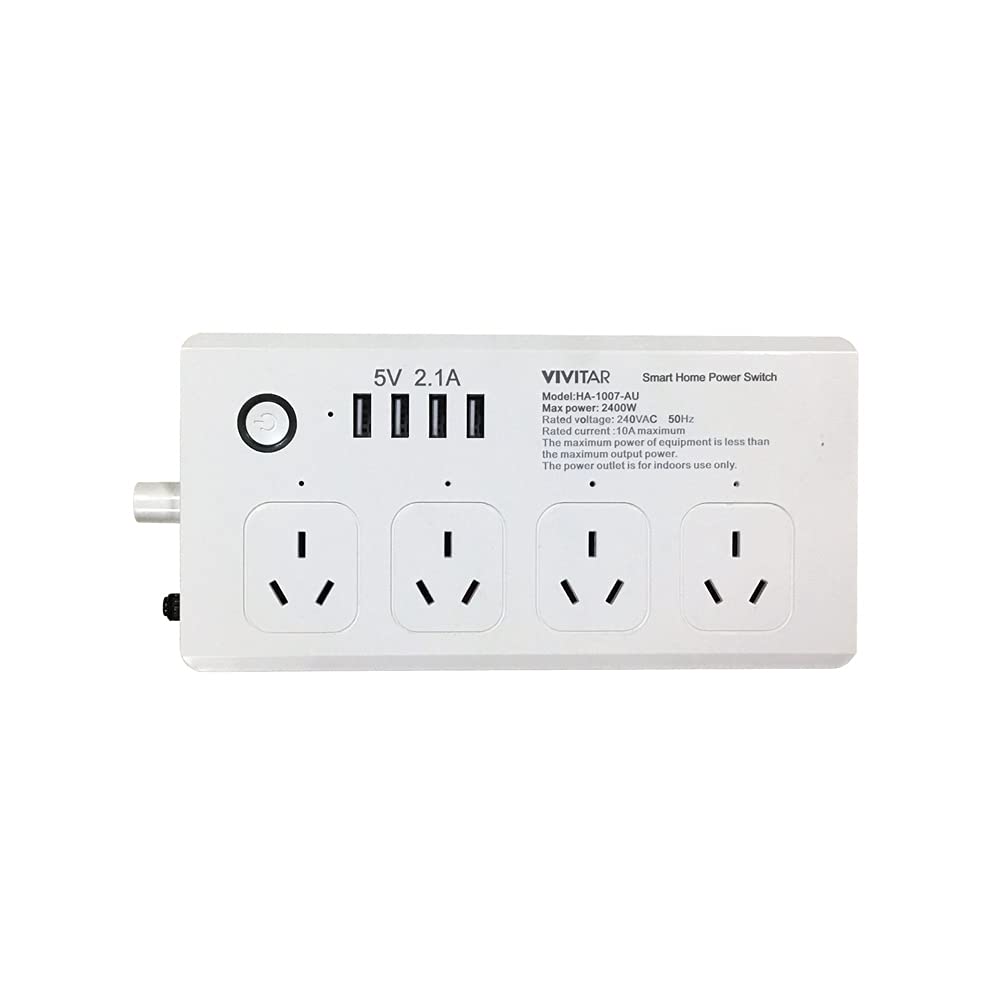
Imej: Depan view of the Vivitar Smart Home Power Strip HA-1007, showing four AC outlets and four USB ports.
The Vivitar Smart Home Power Strip HA-1007 features a compact design with multiple power options. It includes four standard 3-prong AC outlets and four USB charging ports. A master power button controls the entire strip, while individual outlets can be managed via the Vivitar Smart Home Security App.
- Cawangan AC (x4): For standard electrical devices. Each can be controlled independently via the app.
- Port USB (x4): For charging mobile devices. These ports are typically controlled as a group.
- Butang Kuasa: Located on the side or front, this button manually turns the entire power strip on or off. It also serves as a reset button for Wi-Fi pairing.
- Penunjuk LED: Shows the power status and Wi-Fi connection status.
Persediaan
1. Download the Vivitar Smart Home Security App
- Cari untuk "Vivitar Smart Home Security" in the Apple App Store (for iOS devices) or Google Play Store (for Android devices).
- Muat turun dan pasang aplikasi pada telefon pintar atau tablet anda.
2. Daftar Akaun
- Open the Vivitar Smart Home Security App.
- Follow the on-screen instructions to register a new account using your email address or phone number.
- Buat kata laluan selamat.
3. Connect the Power Strip to Wi-Fi
- Plug the Vivitar Smart Home Power Strip into a wall outlet. The LED indicator should start blinking rapidly, indicating it's in pairing mode. If not, press and hold the power button for 5-10 seconds until it blinks rapidly.
- Pastikan telefon pintar anda disambungkan ke a Rangkaian Wi-Fi 2.4GHz. This device does not support 5GHz Wi-Fi networks.
- Open the Vivitar Smart Home Security App and tap "Add Device" or the "+" icon.
- Select "Power Strip" or the appropriate device type from the list.
- Confirm that the indicator light on the power strip is blinking rapidly.
- Enter your 2.4GHz Wi-Fi network password when prompted.
- The app will attempt to connect to the power strip. This process may take a few moments.
- Once connected, the LED indicator will turn solid, and the app will confirm successful pairing.
Arahan Operasi
1. Controlling Outlets and USB Ports
- In the Vivitar Smart Home Security App, select your connected power strip.
- You will see individual controls for each AC outlet and a collective control for the USB ports.
- Tap the toggle switch next to each outlet or the USB section to turn them on or off.
- You can rename each outlet within the app for easier identification (e.g., "Lamp," "Fan," "Charger").
2. Setting Schedules and Timers
- Within the power strip's control interface in the app, look for options like "Schedule" or "Timer."
- You can set specific times for individual outlets or the USB ports to turn on or off automatically.
- Create recurring schedules for daily or weekly automation.
3. Penyepaduan Kawalan Suara
The Vivitar Smart Home Power Strip is compatible with Amazon Alexa and Google Home/Assistant.
- Untuk Amazon Alexa:
- Open the Alexa app, go to "Skills & Games," and search for "Vivitar Smart Home Security."
- Enable the skill and link your Vivitar account.
- Discover devices. You can then use voice commands like "Alexa, turn on the living room lamp" (if you named an outlet "living room lamp").
- For Google Home/Assistant:
- Open the Google Home app, tap "Add" > "Set up device" > "Works with Google."
- Cari untuk "Vivitar Smart Home Security," link your account, and assign devices to rooms.
- Use commands like "Hey Google, turn off the fan."
Penyelenggaraan
- Pembersihan: Disconnect the power strip from the wall outlet before cleaning. Use a soft, dry cloth to wipe the surface. Do not use liquid cleaners or abrasive materials.
- Storan: When not in use for extended periods, store the power strip in a cool, dry place away from direct sunlight.
- Pemeriksaan: Periodically check the power cord and the power strip for any signs of damage. If damaged, discontinue use and replace the unit.
Menyelesaikan masalah
| Masalah | Kemungkinan Punca | Penyelesaian |
|---|---|---|
| Power strip not turning on. | No power from wall outlet; power strip switch off. | Check wall outlet with another device. Ensure the power strip's master switch is on. |
| Tidak dapat menyambung ke Wi-Fi. | Incorrect Wi-Fi password; 5GHz network used; power strip too far from router; incorrect pairing mode. | Verify Wi-Fi password. Ensure you are using a 2.4GHz network. Move power strip closer to router. Reset power strip by holding the power button until the indicator blinks rapidly. |
| App cannot find the device. | Power strip not in pairing mode; network issues. | Ensure the power strip's LED is blinking rapidly. Restart the app and try again. Check your home Wi-Fi connection. |
| Individual outlets unresponsive. | App glitch; device overload. | Restart the Vivitar app. Unplug and replug the device into the outlet. Check if the total load exceeds 10 Amps. |
Spesifikasi
- model: HA-1007
- Input Voltage: 240 Volt
- Jumlah Outlet Kuasa: 4 Outlet AC
- Port USB: 4 Port Pengecasan USB
- Muatan Maks: 10 Amps
- Kesambungan Tanpa Wayar: Wi-Fi 2.4GHz (IEEE 802.11 b/g/n)
- Dimensi: 7.5 x 1.9 x 10 inci
- Berat: 1 paun
- Suhu Operasi: 0°C hingga 40°C (32°F hingga 104°F)
- Keserasian: iOS and Android devices, Amazon Alexa, Google Home/Assistant, IFTTT/Nest
Maklumat Waranti
Vivitar products are covered by a limited warranty. For specific details regarding your product's warranty period and terms, please refer to the warranty card included in your product packaging or visit the official Vivitar webtapak. Simpan resit pembelian anda sebagai bukti pembelian untuk tuntutan waranti.
Sokongan Pelanggan
If you encounter any issues or have questions regarding your Vivitar Smart Home Power Strip HA-1007, please contact Vivitar Customer Support. You can typically find contact information (phone number, email, or support portal) on the Vivitar official website or within the Vivitar Smart Home Security App's settings/help section.


