pengenalan
Terima kasih kerana membeliasing the POWERFLEX PF-AZ01-Z003 Portable Bluetooth Speaker. This device is designed to provide high-quality audio playback and hands-free calling capabilities. Please read this manual carefully before using the speaker to ensure proper operation and to maximize its performance.

Imej: The POWERFLEX PF-AZ01-Z003 Portable Bluetooth Speaker is shown from an angled perspective, highlighting its black finish, front grille, and the touch-sensitive control panel on its top surface, which features illuminated volume controls.
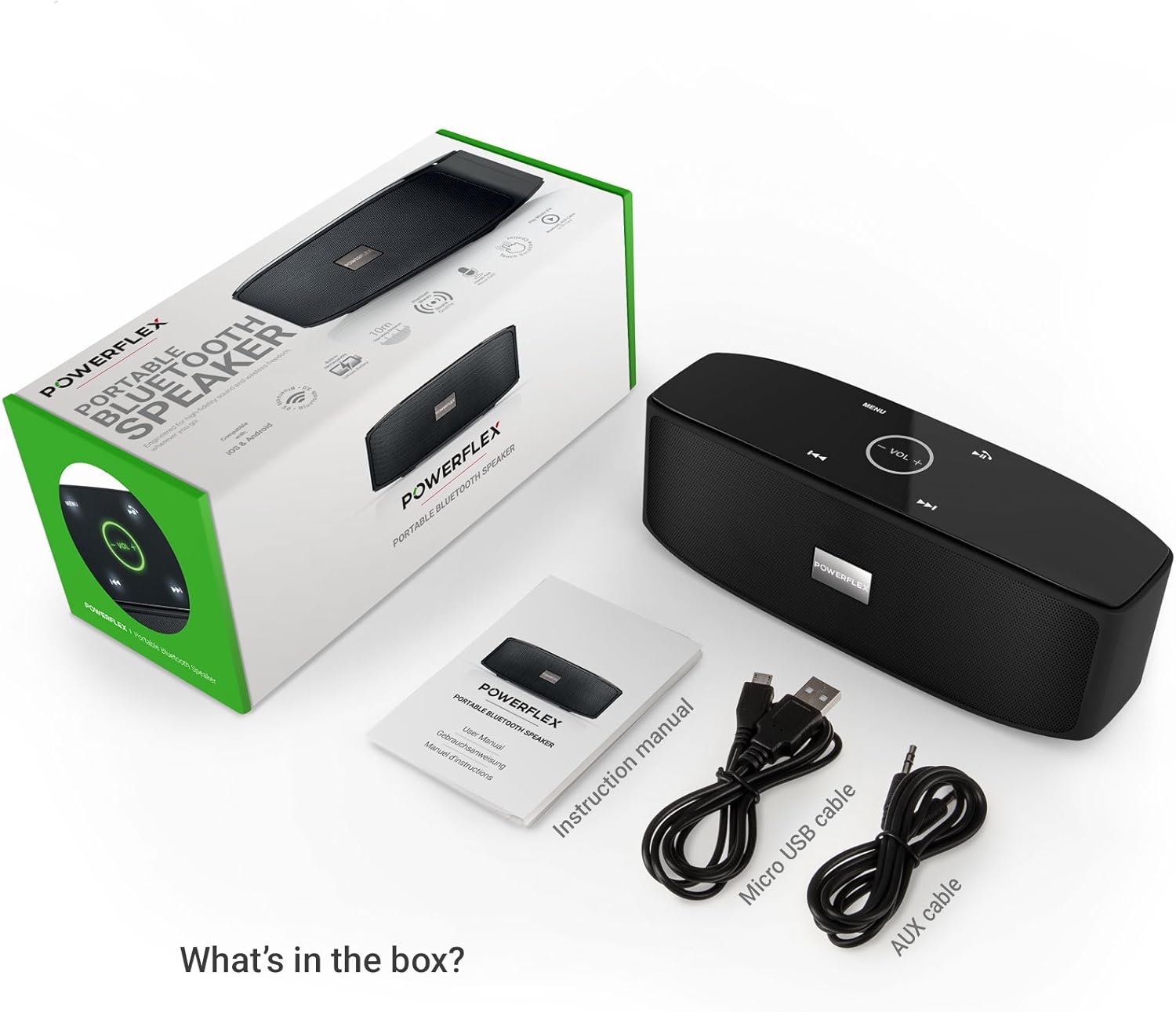
Kandungan Pakej
Sila tandai kotak untuk item berikut:
- POWERFLEX PF-AZ01-Z003 Portable Bluetooth Speaker
- Kabel Pengecas USB Mikro
- Kabel AUX
- Manual Pengguna

Imej: This image displays the POWERFLEX PF-AZ01-Z003 Portable Bluetooth Speaker alongside its accessories: a Micro USB charging cable, an AUX cable, and the instruction manual. These are the items typically found inside the product packaging.
Ciri Lebihview
The POWERFLEX PF-AZ01-Z003 speaker offers several key features for an enhanced audio experience:
- Audio Superior: Equipped with dual five-watt drivers for clear highs, detailed mid-ranges, and deep bass.
- Kesambungan Bluetooth 3.0: Provides a stable wireless connection up to 10 meters (33 feet).
- Panggilan Bebas Tangan: Integrated microphone allows for clear phone calls.
- Pelbagai Pilihan Main Semula: Supports Bluetooth, AUX input, and TF (MicroSD) card playback.
- Kawalan Sentuh: Intuitive touch-sensitive panel for easy music and call management.
- Reka Bentuk Mudah Alih: Compact build for easy transport.

Imej: This image presents a cutaway view of the POWERFLEX PF-AZ01-Z003 speaker, revealing its internal components, specifically the dual five-watt drivers. The visual emphasizes the speaker's design for delivering vibrant highs, detailed mid-ranges, and deep bass for true stereo sound.

Imej: This image showcases the POWERFLEX PF-AZ01-Z003 speaker positioned in front of a collection of diverse iOS and Android Bluetooth-enabled devices, including smartphones and tablets. The arrangement visually confirms the speaker's broad compatibility with various mobile operating systems.

Imej: This image demonstrates the compact design of the POWERFLEX PF-AZ01-Z003 speaker, showing it being easily placed into a backpack. The accompanying text highlights its portability and specific dimensions (190 x 58 x 70mm), indicating it fits conveniently into bags.
Persediaan
1. Mengisi Speaker
The speaker is powered by an internal 1800 mAh rechargeable battery. Before first use, fully charge the speaker.
- Connect the Micro USB charging cable to the DC5V port on the speaker.
- Sambungkan hujung kabel USB yang satu lagi ke penyesuai kuasa USB (tidak disertakan) atau port USB komputer.
- The charging indicator light will illuminate. Once fully charged, the light will change color or turn off (refer to LED indicator section in the full manual for details).
2. Menghidupkan/Mematikan
To power on the speaker, slide the ON/OFF switch to the 'ON' position. To power off, slide the switch to the 'OFF' position.
Imej: Imej ini memberikan yang terperinci view of the speaker's rear panel, highlighting the physical ON/OFF switch, the DC5V port for charging, the AUX input jack for wired connections, and the TF (MicroSD) card slot for direct media playback.
Arahan Operasi
1. Berpasangan Bluetooth
- Ensure the speaker is powered on and within 10 meters (33 feet) of your Bluetooth-enabled device.
- The speaker will automatically enter Bluetooth pairing mode, indicated by a flashing LED light (refer to LED indicator section in the full manual).
- Pada peranti anda (telefon pintar, tablet, dsb.), pergi ke tetapan Bluetooth dan cari peranti yang tersedia.
- Select "PF-AZ01-Z003" from the list.
- Sebaik sahaja dipasangkan, pembesar suara akan mengeluarkan pengesahan yang boleh didengar dan lampu LED akan menjadi pekat.

Imej: This image demonstrates the speaker's Bluetooth connectivity, showing a smartphone wirelessly streaming music to the POWERFLEX PF-AZ01-Z003. Blue concentric circles emanate from the phone towards the speaker, symbolizing the wireless connection, and text indicates playback from up to 10 meters.
2. Memainkan Muzik
Once connected via Bluetooth, you can play music from your device. The speaker also supports AUX cable and TF card playback.
- Bluetooth: Play music directly from your paired device.
- Input AUX: Connect an audio device using the provided 3.5mm AUX cable to the AUX port. The speaker will automatically switch to AUX mode.
- Kad TF: Insert a TF (MicroSD) card with MP3 files into the TF card slot. The speaker will automatically begin playing music from the card.
3. Kawalan Sentuh
The speaker features touch-sensitive controls on its top panel for easy operation.
- Main/Jeda: Tap the Play/Pause button (usually indicated by a triangle or two vertical bars).
- Kelantangan Naik/Turun: Tap the '+' or '-' buttons to adjust the volume.
- Lagu Seterusnya: Tap the '>>|' button.
- Trek Sebelumnya: Tap the '|<<' button.
- Mod/Menu: Tap the 'MENU' button to switch between input modes (Bluetooth, AUX, TF).

Imej: This image shows a hand interacting with the touch-sensitive controls on the top surface of the POWERFLEX PF-AZ01-Z003 speaker. A finger is pressing the 'VOL +' button, which is illuminated in green, while a smartphone displaying music playback is visible in the foreground, emphasizing the ease of control.
4. Panggilan Bebas Tangan
The speaker includes a built-in microphone, allowing you to answer phone calls when connected via Bluetooth.
- Apabila panggilan masuk, muzik akan dijeda.
- Tap the Play/Pause button to answer the call.
- Bercakap ke dalam pembesar suara.
- Tap the Play/Pause button again to end the call.

Imej: This image depicts a smartphone displaying an incoming call, positioned next to the POWERFLEX PF-AZ01-Z003 speaker. The text "Make hands free calls with the built-in microphone" is prominently displayed, indicating the speaker's capability for hands-free communication.
Penyelenggaraan
To ensure the longevity and optimal performance of your POWERFLEX PF-AZ01-Z003 speaker, follow these maintenance guidelines:
- Pembersihan: Gunakan kain lembut dan kering untuk mengelap permukaan pembesar suara. Jangan gunakan pembersih yang kasar, alkohol atau pelarut kimia.
- Storan: Simpan pembesar suara di tempat yang sejuk dan kering jauh dari cahaya matahari langsung dan suhu yang melampau.
- Pendedahan Air: Pembesar suara ini tidak kalis air. Elakkan daripada mendedahkannya kepada air atau kelembapan berlebihan.
- Penjagaan Bateri: To preserve battery life, avoid fully discharging the battery frequently. Charge the speaker regularly, even if not in use for extended periods.
Menyelesaikan masalah
If you encounter issues with your POWERFLEX PF-AZ01-Z003 speaker, refer to the following common problems and solutions:
| Masalah | Kemungkinan Punca | Penyelesaian |
|---|---|---|
| Speaker tidak dihidupkan. | Bateri habis. | Cas pembesar suara menggunakan kabel Mikro USB. |
| Tidak boleh berpasangan melalui Bluetooth. | Speaker is not in pairing mode; device is too far; Bluetooth is off on device. | Ensure speaker is in pairing mode (flashing LED). Move device closer. Enable Bluetooth on your device. Forget previous pairings and try again. |
| Tiada bunyi atau kelantangan rendah. | Volume too low on speaker or device; incorrect input mode; loose AUX cable. | Increase volume on both speaker and connected device. Press 'MENU' to select correct input mode. Ensure AUX cable is securely connected. |
| Penyelewengan bunyi. | Kelantangan terlalu tinggi; peranti terlalu jauh dari pembesar suara. | Reduce volume on speaker and/or connected device. Move device closer to the speaker. |
Spesifikasi
| Ciri | Perincian |
|---|---|
| Nama Model | PF-AZ01-Z003 |
| Jenama | POWERFLEX |
| Teknologi Ketersambungan | Bluetooth, USB |
| Versi Bluetooth | 3.0 |
| Ciri Khas | Portable, Built-in Microphone |
| Peranti Serasi | Universal (iOS & Android Bluetooth enabled devices) |
| Jenis Pemasangan | Atas meja |
| Sumber Kuasa | Bateri |
| Kapasiti Bateri | 1800 mAh |
| Kandungan Tenaga Bateri | 6.66 Watt-jam |
| Lithium Ion Cells | 1 |
| Dimensi Produk | 23 x 10.6 x 9.6 cm |
| Berat Produk | 760 g |
| warna | Hitam |
Waranti dan Sokongan
For warranty information and technical support, please refer to the documentation included with your purchase or contact POWERFLEX customer service. Keep your proof of purchase for warranty claims.
Pengeluar: POWERFLEX
produk ASIN: B074M8W712


