1. Pengenalan
The ZTW Mantis Slim 15A Brushless Electronic Speed Controller (ESC) is designed for F3P airplanes and gliders, offering super smooth startup and throttle response. This manual provides essential information for safe and efficient operation of your ESC. Please read it thoroughly before use.
2. Ciri-ciri Utama
- Super smooth and accurate throttle linearity and throttle response.
- High efficiency with low resistance and low heat MOSFET and CPU.
- Multiple Protection, such as over temperature protection, low voltage protection, and more.
- Strong BEC output up to 2A/5V continuous and peak to 3A.
- Reasonable size and light design for high-efficiency flying.
- Menyokong motor RPM tinggi.
- Programmable by ZTW Beatles series programming card and transmitter.
3. Spesifikasi
| Ciri | Nilai |
|---|---|
| ESC Size (LxWxH) | 27mm x 14mm x 5.5mm |
| Kuasa Input | 2-4S Lipo / 5-12NC |
| Keluaran BEC | 2A/5V (3A peak) |
| Arus Berterusan | 15A |
| Berat badan | 6.8g |
| Penyambung Motor | 2.0mm female bullet connector |
| Penyambung Kuasa | JST (female case with male pin) |
Product Dimensions: 1.2 x 1 x 0.1 inches. Item Weight: 0.64 ounces.

Figure 1: ZTW Mantis Slim 15A ESC with detailed dimensions (Length: 27mm, Width: 14mm, Height: 5.5mm).
4. Persediaan & Pemasangan
Proper installation is crucial for the performance and safety of your ESC. Follow these steps carefully:
4.1 Sambungan Pendawaian
- Connect the ESC's three black motor wires to your motor's connectors. The order of connection determines the motor's rotation direction.
- Connect the ESC's black-red-white 3-pin signal wire to your receiver's throttle channel (usually channel 3).
- Ensure all connections are secure and insulated with heat shrink tubing.
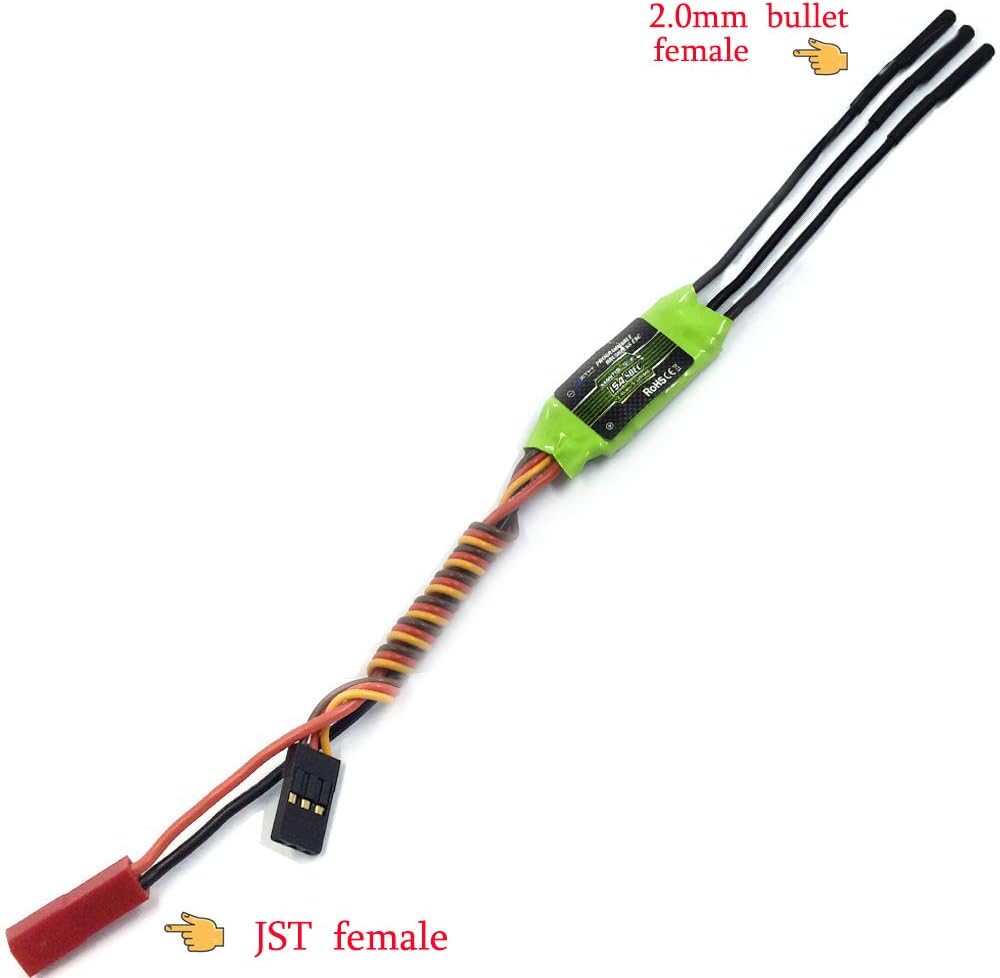
Figure 2: ZTW Mantis Slim 15A ESC showing 2.0mm female bullet motor connectors and JST female power connector.
4.2 Memasang ESC
Choose a location that has good airflow to offer best cooling to prevent overheating. Do NOT cover the side with the flat heat shield with hook and loop tape or any other material as this will greatly lower its effectiveness. Mount the ESC with a combination of hook and loop tape or 2-sided foam tape.
Video 1: Brushless ESC for Drone & RC Plane Easy to install (Source: HAWK'S WORK). This video demonstrates the general installation process of a Brushless ESC for a Drone or RC Plane, highlighting easy installation steps.
5. Arahan Operasi
Always perform throttle calibration before the first use or if you change your transmitter.
5.1 Penentukuran Pendikit
- Hidupkan radio anda dan simpan pendikit pada kedudukan teratas.
- Connect the battery pack to the ESC. Wait for about 2 seconds, the motor will beep twice, then pull the throttle to the minimum position. The motor will also beep, which indicates that your ESC has got the signal range of the throttle from your transmitter.
Video 2: How to do throttle calibration for Mantis Slim G2 20A/30A (Source: ZTW Model). This video provides instructions on how to perform throttle calibration for the Mantis Slim G2 20A/30A ESC, which is applicable to the 15A model.
Video 3: How to calibrate ESC (Source: HAWK'S WORK). This video demonstrates the general process of calibrating an ESC, which can be helpful for understanding the throttle calibration process.
5.2 Pengaturcaraan ESC
The ZTW Mantis Slim ESC can be programmed using a ZTW Beatles series programming card or directly via your transmitter.
5.2.1 Using an LCD Program Card
- Unplug the ESC throttle cable from the receiver.
- Insert the LCD Program Card G2 into the ESC's throttle cable port.
- Connect the ESC to the battery.
- Wait for the LCD screen to display the power-on interface.
- Press the "ITEM" or "OK" button to enter the parameter setting interface.
- Use the navigation buttons to select parameters and adjust values.
- Upon completion of programming, press the "OK" button to save the parameters.
Video 4: How to set parameter for Mantis Slim G2 20A/30A by LCD Card (Source: ZTW Model). This video demonstrates how to set parameters for Mantis Slim G2 20A/30A using an LCD Card, which is applicable to the 15A model.
5.2.2 Setting SMR (Switch Motor Rotation) Function
The SMR function allows you to change the motor rotation direction. It is only allowed to be used when the aircraft is landing on the ground, and it can effectively shorten the landing distance of the aircraft.
Video 5: Set the SMR (Reverse) function of your ESC (Source: TOYTENSI). This video explains how to set the SMR (Switch Motor Rotation) function for your ESC, which is useful for controlling motor direction during landing.
6. Penyelenggaraan
To ensure the longevity and optimal performance of your ZTW Mantis Slim ESC, follow these maintenance guidelines:
- Keep the ESC clean and free from dust, dirt, and moisture.
- Periksa semua wayar dan penyambung secara berkala untuk tanda-tanda haus, kerosakan atau sambungan yang longgar.
- Pastikan aliran udara yang mencukupi di sekitar ESC semasa operasi untuk mengelakkan pemanasan melampau.
- Simpan ESC di persekitaran yang kering dan sejuk apabila tidak digunakan.
7. Penyelesaian masalah
If you encounter issues with your ESC, consider the following common troubleshooting steps:
- No Motor Response: Check all wiring connections, ensure the battery is charged, and verify throttle calibration.
- Erratic Motor Behavior: Recalibrate the throttle. Check for loose motor wires or damaged connectors.
- Terlalu panas: Ensure proper airflow around the ESC. Reduce load if possible.
- ESC Beeping Continuously: Refer to the ESC's beep codes (if available in a separate manual) to diagnose the issue, often related to low voltage or signal loss.
8. Maklumat Keselamatan
Always prioritize safety when operating RC equipment. Failure to do so may result in property damage, injury, or death.
- Always connect the battery to the ESC last and disconnect it first.
- Ensure the throttle stick is at the lowest position before connecting the battery.
- Keep hands and loose clothing away from rotating propellers.
- Mengendalikan pesawat RC di kawasan terbuka, jauh daripada manusia, haiwan dan halangan.
- Never operate damaged equipment.
- Always observe local laws when you fly a RC aircraft or other RC vehicles.
9. Waranti & Sokongan
ZTW and HAWK HOBBY offer a 100% free warranty for this ESC. For any issues or support needs, please contact your retailer or the manufacturer directly.


