1. Produk Lebihview
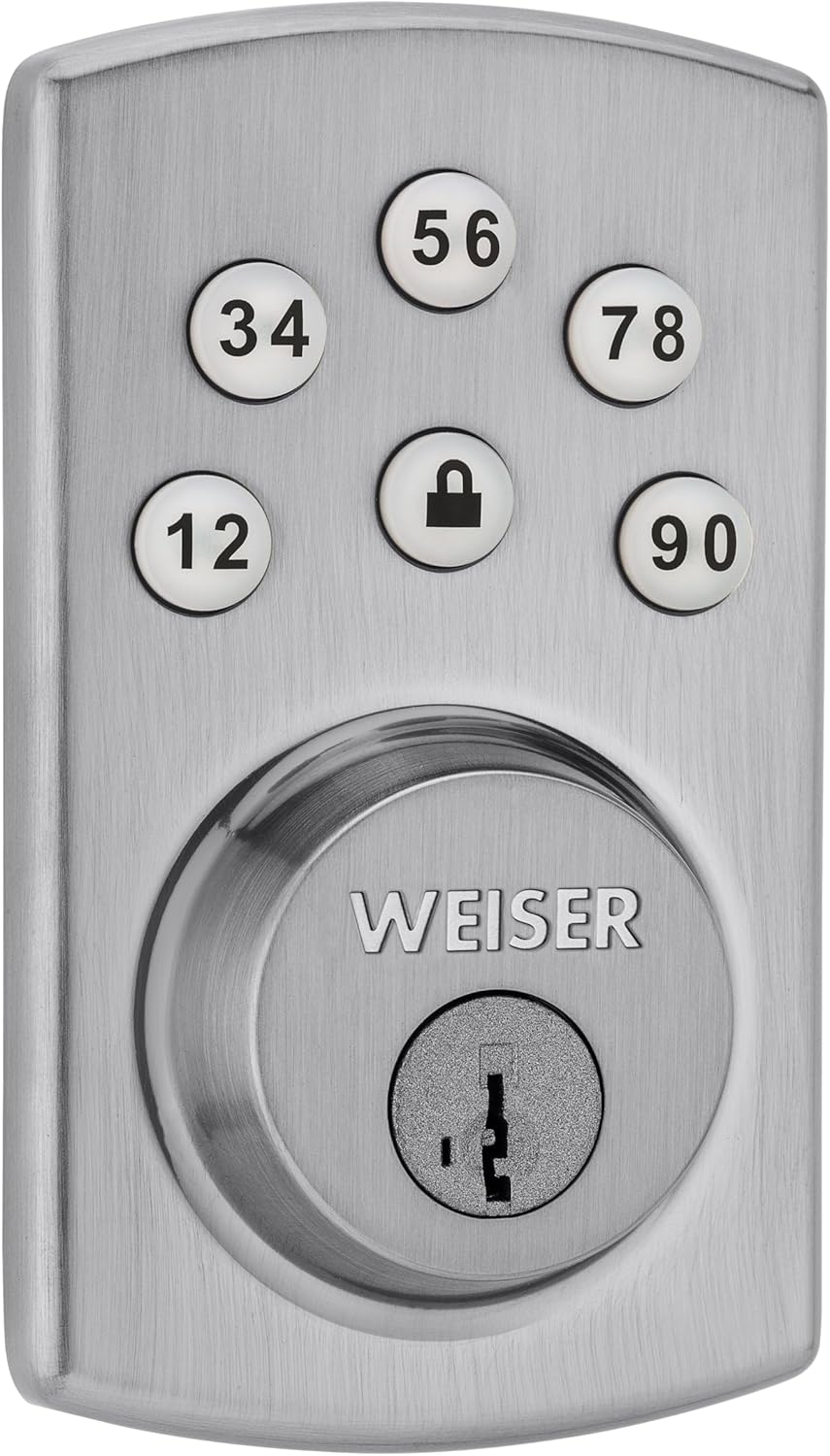
The Weiser Powerbolt 2 is a keyless entry deadbolt lock designed for convenient and secure access. It features a keypad for personalized access codes, motorized locking, and SmartKey re-key technology. This single cylinder deadbolt can be operated using the keypad or a traditional key from the outside, and a turn button from the inside. The Satin Chrome finish provides a modern aesthetic.

2. Persediaan dan Pemasangan
2.1 Kandungan Pakej
Sebelum memulakan pemasangan, pastikan semua komponen ada:
- Interior and Exterior Assembly Units
- Penutup Dalaman
- Kolar Pandu Masuk
- 4 AA Batteries (not always included, check packaging)
- Plat Pemasangan
- selak
- Pukulan Pukulan
- Skru
- 2 Kekunci
- Alat SmartKey
- Manual Arahan
2.2 Door Preparation and Installation
The Powerbolt 2 is designed for easy installation with a standard screwdriver. Ensure your door meets the following specifications:
- Bore Hole: 2 1/8 inci (54 mm)
- Ketebalan pintu: 1 3/8 inches to 1 3/4 inches (35 mm - 44 mm)
Follow the detailed instructions provided in the included manual for step-by-step installation. This typically involves installing the latch, exterior keypad assembly, interior mounting plate, and interior assembly.

2.3 Pemasangan Bateri
The lock operates on 4 AA batteries. Install these into the interior assembly unit as directed in the manual. Ensure correct polarity. The lock will indicate low battery status when replacement is needed.
2.4 Teknologi Semula Kunci Pintar
The SmartKey feature allows you to re-key your lock to work with an existing key from another Weiser SmartKey lock. This process can be completed in seconds using the provided SmartKey tool.
- Insert your functioning key into the cylinder and turn it 90 degrees clockwise.
- Masukkan alat SmartKey sepenuhnya dan kuat ke dalam lubang SmartKey.
- Tanggalkan alat SmartKey.
- Tanggalkan kunci anda yang berfungsi.
- Insert your new key fully and firmly into the cylinder.
- Putar kekunci baharu 180 darjah lawan arah jam.
- Tanggalkan kunci baharu. Kunci itu kini telah dipasang semula.

3. Arahan Operasi
3.1 Programming Access Codes
The Powerbolt 2 supports up to 6 user access codes, 1 master code, and 1 temporary code. Refer to your specific manual for detailed programming steps, as these can vary slightly.
Penting: The master code is used for programming and managing other codes, not typically for daily entry. User codes are your primary entry codes.
3.2 Kemasukan Tanpa Kunci
Untuk membuka kunci pintu menggunakan pad kekunci:
- Enter your personalized user access code.
- The deadbolt will retract, allowing you to open the door.
3.3 One-Touch Motorized Locking
To lock the door from the outside:
- Press the lock button on the keypad. The deadbolt will extend automatically.
To lock the door from the inside:
- Rotate the turn button on the interior assembly.
3.4 Automatic Door Locking (Auto-Lock)
The Powerbolt 2 features a togglable automatic door locking function. When enabled, the deadbolt will automatically extend 30 seconds after being unlocked. This feature can be configured or disabled through the programming steps outlined in your manual.
3.5 Backlit Keypad
The keypad is backlit for improved visibility in low-light conditions. The backlight activates when any button is pressed and remains lit for 30 seconds after inactivity.
4. Penyelenggaraan
4.1 Penggantian Bateri
When the batteries are low, the lock will provide an indication (e.g., a series of beeps or a flashing light). To replace the batteries:
- Tanggalkan penutup dalaman.
- Carefully remove the old AA batteries.
- Insert 4 new AA alkaline batteries, ensuring correct polarity.
- Replace the interior cover.
It is recommended to use high-quality alkaline batteries for optimal performance and battery life.
4.2 Penjagaan Am
Bersihkan papan kekunci dan permukaan luaran dengan kain lembut danamp kain. Elakkan menggunakan pembersih atau pelarut yang melelas, kerana ini boleh merosakkan kemasan dan komponen elektronik.
5. Penyelesaian masalah
- Kunci tidak bertindak balas: Check battery levels. Replace batteries if necessary. Ensure the interior cable is securely connected.
- Papan kekunci tidak menyala: This may indicate low batteries or a connection issue. Replace batteries first.
- Kunci tidak terkunci/terlepas: Ensure the deadbolt is properly aligned with the strike plate on the door frame. Check for any obstructions.
- Isu pengaturcaraan: Double-check the programming steps in your manual. Ensure you are distinguishing between the master code (for programming) and user codes (for entry). If issues persist, perform a factory reset (refer to your manual for instructions) and reprogram all codes.
- Petunjuk Bateri Rendah: If the lock emits a series of beeps or a flashing light, replace the 4 AA batteries promptly.
6. Spesifikasi Produk
| Ciri | Perincian |
|---|---|
| Pengeluar | Weiser |
| Nombor Model | 9GED14600-104 |
| Dimensi Produk | 6.99 x 12.07 x 4.92 cm |
| Berat Barang | 1.09 kg |
| warna | Satin Chrome |
| Gaya | Kuasa 2 |
| Selesai | Satin Chrome |
| bahan | logam |
| Sumber Kuasa | Dikuasakan Bateri (4 bateri AA diperlukan) |
| Kaedah Pemasangan | Terbina Dalam |
| Ciri Khas | Auto-Lock, Back-Lit Keypad, Low Battery Indication, Motorized Locking, SmartKey |
| Jenis Kunci | Papan kekunci |
| Penggunaan yang Disyorkan | Exterior Entry Door, Garage Door, Office Door, Shed Door |
| Ketebalan Pintu | 1 3/8" - 1 3/4" |
| Lubang Bor | 2 1/8" |
7. Maklumat Waranti
The Weiser Powerbolt 2 Keyless Entry Deadbolt Lock comes with a Waranti Seumur Hidup Terhad. For specific details regarding coverage, terms, and conditions, please refer to the warranty documentation included with your product or visit the official Weiser webtapak.
8. Sokongan dan Hubungan
For further assistance, technical support, or to inquire about replacement parts, please contact Weiser customer service. Contact information can typically be found on the official Weiser webtapak atau dalam pembungkusan produk.
Sumber Dalam Talian: Lawati Weiser rasmi website for FAQs, additional guides, and product registration.


