pengenalan
This manual provides detailed instructions for the safe and proper installation, operation, and maintenance of your Mount-It! MI-2042 Full Motion TV Wall Mount. This universal wall mount is designed for 19 to 40-inch TVs and computer monitors, supporting VESA 75x75mm and 100x100mm patterns. It offers full motion capabilities including tilt, swivel, and extension up to 15 inches, allowing for optimal viewsudut-sudut.

Figure 1: Mount-It! MI-2042 Full Motion TV Wall Mount with a television attached.
Maklumat Keselamatan
- Read all instructions before installation. If you have any questions, contact customer support.
- Pastikan permukaan pelekap dapat menyokong berat gabungan pelekap dan paparan dengan selamat.
- Jangan melebihi kapasiti berat maksimum 33 lbs (15 kg).
- Use only the provided hardware. Do not use parts not supplied by the manufacturer.
- Pemasangan yang tidak betul boleh mengakibatkan kerosakan harta benda atau kecederaan diri.
- Always have two people for installation to prevent injury or damage.
- Produk ini bertujuan untuk kegunaan dalaman sahaja.
Kandungan Pakej
Verify that all components are present and undamaged before beginning installation. If any parts are missing or defective, contact Mount-It! customer service.
| Komponen | Kuantiti |
|---|---|
| Pemasangan Plat Dinding | 1 |
| Plat VESA | 1 |
| Perkakasan Pemasangan (skru, sauh, pencuci) | Macam-macam |
| Manual Arahan | 1 |
Video 1: Official product video demonstrating the features and installation of the Mount-It! MI-2042 Full Motion TV Wall Mount.
Persediaan dan Pemasangan
Follow these steps for secure installation of your wall mount. It is recommended to have two people for this process.
- Verify VESA Compatibility: Check the back of your TV or monitor for the four mounting holes. Measure the horizontal and vertical distance between these holes. This mount supports VESA patterns of 75x75mm and 100x100mm (3x3 inches or 4x4 inches).
- Attach VESA Plate to Display: Secure the VESA plate to the back of your TV or monitor using the appropriate screws and washers from the provided hardware kit. Ensure a snug fit without overtightening.
- Lekapkan Plat Dinding ke Dinding:
- Locate a suitable mounting position on a wall stud or solid concrete/brick wall.
- Mark the drill holes for the wall plate.
- Drill pilot holes according to the instructions for your wall type (wood stud or concrete).
- Secure the wall plate to the wall using the provided lag bolts and washers. Ensure it is level and firmly attached.
- Attach Display to Wall Mount: Carefully lift the TV/monitor (with the VESA plate attached) and slide it onto the articulating arm's socket on the wall plate assembly. Ensure it clicks securely into place.
- Laraskan Sudut Kecondongan: Loosen the tilt adjustment knob, set the desired tilt angle, and then tighten the knob to secure the display.

Figure 2: VESA compatibility check for your display.

Figure 3: Attaching the VESA plate to the display.
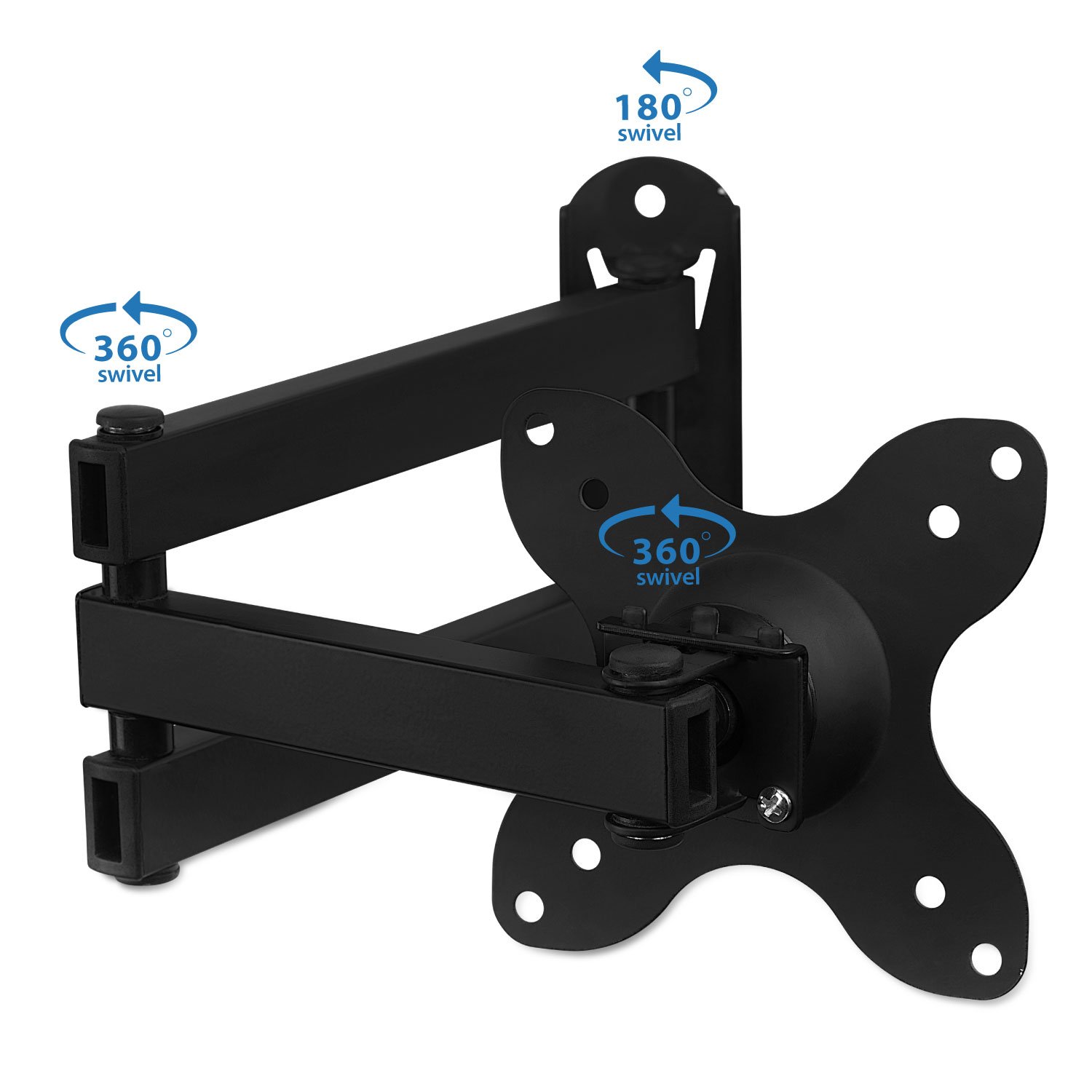
Figure 4: Attaching the display to the wall mount.
Arahan Pengendalian (Pelarasan)
The Mount-It! MI-2042 offers versatile adjustments for optimal viewing.
- Sambungan: The articulating arm allows the display to extend from 1.75 inches (minimum) to 15 inches (maximum) from the wall. Gently pull or push the display to achieve the desired distance.
- Condong: The mount allows for a tilt range of up to 15 degrees up or down. Loosen the tilt knob, adjust the screen to your preferred vertical angle, and then re-tighten the knob.
- Pusing: The mount provides 180 degrees of swivel at each joint, allowing you to angle the screen left or right. Gently push the display to the desired horizontal viewkedudukan.
- Putaran: The VESA plate can rotate 360 degrees, enabling you to switch between landscape and portrait orientation for your display.

Figure 5: Display extension from the wall.

Figure 6: Tilt and rotation capabilities.
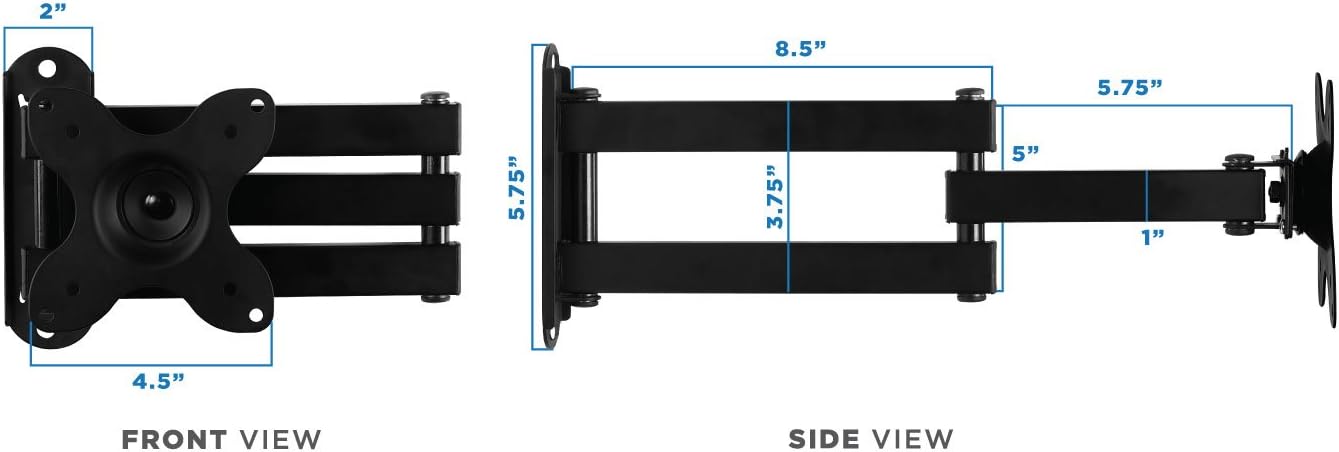
Figure 7: Swivel and rotation points on the mount.
Penyelenggaraan
Penyelenggaraan berkala memastikan ketahanan dan operasi pemasangan dinding anda yang selamat.
- Pembersihan: Lap pelekap dengan lembut, damp kain untuk menghilangkan habuk dan kotoran. Elakkan bahan kimia yang keras atau pembersih yang kasar.
- Pemeriksaan: Periksa semua skru dan sambungan secara berkala untuk memastikan ia ketat dan kukuh. Ketatkan semula jika perlu.
- Pelinciran: If joints become stiff, apply a small amount of silicone-based lubricant to the moving parts.
Menyelesaikan masalah
Jika anda menghadapi masalah, rujuk masalah dan penyelesaian biasa berikut.
| Masalah | Kemungkinan Punca | Penyelesaian |
|---|---|---|
| TV/Monitor is wobbly or not secure. | Loose mounting screws or incorrect installation. | Ensure all wall plate and VESA plate screws are tightened. Verify the wall mount is properly secured to a stud or solid wall. |
| Display tilts forward or does not hold position. | Tilt adjustment knob is loose. | Tighten the tilt adjustment knob located on the VESA plate connection point. |
| Kesukaran menggerakkan lengan yang boleh diartikulasikan. | Sendi kaku atau memerlukan pelinciran. | Apply a small amount of silicone-based lubricant to the arm joints. |
| Missing parts from package. | Packaging error or parts lost during transit. | Contact Mount-It! customer support for replacement parts. |
Spesifikasi
- Nombor Model: MI-2042
- Compatible TV/Monitor Sizes: 19 hingga 40 inci
- Keserasian VESA: 75x75mm, 100x100mm
- Kapasiti Berat: 33 paun (15 kg)
- Sambungan daripada Dinding: 1.75 inci (min) hingga 15 inci (maks)
- Sudut Kecondongan: Up to 15 degrees (up/down)
- Pusing: 180 degrees at each joint
- Putaran: 360 degrees (landscape to portrait)
- Bahan: besi
- warna: Hitam
- Berat Barang: 2.52 paun
- Dimensi Pakej: 12.6 x 9.17 x 1.65 inci

Figure 8: Dimensional specifications of the wall mount.
Maklumat Waranti
For detailed warranty information regarding your Mount-It! MI-2042 Full Motion TV Wall Mount, please refer to the official Mount-It! webtapak atau hubungi sokongan pelanggan mereka secara langsung. Simpan resit pembelian anda sebagai bukti pembelian.
Sokongan Pelanggan
If you require further assistance, have questions about installation, or need to report a missing/defective part, please visit the official Mount-It! website for contact information or their support portal.


