pengenalan
The ARTIX Sport Workout Earbuds Headphones XJR are designed for active individuals seeking high-quality audio performance during workouts, travel, running, and exercise. These lightweight, in-ear stereo wired earphones feature a built-in microphone and sweat-proof construction, ensuring durability and clear communication.
Key features include enhanced high-quality sound with natural clear acoustics and powerful bass, an ergonomic and stylish design with comfortable over-ear hooks, and integrated controls for music and calls. The noise-isolating earpods help minimize ambient background noise, providing an immersive listening experience.

Imej: Depan view of the ARTIX Sport Workout Earbuds XJR, highlighting their vibrant green color and ergonomic over-ear design.
Panduan Persediaan
1. Memilih Petua Telinga yang Betul
For optimal sound quality and comfort, it is crucial to select the correct size of silicone ear tips. The ARTIX XJR earbuds come with three sizes (Small, Medium, Large). Experiment with each size to find the one that provides a secure fit and good seal in your ear canal.
- Gently pull on the edge of the current ear tip to remove it from the earbud nozzle.
- Select a new ear tip size and firmly push it onto the nozzle until it clicks into place.
- Test the fit by inserting the earbuds into your ears. A good fit will block out most external noise and provide rich bass.
2. Memakai Earbud
The ARTIX XJR earbuds feature ergonomic over-ear hooks for a secure and comfortable fit, especially during physical activity. These hooks are removable if preferred, but are recommended for active use.
- Kenal pasti fon telinga kiri (L) dan kanan (R).
- Place the earbud into your ear canal and gently loop the over-ear hook behind your ear.
- Adjust the earbud and hook until it feels snug and comfortable.
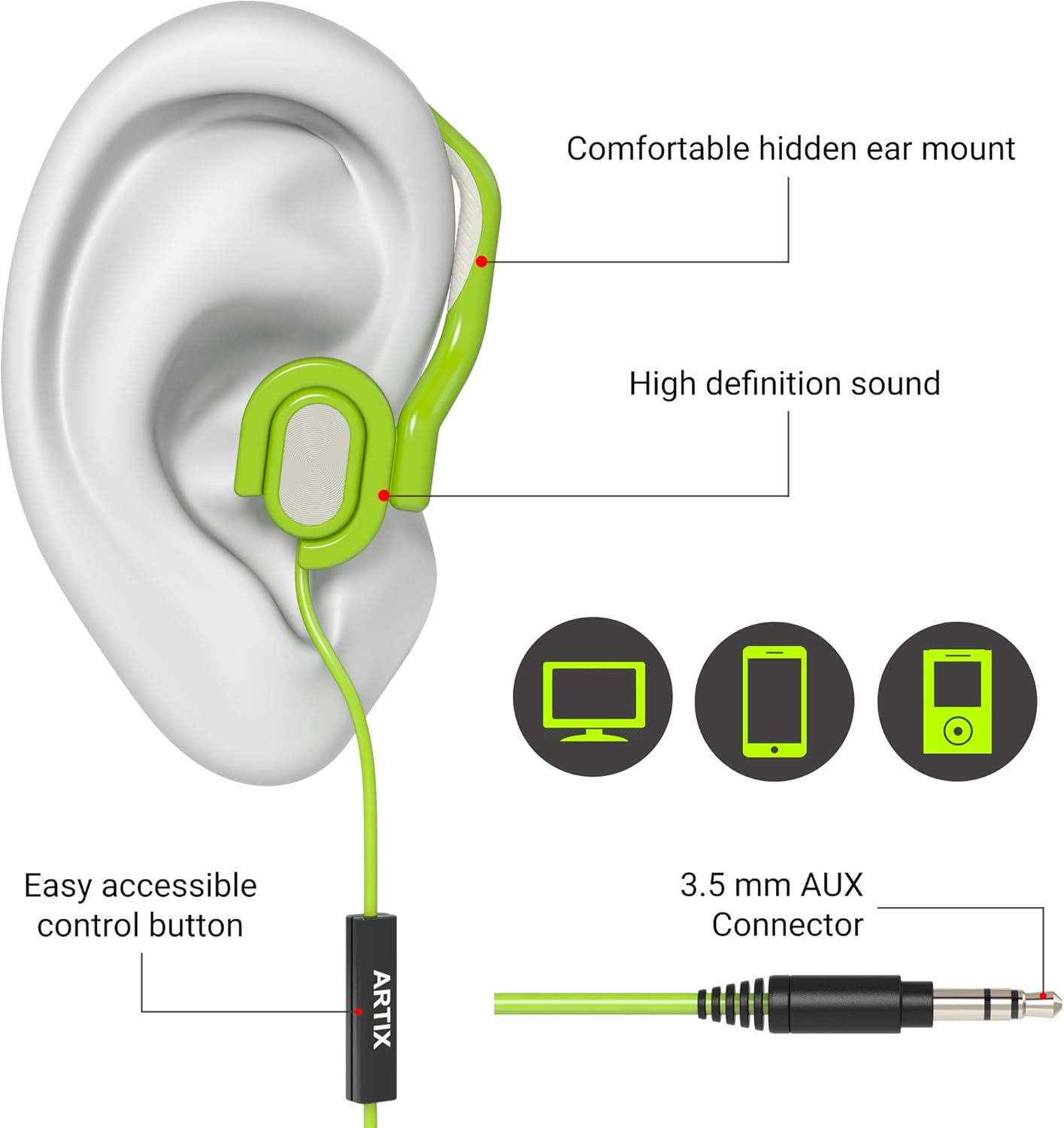
Image: A diagram illustrating the proper way to wear the earbud, showing the ear tip inserted into the ear canal and the over-ear hook securely positioned behind the ear. Labels point to the "Comfortable hidden ear mount" and "High definition sound".
3. Menyambung ke Peranti Anda
The ARTIX XJR earbuds connect via a standard 3.5mm audio jack. They are compatible with a wide range of devices.
- Locate the 3.5mm audio jack on your smartphone, tablet, MP3 player, laptop, or computer.
- Insert the 3.5mm connector of the earbud cable firmly into the device's audio jack.
- Ensure the connection is secure for uninterrupted audio.

Image: The ARTIX Sport Workout Earbuds XJR are shown connected to a smartphone, with running shoes in the background, illustrating their use with mobile devices for active lifestyles.
Arahan Operasi
The ARTIX XJR earbuds feature an inline remote with a built-in microphone for convenient control of music playback and phone calls.
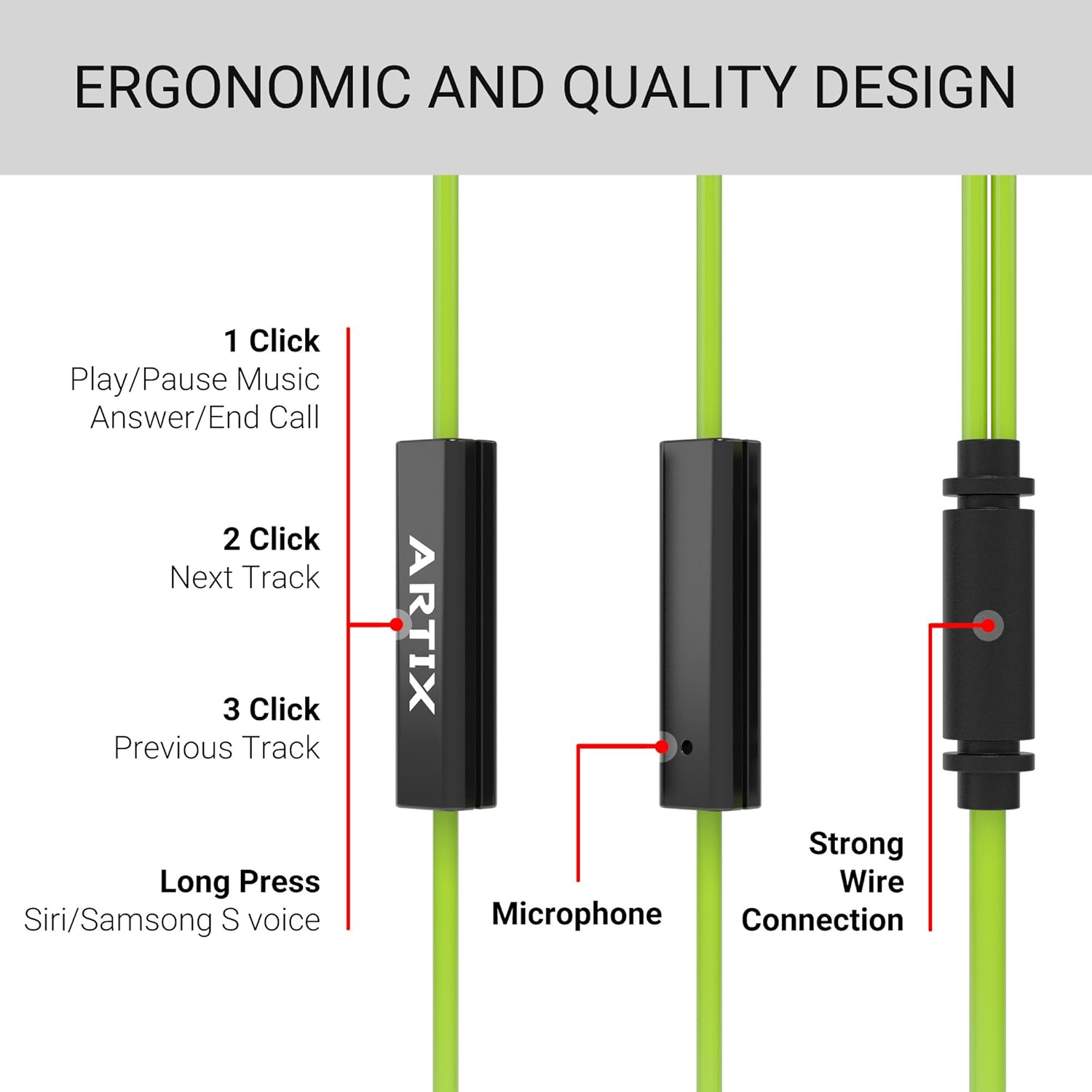
Image: A detailed diagram of the inline remote control, showing the single button and its various functions based on the number of clicks or duration of press.
Kawalan Muzik:
- 1 Klik: Main/Jeda muzik.
- 2 Klik: Langkau ke trek seterusnya.
- 3 Klik: Kembali ke trek sebelumnya.
Kawalan Panggilan:
- 1 Klik: Jawab panggilan masuk atau tamatkan panggilan yang sedang berjalan.
- Tekan lama: Activate voice assistant (Siri/Samsung S voice) on compatible devices.
The built-in microphone ensures clear voice transmission during calls.
Penyelenggaraan dan Penjagaan
To ensure the longevity and optimal performance of your ARTIX Sport Workout Earbuds XJR, follow these maintenance guidelines:
- Pembersihan: Regularly wipe the earbuds, especially the ear tips and over-ear hooks, with a soft, dry cloth. For sweat or dirt, use a slightly damp cloth and ensure they are completely dry before storage.
- Kebersihan Hujung Telinga: Remove the silicone ear tips periodically and clean them with mild soap and water. Rinse thoroughly and allow them to air dry completely before reattaching.
- Penjagaan Kabel: Avoid sharp bends or excessive pulling on the cable, as this can damage the internal wiring. Store the earbuds neatly to prevent tangling.
- Storan: Apabila tidak digunakan, simpan fon telinga di tempat yang bersih dan kering, jauh daripada suhu yang melampau dan cahaya matahari langsung.
- Tahan Air: While sweat-resistant, these earbuds are not fully waterproof. Avoid submerging them in water or exposing them to heavy rain.
Menyelesaikan masalah
If you encounter any issues with your ARTIX Sport Workout Earbuds XJR, please refer to the following common troubleshooting steps:
| Masalah | Kemungkinan Punca | Penyelesaian |
|---|---|---|
| Tiada suara atau kelantangan rendah |
|
|
| Mikrofon tidak berfungsi |
|
|
| Earbuds fall out during activity |
|
|
Jika masalah berterusan selepas mencuba penyelesaian ini, sila rujuk bahagian Sokongan.
Spesifikasi
| Ciri | Perincian |
|---|---|
| Nombor Model | XJR |
| Teknologi Ketersambungan | berwayar |
| Jack Fon Kepala | Jack 3.5 mm |
| Komponen yang Disertakan | Kabel, Kusyen Telinga |
| bahan | silikon |
| Kegunaan Khusus Untuk Produk | Travel, Sports and Exercise, Studio |
| Peranti Serasi | Laptops, Desktops, Tablets, Cellphones, and other devices with a 3.5mm audio jack or compatible adapter |
| Jenis Kawalan | Kawalan Media |
| Ciri Kabel | Boleh ditarik balik |
| Tahap Ketahanan Air | Water Resistant (Sweat-proof) |
| Julat Kekerapan | 20 Hz hingga 20,000 Hz |
| Dimensi Produk | 5.12 x 5.12 x 1.57 inci |
| Berat Barang | 3.84 auns |
| warna | hijau |
| Penempatan Telinga | Di Telinga |
| Faktor Bentuk | Di Telinga |
| Kawalan Bunyi | Pengasingan Bunyi |
Produk Selesaiview Video
Tonton video produk rasmi ini untuk visual seterusnyaview of the ARTIX Sport Workout Earbuds XJR, demonstrating key features and usage scenarios.
Video: Seorang pegawai tamatview of the ARTIX Sport Workout Earbuds XJR, showcasing their design, features, and suitability for active use.
Waranti dan Sokongan
Maklumat Waranti:
Please refer to the product packaging or the official ARTIX website for detailed warranty information regarding your ARTIX Sport Workout Earbuds XJR. Warranty terms and conditions may vary by region and purchase date.
Sokongan Pelanggan:
For further assistance, technical support, or inquiries not covered in this manual, please visit the official ARTIX website or contact their customer service department. Contact details can typically be found on the product packaging or the brand's online presence.
Anda juga boleh melawat ARTIX Store on Amazon untuk mendapatkan lebih banyak maklumat produk dan sumber sokongan.


