1. Pengenalan
This manual provides comprehensive instructions for the safe and effective use of your Digitek DFL-200T PRO-089IRT-C Flash. Please read this manual thoroughly before operating the device and retain it for future reference. This flash unit is designed to provide versatile lighting solutions for various photographic needs, compatible with Canon cameras.
2. Maklumat Keselamatan
- Do not disassemble or modify the flash unit. This may cause electric shock or damage the product.
- Pastikan unit denyar kering. Jangan dedahkannya kepada hujan, kelembapan atau kelembapan yang tinggi.
- Avoid direct eye exposure to the flash light, especially at close range, as it can impair vision.
- Use only specified batteries (4xAA Alkaline / Rechargeable Ni-MH). Incorrect battery types may cause leakage or explosion.
- Ensure the flash is securely mounted to the camera hot shoe to prevent accidental detachment.
- Jangan kendalikan lampu kilat jika terdapat gas atau cecair mudah terbakar.
3. Kandungan Pakej
Sahkan bahawa semua item terdapat dalam pakej anda:
- Digitek DFL-200T PRO-089IRT-C Flash Unit
- Manual Arahan

Image 3.1: The Digitek DFL-200T PRO-089IRT-C flash unit shown with its included soft case and a mini stand.
4. Produk Lebihview
Familiarize yourself with the components and controls of your Digitek DFL-200T PRO-089IRT-C Flash.

Imej 4.1: Depan view of the flash unit, displaying the large LCD panel, control buttons (MODE, Fn, CLEAR, ZOOM, ON/OFF, LOCK), and the flash head.
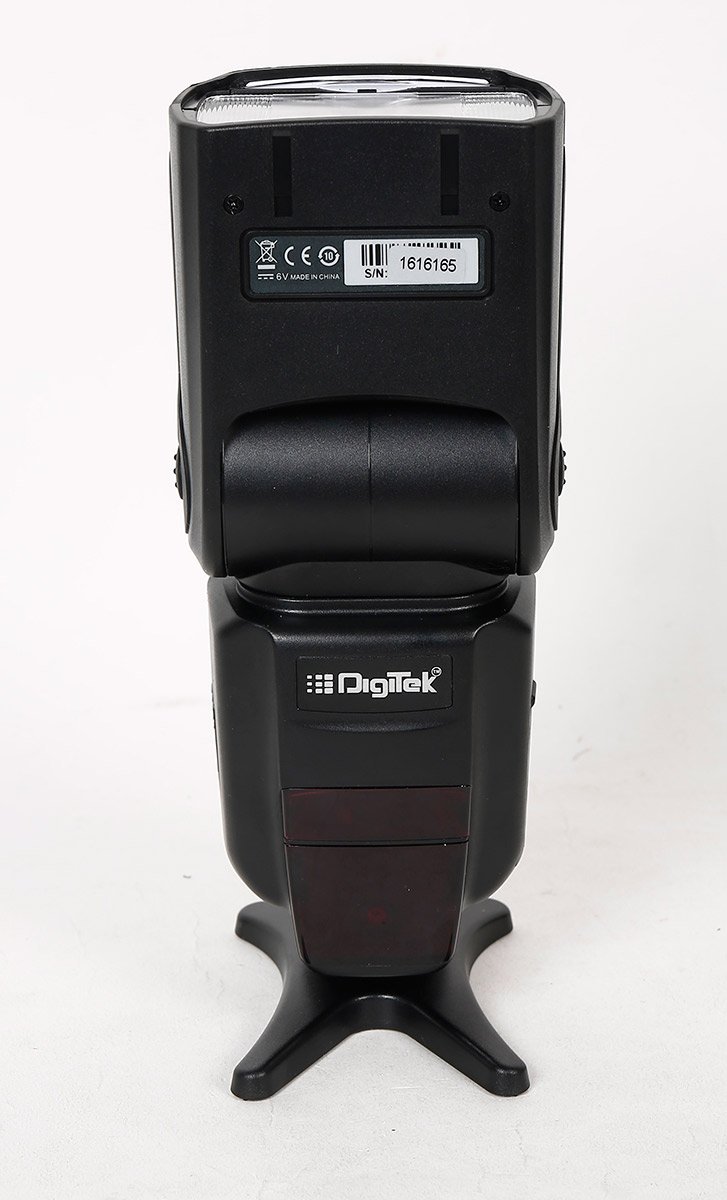
Imej 4.2: Belakang view of the flash unit, showing the battery compartment cover and product identification labels including the serial number.

Imej 4.3: Bersudut view of the flash unit, demonstrating the adjustable flash head in a tilted position.
5. Persediaan
5.1. Pemasangan Bateri
- Open the battery compartment cover located on the back of the flash unit.
- Insert four (4) AA alkaline or Ni-MH rechargeable batteries, ensuring correct polarity (+/-).
- Tutup penutup petak bateri dengan selamat.
5.2. Memasang Unit Lampu Kilat
- Slide the metal hot shoe of the flash unit into the hot shoe mount on your camera.
- Rotate the locking ring or lever on the flash unit clockwise until it is securely fastened to the camera.
- To remove, rotate the locking mechanism counter-clockwise and slide the flash off.
6. Arahan Operasi
6.1. Hidupkan/Mati Kuasa
Tekan dan tahan butang HIDUP/MATI button to power the flash unit on or off. The large LCD panel will illuminate upon power-on.
6.2. Mod Denyar
Tekan ke MODE butang untuk mengitar mod denyar yang tersedia:
- TTL (Through-The-Lens): Automatic flash exposure control.
- Manual: Manually set flash power output (1/128 to 1/1).
- Multi (Stroboscopic): Fires a series of rapid flashes for multiple exposures in a single frame.
- S1 & S2 (Optical Slave): Triggered by another flash. S1 fires on the first flash, S2 ignores the pre-flash.
6.3. Zoom Position
Tekan ke ZOOM button to adjust the flash coverage. The zoom position can be set manually or automatically (24-28-35-50-70-85-105mm) to match the lens focal length.
6.4. Flash Head Adjustment
The flash head can be rotated horizontally from 0 to 270 degrees and vertically from 0 to 90 degrees for bounce flash photography.
6.5. Penyegerakan Berkelajuan Tinggi (HSS)
The flash supports High-Speed Sync up to 1/8000s, allowing for flash photography with fast shutter speeds.
6.6. Operasi Tanpa Wayar
The flash unit supports wireless triggering with an indoor range of 20-30 meters and an outdoor range of 10-15 meters.
7. Penyelenggaraan
- Bersihkan unit denyar dengan kain lembut dan kering. Jangan gunakan pelarut atau pembersih yang kasar.
- Remove batteries if the flash unit will not be used for an extended period to prevent leakage.
- Simpan flash di tempat yang sejuk dan kering, jauh daripada cahaya matahari langsung dan suhu yang melampau.
- Protect the hot shoe contacts from dust and moisture.
8. Penyelesaian masalah
| Masalah | Kemungkinan Punca | Penyelesaian |
|---|---|---|
| Flash tidak menyala. | Low battery power; incorrect mode; flash not securely mounted. | Replace batteries; check flash mode settings; ensure flash is firmly attached to camera hot shoe. |
| Masa kitar semula kilat adalah perlahan. | Kuasa bateri rendah. | Gantikan atau cas semula bateri. |
| Output Flash tidak konsisten. | Dirty hot shoe contacts; flash head not properly positioned. | Clean hot shoe contacts on both flash and camera; adjust flash head for direct or bounce lighting. |
| Perlindungan terlalu panas diaktifkan. | Tembakan berterusan yang berlebihan. | Allow the flash unit to cool down. The unit will resume normal operation once cooled. |
9. Spesifikasi
| Ciri | Perincian |
|---|---|
| Model | DFL-200T PRO-089IRT-C |
| Panduan No. | 60 (ISO 100, 105mm Zoom) |
| Suhu Warna | 5500 ± 100K |
| Kelajuan Penyegerakan Denyar | High Speed Sync up to 1/8000s, Rear Curtain Sync |
| Kedudukan Zum | 24-28-35-50-70-85-105mm (Auto/Manual) |
| Sudut Putaran Mendatar | 0~270 Darjah |
| Sudut Putaran Menegak | 0~90 Darjah |
| Mod Flash | TTL / Manual / Multi / S1 & S2 |
| Kawalan Denyar | 8 Grade Hi-Speed control (1/128-1/1) |
| Jarak Tanpa Wayar | Indoor 20-30 Mtrs. & Outdoor 10-15 Mtrs. |
| Budak Optik | Instant Sync Mode S1 & S2 |
| Flash Recycle Time | lebih kurang 0.5-3.2 saat |
| Ciri-ciri Tambahan | FEC, AEB, Manual & Auto Zoom, Over Heating Protection |
| Antara muka persisian | Metal Hotshoe, PC Sync Port |
| Sumber Kuasa | 4xAA Alkaline / Rechargeable (Ni-MH) Battery |
| Masa Pencahayaan | 100-1500 times (Using AA Alkaline Cells) |
| Berat Barang | 454 g |
| Jenis Pemasangan | Gunung Sepatu Panas |
| Pemasangan yang Serasi | Canon |
10. Waranti dan Sokongan
For warranty information or technical support, please refer to the warranty card included with your product or contact Digitek customer service. Keep your purchase receipt as proof of purchase.
You can visit the official Digitek store for more information: Digitek Store on Amazon


