pengenalan
The Sure Petcare Hub serves as the central link between your Sure Petcare Connect products and the Sure Petcare app. This device enables you to remotely control and monitor your connected pet products from anywhere in the world. It is designed to integrate seamlessly with SureFlap and SureFeed Connected Products, allowing you to manage up to 10 connected devices within your household.
The Hub requires a mains power connection and an Ethernet cable connection to your WiFi router for operation. It is not compatible with standard (non-Connect) SureFlap products.
1. Persediaan
1.1 Menyahkotak dan Komponen
Upon opening the Sure Petcare Hub package, verify that all components are present:
- Sure Petcare Hub unit
- Penyesuai kuasa utama
- Kabel Ethernet

Figure 1: Contents of the Sure Petcare Hub package, showing the main hub unit, power adapter with interchangeable plugs, and an Ethernet cable.
1.2 Menyambungkan Hab
- Sambungkan Kuasa: Plug the mains power adaptor into the power port on the Sure Petcare Hub. Then, plug the adaptor into a standard wall outlet.
- Sambung ke Penghala: Insert one end of the provided Ethernet cable into the Ethernet port on the Sure Petcare Hub. Connect the other end of the Ethernet cable to an available LAN port on your home WiFi router.
- Hidupkan kuasa: Once connected, the Hub will power on automatically. The cat ear lights on the Hub will illuminate, indicating its status.

Figure 2: The Sure Petcare Hub with its power and Ethernet cables connected, ready for operation.

Figure 3: The Sure Petcare Hub displaying its illuminated green cat ears, signifying a successful connection and operational status.
1.3 Muat Turun Apl dan Berpasangan
Download the Sure Petcare app from your device's app store (available for iOS and Android) or access the web application. Follow the in-app instructions to create an account and pair your Sure Petcare Hub with your account. This process will guide you through connecting your Sure Petcare Connect devices to the Hub.
2. Beroperasi
2.1 Hub Functionality
The Sure Petcare Hub acts as a bridge, allowing your Sure Petcare Connect devices (such as the SureFlap Connect Pet Door or SureFeed Connect Microchip Pet Feeder) to communicate with the Sure Petcare app via your home internet connection. It facilitates real-time data exchange and remote control capabilities.
2.2 Using the Sure Petcare App
The Sure Petcare app provides comprehensive control and monitoring features for your connected devices:
- Pemberitahuan: Receive instant alerts when your pet enters or leaves the house through a connected pet door, or when they use a connected feeder.
- Kunci dan Buka Kunci: Create custom schedules for when your pets are allowed outside or manually control the locking and unlocking of your pet door from anywhere.
- Cerapan: Monitor your pet's activity patterns and feeding habits to identify any changes in behavior that might indicate health issues.
- Intruder Alerts: Be notified if neighborhood animals attempt to use your pet door and are denied entry.
- Akses Kongsi: Invite family members or pet sitters to access and manage your Sure Petcare devices with customizable permissions.
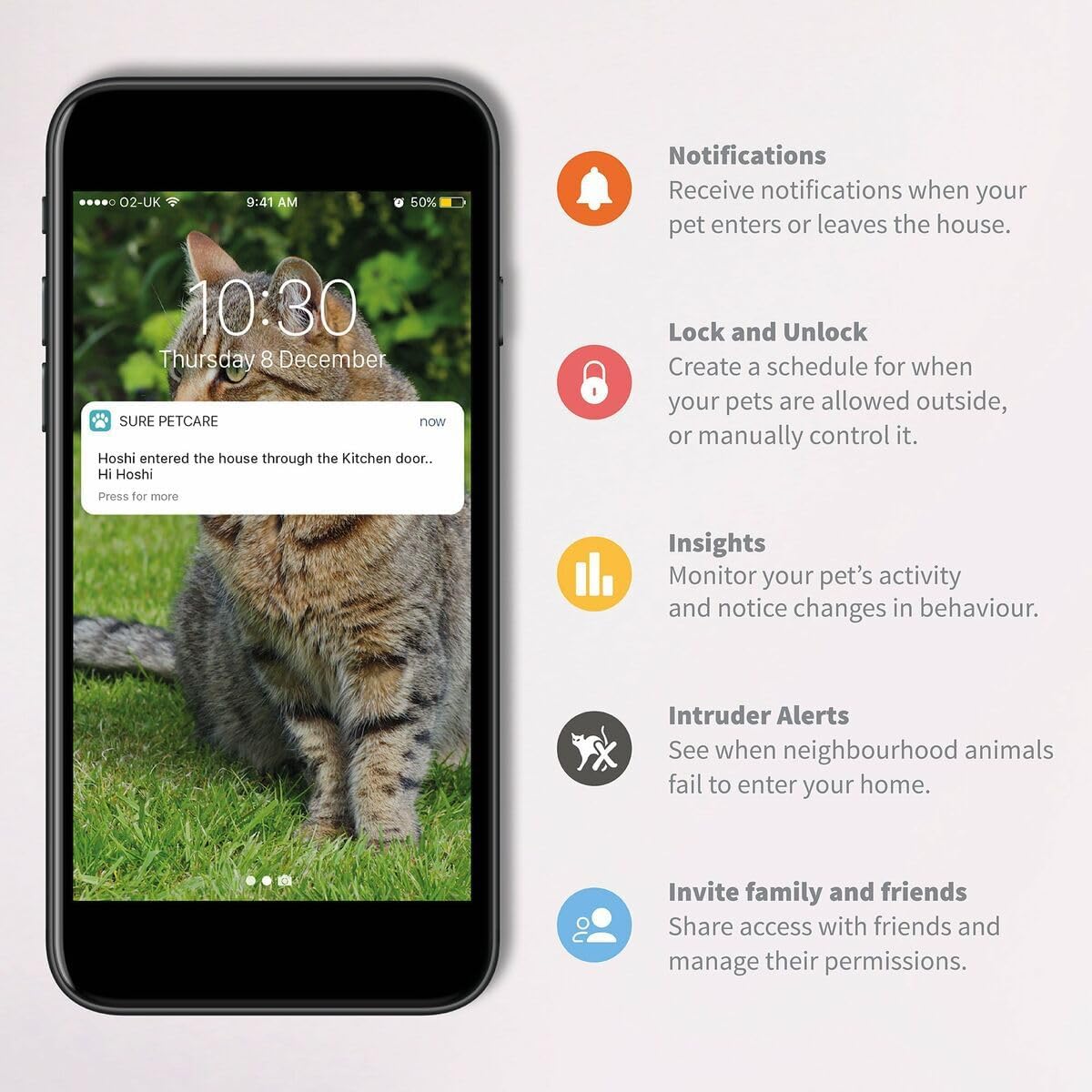
Rajah 4: Bekasample of the Sure Petcare app interface, highlighting features like notifications, lock/unlock controls, insights, and intruder alerts.
The Hub supports connection with up to 10 Sure Petcare Connect devices simultaneously.
3. Penyelenggaraan
3.1 Pembersihan
To clean the Sure Petcare Hub, gently wipe the exterior with a soft, dry cloth. Avoid using abrasive cleaners, solvents, or excessive moisture, as these can damage the device. Ensure the Hub is unplugged from power before cleaning.
3.2 Kemas Kini Perisian Tegar
The Sure Petcare Hub may receive automatic firmware updates to improve performance, add new features, or address security vulnerabilities. Ensure your Hub remains connected to power and the internet to receive these updates. Do not unplug the Hub during an update process.
3.3 Connection Security
Periodically check that the power and Ethernet cables are securely connected to both the Hub and your router. Loose connections can lead to intermittent connectivity issues.
4. Penyelesaian masalah
| Masalah | Kemungkinan Punca | Penyelesaian |
|---|---|---|
| Hub lights are off or not glowing. | No power or power cable is loose. | Ensure the power adaptor is securely plugged into the Hub and a working wall outlet. Try a different outlet. |
| Hub lights are not green (e.g., red or flashing). | Connectivity issue with the internet or Sure Petcare servers. | Check the Ethernet cable connection to your router. Power cycle the Hub (unplug, wait 10 seconds, plug back in). Ensure your router has an active internet connection. |
| Sure Petcare app cannot detect the Hub or connected devices. | Hub is offline, app synchronization issue, or incorrect setup. | Verify the Hub's lights are green. Ensure your mobile device has an internet connection. Try force-closing and reopening the Sure Petcare app. Re-pair devices if necessary following in-app instructions. |
| Connected devices are not responding to app commands. | Communication issue between Hub and device, or device power issue. | Ensure the connected device has power and is within range of the Hub. Check the device's own indicator lights. |
For persistent issues or advanced troubleshooting, please refer to the Sure Petcare online support resources or contact customer service.
5. Spesifikasi
| Ciri | Perincian |
|---|---|
| Nama Model | Pasti Hab Petcare |
| Nombor Model | 396680 |
| Dimensi (LxWxH) | 5.71 x 4.53 x 4.33 inci |
| Berat Barang | 10.58 auns (0.3 Kilogram) |
| warna | putih |
| bahan | plastik |
| Ketersambungan | Ethernet (wired connection to router) |
| Peranti Bersambung Maks | Up to 10 Sure Petcare Connect products |
| Pengeluar | Sure petcare |
| Pertama Tersedia | 4 Oktober 2017 |
6. Maklumat Waranti
The Sure Petcare Hub is covered by a manufacturer's warranty. For specific details regarding the warranty period and terms, please refer to the documentation included with your product or visit the official Sure Petcare website. EU spare part availability duration is 1 year.
7. Sokongan
For further assistance, technical support, or to access frequently asked questions, please visit the official Sure Petcare support website. You can also find helpful resources and community forums through the Sure Petcare app.
Sumber Dalam Talian: www.surepetcare.com/support


