pengenalan
Terima kasih kerana membeliasing the Blackweb BWA16AA003 1000W HiFi Bluetooth Stereo System. This powerful audio system is designed to provide a rich and immersive sound experience with its front speakers and subwoofer. It features wireless Bluetooth connectivity, a digital FM radio, and a top-loading CD player, allowing you to enjoy your favorite music from various sources. This manual provides detailed instructions for setup, operation, maintenance, and troubleshooting to ensure optimal performance and longevity of your device.
Maklumat Keselamatan Penting
Sila baca semua arahan keselamatan dan pengendalian dengan teliti sebelum menggunakan produk ini. Simpan arahan ini untuk rujukan masa hadapan.
- Jangan dedahkan perkakas ini kepada hujan atau lembapan.
- Jangan sekat sebarang bukaan pengudaraan. Pasang mengikut arahan pengilang.
- Jangan pasang berhampiran mana-mana sumber haba seperti radiator, daftar haba, dapur, atau radas lain (termasuk amppenghidup) yang menghasilkan haba.
- Lindungi kabel kuasa dari berjalan atau dicubit, terutama pada palam, wadah kemudahan, dan titik di mana mereka keluar dari perkakas.
- Hanya gunakan lampiran/aksesori yang ditentukan oleh pengilang.
- Cabut plag perkakas ini semasa ribut petir atau apabila tidak digunakan untuk jangka masa yang lama.
- Rujuk semua servis kepada kakitangan perkhidmatan yang berkelayakan. Servis diperlukan apabila radas telah rosak dalam apa jua cara, seperti kord bekalan kuasa atau palam rosak, cecair telah tertumpah atau objek jatuh ke dalam radas, radas telah terdedah kepada hujan atau lembapan, tidak beroperasi seperti biasa. , atau telah digugurkan.
Kandungan Pakej
Carefully unpack your stereo system and ensure all items are present. If any items are missing or damaged, please contact your retailer.
- Hitamweb BWA16AA003 Main Unit
- Speaker kiri
- Penceramah Betul
- Subwufer
- Kord Kuasa
- Manual Pengguna
Produk Selesaiview
Biasakan diri anda dengan kawalan dan ciri unit utama.
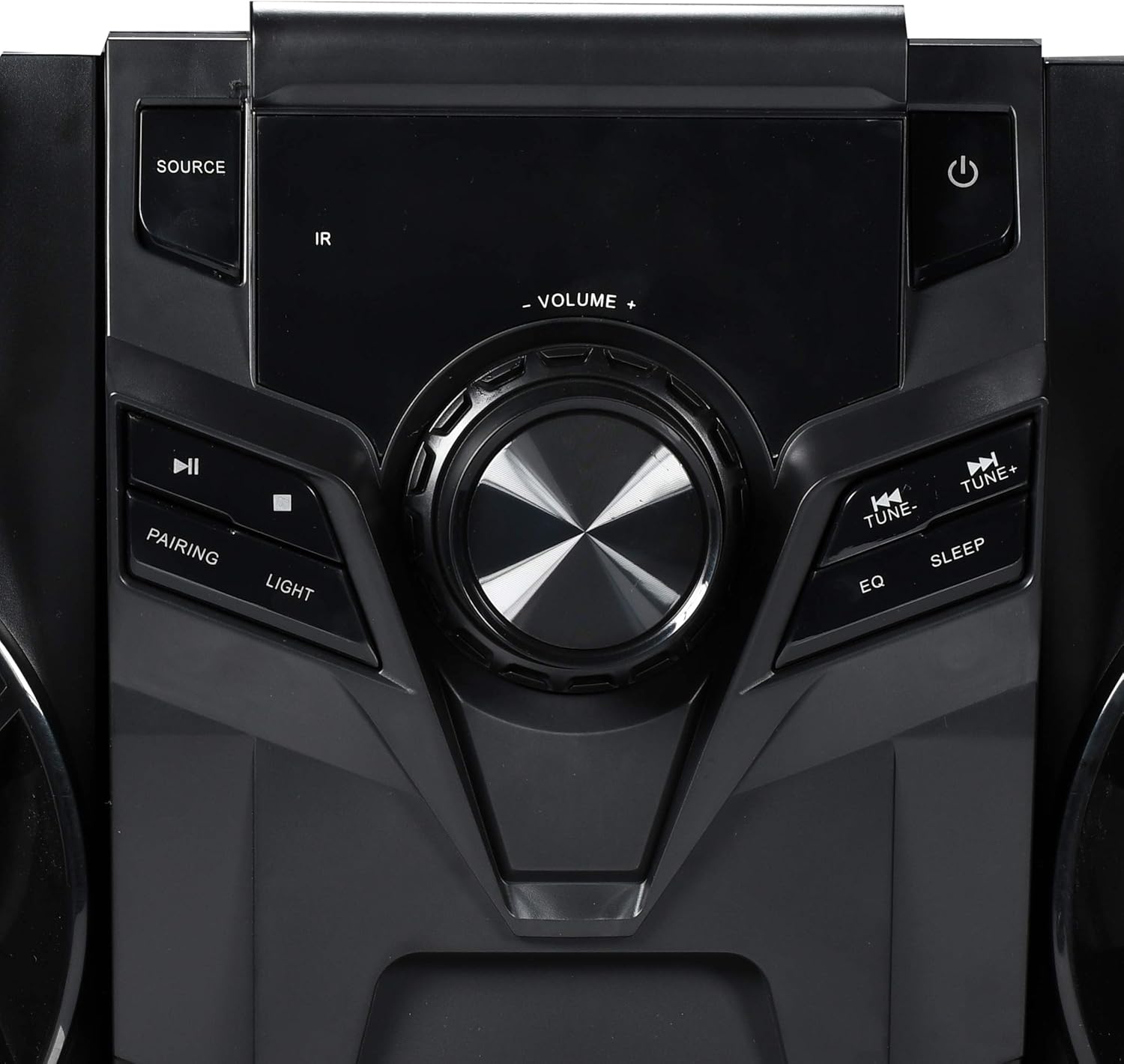
Rajah 1: Kawalan Panel Hadapan
This image displays the central control panel of the Blackweb BWA16AA003 stereo system. Key controls visible include the large central volume knob, a "SOURCE" button on the upper left for input selection, and a power button (represented by the universal power symbol) on the upper right. Below the source button are playback controls: a play/pause button and a pairing button for Bluetooth. Below the power button are "TUNE-" and "TUNE+" buttons for radio tuning, along with "EQ" and "SLEEP" buttons. An "IR" sensor for remote control input is also visible.
Fungsi Panel Kawalan:
- Butang kuasa (⏻): Menghidupkan atau mematikan sistem.
- Butang SUMBER: Selects the input source (e.g., CD, Bluetooth, FM Radio).
- Tombol VOLUME: Melaraskan tahap kelantangan induk.
- Butang Main/Jeda (⏸): Plays or pauses audio playback (CD/Bluetooth).
- PAIRING Button: Memulakan mod berpasangan Bluetooth.
- Butang CAHAYA: Controls the multi-color LED lighting effects on the speakers.
- Butang TUNE- / TUNE+: Tunes FM radio frequencies or navigates tracks/chapters.
- Butang EQ: Kitaran melalui pratetap penyamaan.
- Butang SLEEP: Menetapkan pemasa tidur.
- Sensor IR: Receives signals from a compatible remote control (note: remote control not included as per specifications).
- Port USB: Located on the front or rear panel, used for charging compatible devices (charging cable sold separately).
- Dulang CD: Top-loading tray for inserting audio CDs.
Persediaan
1. penempatan
Place the main unit and speakers on a stable, flat surface. Ensure adequate ventilation around the unit to prevent overheating. For optimal sound, position the left and right speakers equidistant from the main unit and facing the listening area.
2. Sambungan Pembesar Suara
Connect the speaker wires from the left and right speakers and the subwoofer to the corresponding speaker terminals on the rear of the main unit. Ensure correct polarity (positive to positive, negative to negative) for optimal sound quality.
3. Sambungan Kuasa
Plug the power cord into the AC IN socket on the rear of the main unit, then plug the other end into a standard wall outlet (AC 120V~60Hz).
Arahan Operasi
Hidupkan/Mati Kuasa
Tekan ke Butang Kuasa (⏻) on the front panel to turn the system on or off.
Pemilihan Sumber
Tekan ke Butang SUMBER repeatedly to cycle through available input modes: CD, Bluetooth, FM Radio.
Operasi Bluetooth
- Switch the system to Bluetooth mode using the Butang SUMBER. The display will indicate "BT" or "Bluetooth".
- The system will automatically enter pairing mode. If not, press the PAIRING Button. The Bluetooth indicator will flash.
- Pada peranti berdaya Bluetooth anda (telefon pintar, tablet, komputer riba), dayakan Bluetooth dan cari peranti yang tersedia.
- Select "Blackweb BWA16AA003" (or similar name) from the list of devices.
- Once paired, the Bluetooth indicator will stop flashing and remain solid. You can now play audio wirelessly from your device.
Main semula CD
- Switch the system to CD mode using the Butang SUMBER.
- Gently place an audio CD (CD or CD-R/RW) into the top-loading CD tray with the label side facing up.
- The system will automatically begin playing the CD. If not, press the Butang Main/Jeda (⏸).
- Gunakan TUNE- / TUNE+ Buttons untuk melangkau trek.
Operasi Radio FM
- Switch the system to FM Radio mode using the Butang SUMBER.
- Panjangkan antena FM sepenuhnya untuk penerimaan yang lebih baik.
- Tekan ke TUNE- / TUNE+ Buttons to manually tune to a desired frequency.
- To auto-scan and save presets (if available), refer to the on-screen display or specific instructions for your model's auto-scan function.
Pengecasan USB
Connect your compatible device's USB charging cable (sold separately) to the USB port on the stereo system to charge your device.
Kawalan Lampu LED
Tekan ke Butang LIGHT to cycle through different multi-color LED lighting effects on the speakers or to turn them off.
Pelarasan Kelantangan
Putar Tombol VOLUME mengikut arah jam untuk meningkatkan kelantangan dan lawan arah jam untuk mengurangkan kelantangan.
Penyamaan (EQ)
Tekan ke Butang EQ to cycle through various preset equalizer modes (e.g., Rock, Pop, Jazz, Classic, Flat) to optimize sound for different music genres.
Pemasa Tidur
Tekan ke Butang TIDUR repeatedly to set a sleep timer (e.g., 15, 30, 60, 90 minutes). The system will automatically turn off after the selected time.
Penyelenggaraan
Pembersihan
Wipe the unit with a soft, dry cloth. Do not use abrasive cleaners, waxes, or solvents as they may damage the finish. Ensure the unit is unplugged before cleaning.
Penyimpanan
If the unit is to be stored for an extended period, unplug it from the power outlet and store it in a cool, dry place, away from direct sunlight and extreme temperatures.
Menyelesaikan masalah
Sebelum menghubungi sokongan pelanggan, sila rujuk jadual berikut untuk isu biasa dan penyelesaiannya.
| Masalah | Kemungkinan Punca | Penyelesaian |
|---|---|---|
| Tiada Kuasa | Kord kuasa tidak disambungkan dengan selamat. Salur keluar kuasa tidak berfungsi. | Pastikan kord kuasa dipasang dengan kukuh ke dalam unit dan alur keluar dinding. Uji saluran keluar dengan peranti lain. |
| Tiada Bunyi | Kelantangan terlalu rendah atau diredamkan. Incorrect source selected. Speaker wires not connected properly. | Tingkatkan kelantangan. Tekan butang SOURCE untuk memilih input yang betul. Check speaker wire connections at both the unit and speakers. |
| Gandingan Bluetooth Gagal | Bluetooth device is too far away. Bluetooth not enabled on your device. System is not in pairing mode. | Move your Bluetooth device closer to the stereo system. Pastikan Bluetooth didayakan pada peranti anda. Press the PAIRING button on the stereo system. |
| CD Not Playing | CD kotor atau tercalar. CD dimasukkan dengan salah. Incorrect source selected. | Clean the CD with a soft cloth. Re-insert the CD with the label side facing up. Tekan butang SOURCE untuk memilih mod CD. |
| Penerimaan FM yang Lemah | FM antenna not extended. Gangguan daripada peranti elektronik lain. | Luaskan sepenuhnya antena FM. Move the unit away from other electronic devices. |
Spesifikasi
| Jenama | Hitamweb |
| Model | BWA16AA003 |
| Output Wattage | 1000 Watt |
| Peranti Serasi | Telefon Pintar, Tablet, Komputer riba |
| Teknologi Ketersambungan | Bluetooth, USB |
| Jenis Pembesar Suara | Stereo (with Subwoofer) |
| Pemain CD | Yes (CD and CD-R/RW compatible) |
| Radio FM | Yes (Digital FM with presets) |
| Port USB | Yes (for device charging) |
| Pencahayaan LED | Multi-color LED speaker illumination |
| Dimensi (L x W x H) | 72.64 x 36.83 x 32.77 cm (lebih kurang 28.6 x 14.5 x 12.9 inci) |
| Berat badan | 14.17 kg (kira-kira 31.24 paun) |
Waranti dan Sokongan
For warranty information or technical support, please refer to the documentation included with your purchase or contact Blackweb customer service. Keep your proof of purchase for warranty claims.


