1. Pengenalan
This manual provides essential instructions for the safe and efficient operation of your Altec Lansing LifeJacket XL IMW789 Bluetooth Speaker. Please read this manual thoroughly before using the product and retain it for future reference.
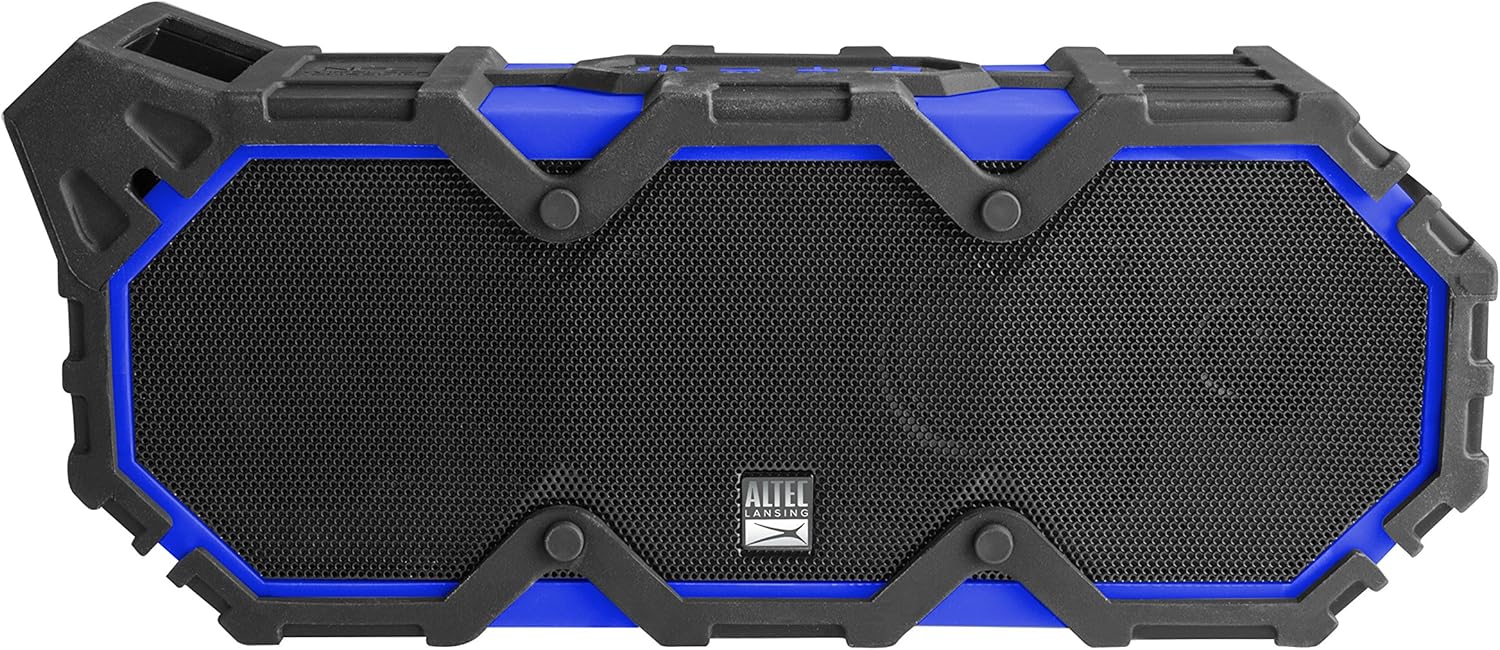
Rajah 1: Depan view of the Altec Lansing LifeJacket XL IMW789 Bluetooth Speaker.
2. Ciri-ciri Utama
- Kesambungan Bluetooth: Connects wirelessly to compatible devices up to 100 feet away.
- Reka bentuk tahan lasak: Certified IP67 rated for waterproof, shockproof, snowproof, and dustproof performance.
- Jangka Hayat Bateri: Provides an estimated 40 hours of audio playback on a single charge.
- Integrated Voice Assistant: Supports Siri and Google Assistant via speakerphone.
- Audio Kaya: Delivers stereo sound with deep bass and clear audio.
- Fungsi Bank Kuasa: USB port allows charging of external smart devices.
3. Apa yang ada di dalam Kotak
- Altec Lansing LifeJacket XL IMW789 Bluetooth Speaker
- Kabel Pengecas USB
- Manual Pengguna (dokumen ini)
4. Persediaan
4.1 Mengecas Speaker
- Locate the charging port on the side of the speaker, typically protected by a rubber flap.
- Open the rubber flap to expose the USB charging port.
- Connect the provided USB cable to the speaker's charging port and the other end to a USB power adapter (not included) or a computer's USB port.
- The LED indicator will show charging status. A full charge provides approximately 40 hours of playback.

Figure 2: Side panel with charging and auxiliary ports.
4.2 Berpasangan dengan Peranti Bluetooth
- Pastikan pembesar suara dicas sepenuhnya.
- Tekan dan tahan butang Kuasa (⏻) on the speaker until the LED indicator flashes blue, indicating pairing mode.
- On your smart device (smartphone, tablet, laptop), navigate to the Bluetooth settings.
- Select "LifeJacket XL" from the list of available devices.
- Sebaik sahaja disambungkan, penunjuk LED pada pembesar suara akan bertukar menjadi biru padu.
- Anda kini boleh memainkan audio daripada peranti anda melalui pembesar suara.
5. Arahan Operasi
5.1 Kawalan Asas
- Butang kuasa (⏻): Tekan dan tahan untuk menghidupkan/mematikan kuasa. Tekan pendek untuk memainkan/menjeda audio.
- Kelantangan Naik (+): Tekan pendek untuk meningkatkan kelantangan.
- Perlahankan suara (-): Tekan pendek untuk mengurangkan kelantangan.
- Track Skip (>>): Press and hold Volume Up to skip to the next track.
- Track Back (<<): Press and hold Volume Down to go to the previous track.
- Jawab/Tamatkan Panggilan: Short press the Power button during an incoming call.
- Aktifkan Pembantu Suara: Short press the dedicated voice assistant button (if available, refer to speaker diagram).
5.2 Using the Altec Lansing App
Download the Altec Lansing app from your device's app store to access additional features, including equalizer adjustments for customized sound profiles (Pop, Rock, Classical, Dance, etc.).
5.3 Kefungsian Power Bank
The speaker features a USB-A output port (located under the rubber flap) that allows you to charge other USB-powered devices, such as smartphones or tablets, using the speaker's internal battery.
6. Penyelenggaraan
- Pembersihan: Lap pembesar suara dengan lembut, damp kain. Jangan gunakan bahan kimia yang keras atau pembersih yang kasar.
- Pendedahan Air: Ensure all rubber flaps covering ports are securely closed before exposing the speaker to water. After exposure to saltwater or chlorinated water, rinse the speaker with fresh water and allow it to dry completely before charging or opening ports.
- Storan: Simpan pembesar suara di tempat yang sejuk dan kering jauh dari cahaya matahari langsung dan suhu yang melampau.
- Penjagaan Bateri: For optimal battery life, charge the speaker regularly, even if not in frequent use. Avoid fully discharging the battery for extended periods.

Figure 3: The speaker is designed to float and be used in water.
7. Penyelesaian masalah
| Masalah | Kemungkinan Punca | Penyelesaian |
|---|---|---|
| Speaker tidak dihidupkan. | Bateri lemah. | Cas pembesar suara menggunakan kabel USB yang disediakan. |
| Tidak boleh berpasangan dengan peranti Bluetooth. | Pembesar suara tidak dalam mod berpasangan; peranti terlalu jauh; gangguan. | Ensure speaker is in pairing mode (flashing blue LED). Move device closer to speaker. Turn off other Bluetooth devices. |
| Tiada bunyi atau kelantangan rendah. | Kelantangan terlalu rendah pada pembesar suara atau peranti; sumber audio yang salah. | Increase volume on both speaker and connected device. Verify correct audio output on your device. |
| Audio cuts out or is distorted. | Device too far from speaker; obstacles between devices; low battery. | Move device closer to speaker. Remove obstacles. Charge the speaker. |
8. Spesifikasi
- Nama Model: IMW789-CB
- Jenis pembesar suara: Luar
- Ketersambungan: Bluetooth, Wi-Fi (Note: Wi-Fi connectivity may refer to app control or specific features, primary audio is Bluetooth)
- Julat Bluetooth: Sehingga 100 kaki
- Tahan Air: IP67 (Waterproof, Shockproof, Snowproof, Dustproof)
- Hayat Bateri: Anggaran 40 jam
- Sumber Kuasa: Dikuasakan Bateri (termasuk 1 bateri Lithium Ion)
- Mod Output Audio: Stereo
- Kuasa Output Maksimum Pembesar Suara: 10 Watt
- Dimensi: 10 x 6.3 x 4.3 inci
- Berat Barang: 4.1 paun
- Pengeluar: Sakar Antarabangsa
9. Maklumat Waranti
The Altec Lansing LifeJacket XL IMW789 Bluetooth Speaker comes with a Limited Warranty. For specific terms and conditions, please refer to the warranty card included with your product or visit the official Altec Lansing webtapak.
10. Sokongan Pelanggan
For further assistance, technical support, or to inquire about replacement parts, please contact Altec Lansing customer service. Contact details can typically be found on the product packaging or the official Altec Lansing webtapak.