1. Pengenalan
Terima kasih kerana membeliasing the Supersonic SC-20H DVD Player. This manual provides essential information for the proper installation, operation, and maintenance of your device. Please read this manual thoroughly before using the product and retain it for future reference.
2. Maklumat Keselamatan
Untuk memastikan operasi yang selamat dan mengelakkan kerosakan, patuhi langkah berjaga-jaga berikut:
- Sumber Kuasa: Connect the player only to a power supply within the specified range (110-240V, 50/60Hz).
- Pengudaraan: Jangan sekat bukaan pengudaraan. Pastikan ruang yang mencukupi di sekeliling unit untuk aliran udara yang betul.
- Kelembapan: Do not expose the player to rain, moisture, or dripping/splashing liquids. Do not place objects filled with liquids, such as vases, on the apparatus.
- haba: Jauhkan pemain daripada sumber haba seperti radiator, daftar haba, dapur atau peralatan lain (termasuk amppenghidup) yang menghasilkan haba.
- Pembersihan: Unplug the player from the wall outlet before cleaning. Use a dry cloth for cleaning.
- Servis: Jangan cuba servis produk ini sendiri. Rujuk semua perkhidmatan kepada pegawai perkhidmatan yang berkelayakan.
- Amaran Cadangan 65 California: Produk ini mengandungi bahan kimia yang diketahui oleh Negeri California untuk menyebabkan kanser dan kecacatan kelahiran atau bahaya pembiakan lain.
3. Kandungan Pakej
Sahkan bahawa semua item terdapat dalam pakej:
- Supersonic SC-20H DVD Player
- Kabel Bekalan Kuasa
- AV Cables (Composite)
- Full Function Remote Control (Batteries not included)
- Manual Pengguna (dokumen ini)
4. Produk Lebihview
4.1 Panel Depan
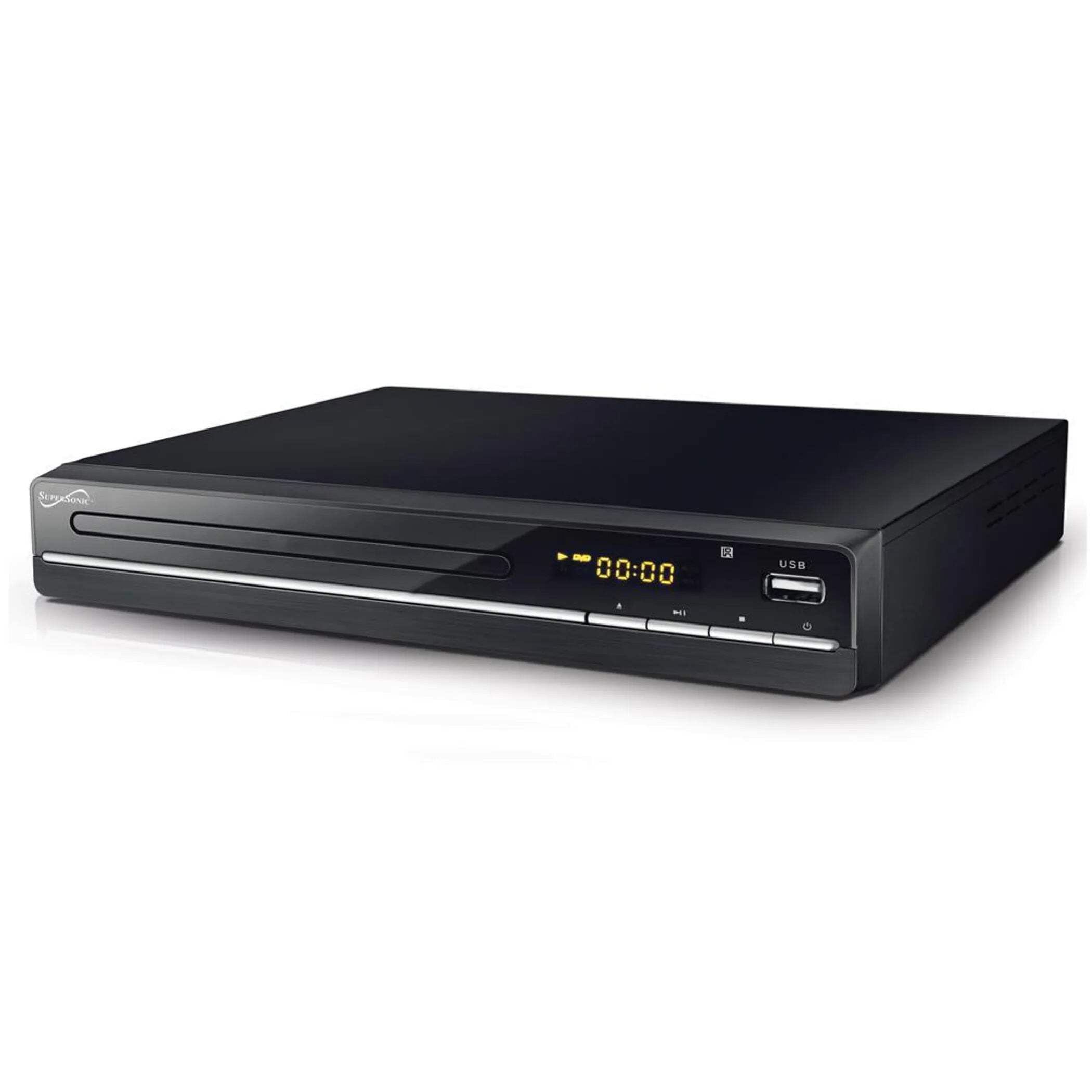
The image above displays the front panel of the SC-20H DVD Player. Key features include:
- Dulang Cakera: For inserting DVDs, VCDs, CDs, and other compatible discs.
- Skrin Paparan: Shows playback time, track number, and other operational information.
- Butang Kawalan: Includes Play/Pause, Stop, Previous, Next, and Power buttons for direct control.
- Input USB: Allows connection of USB flash drives for media playback.
- Slot Kad SD: For inserting SD cards to play media files. (Note: The image primarily shows the USB port, but the product features indicate an SD input as well, typically located near the USB port or on the side).
4.2 Panel Belakang
The rear panel of the DVD player contains all the necessary connection ports for audio and video output.
- Output HDMI: Connects to an HDMI-enabled TV or display for high-definition audio and video.
- Composite A/V Output (RCA): Yellow (Video), White (Left Audio), Red (Right Audio) jacks for standard definition connection to older TVs.
- Component YUV Output: Y (Luminance), Pb (Blue difference), Pr (Red difference) jacks for progressive scan video output, offering better quality than composite.
- Input Kuasa: For connecting the power supply cable.
5. Persediaan
5.1 Menyambung ke Televisyen
Pilih salah satu daripada kaedah sambungan berikut:
- Sambungan HDMI (Disyorkan):
- Connect one end of an HDMI cable (not included) to the HDMI OUT port on the DVD player.
- Sambungkan hujung kabel HDMI yang satu lagi ke port HDMI IN pada televisyen anda.
- Pilih input HDMI yang sepadan pada TV anda menggunakan alat kawalan jauhnya.
- Composite A/V Connection:
- Connect the yellow RCA cable to the VIDEO OUT port on the DVD player and the VIDEO IN port on your TV.
- Connect the white RCA cable to the L AUDIO OUT port on the DVD player and the L AUDIO IN port on your TV.
- Connect the red RCA cable to the R AUDIO OUT port on the DVD player and the R AUDIO IN port on your TV.
- Select the corresponding A/V input on your TV.
- Component YUV Connection:
- Connect the Y, Pb, and Pr cables to the corresponding YUV OUT ports on the DVD player and YUV IN ports on your TV.
- For audio, use the white and red RCA cables to connect the L/R AUDIO OUT ports on the DVD player to the L/R AUDIO IN ports on your TV.
- Select the corresponding Component input on your TV.
5.2 Sambungan Kuasa
After connecting the audio/video cables, plug the power supply cable into the DVD player's power input and then into a wall outlet.
6. Arahan Operasi
6.1 Main Semula Cakera Asas
- Hidupkan kuasa: Tekan butang Kuasa pada panel hadapan atau alat kawalan jauh.
- Masukkan Cakera: Press the OPEN/CLOSE button to open the disc tray. Place a compatible disc (DVD, VCD, CD, KODAK CD, DVD±R/RW, CD-R, CD-RW) onto the tray with the label side facing up. Press OPEN/CLOSE again to close the tray.
- Main balik: The player will typically begin playback automatically. If not, press the PLAY button.
- Jeda/Sambung semula: Press the PAUSE button to temporarily stop playback. Press PLAY again to resume.
- Berhenti: Tekan butang STOP untuk menamatkan main balik.
- Skip Tracks/Chapters: Use the PREVIOUS and NEXT buttons to navigate between tracks or chapters.
6.2 USB/SD Media Playback
- Sisipkan Media: Masukkan pemacu kilat USB ke dalam port USB atau kad SD ke dalam slot kad SD.
- Pilih Sumber: Use the SOURCE or USB/SD button on the remote control to switch to the USB or SD input.
- Semak imbas Files: Use the navigation buttons (Up, Down, Left, Right) and OK button on the remote to browse through your media files (MP3, video formats).
- Main File: Pilih yang dikehendaki file and press the PLAY button to begin playback.
6.3 System Settings (OSD Menu)
Access the On-Screen Display (OSD) menu to configure various settings:
- Menu Akses: Press the SETUP button on the remote control.
- Navigasi: Use the navigation buttons to move through menu options.
- Pilihan: Press OK to select an option or enter a sub-menu.
- Keluar: Press SETUP again to exit the menu.
Tetapan utama termasuk:
- Bahasa: Set OSD menu language and subtitle language (supports multiple languages).
- Nisbah Aspek: Choose between 4:3 (Standard) and 16:9 (Widescreen) for video output.
- Kawalan Ibu Bapa: Set a password and rating level to restrict playback of certain content.
- Tetapan Audio: Adjust audio output modes (e.g., Surround).
7. Penyelenggaraan
Proper maintenance ensures the longevity of your DVD player:
- Membersihkan Unit: Wipe the exterior of the player with a soft, dry cloth. Do not use liquid cleaners or aerosol sprays.
- Pembersihan Cakera: Use a soft, lint-free cloth to wipe discs from the center outwards. Do not use abrasive cleaners or solvents.
- Pengendalian Cakera: Always hold discs by their edges to avoid fingerprints and scratches. Store discs in their cases when not in use.
- Pengudaraan: Pastikan bukaan pengudaraan bebas daripada habuk dan serpihan untuk mengelakkan pemanasan melampau.
8. Penyelesaian masalah
Jika anda menghadapi masalah, rujuk kepada masalah dan penyelesaian biasa berikut:
| Masalah | Kemungkinan Punca | Penyelesaian |
|---|---|---|
| Tiada kuasa | Kabel kuasa tidak disambungkan; Salur keluar kuasa rosak | Pastikan kabel kuasa dipasang dengan selamat. Uji alur keluar dengan peranti lain. |
| Tiada gambar | Incorrect video connection; Wrong TV input selected | Check video cables (HDMI, Composite, Component) are correctly connected. Select the correct input source on your TV. |
| Tiada bunyi | Incorrect audio connection; TV/player volume too low; Mute activated | Check audio cables (HDMI, RCA) are correctly connected. Increase volume on TV and player. Deactivate mute function. |
| Cakera tidak dimainkan | Disc inserted incorrectly; Disc is dirty or scratched; Incompatible disc format | Ensure disc is inserted label-side up. Clean the disc. Check if the disc format is supported (DVD, VCD, CD, KODAK CD, DVD±R/RW, CD-R, CD-RW, MP3). |
| USB/SD media not playing | Incorrect source selected; Incompatible file format; USB/SD device faulty | Select USB or SD source. Ensure media files are compatible. Try another USB/SD device. |
9. Spesifikasi
Detailed technical specifications for the Supersonic SC-20H DVD Player:
- model: SC-20H
- Jenama: Supersonik
- Keserasian Cakera: DVD, VCD, KODAK CD, DVD±R/RW, CD, CD-R, CD-RW, MP3
- Output Video: HDMI, Composite A/V, Component YUV
- Mod Output Audio: Keliling
- Resolusi: 1920x1080 (via HDMI)
- Ketersambungan: USB 2.0, SD Card Slot
- Bekalan Kuasa: 110-240V, 50/60Hz
- Penggunaan Kuasa: 15W
- Dimensi (L x W x H): 10.5 x 10 x 3.3 inci
- Berat Barang: 1.75 paun
- Ciri Khas: Multi-language subtitles (up to 32 languages), PAL/NTSC compatible, Parental Lock, Aspect Ratio (4:3, 16:9)
10. Waranti & Sokongan
For warranty information and technical support, please refer to the documentation included with your purchase or visit the official Supersonic webtapak. Simpan bukti pembelian anda untuk sebarang tuntutan waranti.


