1. Pengenalan
This user manual provides detailed instructions for the installation, setup, operation, and maintenance of the Fantini Cosmi CH180 Backlit Touch Chronothermostat. Please read this manual thoroughly before installation and use to ensure proper function and safety. This device is designed to control heating systems, offering programmable temperature management for enhanced comfort and energy efficiency.
2. Maklumat Keselamatan
- Pemasangan Elektrik: Installation must be performed by a qualified electrician in accordance with local electrical codes and regulations. Ensure the main power supply is disconnected before commencing any wiring work.
- Voltage: The CH180-230V model operates on 230 Volts AC. Verify your power supply matches this requirement.
- penempatan: Install the chronothermostat away from direct sunlight, drafts, and heat sources (e.g., radiators, lamps) to ensure accurate temperature readings. Avoid placing it near doors or windows.
- Pembersihan: Gunakan kain lembut dan kering untuk pembersihan. Jangan gunakan pembersih atau pelarut yang melelas.
- Pembongkaran: Jangan cuba membuka atau membaiki peranti ini sendiri. Rujuk semua servis kepada kakitangan yang berkelayakan.
3. Produk Lebihview
The Fantini Cosmi CH180 is a modern, backlit touch chronothermostat designed for intuitive control of your heating system. Its clear LCD display provides essential information at a glance, while the touch-sensitive buttons allow for easy programming and mode selection.
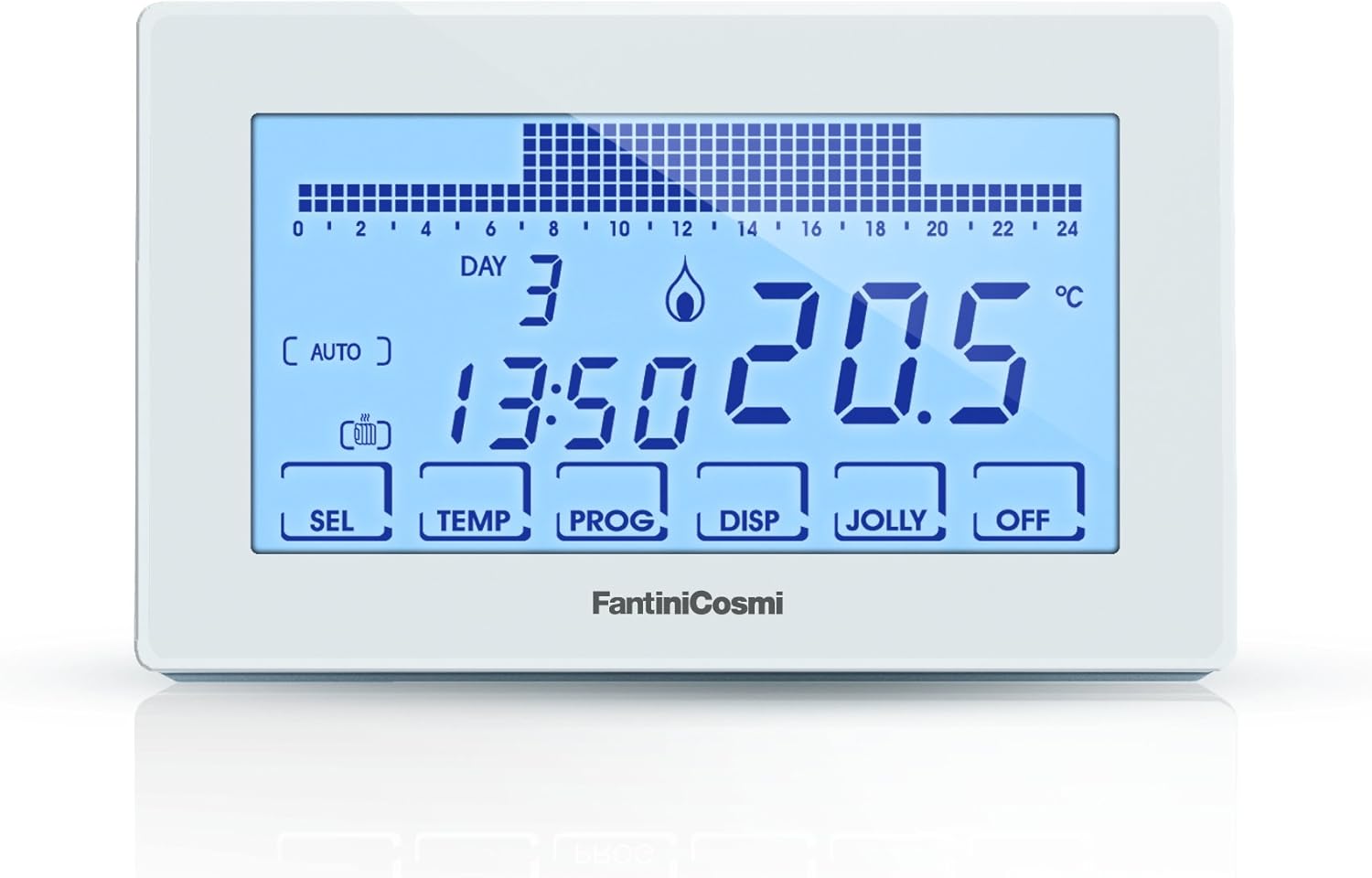
Figure 1: Fantini Cosmi CH180 Chronothermostat Display
This image displays the Fantini Cosmi CH180 Chronothermostat's backlit LCD screen. The screen shows the current day (DAY 3), time (13:50), and temperature (20.5 °C). Below the main display, touch-sensitive buttons are visible: SEL, TEMP, PROG, DISP, JOLLY, and OFF. The 'AUTO' indicator is active, and a flame icon suggests heating is engaged. A bar graph at the top indicates the programmed temperature profile lebih 24 jam.
Komponen Utama:
- Paparan LCD: Shows current time, day, temperature, operating mode, and programming schedule.
- Butang Sentuh:
- SEL: Pilih/Sahkan
- TEMP: Laraskan tetapan suhu
- PROG: Access programming menu for weekly schedules
- DISP: Change display information or backlight settings
- JOLLY: Activate "Jolly" (Holiday) mode
- MATI: Turn the heating system off
- Bateri Dalaman: Maintains programming settings during power outages (non-replaceable).
4. Pemasangan
4.1 Lokasi Pemasangan
Choose an interior wall, approximately 1.5 meters (5 feet) from the floor, in a central area of the room that represents the average temperature. Avoid locations near windows, doors, air vents, or direct sunlight, as these can affect temperature accuracy.
4.2 Pendawaian
WARNING: Disconnect power to the heating system at the main circuit breaker before proceeding with wiring to prevent electrical shock.
- Carefully remove the front cover of the chronothermostat to access the wiring terminals.
- Connect the 230V AC power supply wires to the designated terminals. Refer to the wiring diagram provided with the product packaging for specific terminal assignments.
- Connect the heating system control wires (e.g., boiler input) to the appropriate relay terminals on the chronothermostat. Ensure all connections are secure.
- Some installations may require a neutral jumper connection. Consult the detailed wiring diagram specific to your heating system and the chronothermostat.
- Once wiring is complete, reattach the front cover securely.
It is strongly recommended that a qualified electrician performs the wiring to ensure safety and compliance with all applicable standards.
5. Persediaan Awal
After power is restored, the chronothermostat will typically prompt for initial setup.
- Hidupkan kuasa: Restore power to the heating system at the main circuit breaker. The display should illuminate.
- Tetapan Masa dan Tarikh:
- Tekan ke SEL butang untuk masuk ke menu persediaan.
- Gunakan TEMP buttons (up/down arrows, if present, or repeated presses of TEMP) to adjust the hour, then press SEL untuk mengesahkan.
- Repeat for minutes, day of the week, month, and year.
- Tekan SEL or wait for the device to exit the setting mode automatically.
- Tetapan Lampu Latar:
- Tekan HILANGKAN to cycle through backlight options: OFF, ON (for a few seconds after touch), ALWAYS ON.
- If "ALWAYS ON" is selected, you may be able to adjust intensity using TEMP buttons. The device offers 5 intensity levels. Note that the lowest setting might still be bright in dark environments.
6. Mod Operasi
The CH180 offers several operating modes to suit your needs:
- Automatic Mode (AUTO): The chronothermostat follows the programmed weekly schedule. This is the default and most energy-efficient mode.
- Manual Mode (MAN): Allows you to set a constant temperature that overrides the programmed schedule until the next programmed event or until you switch back to AUTO mode.
- Tekan TEMP to adjust the desired temperature. The device will maintain this temperature.
- To return to AUTO mode, press PROG or SEL (depending on model variant) until AUTO is displayed.
- Jolly Mode (Holiday Mode): Designed for periods when you are away. You can set a specific temperature for a defined duration (e.g., several days).
- Tekan MERIAH.
- guna TEMP to set the desired temperature and the duration in days.
- Sahkan dengan SEL. The device will revert to AUTO mode after the set duration.
- Mod MATI: Turns off the heating system. The display will show "OFF" and the temperature will not be regulated.
- Tekan DIMATIKAN to activate this mode.
- Press any other mode button (e.g., PROG for AUTO) to exit OFF mode.
7. Programming Weekly Schedule
The CH180 allows for detailed weekly programming with multiple temperature levels (T1, T2, T3) throughout the day.
- Masukkan Pengaturcaraan: Tekan ke PROG button. The display will show the current day and a flashing time segment.
- Pilih Hari: Gunakan SEL button to cycle through the days of the week (or a dedicated day button if available).
- Set Temperature Levels (T1, T2, T3):
- For each hour segment, use the TEMP buttons to select the desired temperature level (T1, T2, T3, or OFF).
- T1: Comfort temperature (e.g., 20°C)
- T2: Economy temperature (e.g., 18°C)
- T3: Anti-freeze temperature (e.g., 5°C)
- MATI: Heating off for that hour.
- Advance Through Hours: After setting the temperature level for an hour, the display will automatically advance to the next hour, or you can use SEL untuk bergerak ke hadapan.
- Copy Program: Some models allow copying a day's program to other days. Consult the specific on-screen prompts.
- Pengaturcaraan Keluar: Tekan PROG again or wait for the device to time out and return to the main display.
You can modify the default temperature values for T1, T2, and T3 in the advanced settings menu (often accessed by holding SEL or PROG for a few seconds).
8. Penyelenggaraan
- Pembersihan: Wipe the chronothermostat's surface with a soft, dry, or slightly damp cloth. Do not use chemical cleaners, as they may damage the display or casing.
- Bateri Dalaman: The CH180 features an internal battery that preserves settings during power outages. This battery is designed for the lifetime of the product and does not require replacement.
- Pemeriksaan biasa: Periodically ensure the chronothermostat is securely mounted and that no obstructions are blocking its temperature sensor.
9. Penyelesaian masalah
| Masalah | Kemungkinan Punca | Penyelesaian |
|---|---|---|
| Paparan kosong | No power supply; loose wiring. | Check circuit breaker. Ensure wiring connections are secure (consult an electrician if unsure). |
| Pemanasan tidak hidup/mati | Incorrect mode; incorrect temperature setting; wiring issue; heating system fault. | Verify operating mode (AUTO, MAN). Check programmed temperatures. Ensure desired temperature is above/below current room temperature. Consult an electrician for wiring check. Check heating system (boiler, furnace). |
| Butang sentuh tidak bertindak balas | Screen dirty; temporary software glitch. | Clean the screen with a soft, dry cloth. Briefly disconnect and reconnect power (at the circuit breaker) to reset the device. |
| Bacaan suhu tidak tepat | Poor placement; sensor obstruction. | Ensure the chronothermostat is not in direct sunlight, near drafts, or heat sources. Remove any objects blocking the sensor. |
| Programming not saving | Programming steps not completed correctly. | Review Section 7 and ensure all steps are followed, including confirmation. |
If problems persist after attempting these solutions, please contact Fantini Cosmi customer support or a qualified technician.
10. Spesifikasi Teknikal
- Jenama: Fantini Cosmi
- model: CH180-230V
- warna: putih
- Dimensi (L x W x H): 12.8 x 2.4 x 8.2 cm (5.04 x 0.94 x 3.23 inci)
- Berat: 180 g (0.4 paun)
- Vol Operasitage: 230 Voltan AC
- Sumber Kuasa: AC (Mains powered)
- Jenis Pengawal: Manual Control (with programmable features)
- Protokol Ketersambungan: BACnet MS/TP (for advanced system integration, if applicable)
- Lampu latar: Yes, adjustable intensity
- Bateri Dalaman: Non-replaceable, for program retention during power loss.
- International Article Code (EAN): 08025863053606
11. Waranti dan Sokongan
Fantini Cosmi products are manufactured to high-quality standards. For information regarding warranty terms and conditions, please refer to the documentation included with your purchase or visit the official Fantini Cosmi website. For technical support, troubleshooting assistance, or spare parts inquiries, please contact Fantini Cosmi customer service directly.
Simpan resit pembelian anda sebagai bukti pembelian untuk tuntutan waranti.


