1. Pengenalan
This manual provides detailed instructions for the Gembird MUSG-04 USB Optical Gaming Mouse. It covers product features, setup procedures, operational guidelines, maintenance tips, and troubleshooting information to ensure optimal use of your device.

Image 1.1: The Gembird MUSG-04 Gaming Mouse presented in its retail packaging, highlighting the product's design and branding.
2. Ciri-ciri Produk
The Gembird MUSG-04 is designed for gaming, offering a range of features for enhanced control and customization:
- Programmable 8-Button Design: Provides extensive customization options for various in-game actions.
- DPI boleh laras: Quick DPI button allows on-the-fly sensitivity adjustments from 1200 to 3200 DPI.
- Pengaturcaraan Makro: Dedicated software enables creation and assignment of complex macro commands to buttons.
- Illuminated Elements: Features an illuminated scroll wheel, logo, and side accents for visual feedback and aesthetic appeal.
- Ergonomic Right-Handed Design: Shaped for comfortable use during extended gaming sessions.
- Kesambungan USB: Antara muka USB standard untuk keserasian yang luas.
- Kabel Tahan Lama: 1.5-meter braided cable for reliable connection and longevity.
- Wide Operating System Support: Compatible with Windows 10 and other recent Windows operating systems.

Imej 2.1: Sebelah view of the Gembird MUSG-04 mouse, showcasing its ergonomic contours and button placement designed for right-handed users.
3. Kandungan Pakej
Sahkan bahawa pakej anda mengandungi item berikut:
- Gembird MUSG-04 USB Optical Gaming Mouse
- Manual Pengguna (dokumen ini)
- Macro Programming Software (typically available via download or included on a mini-CD)

Image 3.1: The side of the Gembird MUSG-04 retail box, displaying key features and specifications of the gaming mouse.
4. Arahan Persediaan
4.1. Sambungan Perkakasan
- Cari port USB yang tersedia pada komputer anda.
- Plug the USB connector of the Gembird MUSG-04 mouse into the USB port.
- Your operating system will typically detect the mouse automatically and install the necessary drivers. This process may take a few moments.
4.2. Software Installation (Optional for Macro Programming)
To utilize the programmable buttons and macro features, install the dedicated software:
- If a mini-CD is included, insert it into your computer's optical drive and follow the on-screen instructions.
- Alternatively, download the latest software from the official Gembird support webtapak.
- Run the installer and follow the prompts to complete the software installation.
- Mulakan semula komputer anda jika digesa.
5. Mengendalikan Tetikus
5.1. Fungsi Butang
The Gembird MUSG-04 features 8 buttons with default functions:
- Butang Kiri: Fungsi klik utama.
- Butang Kanan: Fungsi klik sekunder (menu konteks).
- Roda Tatal: Scrolls content up/down. Pressing it acts as a middle click.
- Butang DPI: Cycles through preset DPI sensitivity levels (e.g., 1200, 1600, 2400, 3200 DPI).
- Butang Maju/Mundur: Navigasi web halaman atau folder.
- Butang Api: Often used for rapid-fire actions in games.
- Butang Makro: Customizable via software for specific commands or macros.
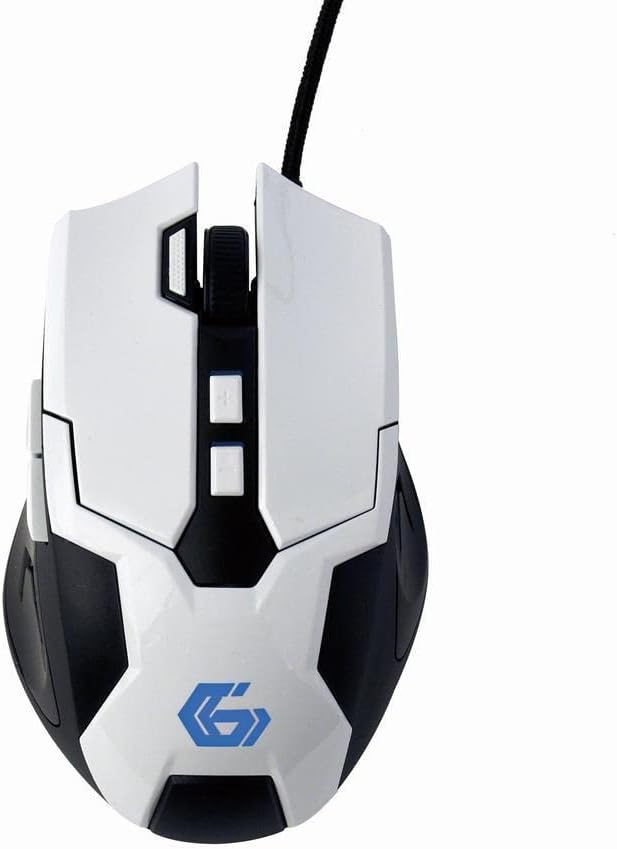
Imej 5.1: Atas ke bawah view of the Gembird MUSG-04 mouse, illustrating the placement of its various buttons, including the left, right, scroll wheel, DPI, and side buttons. The Gembird logo is illuminated in blue.
5.2. Adjusting DPI
Tekan ke butang DPI (usually located behind the scroll wheel) to cycle through the available sensitivity settings. Each press will switch to the next DPI level, indicated by a change in the mouse's illumination color or pattern (if supported).
5.3. Macro Programming
The included macro programming software allows you to customize button functions and create complex sequences of commands. Refer to the software's built-in help or the Gembird support website for detailed instructions on macro creation and assignment.
5.4. Pencahayaan
The mouse features dynamic illumination on its scroll wheel, logo, and side accents. These lights may change color based on the selected DPI setting or can be customized via the macro programming software.

Image 5.2: The Gembird MUSG-04 mouse with its logo and side accents illuminated in green, demonstrating the customizable lighting feature.
6. Penyelenggaraan
To ensure the longevity and optimal performance of your Gembird MUSG-04 mouse, follow these maintenance guidelines:
- Pembersihan: Gunakan kain lembut, kering dan tidak berbulu untuk mengelap permukaan tetikus. Untuk kotoran degil, lap sedikitampen kain dengan air atau larutan pembersih lembut. Elakkan bahan kimia yang keras atau bahan yang melelas.
- Sensor Optik: Periodically clean the optical sensor area on the underside of the mouse with a cotton swab to prevent tracking issues.
- Penjagaan Kabel: Avoid sharply bending or twisting the USB cable. Store the mouse in a way that prevents stress on the cable connection.
- Storan: Apabila tidak digunakan untuk tempoh yang lama, simpan tetikus di persekitaran yang bersih dan kering, jauh daripada cahaya matahari langsung dan suhu yang melampau.
7. Penyelesaian masalah
If you encounter issues with your Gembird MUSG-04 mouse, refer to the following common problems and solutions:
- Tetikus Tidak Menjawab:
- Pastikan kabel USB dipasang dengan selamat ke dalam port USB yang berfungsi.
- Cuba pasangkan tetikus ke port USB yang berbeza pada komputer anda.
- Test the mouse on another computer to determine if the issue is with the mouse or the computer.
- Mulakan semula komputer anda.
- Pergerakan Kursor Tidak Menentu:
- Bersihkan sensor optik di bahagian bawah tetikus.
- Pastikan anda menggunakan tetikus pada permukaan yang sesuai (cth, pad tetikus). Elakkan permukaan yang sangat reflektif atau lutsinar.
- Check for any software conflicts or outdated drivers.
- Buttons Not Working/Macros Not Activating:
- Verify that the macro programming software is correctly installed and running.
- Semak tugasan butang dalam perisian.
- Ensure the software profile sedang aktif.
- Illumination Not Working:
- Check software settings for illumination control.
- Ensure the mouse is receiving sufficient power from the USB port.
8. Spesifikasi
| Ciri | Spesifikasi |
|---|---|
| Jenama | Burung permata |
| Model | MUSG-04 |
| Teknologi Ketersambungan | USB |
| Teknologi Pengesanan Pergerakan | Optik |
| Sensitiviti DPI | Boleh Laras (1200-3200 DPI) |
| Bilangan Butang | 8 (Boleh Diprogram) |
| Panjang Kabel | 1.5 meter |
| Sokongan Sistem Pengendalian | Windows 10 dan lebih baru |
| Dimensi Produk (LxWxH) | 4.96 x 3.19 x 1.61 inci (12.6 x 8.1 x 4.1 cm) |
| Berat Barang | 8.3 auns (235 gram) |
9. Waranti dan Sokongan
For warranty information, please refer to the documentation provided with your purchase or visit the official Gembird website. Technical support and driver downloads can also be found on the Gembird support portal.
For further assistance, please contact Gembird customer service through their official channels.