pengenalan
Terima kasih kerana membeliasing the Trevi RR 501 BT Portable Bluetooth, USB, SD, MP3 Stereo Boombox. This manual provides essential information for the safe and efficient use of your new device. Please read these instructions carefully before operating the unit and retain them for future reference.
Maklumat Keselamatan
- Jangan dedahkan perkakas ini kepada hujan atau lembapan.
- Jangan sekat sebarang bukaan pengudaraan.
- Pastikan kord kuasa tidak tersepit atau berjalan.
- Hanya gunakan lampiran/aksesori yang ditentukan oleh pengilang.
- Cabut plag perkakas semasa ribut petir atau apabila tidak digunakan untuk jangka masa yang lama.
- Rujuk semua servis kepada kakitangan perkhidmatan yang berkelayakan.
- Jangan buka unit casing; tiada bahagian yang boleh diservis pengguna di dalamnya.
Kandungan Pakej
Sila pastikan item berikut disertakan dalam pakej anda:
- Trevi RR 501 BT Boombox Unit
- Kabel Kuasa AC
- Manual Pengguna (dokumen ini)
Produk Selesaiview
Familiarize yourself with the main components of your Trevi RR 501 BT Boombox.
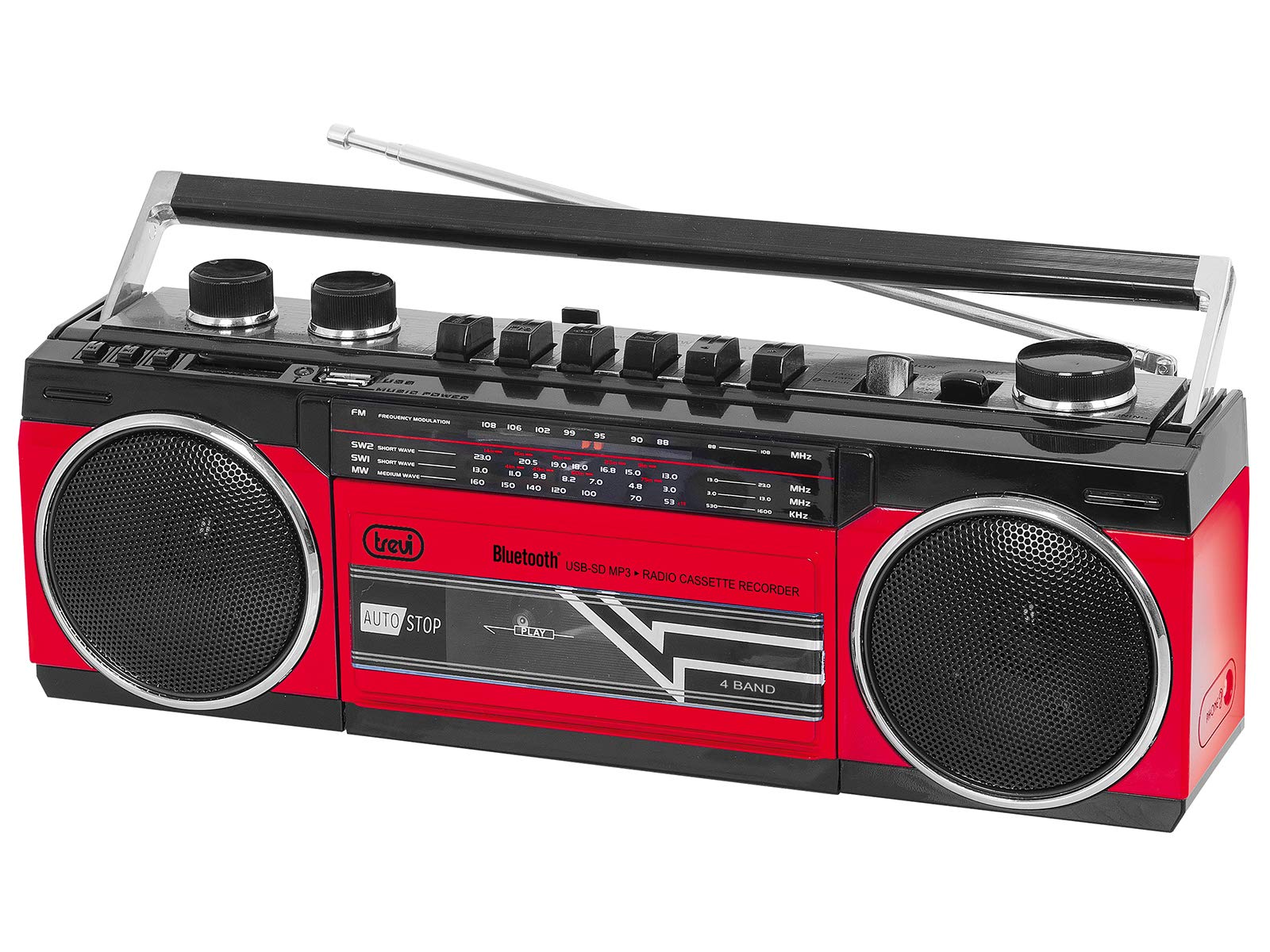
Rajah 1: Depan view of the Trevi RR 501 BT Boombox, showing the dual speakers, control panel, and cassette deck.

Rajah 2: bersudut view of the Trevi RR 501 BT Boombox, highlighting the side profile dan mengendalikan.
Komponen Utama:
- Penceramah: Two integrated stereo speakers.
- Panel Kawalan: Buttons for playback, mode selection, and tuning.
- Tombol Kelantangan: Melaraskan tahap output audio.
- Tombol Penalaan: For radio frequency selection.
- Pemilih Mod: Switches between Radio, Bluetooth, USB, SD, and Cassette modes.
- Dek Kaset: For playing and recording audio cassettes.
- Port USB: Untuk main balik pemacu kilat USB.
- Slot Kad SD: Untuk main balik kad SD.
- Antena: Telescopic antenna for FM radio reception.
- Input Kuasa: Untuk menyambungkan kabel kuasa AC.
- Petak Bateri: (Located on the bottom/rear) For optional battery operation.
Persediaan
Sambungan Kuasa:
- Kuasa AC: Insert the AC power cable into the AC input jack on the back of the unit, then plug the other end into a standard wall outlet.
- Kuasa Bateri (Pilihan): Open the battery compartment cover (usually on the bottom or rear). Insert the required number of D-size batteries (not included), ensuring correct polarity (+/-). Close the compartment cover securely.
Note: When using AC power, batteries are automatically disconnected. Remove batteries if the unit will not be used for an extended period.
Arahan Operasi
Menghidupkan/Mematikan:
To turn the unit on, rotate the Tombol Kelantangan clockwise until you hear a click. To turn off, rotate the Tombol Kelantangan counter-clockwise until it clicks off.
Radio Operation (FM):
- Hidupkan unit.
- Tetapkan Pemilih Mod to "RADIO".
- Panjangkan antena teleskopik untuk penerimaan optimum.
- Putar Tombol Penalaan to select your desired FM station.
- Laraskan Tombol Kelantangan to your preferred listening level.
Sambungan Bluetooth:
- Hidupkan unit.
- Tetapkan Pemilih Mod to "BT" (Bluetooth). The unit will enter pairing mode, indicated by a flashing LED.
- Pada peranti anda yang didayakan Bluetooth (cth., telefon pintar, tablet), dayakan Bluetooth dan cari peranti yang tersedia.
- Select "Trevi RR 501 BT" from the list of devices.
- Once paired, the LED indicator will stop flashing and remain solid. You can now play audio from your device through the boombox.
Main balik USB/SD:
- Hidupkan unit.
- Masukkan pemacu kilat USB ke dalam Port USB atau kad SD ke dalam Slot Kad SD. Ensure the media contains MP3 audio files.
- Tetapkan Pemilih Mod to "USB/SD". The unit will automatically begin playing the first compatible audio file.
- Use the playback control buttons (e.g., Play/Pause, Next, Previous) on the unit to manage your audio.
Main Semula Kaset:
- Hidupkan unit.
- Tekan ke BERHENTI/EJECT button on the cassette deck to open the cassette compartment.
- Insert an audio cassette with the open edge facing upwards and the tape side facing you. Close the compartment door.
- Tetapkan Pemilih Mod to "TAPE".
- Tekan ke BERMAIN butang untuk memulakan main balik.
- Gunakan REWIND dan CEPAT KE HADAPAN butang untuk menavigasi pita.
- Tekan BERHENTI/EJECT to stop playback and open the compartment.
Cassette Recording:
- Insert a blank cassette into the cassette deck.
- Select the desired audio source (Radio, Bluetooth, USB, SD) using the Pemilih Mod.
- Start playback of the source audio.
- Tekan ke REKOD button (usually red) on the cassette deck. The BERMAIN button will also engage. Recording will begin.
- Untuk berhenti merakam, tekan BERHENTI/EJECT butang.
Penyelenggaraan
- Pembersihan: Gunakan kain lembut dan kering untuk membersihkan bahagian luar unit. Jangan gunakan pembersih atau pelarut yang melelas.
- Penjagaan Dek Kaset: Bersihkan kepala pita dan penggelek picit secara berkala dengan kapas secara perlahan-lahanampditambah dengan isopropil alkohol.
- Storan: When not in use for extended periods, store the unit in a cool, dry place, away from direct sunlight and extreme temperatures. Remove batteries if applicable.
Menyelesaikan masalah
| Masalah | Kemungkinan Punca | Penyelesaian |
|---|---|---|
| Tiada kuasa | Power cable not connected; Batteries depleted or incorrectly inserted. | Check AC power connection; Replace batteries or ensure correct polarity. |
| Penerimaan radio yang lemah | Antena tidak dilanjutkan; Isyarat lemah. | Fully extend the telescopic antenna; Reposition the unit for better signal. |
| Bluetooth tidak berpasangan | Unit not in BT mode; Device too far; Already paired with another device. | Ensure mode is set to BT; Move device closer; Disconnect from other devices. |
| USB/SD tidak dimainkan | Mod salah; Tidak serasi file format; Corrupted media. | Set mode to USB/SD; Ensure files are MP3; Try different USB/SD media. |
| Isu main balik kaset | Cassette inserted incorrectly; Tape heads dirty. | Re-insert cassette correctly; Clean tape heads and pinch rollers. |
Spesifikasi
| Jenama | Trevi |
| Nombor Model | 0RR50102 |
| Teknologi Ketersambungan | Bluetooth, USB |
| Jenis Pembesar Suara | Stereo |
| Dimensi (L x W x H) | 50 x 50 x 28 sentimeter |
| Sumber Kuasa | AC |
| Berat Barang | 1.25 Kilogram |
| Kuasa Keluaran | 6 Watt |
| warna | merah |
| Gaya | Retro |
Waranti dan Sokongan
For warranty information and technical support, please refer to the warranty card included with your product or visit the official Trevi website. Information regarding spare parts availability and software updates is not provided in the product specifications.
Sila simpan bukti pembelian anda untuk sebarang tuntutan waranti.