
1. Produk Lebihview
The GeoVision GV-EFD4700-0F is an indoor, fixed, mini-sized network camera designed for day and night surveillance. It features an automatic IR-cut filter and integrated IR LEDs to ensure clear imaging in various lighting conditions. This model offers an entry-level surveillance solution with essential features and high image quality.
Ciri-ciri utama termasuk:
- 1/3" progressive scan super low lux CMOS sensor for minimal illumination at 0.02 lux.
- Dual streams supporting H.265, H.264, and MJPEG codecs.
- Video resolutions up to 20 fps at 2592 x 1520, 25 fps at 2560 x 1440, and 30 fps at 2048 x 1520.
- Intelligent IR with a distance of up to 15 meters (50 ft).
- Wide Dynamic Range Pro (WDR Pro) for clear images in high-contrast scenes.
- 3D noise reduction for improved image clarity.
- Built-in microphone for audio monitoring.
- 2-axis mechanism (pan / tilt) for flexible positioning.
- Power options: DC 12V or Power over Ethernet (PoE IEEE 802.3af).
2. Kandungan Pakej
Sila sahkan bahawa semua item ada dan dalam keadaan baik semasa membuka bungkusan:
- GeoVision GV-EFD4700-0F Mini Fixed IP Dome Camera
- Kit Skru Pemasangan
- Templat Pemasangan
- Panduan Permulaan Pantas / Manual Arahan (dokumen ini)
3. Maklumat Keselamatan
Read these instructions carefully before installation and operation. Keep this manual for future reference.
- Sumber Kuasa: Use only the specified power adapter (DC 12V) or a compliant PoE (IEEE 802.3af) switch. Incorrect voltage boleh merosakkan peranti.
- Pemasangan: Ensure the camera is securely mounted to prevent it from falling. Installation should be performed by qualified personnel if necessary.
- Persekitaran: This camera is designed for indoor use. Do not expose it to water, moisture, or extreme temperatures.
- Pembersihan: Putuskan kuasa sebelum membersihkan. Gunakan kain lembut dan kering. Jangan gunakan pembersih cecair atau aerosol.
- Servis: Jangan cuba servis produk ini sendiri. Rujuk semua perkhidmatan kepada pegawai perkhidmatan yang berkelayakan.
4. Persediaan dan Pemasangan
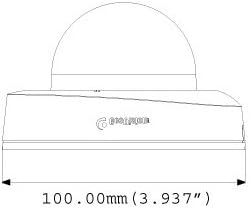
4.1 Dimensi Fizikal
Understand the camera's dimensions for proper placement and mounting.

4.2 Pilihan Pemasangan
The GV-EFD4700-0F supports both ceiling and wall-surface mounting.


4.3 Langkah Pemasangan
- Pilih Lokasi: Choose a suitable indoor location for optimal surveillance coverage.
- Sediakan Permukaan: Use the provided installation template to mark drilling points on the ceiling or wall.
- Lubang gerudi: Drill pilot holes according to the template. Insert wall anchors if necessary.
- Kamera Selamat: Attach the camera base to the mounting surface using the supplied screws.
- Sambungkan Kabel: Connect the Ethernet cable for network and PoE, or a DC 12V power adapter and a separate Ethernet cable.
- Laraskan Sudut: Loosen the adjustment screws to pan and tilt the camera lens to the desired viewing angle. Tighten screws once adjusted.
4.4 Tatarajah Awal
After physical installation and power connection, access the camera's web interface for initial setup:
- Sambungan Rangkaian: Ensure the camera is connected to your network. It will typically obtain an IP address via DHCP.
- Kamera Temui: Use GeoVision's IP Device Utility software or a network scanner to find the camera's IP address.
- Akses Web Antara muka: Buka a web browser and enter the camera's IP address.
- log masuk: Enter the default username and password (refer to the Quick Start Guide or GeoVision documentation for default credentials). Change these immediately for security.
- Tetapan Asas: Configure network settings, date/time, video resolution, and recording preferences.
5. Mengendalikan Kamera
5.1 Langsung View dan Rakaman
Once configured, you can access the live video feed through the web interface or compatible NVR/VMS software. The camera supports continuous recording, scheduled recording, and event-triggered recording (e.g., motion detection).
- Mampatan H.265: Utilizes H.265 video codec for efficient storage and reduced network bandwidth while maintaining high image quality.
- WDR Pro: Wide Dynamic Range Pro enhances image visibility in scenes with both very bright and very dark areas.
- Fungsi IR: The built-in IR LEDs automatically activate in low-light conditions, providing clear black and white images up to 15 meters.
5.2 Pengesanan Gerakan dan Makluman
Configure motion detection zones and sensitivity within the camera's web interface. The camera can be set to trigger recordings, send email alerts, or notify your VMS upon detecting motion.
5.3 Pemantauan Audio
The integrated microphone allows for audio monitoring of the surveillance area. Audio settings can be adjusted via the web antara muka.
6. Penyelenggaraan
6.1 Pembersihan
Regularly clean the camera lens and housing to ensure optimal image quality. Use a soft, lint-free cloth. For stubborn dirt, a slightly damp kain dengan detergen lembut boleh digunakan, diikuti dengan kain kering. Elakkan pembersih atau pelarut yang melelas.
6.2 Kemas Kini Perisian Tegar
Periodically check the GeoVision website for firmware updates. Firmware updates can provide new features, performance improvements, and security enhancements. Follow the instructions provided with the firmware update package carefully to avoid damaging the device.
7. Penyelesaian masalah
If you encounter issues with your GV-EFD4700-0F camera, refer to the following common problems and solutions:
- Tiada Kuasa:
- Check if the power adapter is securely connected and providing 12V DC.
- If using PoE, ensure the Ethernet cable is connected to a PoE-enabled switch or injector and that the switch port is active.
- Tiada Suapan Video:
- Verify network connectivity. Ping the camera's IP address.
- Ensure the camera's IP address, subnet mask, and gateway settings are correct.
- Check if the video stream settings (e.g., resolution, frame rate) are compatible with your viewing software or NVR.
- Restart the camera by disconnecting and reconnecting power.
- Kualiti Imej Lemah:
- Bersihkan lensa kamera.
- Periksa halangan dalam bidang kamera view.
- Adjust WDR Pro settings in the web interface for high-contrast scenes.
- Ensure sufficient lighting for optimal color images; IR will provide black and white in low light.
- Tidak Boleh Akses Web Antara muka:
- Confirm the camera's IP address is correct.
- Pastikan komputer anda berada pada segmen rangkaian yang sama dengan kamera.
- Cuba yang berbeza web pelayar.
- Lumpuhkan sebarang perisian firewall pada komputer anda buat sementara waktu.
If problems persist, contact GeoVision technical support.
8. Spesifikasi
| Ciri | Perincian |
|---|---|
| Nama Model | GV-EFD4700-0F |
| Penderia Imej | 1/3" progressive scan super low lux CMOS |
| Resolusi Pegun Berkesan | 4 MP |
| Pencahayaan Minimum | 0.02 lux |
| Pemampatan Video | H.265, H.264, MJPEG |
| Maks. Kadar bingkai | 30 fps at 2048 x 1520 |
| Jarak IR | Sehingga 15 m (50 kaki) |
| Lensa | 2.8mm (Tetap) |
| Julat Dinamik | WDR Pro |
| Pengurangan Bunyi | Pengurangan Bunyi 3D |
| Audio | Mikrofon terbina dalam |
| Pan/Tilt Mechanism | 2-paksi |
| Input Kuasa | DC 12V / PoE (IEEE 802.3af) |
| Teknologi Ketersambungan | Wired (Ethernet), Wi-Fi (for certain functions/protocols) |
| Penggunaan Dalaman/Luar | Dalaman |
| Dimensi (Item) | 3.9 x 3.9 x 2.4 inci (100 x 100 x 60.8 mm) |
| Berat (Item) | 5.28 auns |
| warna | putih |
| Pengeluar | USA Vision Systems |
9. Maklumat Waranti
GeoVision products typically come with a limited manufacturer's warranty. Specific warranty terms, conditions, and duration may vary by region and retailer. Please refer to the warranty card included with your purchase or visit the official GeoVision weblaman web untuk maklumat jaminan terperinci dan prosedur pendaftaran. Simpan bukti pembelian anda untuk tuntutan jaminan.
10. Sokongan
For technical assistance, product inquiries, or further support, please utilize the following resources:
- GeoVision Official Webtapak: melawat www.geovision.com.tw untuk dokumentasi produk, Soalan Lazim, muat turun perisian dan maklumat hubungan sokongan.
- Sokongan Teknikal: Contact GeoVision's technical support team through their website or the contact details provided in your product's packaging.
- Sumber Dalam Talian: Explore online forums and communities for user-generated tips and solutions.