pengenalan
This manual provides detailed instructions for setting up, operating, and maintaining your Lenovo ThinkCentre M710q Tiny desktop computer (Model 10MR0004US). The compact design allows it to fit in various environments, while its robust engineering ensures reliable performance.
Persediaan
1. Membongkar
Keluarkan semua komponen dari pembungkusan dengan berhati-hati. Pastikan item berikut ada:
- Lenovo ThinkCentre M710q Tiny Desktop Computer
- Papan Kekunci USB
- Tetikus USB
- Penyesuai Daya 65W
- Floor Stand (optional accessory)
2. Menyambung Peranti
Connect your monitor, keyboard, mouse, and power adapter to the appropriate ports on the ThinkCentre M710q Tiny.

Imej: Belakang view of the ThinkCentre M710q Tiny, highlighting the Display Port, VGA, Ethernet, and multiple USB 3.0 ports.
- Kuasa: Connect the 65W power adapter to the power input port.
- paparan: Connect your monitor using either the Display Port or VGA port.
- Papan Kekunci & Tetikus: Plug the USB keyboard and mouse into any of the available USB 3.0 ports.
- Rangkaian: For wired network access, connect an Ethernet cable to the RJ-45 port. For wireless, ensure the Intel 8265 Dual Band AC Wireless is enabled.
- Audio: Use the audio ports for headphones or external speakers.
3. Kuasa Awal Hidup
Press the power button located on the front of the device. The system will boot into Windows 10 Pro 64-bit. Follow the on-screen instructions for initial setup, including language, region, and user account creation.
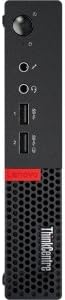
Imej: Sisi view of the ThinkCentre M710q Tiny, showing the power button, audio jacks, and front-facing USB ports.
Arahan Operasi
Windows 10 Pro
Your ThinkCentre M710q Tiny comes preloaded with Windows 10 Pro 64-bit. Familiarize yourself with the operating system's interface and features. Regular updates are recommended for optimal performance and security.
Ketersambungan
- Peranti USB: Utilize the 6 USB 3.0 ports and 2 USB 2.0 ports for connecting external drives, printers, or other USB peripherals.
- Bluetooth: The integrated Bluetooth 4.1 allows for wireless connection to compatible devices such as headphones, speakers, or mobile phones.
- Rangkaian tanpa wayar: Connect to Wi-Fi networks using the Intel 8265 Dual Band AC Wireless for high-speed internet access.
Penyelenggaraan
Penjagaan Am
Keep the desktop in a clean, dust-free environment. Avoid placing heavy objects on top of the unit or blocking ventilation openings. The chassis intrusion switch is a security feature; avoid tampering dengannya.
Pembersihan
Use a soft, dry cloth to clean the exterior of the device. For stubborn marks, a slightly damp cloth with mild cleaning solution can be used. Ensure the device is powered off and unplugged before cleaning.
Kemas Kini Perisian
Regularly check for and install operating system and driver updates to ensure system stability, security, and performance. Windows Update can be configured to automatically download and install updates.
Menyelesaikan masalah
This section addresses common issues you might encounter with your ThinkCentre M710q Tiny.
| Masalah | Kemungkinan Punca | Penyelesaian |
|---|---|---|
| Sistem tidak dihidupkan. | Power cable disconnected, faulty power adapter, or power outlet issue. | Verify power cable connection, test power adapter with another device if possible, or try a different power outlet. |
| Tiada paparan pada monitor. | Incorrect display cable connection, monitor off, or incorrect input source selected on monitor. | Check display cable connections (Display Port/VGA), ensure monitor is powered on, and select the correct input source on the monitor. |
| "No operating system found" error. | Operating system corruption or hard drive issue. | Restart the system. If the issue persists, consult the Lenovo support website for recovery options or contact technical support. |
| Periferi (papan kekunci/tetikus) tidak bertindak balas. | Loose USB connection, faulty peripheral, or driver issue. | Ensure USB connections are secure, try a different USB port, or test the peripheral on another computer. Update drivers if necessary. |
Spesifikasi
Detailed technical specifications for the Lenovo ThinkCentre M710q Tiny - 10MR0004US:
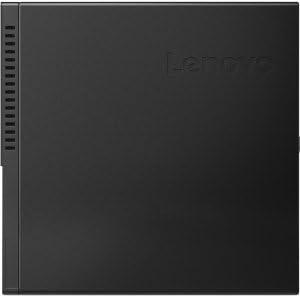
Imej: Atas view of the ThinkCentre M710q Tiny, showcasing faktor bentuk padatnya.
| Ciri | Perincian |
|---|---|
| Pemproses | Intel Core i5-7500T (6MB Cache, 2.7GHz up to 3.3GHz Turbo Boost) |
| Grafik | Intel HD Graphics 630 (Bersepadu) |
| RAM | 8GB DDR4-2400MHz |
| Penyimpanan | 256GB SSD M.2 PCIe NVMe Opal |
| Sistem Operasi | Windows 10 Pro 64-bit |
| Kesambungan Wayarles | Intel 8265 Dual Band AC Wireless, Bluetooth 4.1 |
| Port USB | 6 x USB 3.0, 2 x USB 2.0 |
| Pelabuhan Paparan | Display Port, VGA |
| Penyesuai Kuasa | 65W |
| Dimensi (LxWxH) | 7 x 1.4 x 7.2 inci |
| Berat badan | 2.91 paun |
| warna | Hitam |
Waranti dan Sokongan
Untuk maklumat jaminan dan sokongan teknikal, sila rujuk Lenovo rasmi website or the documentation included with your product. Keep your purchase receipt and product serial number (located on the device) handy when contacting support.
You can visit the official Lenovo support page for your product model for drivers, manuals, and troubleshooting guides: Sokongan Lenovo


