pengenalan
The MOOER Ocean Machine TDL3 is a versatile multi-effects pedal designed for electric guitar, combining two independent delays, a high-fidelity reverb, and an audio looper. This manual provides detailed instructions for setting up, operating, and maintaining your device to ensure optimal performance and creative expression.

Rajah 1: Depan view of the MOOER Ocean Machine TDL3 multi-effects pedal, showcasing kawalan dan paparannya.
Persediaan
Keperluan Kuasa
The Ocean Machine TDL3 requires a 9V DC power supply with a minimum current of 500mA. Ensure the power supply is center-negative. Using an incorrect power supply can damage the unit and void the warranty.
- Voltage: 9 Volt DC
- semasa: 500mA (minimum)
- Kekutuban: Pusat-negatif
Sambungan
Connect your guitar and amplifier to the appropriate input and output jacks. The pedal supports both mono and stereo configurations.
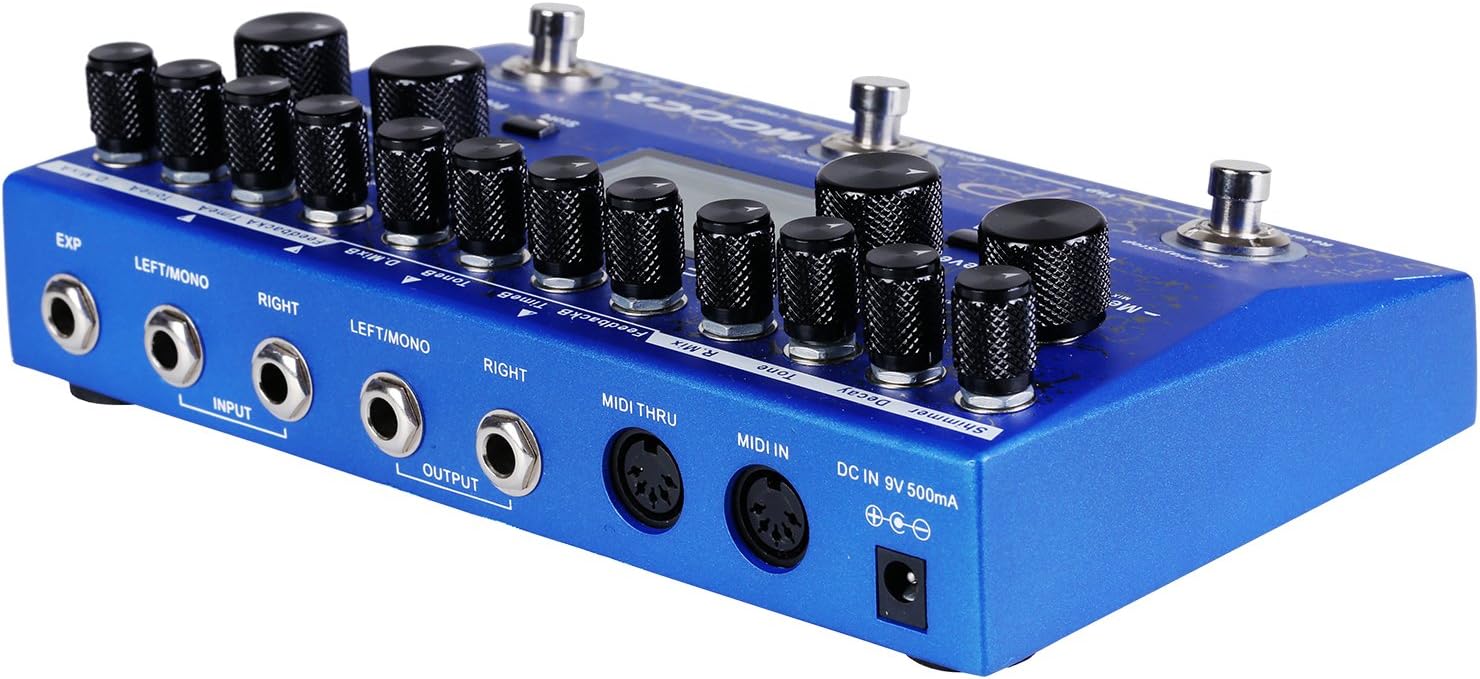
Rajah 2: belakang view of the MOOER Ocean Machine TDL3, showing input/output jacks, MIDI ports, and power input.
- Input (LEFT/MONO, RIGHT): Connect your instrument to the LEFT/MONO input for mono operation. For stereo input, connect to both LEFT/MONO and RIGHT inputs.
- Output (LEFT/MONO, RIGHT): Sambung ke anda amplifier or audio interface. Use LEFT/MONO for mono output. For stereo output, connect to both LEFT/MONO and RIGHT outputs.
- KECUALI: Connect an external expression pedal for real-time control over various parameters.
- MIDI IN/THRU: Connect to MIDI devices for external control and synchronization.
- DC IN 9V 500mA: Connect the specified 9V DC power adapter.
Arahan Operasi
The Ocean Machine TDL3 offers extensive control over its delay, reverb, and looper functions. Familiarize yourself with the main controls and display.
Main Controls Overview
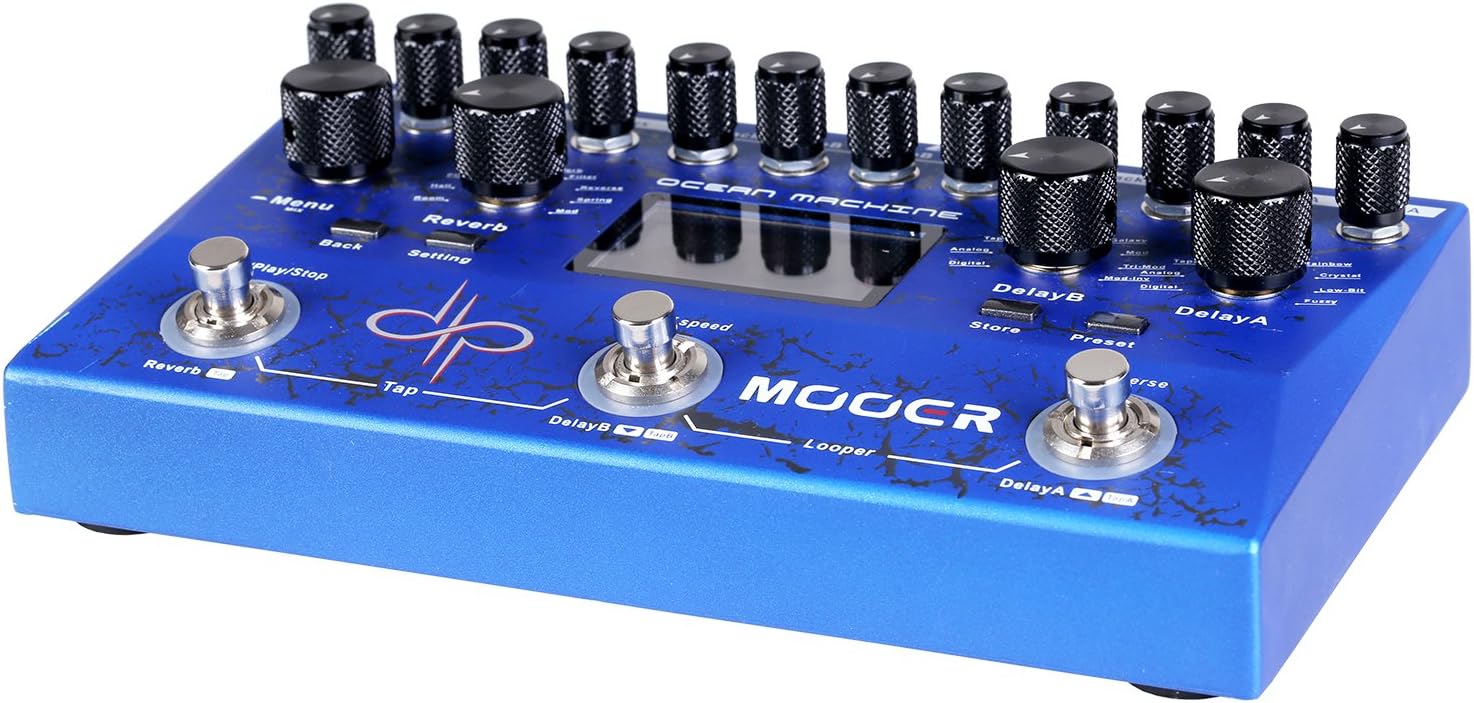
Rajah 3: Atas view of the MOOER Ocean Machine TDL3, highlighting the various knobs and footswitches.
- Tombol MENU: Navigates through menus and adjusts parameters on the LCD screen.
- REVERB Section: Controls for Mix, Tone, Decay, Shimmer, and Reverb Type.
- DELAY A Section: Controls for Mix, Feedback, Time, and Delay Type.
- DELAY B Section: Controls for Mix, Feedback, Time, and Delay Type.
- Footswitches (REVERB, DELAY B, DELAY A): Activate/deactivate effects, tap tempo, and looper functions.
- Paparan LCD: Shows current settings, preset information, and menu options.
Fungsi Kelewatan
The pedal features two independent delays (Delay A and Delay B) with 15 different delay types and a delay time range of 0-2 seconds. Each delay can be configured with optional ping-pong effects.
- Delay Types: Explore various delay algorithms including Analog, Digital, Tape, Modulated, Reverse, and more.
- Masa: Adjusts the delay time. Can be synchronized via Tap Tempo.
- Maklum balas: Mengawal bilangan ulangan kelewatan.
- Campurkan: Melaraskan keseimbangan basah/kering bagi kesan lengah.
Reverb Functions
A high-fidelity reverb section offers 9 different reverb types and a shimmer effect for ambient textures.
- Jenis Reverb: Includes Hall, Plate, Room, Spring, Modulated, Filter, Reverse, and Shimmer.
- Pereputan: Controls the length of the reverb tail.
- Nada: Adjusts the brightness or darkness of the reverb.
- Kilauan: Adds an octave-up effect to the reverb tail.
- Campurkan: Adjusts the wet/dry balance of the reverb effect.
Fungsi Looper
The integrated audio looper provides 32 MB of storage memory, allowing up to 44 seconds of recording time.
- Record/Play/Stop: Controlled by the dedicated footswitch (typically the REVERB footswitch in Looper mode).
- Overdub: Layer additional guitar parts over your recorded loop.
- Buat asal/Buat Semula: Correct mistakes during overdubbing.
Modes of Operation and Presets
The Ocean Machine TDL3 features multiple operational modes and the ability to save and recall presets.

Rajah 4: Close-up of the LCD screen showing various settings and parameters, including delay and reverb types.
- Mod Langsung: Allows direct control of effects via knobs and footswitches.
- Mod Pratetap: Recall saved combinations of delay, reverb, and looper settings. The pedal offers a multitude of programmable options via the LCD menu.
- Menyimpan Pratetap: To save a preset, adjust your desired settings, then navigate through the menu using the MENU knob to find the "Store" option. Confirm to save.
- Effect Chain Order: The pedal allows you to reorder the internal effect chain (Delay A, Delay B, Reverb) to customize your sound. This is accessible through the system menu.
Kawalan MIDI
The Ocean Machine TDL3 is MIDI programmable, allowing integration with other MIDI-enabled devices for advanced control and synchronization.
- Program Change (PC) Messages: Recall specific presets.
- Control Change (CC) Messages: Control individual parameters in real-time.
- MIDI Melalui: Passes MIDI data to other devices in a chain.
Tetapan Global
Access the global settings menu to adjust overall parameters such as Global EQ, input/output levels, and other system configurations.
- EQ global: Fine-tune the overall tonal response of the pedal.
- Input/Output Levels: Optimize signal levels for seamless integration with various instruments and setups.
Penyelenggaraan
To ensure the longevity and optimal performance of your MOOER Ocean Machine TDL3, follow these maintenance guidelines:
- Pembersihan: Gunakan kain lembut dan kering untuk membersihkan permukaan pedal. Elakkan pembersih atau pelarut yang kasar.
- Storan: Simpan pedal di tempat yang sejuk dan kering jauh dari cahaya matahari langsung dan suhu yang melampau.
- Kuasa: Sentiasa putuskan bekalan kuasa apabila pedal tidak digunakan untuk tempoh yang lama.
- Knobs and Footswitches: Handle controls gently. If any knobs feel loose, they may need to be re-secured by a qualified technician.
Menyelesaikan masalah
If you encounter issues with your Ocean Machine TDL3, refer to the following common troubleshooting steps:
- Tiada Bunyi:
- Periksa semua sambungan kabel (instrumen, amplifier, power).
- Ensure the power supply meets the 9V DC, 500mA, center-negative specifications.
- Verify that the pedal is powered on and effects are engaged.
- Check input/output levels in the global settings.
- Bunyi/Dengungan yang Tidak Dijangka:
- Pastikan semua kabel dilindungi dengan betul dan dalam keadaan baik.
- Cuba soket kuasa yang berbeza atau bekalan kuasa terpencil.
- Check for ground loops in your signal chain.
- Tap Tempo Not Working in Preset Mode:
- In Preset Mode, the tap tempo footswitch requires delay sub-divisions to be set.
- Navigate to the desired preset.
- Press REVERB + DELAY B footswitches simultaneously to enter preset edit mode.
- Press the MENU knob once.
- Rotate the MENU knob until "TempoB:" is highlighted and press the knob to enter sub-division settings.
- Press the MENU knob to turn sub-division on, select the desired sub-division, and press "back" to return.
- Press REVERB + DELAY B footswitches simultaneously to exit edit mode. Save the preset if satisfied.
- Isu Paparan LCD:
- Ensure the pedal is receiving adequate power.
- If the display is unresponsive, try power cycling the unit.
Spesifikasi
| Ciri | Spesifikasi |
|---|---|
| Nombor Model | TDL3 |
| Dimensi (L x W x H) | 4.1 x 1.9 x 2.3 inci |
| Berat Barang | 6.4 auns |
| Keperluan Kuasa | 9V DC, 500mA, Center-Negative |
| Delay Types | 15 (2 independent delays) |
| Jenis Reverb | 9 (with Shimmer effect) |
| Looper Recording Time | Up to 44 seconds (32 MB storage) |
| Ketersambungan | Stereo Input/Output, Expression Pedal Input, MIDI IN/THRU |
| Antara Muka Perkakasan | Ethernet (Note: This specification from product data may refer to internal communication or a specific feature not typically user-facing for a guitar pedal.) |
| Format Isyarat | Analog |
| Tarikh Tersedia Pertama | 10 Mac 2017 |
Waranti dan Sokongan
MOOER products are designed for reliability and performance. For warranty information and technical support, please refer to the official MOOER webtapak atau hubungi pengedar tempatan anda. Simpan bukti pembelian anda untuk tuntutan jaminan.
- Official MOOER Webtapak: www.mooeraudio.com
- Perkhidmatan Pelanggan: Contact information can typically be found on the official webtapak atau pembungkusan produk.


