1. Pengenalan
Thank you for choosing the Girmi IM3000 Stainless Steel Stand Mixer. This powerful 1300W planetary mixer is designed to simplify your kitchen tasks, offering exceptional performance for a wide range of culinary preparations. With its 8-speed settings and versatile attachments, you can effortlessly knead dough, mix batters, and whip ingredients to perfection. Please read this manual carefully before first use to ensure safe and optimal operation of your appliance.

Image 1.1: The Girmi IM3000 Stand Mixer, showcasing its sleek white design, stainless steel mixing bowl, and speed control dial.
2. Arahan Keselamatan Penting
Apabila menggunakan peralatan elektrik, langkah berjaga-jaga keselamatan asas hendaklah sentiasa diikuti untuk mengurangkan risiko kebakaran, renjatan elektrik dan kecederaan kepada orang, termasuk yang berikut:
- Baca semua arahan sebelum mengendalikan perkakas.
- Jangan rendam unit motor, kord atau palam ke dalam air atau cecair lain.
- Pengawasan rapi diperlukan apabila sebarang perkakas digunakan oleh atau berhampiran kanak-kanak.
- Cabut plag dari soket apabila tidak digunakan, sebelum memakai atau menanggalkan bahagian, dan sebelum membersihkan.
- Elakkan sentuhan dengan bahagian yang bergerak. Jauhkan tangan, rambut dan pakaian, serta spatula dan peralatan lain, daripada pemukul semasa operasi untuk mengelakkan kecederaan dan/atau kerosakan pada pengadun.
- Jangan kendalikan sebarang perkakas dengan kord atau palam yang rosak atau selepas perkakas tidak berfungsi atau terjatuh atau rosak dalam apa jua cara.
- Penggunaan lampiran yang tidak disyorkan atau dijual oleh pengilang boleh menyebabkan kebakaran, kejutan elektrik atau kecederaan.
- Jangan gunakan di luar rumah.
- Jangan biarkan kord itu tergantung di tepi meja atau kaunter.
- Jangan biarkan kord menyentuh permukaan panas, termasuk dapur.
- Always ensure the appliance is switched off and unplugged before assembling, disassembling, or cleaning.
3. Komponen Produk
Familiarize yourself with the main parts of your Girmi IM3000 Stand Mixer:
- Unit Utama: menempatkan motor dan panel kawalan.
- Mangkuk adunan: 5.2-liter stainless steel bowl for ingredients.
- Pengawal percikan: Prevents ingredients from splashing out during operation.
- Cangkuk Doh: Ideal for kneading heavy doughs like bread and pizza.
- Pemukul Leper: Suitable for mixing medium-heavy mixtures such as batters, cakes, and cookies.
- Pukul Kawat: Sesuai untuk memukul telur, krim dan adunan ringan.
- Dail Kawalan Kelajuan: Adjusts the mixing speed (8 settings).
- Tuas Pelepas Kepala: Lifts the mixer head for attachment changes and bowl access.
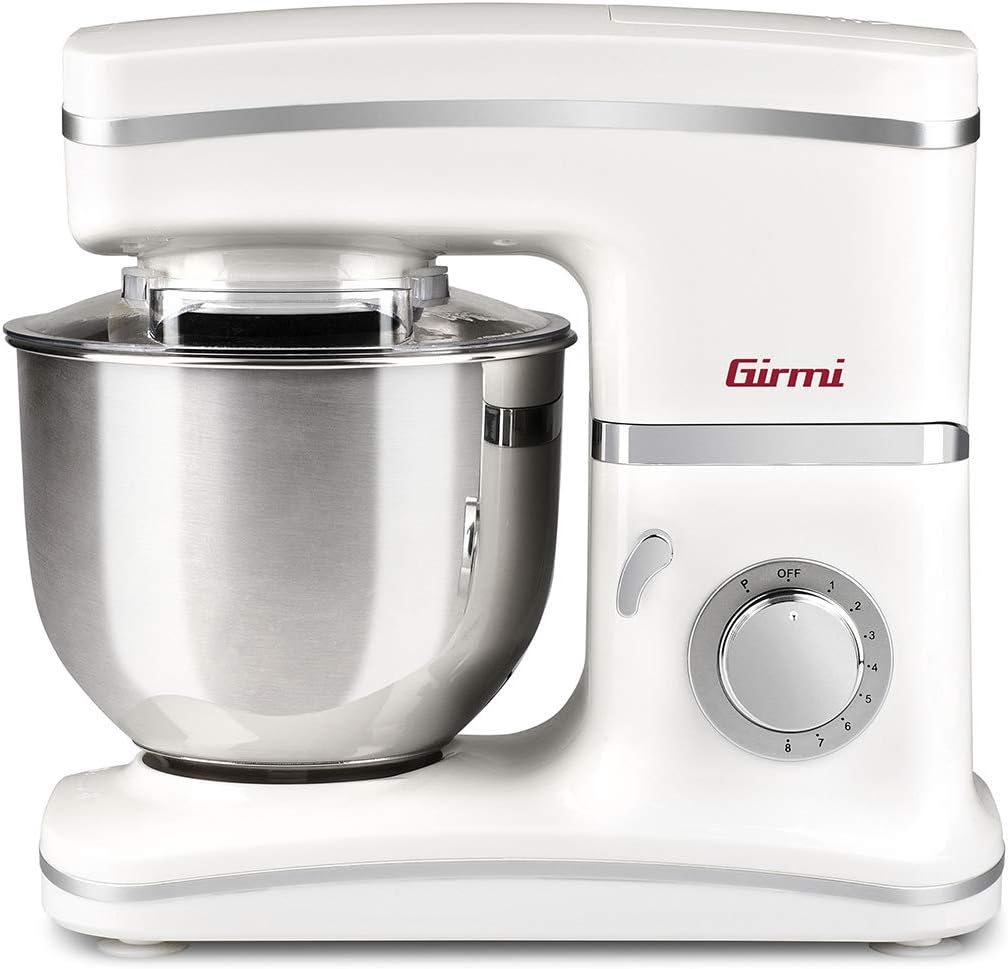
Image 3.1: Mixing bowl with splash guard.

Image 3.2: Flat Beater attachment.

Image 3.3: Dough Hook attachment.

Image 3.4: Wire Whisk attachment.
4. Persediaan
Before using your mixer for the first time, ensure all packaging materials are removed and clean all removable parts as described in the 'Maintenance and Cleaning' section.
- Letakkan Pengadun: Position the mixer on a clean, dry, and stable surface. Ensure there is enough space around the appliance for safe operation.
- Pasang Mangkuk: Place the stainless steel mixing bowl onto the base of the mixer. Turn it clockwise until it locks securely into place.
- Lift the Mixer Head: Press the head release lever (usually located on the side or back of the mixer) and lift the mixer head until it clicks into the upright position.
- Lampirkan Aksesori: Select the desired attachment (dough hook, flat beater, or wire whisk). Align the top of the attachment with the shaft and push upwards, then turn slightly to lock it into place.
- Lower the Mixer Head: Press the head release lever again and gently lower the mixer head until it locks into the operating position. Ensure the attachment is correctly positioned within the bowl.
- Attach Splash Guard (Optional): If desired, place the splash guard over the bowl, ensuring it fits snugly.

Image 4.1: Mixer assembled with a flat beater and bowl, ready for ingredients.
5. Arahan Operasi
Follow these steps to operate your Girmi IM3000 Stand Mixer:
- Sediakan Bahan: Masukkan bahan-bahan anda ke dalam mangkuk adunan.
- Pasangkan: Ensure the speed control dial is set to 'OFF' (0) before plugging the mixer into a suitable power outlet (230V).
- Pilih Kelajuan: Turn the speed control dial to the desired setting (1-8). Start with a lower speed and gradually increase it to prevent splashing and ensure thorough mixing.
- Masa Mencampur: Mix for the recommended duration as per your recipe. Do not overmix.
- Hentikan Operasi: To stop the mixer, turn the speed control dial back to 'OFF' (0).
- Remove Bowl and Attachments: Unplug the mixer. Lift the mixer head using the release lever. Remove the attachment by pushing up and turning counter-clockwise. Unlock and remove the mixing bowl.
Tetapan Kelajuan yang Disyorkan:
- Kelajuan 1-2 (Rendah): For kneading heavy doughs (bread, pizza) with the dough hook.
- Speeds 3-4 (Medium-Low): For mixing batters, mashing potatoes, or combining ingredients with the flat beater.
- Speeds 5-6 (Medium-High): For creaming butter and sugar, or mixing cake batters with the flat beater.
- Kelajuan 7-8 (Tinggi): For whipping egg whites, cream, or making meringues with the wire whisk.
6. Penyelenggaraan dan Pembersihan
Pembersihan dan penyelenggaraan yang betul akan memanjangkan hayat perkakas anda.
- Sentiasa Cabut plag: Before cleaning, always ensure the mixer is unplugged from the power outlet and has cooled down.
- Clean Attachments and Bowl: The stainless steel mixing bowl, dough hook, flat beater, and wire whisk are generally dishwasher safe. For manual cleaning, wash them in warm, soapy water, rinse thoroughly, and dry immediately. Avoid abrasive cleaners or scouring pads that could damage the finish.
- Unit Utama Bersih: Lap bahagian luar unit utama dengan iklanamp cloth. Do not use abrasive cleaners. Never immerse the main unit in water or any other liquid.
- Pengawal percikan: The splash guard can be washed in warm, soapy water and rinsed.
- Storan: Simpan pengadun dan aksesorinya di tempat yang bersih dan kering.
7. Penyelesaian masalah
If you encounter any issues with your Girmi IM3000 Stand Mixer, refer to the following table for common problems and solutions:
| Masalah | Kemungkinan Punca | Penyelesaian |
|---|---|---|
| Pengadun tidak dihidupkan. | Not plugged in; power outlet fault; speed dial not on. | Ensure plug is securely in outlet; check power outlet with another appliance; turn speed dial to a numbered setting. |
| Lampiran tidak berputar. | Attachment not properly installed; mixer head not fully lowered. | Re-install attachment, ensuring it clicks into place; ensure mixer head is fully locked down. |
| Bunyi luar biasa semasa operasi. | Overloaded; attachment hitting bowl; foreign object. | Reduce ingredient quantity; ensure attachment is correctly installed and not touching the bowl; check for any foreign objects. |
| Pengadun berhenti semasa operasi. | Perlindungan terlalu panas diaktifkan. | Turn off and unplug the mixer. Let it cool down for at least 30 minutes before restarting. Reduce load if consistently stopping. |
Jika masalah berterusan selepas mencuba penyelesaian ini, sila hubungi sokongan pelanggan.
8. Spesifikasi
- Jenama: Girmi
- Nombor Model: IM3000
- warna: putih
- Dimensi (L x W x H): 38 x 22.5 x 35 cm
- kapasiti: 5.2 Liter
- Kuasa: 1300 Watt
- Voltage: 230V
- Bahan: Keluli Tahan Karat
- Matikan automatik: Tidak
- Bilangan Kelajuan: 8
- Ciri Khas: Mangkuk boleh tanggal
- Berat Barang: 6.3 kg

Image 8.1: Product dimensions of the Girmi IM3000 Stand Mixer.
9. Waranti dan Sokongan
Your Girmi IM3000 Stand Mixer comes with a standard manufacturer's warranty. Please refer to the warranty card included with your purchase for specific terms and conditions, including coverage duration and limitations.
For technical assistance, troubleshooting beyond this manual, or warranty claims, please contact the retailer where you purchased the product or visit the official Girmi weblaman web untuk maklumat sokongan pelanggan.
Simpan bukti pembelian anda (resit atau invois) kerana ia diperlukan untuk sebarang perkhidmatan jaminan.