1. Pengenalan
The Generation Guard GM-800A is an automatic upper arm blood pressure monitor designed for convenient and accurate home use. This device measures systolic and diastolic blood pressure, as well as heart rate, providing essential health information. It features an advanced measuring technique for accuracy and includes a heartbeat detector and hypertension indicator for comprehensive monitoring.

Image 1: The Generation Guard GM-800A monitor with its arm cuff, displaying blood pressure and heart rate readings.
2. Ciri-ciri Produk
- Instant Monitoring: Provides quick and easy measurements of systolic, diastolic blood pressure, and heart rate.
- Clinically Accurate: Utilizes an advanced measuring technique for reliable and precise readings.
- Heartbeat Detector & Hypertension Indicator: Alerts users to irregular heart rates and indicates if readings exceed internationally recognized guidelines for normal home blood pressure levels.
- Ingat Ingatan: Stores up to 90 previous readings, allowing for tracking of blood pressure fluctuations over time.
- Paparan Skrin Besar: Features a clear, easy-to-read display for all measurement results.
- Adjustable Arm Cuff: Designed to fit a range of arm sizes (22-32 cm).
- Reka Bentuk Mudah Alih: Compact and easy to transport, ideal for home or travel.

Image 2: Visual representation of the monitor's key features.
3. Kandungan Pakej
Sahkan bahawa semua item terdapat dalam pakej:
- Generation Guard GM-800A Blood Pressure Monitor Unit
- Manset Lengan Atas (22-32 cm)
- Membawa Sarung
- 4 Bateri AA
- Manual Pengguna (dokumen ini)

Image 3: The monitor, cuff, and included carrying case.
4. Persediaan
4.1 Pemasangan Bateri
- Buka penutup petak bateri di belakang monitor.
- Masukkan empat (4) bateri AA, pastikan kekutuban (+/-) yang betul.
- Tutup penutup petak bateri dengan selamat.
4.2 Sambungan Manset
- Cari penyambung tiub udara pada manset lengan.
- Insert the air tube connector firmly into the air jack on the side of the monitor unit.
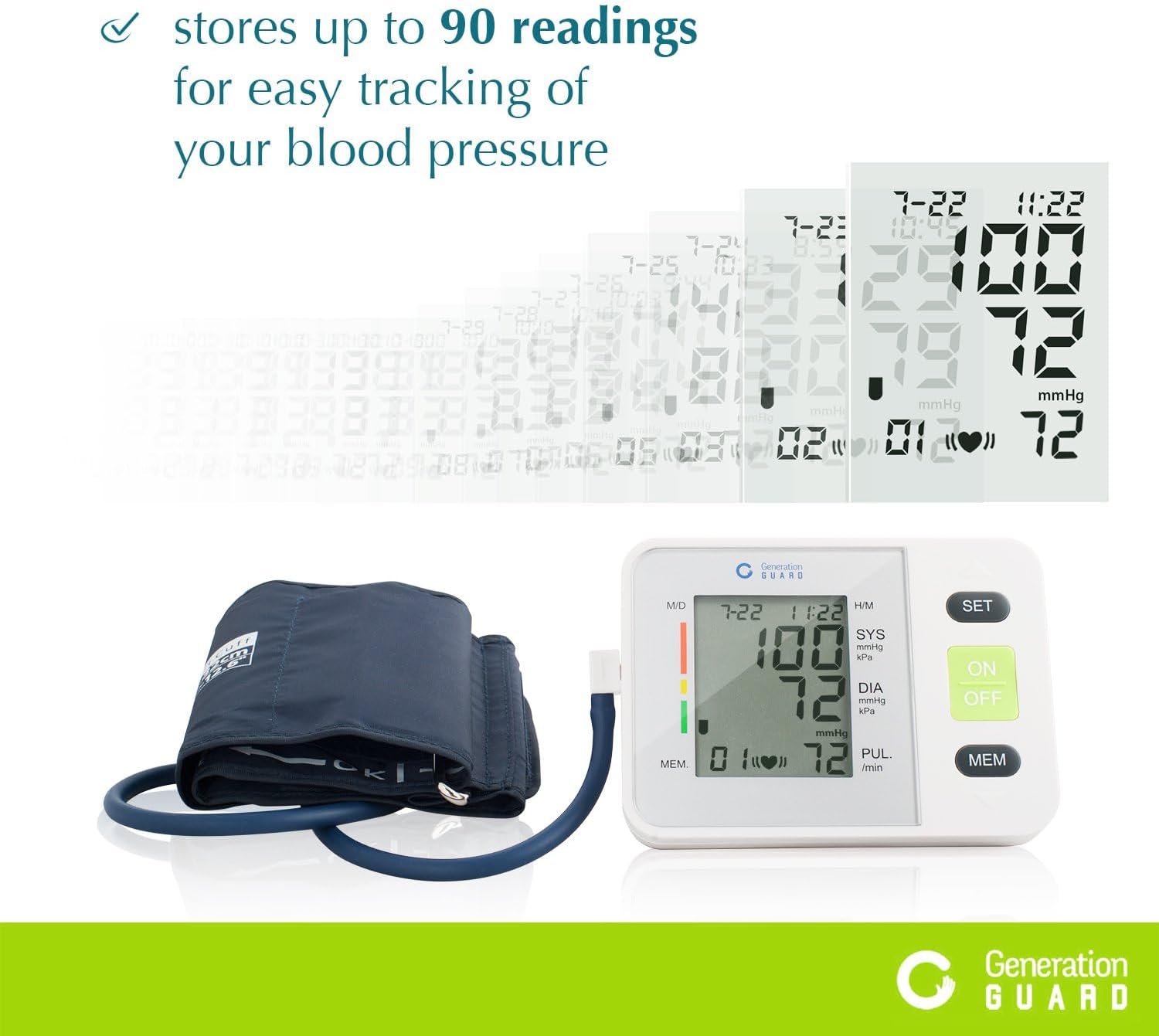
Image 4: The monitor unit with the arm cuff properly connected.
5. Arahan Operasi
5.1 Sebelum Pengukuran
- Avoid eating, drinking alcohol, smoking, exercising, or bathing for 30 minutes before measurement.
- Rehat sekurang-kurangnya 5 minit sebelum mengambil ukuran.
- Duduk dalam kedudukan yang selesa dengan punggung disandarkan dan kaki rata di atas lantai.
5.2 Memakai Cuff
- Slide the cuff onto your bare left upper arm, approximately 1-2 cm above the elbow joint.
- Ensure the air tube runs down the center of your arm, aligned with your middle finger.
- Wrap the cuff snugly around your arm, securing it with the Velcro closure. The index mark on the cuff should fall within the 'OK' range.
- Letakkan lengan anda di atas meja supaya manset berada pada paras yang sama dengan jantung anda.
5.3 Mengambil Pengukuran
- Tekan ke HIDUP/MATI button to power on the monitor.
- Tekan ke HIDUP/MATI button again to start the measurement. The cuff will automatically inflate.
- Kekal diam dan senyap semasa pengukuran. Jangan bercakap atau menggerakkan lengan anda.
- Once the measurement is complete, the cuff will deflate, and your readings will be displayed on the screen.
- Tekan ke HIDUP/MATI button to turn off the monitor, or it will automatically shut off after a period of inactivity.
Video 1: A demonstration of how to set up and take a blood pressure reading using the Generation Guard GM-800A monitor.
6. Reading Your Results
Monitor memaparkan tiga nilai utama:
- SYS (Tekanan Sistolik): Nombor teratas, menunjukkan tekanan dalam arteri anda apabila jantung anda berdegup.
- DIA (Tekanan Diastolik): Nombor bawah, menunjukkan tekanan dalam arteri anda antara degupan.
- PUL (Kadar Nadi): Kadar denyutan anda, diukur dalam degupan seminit.
The monitor also includes a color-coded hypertension indicator on the left side of the display, which visually represents your blood pressure category based on established guidelines. An irregular heartbeat detector will display a symbol if an irregular heartbeat is detected during the measurement.
7. Fungsi Memori
The GM-800A monitor can store up to 90 sets of readings, allowing you to track your blood pressure trends over time. Each stored reading includes the blood pressure values, pulse rate, and the date/time of the measurement.
7.1 Accessing Memory
- Dengan monitor dimatikan, tekan butang MEM butang.
- Bacaan terkini akan dipaparkan dahulu.
- Tekan ke MEM button repeatedly to scroll through previous readings.

Image 5: The monitor's display showing stored readings for easy tracking.
8. Penyelenggaraan
8.1 Pembersihan
- Lap unit monitor dan manset dengan kain lembut dan kering.
- Jika perlu, gunakan sedikit damp kain dengan sabun lembut, kemudian lap sehingga kering.
- Do not use abrasive cleaners, solvents, or immerse the unit or cuff in water.
8.2 Penyimpanan
- Store the monitor and cuff in the provided carrying case when not in use.
- Simpan peranti di tempat yang sejuk dan kering, jauh dari cahaya matahari langsung dan suhu yang melampau.
- Elakkan bengkok atau creasing the air tube excessively.
9. Penyelesaian masalah
Jika anda menghadapi masalah dengan monitor tekanan darah anda, rujuk masalah dan penyelesaian biasa berikut:
| Masalah | Kemungkinan Punca | Penyelesaian |
|---|---|---|
| "E" or Error Message on Display | Cuff not properly applied, movement during measurement, or air leakage. | Re-apply the cuff correctly, remain still and silent, check for secure cuff connection. |
| Bacaan Tidak Tepat | Incorrect cuff size/placement, talking/moving during measurement, or insufficient rest before measurement. | Ensure proper cuff placement and size, rest for 5 minutes, avoid talking/moving. Take multiple readings with a few minutes in between. |
| Monitor Does Not Turn On | Bateri mati atau tidak dipasang dengan betul. | Gantikan bateri dengan bateri AA baharu, memastikan kekutuban yang betul. |
10. Spesifikasi
- Nama Model:
- GM-800A
- Jenama:
- Pengawal Generasi
- Sumber Kuasa:
- 4 Bateri AA (termasuk)
- Saiz manset:
- 22-32 cm (Lengan Atas)
- Jenis Paparan:
- Paparan Digital Besar
- Kapasiti Memori:
- Sehingga 90 bacaan
- Item Weight (approx.):
- 0.01 Auns
- Komponen yang Disertakan:
- Monitor Unit, Cuff, Carrying Case
- Tarikh Mula-mula Tersedia:
- 7 Februari 2017
11. Maklumat Keselamatan Penting
Please read all instructions carefully before using this device. This blood pressure monitor is intended for home use to measure blood pressure and pulse rate. It is not intended to be a substitute for professional medical advice, diagnosis, or treatment. Always consult with a healthcare professional for interpretation of your blood pressure readings and for any health concerns.
AMARAN: This product can expose you to chemicals including [List known chemicals if available, otherwise state 'chemicals known to the State of California to cause cancer and birth defects or other reproductive harm.'], which is/are known to the State of California to cause cancer and birth defects or other reproductive harm. For more information go to www.P65Warnings.ca.gov.
12. Waranti dan Sokongan
For warranty information, technical support, or service inquiries, please refer to the documentation included with your product or visit the official Generation Guard webtapak. Simpan resit pembelian anda sebagai bukti pembelian untuk tuntutan waranti.


