1. Pengenalan
This manual provides detailed instructions for the FERM OTM1006 12V Li-Ion Cordless Multi-Tool. It covers safe setup, operation, and maintenance for various tasks such as sawing, sanding, cutting, and scraping. Please read this manual thoroughly before using the tool to ensure safe and efficient operation.
2. Produk Lebihview
The FERM OTM1006 is a versatile 12V Li-Ion cordless multi-tool designed for a wide range of applications. Its powerful motor delivers up to 18,000 oscillations per minute, making it suitable for demanding tasks. The tool features variable speed control for optimal performance across different materials and applications, and its quick accessory change system enhances user convenience.

Rajah 1: The FERM OTM1006 Cordless Multi-Tool shown with its 12V Li-Ion battery and various attachments, including sanding pads, scraper blade, and saw blades.
3. Arahan Keselamatan
AMARAN: Baca semua amaran keselamatan, arahan, ilustrasi dan spesifikasi yang disediakan dengan alat kuasa ini. Kegagalan mematuhi semua arahan yang disenaraikan di bawah boleh mengakibatkan renjatan elektrik, kebakaran dan/atau kecederaan serius.
Amaran Keselamatan Alat Kuasa Am:
- Keselamatan Kawasan Kerja: Pastikan kawasan kerja bersih dan terang. Kawasan yang berselerak atau gelap mengundang kemalangan. Jangan kendalikan alat kuasa dalam atmosfera yang mudah meletup, seperti di hadapan cecair, gas atau habuk mudah terbakar.
- Keselamatan Elektrik: Palam alat kuasa mesti sepadan dengan alur keluar. Jangan sekali-kali mengubah suai palam dalam apa jua cara. Elakkan sentuhan badan dengan permukaan yang dibumikan atau dibumikan.
- Keselamatan Diri: Stay alert, watch what you are doing, and use common sense when operating a power tool. Do not use a power tool while you are tired or under the influence of drugs, alcohol, or medication. Always wear eye protection, dust mask, non-skid safety shoes, hard hat, or hearing protection as appropriate.
- Penggunaan dan Penjagaan Alat Kuasa: Jangan paksa alat kuasa. Gunakan alat kuasa yang betul untuk aplikasi anda. Putuskan sambungan palam daripada sumber kuasa dan/atau keluarkan pek bateri sebelum membuat sebarang pelarasan, menukar aksesori atau menyimpan alatan kuasa.
- Penggunaan dan Penjagaan Alat Bateri: Isi semula hanya dengan pengecas yang ditentukan oleh pengilang. Gunakan alatan kuasa hanya dengan pek bateri yang ditetapkan secara khusus.
4. Kandungan Pakej
The FERM OTM1006 multi-tool package includes the following items:
- FERM OTM1006 Cordless Li-Ion Multi-Tool
- 12V – 1.5 Ah Li-Ion Battery
- Pengecas Bateri
- Three pieces of Velcro sanding paper
- Plat pengamplasan
- HSS Segment saw blade
- Bilah pengikis
- E-cut saw blade
- Hexagonal screwdriver (Allen key)
- Robust storage case

Rajah 2: A selection of the included accessories: sanding pads, a sanding plate, a segment saw blade, an E-cut saw blade, and a scraper blade.
5. Persediaan
5.1. Mengecas Bateri
- Pastikan bateri dicas sepenuhnya sebelum penggunaan pertama.
- Sambungkan pengecas ke salur keluar kuasa yang sesuai.
- Insert the battery into the charger. The charging indicator light will show the charging status.
- Setelah dicas sepenuhnya, cabut bateri daripada pengecas dan cabut plag pengecas daripada soket.
5.2. Attaching/Removing the Battery
- To attach: Align the battery with the base of the multi-tool and slide it in until it clicks securely into place.
- To remove: Press the battery release button (if present) and slide the battery out.
5.3. Memasang Aksesori
The OTM1006 features an easy accessory change system. Use the provided hexagonal screwdriver (Allen key) for secure attachment.
- Pastikan alat dimatikan dan bateri ditanggalkan sebelum menukar aksesori.
- Loosen the accessory screw on the tool head using the hexagonal screwdriver.
- Place the desired accessory (e.g., sanding plate, saw blade, scraper) onto the tool head, ensuring it aligns with the mounting pins.
- Tighten the accessory screw firmly with the hexagonal screwdriver to secure the attachment.

Rajah 3: The multi-tool head with a circular saw blade securely attached, ready for use.
6. Arahan Operasi
6.1. Menghidupkan/Mematikan
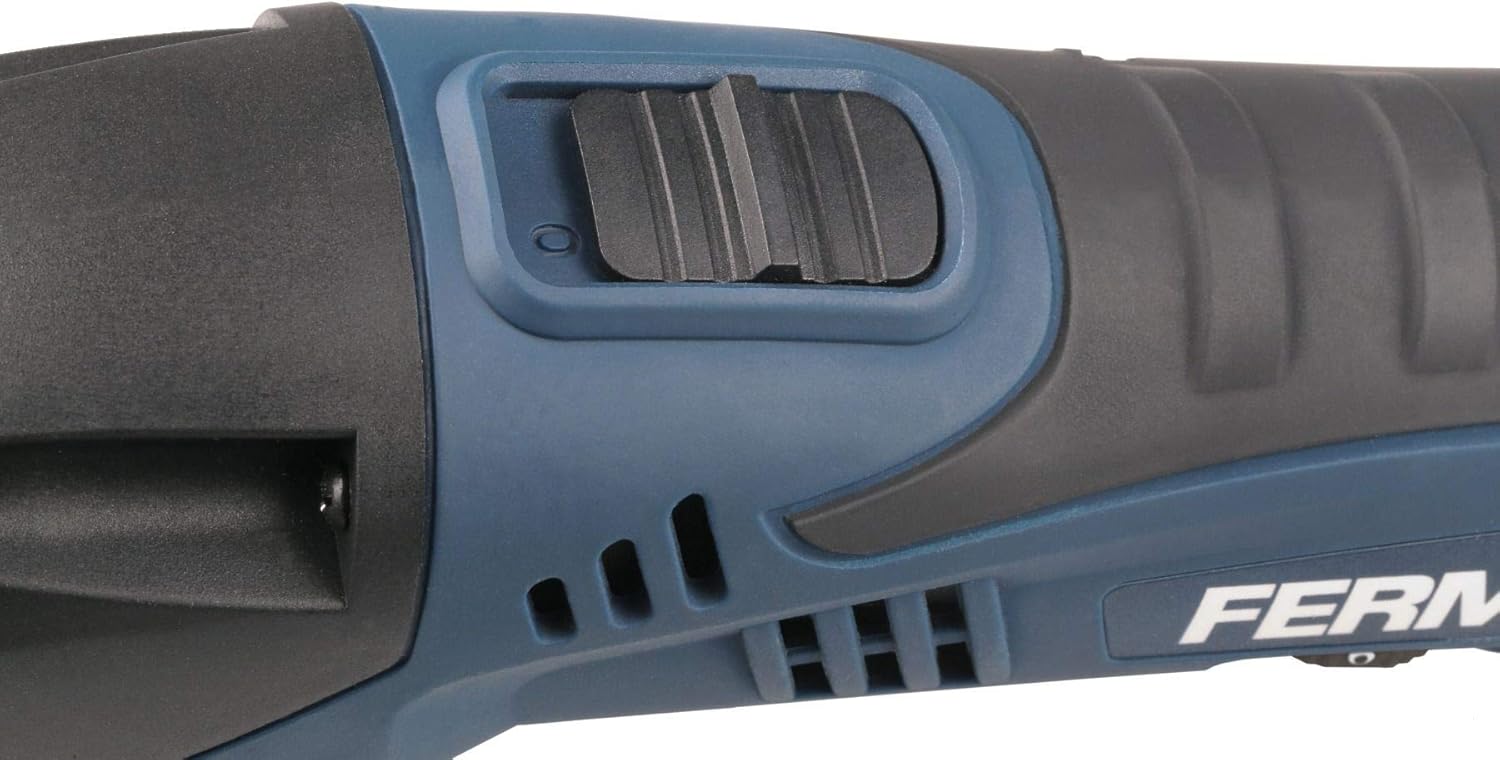
- To turn on: Slide the ON/OFF switch forward to the "I" position.
- To turn off: Slide the ON/OFF switch backward to the "O" position.

Rajah 4: The ON/OFF slide switch located on the top of the multi-tool for easy operation.
6.2. Kawalan Kelajuan Boleh Ubah
The OTM1006 is equipped with a variable speed control dial, allowing you to adjust the oscillation rate from 1 to 6 (or similar markings) for optimal performance on different materials.
- Rotate the speed dial to select the desired oscillation speed. Lower settings are suitable for delicate materials or tasks requiring more control, while higher settings are for faster material removal or harder materials.
- Always test the speed on a scrap piece of material before working on your main project.

Rajah 5: The variable speed control dial, typically numbered 1 to 6, located on the side of the tool.
6.3. Aplikasi
The multi-tool can be used for various tasks depending on the attached accessory:
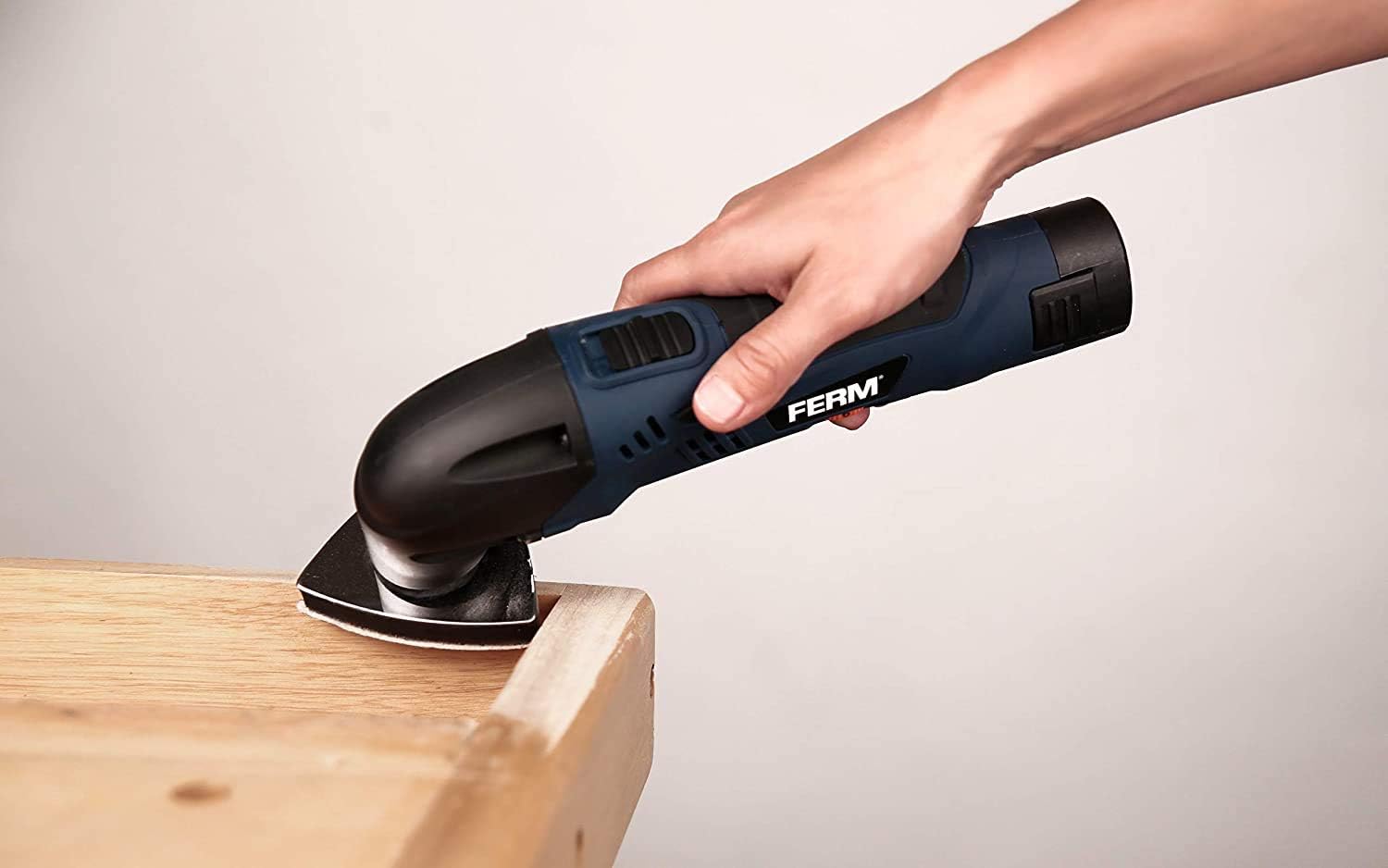
- Pengamplasan: Attach the sanding plate and appropriate grit sanding paper. Use for smoothing surfaces, removing paint, or preparing wood.
- Memotong: Use E-cut or segment saw blades for cutting wood, plastic, soft metals, or drywall.
- Mengikis: Attach the scraper blade for removing old paint, adhesive, or caulk.
Rajah 6: The multi-tool equipped with a sanding pad, actively sanding a wooden surface.

Rajah 7: The multi-tool with a cutting blade, demonstrating its use for cutting a PVC pipe.
Rajah 8: The multi-tool fitted with a scraper blade, ready for scraping tasks.
Sentiasa pastikan bahan kerja berada dalam keadaan selamatamped and wear appropriate personal protective equipment.
7. Penyelenggaraan
7.1. Pembersihan
- Sentiasa keluarkan bateri sebelum membersihkan.
- Pastikan slot pengudaraan alat bersih untuk mengelakkan terlalu panas.
- Lap perumah alat dengan lembut, damp kain. Jangan gunakan bahan kimia yang keras atau pembersih yang kasar.
- Clean accessories after each use to maintain their effectiveness and lifespan.
7.2. Penyimpanan
- Store the tool and accessories in the robust storage case provided.
- Store in a dry, secure place out of reach of children.
- For long-term storage, ensure the battery is partially charged (around 50%) and recharge it every few months to prolong its life.
8. Penyelesaian masalah
| Masalah | Kemungkinan Punca | Penyelesaian |
|---|---|---|
| Alat tidak bermula | Bateri tidak dicas atau dimasukkan dengan tidak betul. | Pastikan bateri dicas sepenuhnya dan dimasukkan dengan betul sehingga ia berbunyi. |
| Prestasi berkurangan / Terlalu panas | Ventilation slots blocked; accessory dull or incorrect for task; excessive pressure applied. | Clean ventilation slots. Replace dull accessories. Use appropriate accessory. Reduce pressure. |
| Accessory vibrates excessively or comes loose | Accessory not properly secured. | Ensure accessory screw is tightened firmly with the hexagonal screwdriver. |
9. Spesifikasi
| Ciri | Perincian |
|---|---|
| Nombor Model | OTM1006 |
| Pengeluar | Ferm |
| Sumber Kuasa | Dikuasakan Bateri |
| Jenis Bateri | 12V Li-Ion (1.5 Ah) |
| Voltage | 12 Volt |
| kuasa | 18 Watt |
| Oscillation Speed | Up to 18,000 oscillations/minute |
| Ciri Khas | Compact, Variable Speed |
| Dimensi Produk (L x W x H) | 30 x 8 x 25 cm |
| Berat Barang | 760 gram |
| Negara Asal | China |
| UPC | 8716507000086 |
10. Waranti dan Sokongan
FERM products are manufactured to high quality standards and are guaranteed against defects in materials and workmanship for a period specified by your local retailer or distributor. Please retain your proof of purchase for warranty claims.
Untuk sokongan teknikal, alat ganti atau perkhidmatan, sila hubungi pengedar FERM tempatan anda atau lawati FERM rasmi website. Information regarding spare parts availability is currently unavailable through this document.


