pengenalan
This manual provides comprehensive instructions for the installation, operation, maintenance, and troubleshooting of your CATA E-100 GTH ventilator. Please read this manual carefully before installation and use to ensure proper function and safety.
The CATA E-100 GTH is a high-performance bathroom ventilator designed for efficient air extraction, featuring humidity control, a timer, and quiet operation. It is equipped with a backdraft damper to prevent air re-entry.
Maklumat Keselamatan
Always follow basic safety precautions when installing, operating, and maintaining this appliance to reduce the risk of fire, electric shock, or injury to persons.
- Pastikan bekalan kuasa diputuskan sambungannya sebelum sebarang kerja pemasangan atau penyelenggaraan.
- Installation must be carried out by a qualified electrician and in accordance with local wiring regulations.
- Do not install the unit in areas where water may directly splash onto it.
- Perkakas ini tidak dimaksudkan untuk digunakan oleh orang (termasuk kanak-kanak) yang kurang keupayaan fizikal, deria atau mental, atau kurang pengalaman dan pengetahuan, melainkan mereka telah diberi pengawasan atau arahan mengenai penggunaan perkakas oleh orang yang bertanggungjawab untuk keselamatan mereka.
- Kanak-kanak harus diawasi untuk memastikan bahawa mereka tidak bermain dengan perkakas.
- The appliance is designed for continuous operation.
Produk Selesaiview
The CATA E-100 GTH ventilator is designed for effective ventilation in bathrooms and other humid environments. Key features include:
- Humidity and Temperature Digital Display: Provides real-time environmental readings.
- Kawalan Kelembapan Boleh Laras: Can be set from 40-95% Relative Humidity (R.F).
- Pemasa boleh laras: Run-on timer adjustable from 0 to 15 minutes.
- Dual Speed System: Allows switching to a higher mode for more effective results.
- Cekap Tenaga: Low power consumption of 8 Watts.
- Operasi senyap: Beroperasi pada tahap hingar rendah 31 dB.
- Integrated Backdraft Damper: Prevents air from flowing back into the room.
- Mudah dibersihkan: Features an extra-flat white glass cover.

Image: The CATA E-100 GTH ventilator, showing its main unit with the front glass panel and the separate backdraft damper component.

Image: Close-up of the CATA E-100 GTH ventilator's front panel, highlighting the digital display which shows temperature and humidity readings.
Persediaan dan Pemasangan
Before beginning installation, ensure you have all necessary tools and that the power supply is turned off at the main circuit breaker.
Dimensi dan Pemasangan

Image: Technical drawing illustrating the dimensions of the CATA E-100 GTH ventilator. The unit measures 150mm x 150mm on the front panel, with a depth of 94mm for the main body and an additional 28.5mm for the front panel. The duct diameter is 98mm.
The unit is designed for wall mounting. Ensure the mounting surface is flat and stable. The required duct diameter is approximately 100mm.
Langkah Pemasangan
- Sediakan Pembukaan: Create a circular opening in the wall or ceiling with a diameter suitable for the ventilator's duct (approx. 100mm).
- Install the Duct and Backdraft Damper: Insert the ventilator's main body into the prepared opening. If using the included backdraft damper, ensure it is properly seated in the duct before or during the main unit installation.
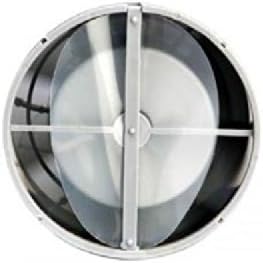
Image: Diagram illustrating how the backdraft damper is inserted into the ventilator's circular duct, ensuring proper airflow direction and preventing reverse flow.
- Selamatkan Unit: Fasten the ventilator to the wall using appropriate screws and wall plugs.
- Sambungan Elektrik: Connect the electrical wiring according to the wiring diagram. The unit requires a 220-240V, 50/60Hz power supply. Ensure correct connection of Live (L), Neutral (N), and Switched Live (SL) for timer/humidity functions.

Image: Detailed wiring diagram for the CATA E-100 GTH ventilator, showing connections for Live (L), Neutral (N), and Switched Live (SL) for the timer and humidity sensor functions, along with an example light switch connection.
- Pasang Panel Depan: Once wiring is complete and tested, attach the glass front panel. It can be rotated to align the display as desired.

Image: Series of diagrams demonstrating how the glass front panel of the CATA E-100 GTH can be rotated and then securely attached to the main unit after installation.
- Hidupkan kuasa: Restore power and test the unit.
Arahan Operasi
The CATA E-100 GTH operates automatically based on humidity levels and timer settings. The digital display shows current temperature and humidity.
Pelarasan Kawalan Kelembapan
The humidity sensor activates the fan when the ambient humidity exceeds the set threshold. The adjustable range is 40-95% R.F. To adjust:
- Locate the humidity adjustment dial, typically accessible after removing the front panel.
- Use a small screwdriver to turn the dial to increase or decrease the humidity threshold. Turning clockwise usually increases the threshold (fan activates at higher humidity), and counter-clockwise decreases it (fan activates at lower humidity).
Pelarasan Pemasa
The timer allows the fan to continue running for a set period after the light switch (or other switched live input) is turned off. The adjustable range is 0-15 minutes. To adjust:
- Locate the timer adjustment dial, typically next to the humidity dial.
- Use a small screwdriver to turn the dial to set the desired run-on time.
Two-Speed Function
The fan is equipped with a two-speed motor. The speed setting is typically configured during installation or via internal jumpers/switches. Refer to the wiring diagram and internal labels for specific speed selection methods. The higher speed provides a flow rate of 115 m3/h.
Penyelenggaraan
Regular cleaning and maintenance will ensure optimal performance and longevity of your ventilator.
Membersihkan Unit
- Putuskan Kuasa: Always turn off the power supply to the unit at the main circuit breaker before cleaning.
- Tanggalkan Panel Hadapan: Carefully remove the glass front panel.
- Permukaan Bersih: Wipe the exterior surfaces and the glass panel with a soft, damp kain. Jangan gunakan pembersih atau pelarut yang melelas.
- Bilah Kipas Bersih: Gently clean any dust or debris from the fan blades and interior housing using a soft brush or vacuum cleaner. Be careful not to bend the blades.
- Pasang semula: Once clean and dry, reattach the front panel and restore power.
It is recommended to clean the unit every 3-6 months, depending on usage and environmental conditions.
Menyelesaikan masalah
If you experience issues with your CATA E-100 GTH ventilator, refer to the table below for common problems and solutions.
| Masalah | Kemungkinan Punca | Penyelesaian |
|---|---|---|
| Kipas tidak dihidupkan. | Tiada bekalan kuasa. Pendawaian yang tidak betul. Humidity level below threshold. | Periksa pemutus litar dan sambungan kuasa. Sahkan pendawaian berdasarkan gambar rajah. Adjust humidity threshold or manually activate (if applicable). |
| Kipas terus berjalan. | Humidity level consistently above threshold. Timer set too long. Faulty humidity sensor/timer. | Check room humidity; ensure proper ventilation. Adjust timer setting. Hubungi juruteknik yang berkelayakan. |
| Kebisingan yang berlebihan. | Fan blades dirty or obstructed. Pemasangan longgar. Isu motor. | Clean fan blades and housing. Pastikan unit dipasang dengan selamat. Hubungi juruteknik yang berkelayakan. |
| Paparan digital tidak berfungsi. | Isu kuasa. Kesalahan dalaman. | Periksa sambungan kuasa. Hubungi juruteknik yang berkelayakan. |
If the problem persists after attempting these solutions, please contact a qualified technician or CATA customer support.
Spesifikasi
| Ciri | Perincian |
|---|---|
| Jenama | CATA |
| Nombor Model | E-100 GTH |
| warna | putih |
| Dimensi (L x W x H) | 15 x 9.4 x 15 cm |
| Berat badan | 990 g |
| kuasa | 8 Watt |
| Voltage | 220-240 Volt |
| bahan | logam |
| Bilangan Kelajuan | 2 (Boleh Dikonfigurasikan) |
| Tahap Kebisingan | 31 dB |
| Kadar Aliran | 115 m3/j |
| Julat Kawalan Kelembapan | 40-95% R.F. |
| Julat Pemasa | 0-15 minit |
| Kelas Perlindungan | IP-44 |
| Kelas Penebat | B |
| Jenis Pemasangan | Lekap di dinding |
Waranti dan Sokongan
Maklumat Waranti
The CATA E-100 GTH ventilator comes with a Waranti 2 tahun from the date of purchase. This warranty covers defects in materials and workmanship under normal use. It does not cover damage resulting from improper installation, misuse, abuse, accident, or unauthorized repairs.
Sila simpan bukti pembelian anda untuk tuntutan waranti.
Sokongan Pelanggan
For technical assistance, warranty claims, or spare parts inquiries, please contact your local CATA distributor or visit the official CATA website. Information regarding spare parts availability may vary by region.
Note: Information regarding spare parts availability is currently unavailable.


