1. Pengenalan
Terima kasih kerana membeliasing the Candy X-Range CMXG20DS Microwave with Grill. This manual provides essential information for the safe and efficient operation of your appliance. Please read these instructions carefully before using the microwave oven and retain them for future reference.
Arahan Keselamatan Penting
- Jangan cuba mengendalikan ketuhar ini dengan pintu terbuka kerana ini boleh mengakibatkan pendedahan berbahaya kepada tenaga gelombang mikro.
- Jangan letakkan sebarang objek di antara muka hadapan ketuhar dan pintu atau biarkan tanah atau sisa yang lebih bersih terkumpul pada permukaan pengedap.
- Jangan beroperasi ketuhar jika ia rosak. Adalah sangat penting bahawa pintu oven ditutup dengan betul dan tidak ada kerosakan pada: (1) pintu (bengkok), (2) engsel dan kait (pecah atau dilonggarkan), (3) penutup pintu dan permukaan kedap.
- Ketuhar tidak boleh dilaraskan atau dibaiki oleh sesiapa kecuali kakitangan perkhidmatan yang berkelayakan.
- Pastikan perkakas dibumikan dengan betul.
- Jangan panaskan cecair atau makanan lain dalam bekas tertutup kerana ia boleh meletup.
- Hanya gunakan perkakas yang sesuai digunakan dalam ketuhar gelombang mikro.
- Semasa memanaskan makanan dalam bekas plastik atau kertas, perhatikan ketuhar kerana kemungkinan pencucuhan.
2. Produk Lebihview
The Candy X-Range CMXG20DS is a 20-liter microwave oven with an integrated grill function, designed for versatile cooking. It features a digital display, multiple power levels, and automatic programs.
Komponen
- Unit Ketuhar Gelombang Mikro
- Glass Turntable (25.5 cm diameter)
- Cincin Meja Putar
- Rak Bakar
- Manual Arahan
Rajah Perkakas
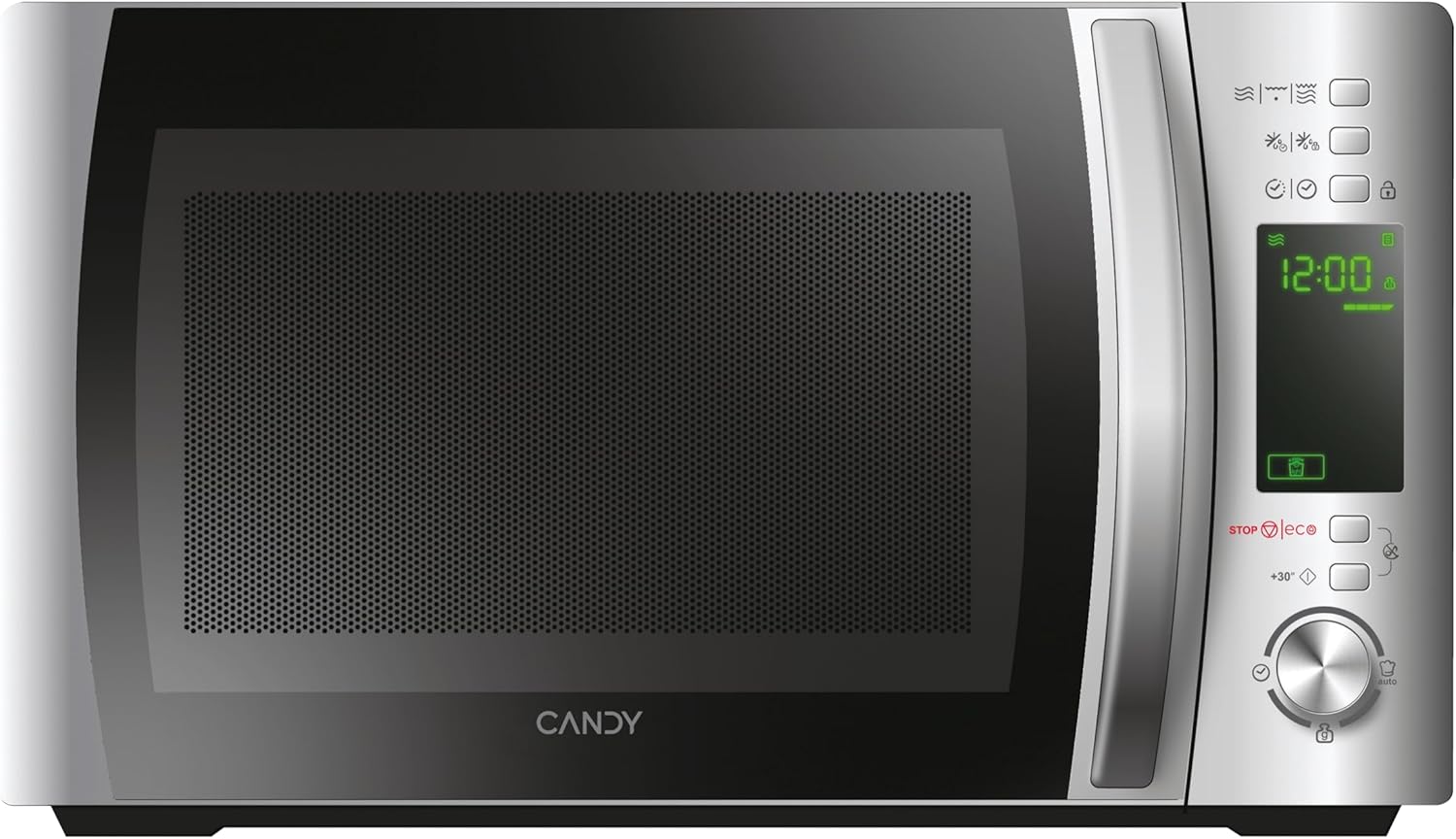

Panel Kawalan
The control panel features a digital display and various buttons and a dial for setting cooking functions, time, and power levels. Specific functions include:
- Paparan Digital: Menunjukkan masa, tahap kuasa dan penunjuk program.
- Power Level Buttons: Adjust microwave power.
- Grill Function Button: Activates the grill.
- Butang Pencairan: Untuk pencairan mengikut berat atau masa.
- Automatic Programs Button: Mengakses program memasak yang telah ditetapkan.
- Butang Kunci Keselamatan: Engages/disengages child lock.
- STOP/ECO Button: Stops cooking or activates Eco mode.
- +30 Seconds Button: Quick start or adds 30 seconds to cooking time.
- Dail Putar: Adjusts time, weight, or program selection.
- Butang Mula: Memulakan masakan.
3. Persediaan
Membongkar dan Meletakkan
- Keluarkan semua bahan pembungkusan dari rongga ketuhar dan aksesori.
- Inspect the oven for any damage such as dents or a misaligned door. Do not operate if damaged.
- Place the microwave oven on a stable, level surface strong enough to hold the oven and the food being cooked.
- Ensure adequate ventilation. Maintain a minimum clearance of 20 cm above the oven, 10 cm at the rear, and 5 cm on both sides. Do not block any ventilation openings.
- Jangan letakkan ketuhar berhampiran sumber haba atau di tempat yangamp persekitaran.

Sambungan elektrik
- Plug the power cord into a properly installed and earthed wall socket.
- Pastikan voltage sepadan dengan label penilaian pada perkakas.
Initial Setup: Setting the Clock
- When the microwave is first plugged in, the display will show "0:00".
- Press the "Clock" button (if available, otherwise consult specific model instructions for clock setting, often combined with a time setting button).
- Rotate the dial to set the hour. Press the "Clock" button again.
- Rotate the dial to set the minutes. Press the "Clock" button to confirm.
4. Arahan Operasi
4.1. Basic Microwave Cooking
- Letakkan makanan di dalam bekas yang selamat digunakan di dalam ketuhar gelombang mikro di atas meja putar kaca. Tutup pintu.
- Press the "Microwave" button (or equivalent power level button) repeatedly to select the desired power level (e.g., 700W, 500W, etc.). The display will show the selected power.
- Putar dail untuk menetapkan masa memasak.
- Tekan butang "Mula" untuk mula memasak.
4.2. Grill Function
- Place food on the grill rack, then place the rack on the turntable.
- Press the "Grill" button. The display will show "G".
- Rotate the dial to set the grilling time.
- Tekan butang "Mula".
4.3. Combination Cooking (Microwave + Grill)
- Place food in a suitable container on the turntable or grill rack.
- Press the "Combi" button (or press Microwave/Grill buttons in sequence to select a combination mode, e.g., C-1, C-2).
- Putar dail untuk menetapkan masa memasak.
- Tekan butang "Mula".
4.4. Fungsi Penyahbekuan
The CMXG20DS offers defrosting by weight or by time.
Pencairan mengikut Berat:
- Letakkan makanan sejuk beku di atas meja putar.
- Press the "Defrost" button once. The display will show "dEF1" (or similar for weight defrost).
- Rotate the dial to set the weight of the food.
- Tekan butang "Mula".
Pencairan mengikut Masa:
- Letakkan makanan sejuk beku di atas meja putar.
- Press the "Defrost" button twice. The display will show "dEF2" (or similar for time defrost).
- Rotate the dial to set the defrosting time.
- Tekan butang "Mula".

4.5. Express Cooking (+30 Seconds)
For quick heating at full power, simply press the "+30 Seconds" button. Each press adds 30 seconds to the cooking time. This function can also be used to extend cooking time during operation.
4.6. Automatic Programs (40 Programs)
The microwave features 40 pre-set automatic cooking programs for various food types. These programs are designed to simplify cooking by automatically setting the optimal time and power.
- Press the "Auto Program" button. The display will show "A-1" (or similar).
- Rotate the dial to select the desired program (e.g., A-1 for pizza, B-1 for vegetables). A list of programs and their corresponding codes is typically found on the inside of the microwave door or in a separate section of this manual.
- Tekan butang "Mula".

4.7. Fungsi Pemasa
The microwave can be used as a kitchen timer without cooking.
- Ensure the oven is not in cooking mode.
- Press the "Timer" button (or a dedicated clock/timer button).
- Rotate the dial to set the desired countdown time.
- Press the "Start" button. The timer will count down without activating the microwave function.
4.8. Safety Lock (Child Lock)
To prevent unintended operation, especially by children:
- Untuk Mengaktifkan: Press and hold the "Safety Lock" button (often indicated by a lock icon) for 3 seconds. A lock indicator will appear on the display.
- Untuk Nyahaktifkan: Press and hold the "Safety Lock" button again for 3 seconds. The lock indicator will disappear.
4.9. Mod Eko
The Eco mode turns off the display to save energy when the microwave is not in use.
- Untuk Mengaktifkan: Press the "STOP/ECO" button once when the microwave is idle. The display will turn off.
- Untuk Nyahaktifkan: Press any button or open the door. The display will reactivate.
4.10. simply-Fi App Integration
The simply-Fi app provides additional functionality, including access to recipes, cooking tips, and product information. Refer to the app's instructions for pairing and usage.

5. Penyelenggaraan dan Pembersihan
Pembersihan dan penyelenggaraan yang kerap akan memastikan jangka hayat dan prestasi optimum ketuhar gelombang mikro anda.
Pembersihan Am
- Sentiasa cabut plag perkakas dari stopkontak sebelum membersihkan.
- Bersihkan rongga ketuhar selepas setiap penggunaan denganamp kain. Untuk kotoran degil, detergen lembut boleh digunakan.
- Permukaan luar hendaklah dibersihkan dengan iklanamp cloth. Prevent water from seeping into the ventilation openings.
- The door and door seals should be cleaned regularly to ensure proper closing and operation.
Aksesori Pembersihan
- Meja putar kaca dan cincin meja putar boleh dibasuh dalam air sabun suam atau dalam mesin basuh pinggan mangkuk.
- The grill rack should be cleaned with warm soapy water and a non-abrasive sponge.
- Ensure all parts are completely dry before reassembling and using the microwave.
6. Penyelesaian masalah
Jika anda menghadapi masalah dengan ketuhar gelombang mikro anda, rujuk jadual berikut untuk masalah dan penyelesaian biasa.
| Masalah | Kemungkinan Punca | Penyelesaian |
|---|---|---|
| Oven tidak akan bermula | Power cord not securely plugged in. Door not closed properly. Fuse blown or circuit breaker tripped. | Ensure power cord is plugged in. Close door securely. Check household fuse or reset circuit breaker. |
| Makanan tidak dipanaskan | Incorrect cooking time or power level set. Microwave-safe dish not used. | Adjust cooking time and power level. Use appropriate microwave-safe cookware. |
| Percikan api di dalam ketuhar | Metal or foil in the oven. Food residue on cavity walls. | Remove any metal objects. Clean the oven cavity thoroughly. |
| Meja putar tidak berpusing | Turntable not properly placed on the ring. Obstruction under the turntable. | Ensure turntable and ring are correctly positioned. Remove any obstructions. |
| Paparan menunjukkan kod ralat | Kerosakan dalaman. | Cabut plag ketuhar selama beberapa minit, kemudian pasangkannya semula. Jika ralat berterusan, hubungi khidmat pelanggan. |
Jika masalah berterusan selepas mencuba penyelesaian ini, sila hubungi sokongan pelanggan.
7. Spesifikasi Teknikal
- Jenama:
- gula-gula
- Nombor Model:
- CMXG20DS
- warna:
- Perak
- Dimensi Produk (D x W x H):
- 44 x 29.5 x 26 cm
- kapasiti:
- 20 Liter
- Keluaran Kuasa Gelombang Mikro:
- 700 Watt
- Voltage:
- 230 Volt
- Bahan:
- Keluli Tahan Karat
- Tahap Bunyi:
- 44 dB
- Ciri Khas:
- Control panel lock, Defrost, Eco mode, Turntable, Programmable, Quick access keys, Timer
- Diameter Meja putar:
- 25.5 sm
- Berat:
- 12.2 kg
8. Waranti dan Sokongan
Maklumat Waranti
This Candy appliance is covered by a standard manufacturer's warranty. Please refer to the warranty card included with your purchase for specific terms and conditions, including the duration of coverage and what is covered.
Sokongan Pelanggan
For technical assistance, spare parts, or service requests, please contact Candy customer support. Contact details can typically be found on the manufacturer's official webtapak atau pada dokumentasi jaminan.
When contacting support, please have your model number (CMXG20DS) and serial number ready.


