1. Pengenalan
This manual provides essential instructions for the safe and efficient operation of your beFree Sound BFS-6445 Projection Party Light Dome Subwoofer Bluetooth Portable Speaker. Please read this manual thoroughly before using the product and retain it for future reference.
The beFree Sound BFS-6445 is a versatile portable speaker system featuring a 10-inch subwoofer, Bluetooth connectivity, USB/SD input, FM radio, and a unique projection light dome. It includes a wireless microphone and a remote control for enhanced functionality.
2. Produk Lebihview
2.1 Ciri-ciri Utama
- Output Kuasa Puncak 800 Watt
- 10-inch Subwoofer for deep bass
- 7" x 4.5" LED Light Projection Dome
- Kesambungan Tanpa Wayar Bluetooth
- USB and SD Card Input for media playback
- Penala Radio FM
- Microphone and Guitar Inputs with priority switch
- Bass, Treble, Echo, Mic Volume, and Guitar Volume Controls
- Built-in Side Handles, Rolling Handle, and Wheels for portability
- Includes Wireless Microphone and Remote Control
2.2 Komponen dan Kawalan Pembesar Suara
Refer to the image below for a visual guide to the speaker's main components and control panel.

Rajah 1: Depan view of the beFree Sound BFS-6445 speaker, showing the projection light dome, control panel, 10-inch subwoofer grille, and included wireless microphone and remote control. The inset images highlight the light dome's color variations (green, blue, red), USB/SD card slots, Bluetooth logo, and FM radio icon.
The control panel, located on the top front of the speaker, provides access to various functions including volume, input selection, equalization, and light dome control.
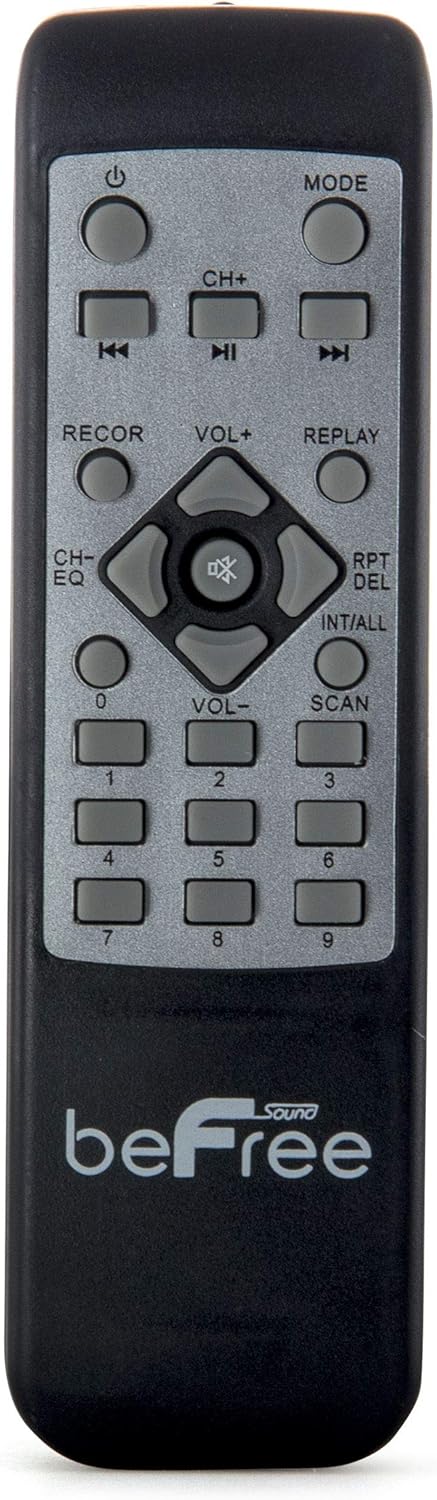
Rajah 2: jarak dekat view of the beFree Sound BFS-6445 remote control. It features buttons for power, mode selection, track navigation, volume adjustment, EQ, record, replay, scan, and numerical input.
The remote control allows for convenient operation of the speaker from a distance.
3. Persediaan
3.1 Membongkar dan Meletakkan
- Keluarkan pembesar suara dan semua aksesori dengan berhati-hati daripada pembungkusan.
- Letakkan pembesar suara di atas permukaan yang stabil dan rata. Pastikan pengudaraan yang mencukupi di sekeliling unit.
- The speaker is equipped with rolling wheels and an extendable handle for easy transport.
3.2 Sambungan Kuasa
- Connect the provided AC power cord to the speaker's AC input port (AC 100-240V, 50/60Hz).
- Pasangkan hujung kord kuasa yang satu lagi ke soket dinding yang sesuai.
- The speaker can operate on AC power.
3.3 Battery Installation (Remote Control & Wireless Microphone)
- Kawalan Jauh: Open the battery compartment on the back of the remote control. Insert 2 x AAA batteries, ensuring correct polarity (+/-). Close the compartment.
- Mikrofon Tanpa Wayar: Open the battery compartment on the microphone. Insert 2 x AA batteries, ensuring correct polarity (+/-). Close the compartment.
4. Arahan Operasi
4.1 Hidupkan/Mati Kuasa
Tekan ke KUASA button on the control panel or remote control to turn the speaker on or off.
4.2 Pemilihan Mod Input
Tekan ke MODE button on the control panel or remote control to cycle through available input modes: Bluetooth, USB, SD, FM Radio, and AUX (if an external device is connected via audio input).
4.3 Berpasangan Bluetooth
- Turn on the speaker and select Bluetooth mode using the MODE button. The display will indicate Bluetooth mode, and a pairing tone may sound.
- Dayakan Bluetooth pada peranti mudah alih anda (telefon pintar, tablet, dll.).
- Cari untuk available Bluetooth devices. The speaker will appear as "beFree Sound BFS-6445" or similar.
- Select the speaker from the list to pair. Once paired, a confirmation tone will sound.
- Anda kini boleh memainkan audio daripada peranti anda melalui pembesar suara.
4.4 Main Semula USB/Kad SD
- Insert a USB flash drive or SD card into the respective slot on the control panel.
- Pembesar suara akan bertukar kepada mod USB atau SD secara automatik dan mula memainkan audio yang serasi files. Jika tidak, tekan MODE butang untuk memilih input yang betul.
- Gunakan MAIN/JEDA, SEBELUMNYA, dan SETERUSNYA buttons on the control panel or remote to control playback.
4.5 Operasi Radio FM
- Pilih Radio FM mode using the MODE button.
- Tekan dan tahan butang IMBAS button (often the PLAY/PAUSE button) to automatically scan and save available FM stations.
- Gunakan SEBELUMNYA dan SETERUSNYA butang untuk menavigasi melalui stesen yang disimpan.
4.6 Input Mikrofon dan Gitar
- Connect a wired microphone to the INPUT MIC jek.
- Sambungkan gitar ke INPUT GUITAR jek.
- Laraskan VOLUME MIC dan VOLUME GITAR knobs on the control panel to set desired levels.
- Gunakan SUIS KEUTAMAAN MIC to enable or disable microphone priority. When enabled, the music volume will automatically lower when the microphone is in use.
- Laraskan ECHO knob for microphone echo effects.
4.7 Light Projection Dome
The speaker features an integrated LED light projection dome. Use the LIGHT POWER SWITCH on the control panel to turn the light dome on or off. The dome projects various colored patterns to enhance the ambiance.
4.8 Pelarasan Audio
Gunakan BASS dan TREBLE knobs on the control panel to adjust the low and high frequencies of the audio output.
Yang utama JILID knob controls the overall output level of the speaker.
4.9 Using as Main or Passive Speaker
This speaker supports dual audio input/output, allowing it to be used in conjunction with another unit. Connect the audio output of one speaker to the audio input of another using an AV cable to amplify sound or create a stereo setup.
5. Penyelenggaraan
5.1 Pembersihan
- Sentiasa cabut plag pembesar suara daripada soket kuasa sebelum membersihkannya.
- Gunakan kain lembut dan kering untuk mengelap permukaan luar pembesar suara.
- Jangan gunakan pembersih, lilin atau pelarut yang melelas kerana ia boleh merosakkan kemasan.
- Pastikan gril pembesar suara bebas daripada habuk dan serpihan.
5.2 Penyimpanan
When not in use for extended periods, store the speaker in a cool, dry place, away from direct sunlight and extreme temperatures. If possible, use the original packaging for protection.
6. Penyelesaian masalah
| Masalah | Kemungkinan Punca | Penyelesaian |
|---|---|---|
| Tiada kuasa | Power cord not connected; outlet not active; power switch off. | Ensure power cord is securely connected. Check wall outlet with another device. Turn the speaker's power switch on. |
| Tiada bunyi | Volume too low; incorrect input mode; device not paired (Bluetooth); media error (USB/SD). | Increase master volume. Select the correct input mode. Re-pair Bluetooth device. Check USB/SD card for compatible files and proper insertion. |
| Bluetooth tidak bersambung | Speaker not in Bluetooth mode; device too far; interference; speaker already paired to another device. | Ensure speaker is in Bluetooth mode. Move device closer to speaker. Turn off other Bluetooth devices. Disconnect from previous device. |
| Mikrofon tidak berfungsi | Microphone not powered; volume too low; incorrect input. | Check microphone batteries (if wireless) or connection (if wired). Increase MIC VOLUME. Ensure MIC PRIORITY switch is set correctly. |
| Light dome not working | Light power switch off. | Ensure the LIGHT POWER SWITCH is in the ON position. |
7. Spesifikasi
- Jenis pembesar suara: Subwufer
- Saiz pembesar suara: 10 Inci
- Kuasa Output Maksimum Pembesar Suara: 800 Watt
- Teknologi Ketersambungan: Bluetooth, USB
- Ciri Khas: Portable, Projection Light Dome, FM Radio, USB/SD Input, Microphone/Guitar Input
- Kaedah Kawalan: Kawalan Jauh, Kawalan Pada Unit
- Sumber Kuasa: AC 100-240V, 50/60Hz
- Dimensi Produk (D x W x H): 13.5" x 12.5" x 29.75"
- Berat Barang: 30.3 paun
- Bateri Kawalan Jauh: 2 x AAA (termasuk)
- Wireless Microphone Batteries: 2 x AA (termasuk)
- Nombor Model: BFS-6445
- UPC: 602573151884
8. Waranti dan Sokongan
beFree Sound products are designed for reliability and performance. For warranty information, technical support, or service inquiries, please refer to the warranty card included with your purchase or contact beFree Sound customer service directly.
Sila simpan bukti pembelian anda untuk tuntutan waranti.


