1. Pengenalan
This manual provides instructions for the LEXIBOOK LBOXA501 Wireless Game Controller. This controller is designed as an additional input device for the Play Droid TV (LBOX500) system, enhancing the gaming experience for various game genres including racing, first-person shooters (FPS), and sports games. Please read this manual thoroughly before using the product to ensure proper operation and to prevent damage.
2. Kandungan Pakej
Sahkan bahawa semua item yang disenaraikan di bawah terdapat dalam pakej anda:
- 1 x LEXIBOOK LBOXA501 Wireless Game Controller
- 1 x Kabel Pengecas USB
- 1 x Manual Arahan (dokumen ini)
3. Produk Lebihview
The LEXIBOOK LBOXA501 controller features an ergonomic design for comfortable handling and a non-slip coating for secure grip during gameplay. Below is an illustration of the controller with its main components.
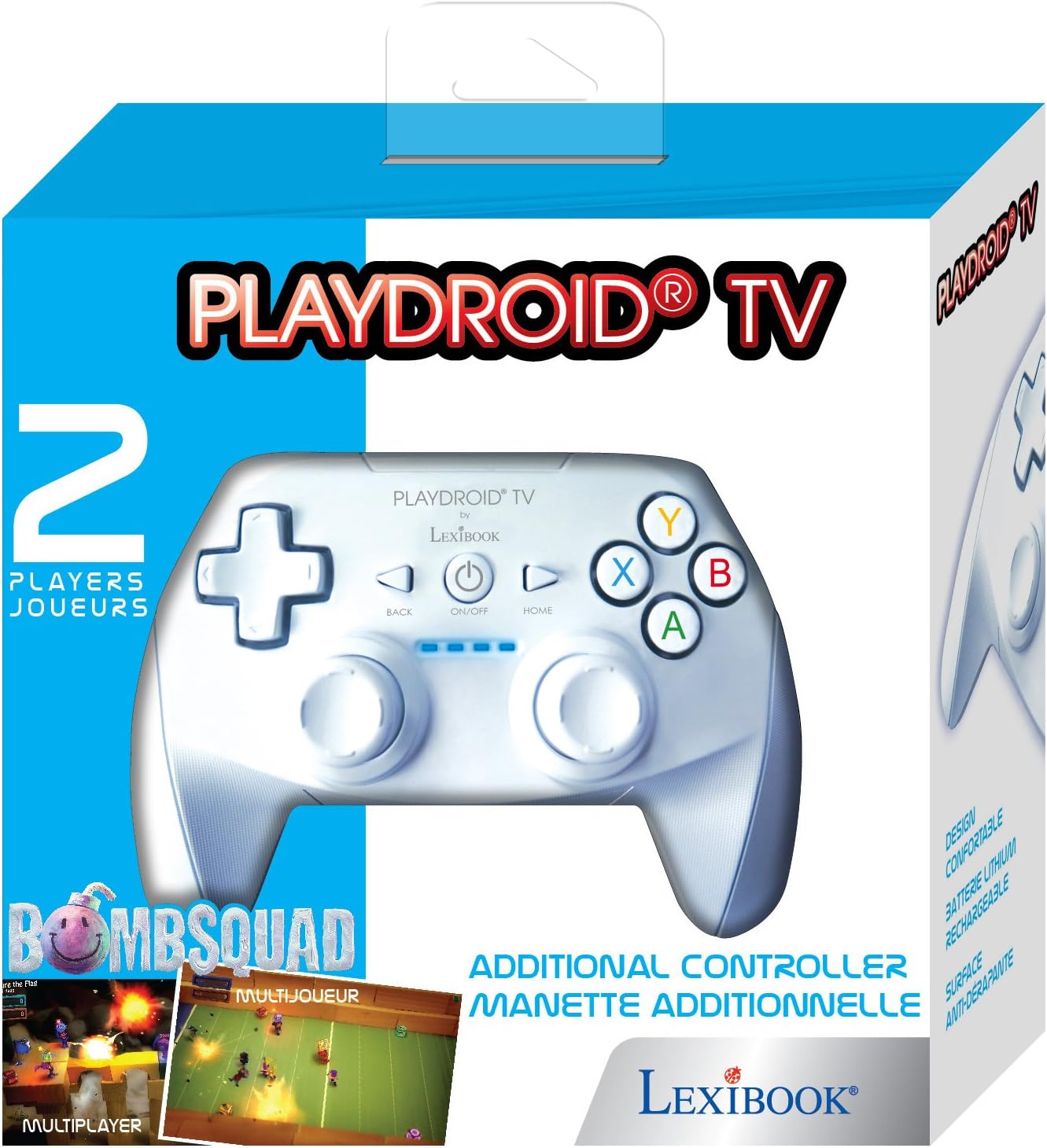
Rajah 1: Depan view of the LEXIBOOK LBOXA501 Wireless Game Controller. This image displays the directional pad (D-pad) on the left, two analog sticks, and the A, B, X, Y action buttons on the right. Central buttons include BACK, ON/OFF, and HOME.
Komponen Pengawal:
- Directional Pad (D-pad): Digunakan untuk input arah dalam permainan dan navigasi menu.
- Analog Sticks (Left & Right): Provide precise 360-degree movement control.
- Butang Tindakan (A, B, X, Y): Primary input buttons for in-game actions.
- Butang KEMBALI: Typically used for returning to previous menus or functions.
- Butang HIDUP/MATI: Powers the controller on or off.
- Butang rumah: Returns to the main menu of the connected device.
- Shoulder Buttons (L1, R1) & Triggers (L2, R2): Located on the top edge for additional in-game actions.
- Port Pengecasan: Untuk menyambungkan kabel pengecas USB.
4. Persediaan
4.1 Pengecasan Awal
Before first use, fully charge the controller. Connect the supplied USB charging cable to the controller's charging port and the other end to a USB power source (e.g., a computer USB port or a USB wall adapter). The charging indicator light will illuminate during charging and turn off or change color when fully charged. A full charge typically takes approximately 2-3 hours.
4.2 Pairing with Play Droid TV (LBOX500)
- Ensure your Play Droid TV (LBOX500) is powered on and in its main menu.
- On the LEXIBOOK LBOXA501 controller, press and hold the HIDUP/MATI button for a few seconds until the indicator lights begin to flash, indicating it is in pairing mode.
- On your Play Droid TV, navigate to the Bluetooth settings or device pairing menu. Refer to your Play Droid TV manual for specific instructions on how to access this menu.
- Select the LEXIBOOK LBOXA501 controller from the list of available devices.
- Once paired, the indicator lights on the controller will stop flashing and remain solid, confirming a successful connection.
- If pairing fails, repeat the steps. Ensure the controller is sufficiently charged and within range of the Play Droid TV.
5. Arahan Operasi
5.1 Hidupkan/Mati Kuasa
- Untuk menghidupkan: Tekan butang HIDUP/MATI button. The controller will attempt to connect to the last paired device.
- Untuk mematikan: Tekan dan tahan butang HIDUP/MATI button for approximately 3 seconds until the indicator lights turn off. The controller will also automatically power off after a period of inactivity to conserve battery.
5.2 Fungsi Kawalan Asas
- Navigasi: Gunakan D-pad or Tongkat Analog Kiri to navigate through menus and game environments.
- Pemilihan/Pengesahan: The A button is typically used for selection or confirmation.
- Cancellation/Return: The B butang atau KEMBALI button is often used to cancel an action or return to a previous screen.
- Menu Utama: Tekan ke RUMAH button to return to the main menu of your Play Droid TV.
- In-Game Actions: The A, B, X, Y butang, Kayu Analog, Shoulder Buttons, dan Pencetus are used for specific actions within games. Refer to individual game instructions for button assignments.
6. Mengecas Bateri
The LEXIBOOK LBOXA501 controller is equipped with a built-in rechargeable lithium-ion battery. When the battery level is low, the indicator lights on the controller may flash or change color to alert you.
- Connect the small end of the USB charging cable to the charging port on the controller.
- Connect the larger end of the USB charging cable to a powered USB port (e.g., on your Play Droid TV, a computer, or a USB wall adapter).
- The charging indicator lights will show the charging status. Once fully charged, disconnect the USB cable.
Nota: Do not use damaged charging cables or adapters. Only use the provided cable or a certified equivalent.
7. Penyelenggaraan
7.1 Pembersihan
- Ensure the controller is powered off before cleaning.
- Use a soft, dry cloth to wipe the surface of the controller.
- Untuk kotoran degil, sedikit dampen the cloth with water. Avoid using harsh chemicals, solvents, or abrasive cleaners, as these can damage the surface and internal components.
- Jangan biarkan cecair memasuki bukaan pengawal.
7.2 Penyimpanan
- Simpan pengawal di tempat yang sejuk dan kering jauh dari cahaya matahari langsung dan suhu yang melampau.
- Elakkan meletakkan objek berat pada alat kawalan.
- If storing for an extended period, charge the battery periodically (e.g., every 3-6 months) to maintain battery health.
8. Penyelesaian masalah
| Masalah | Kemungkinan Punca | Penyelesaian |
|---|---|---|
| Pengawal tidak dihidupkan. | Bateri habis. | Charge the controller using the USB cable. |
| Controller does not pair with Play Droid TV. | Controller not in pairing mode; Out of range; Interference; Play Droid TV Bluetooth issue. |
|
| Butang atau kayu analog tidak bertindak balas. | Low battery; Connection issue; Software glitch; Physical damage. |
|
| Pengawal kerap terputus sambungan. | Low battery; Out of range; Wireless interference. |
|
9. Spesifikasi
| Nombor Model | LBOXA501 |
| Jenama | LEXIBOOK |
| Keserasian | Play Droid TV (LBOX500) |
| Ketersambungan | Tanpa wayar |
| Jenis Bateri | Lithium-Ion yang boleh dicas semula |
| Dimensi (L x W x H) | 12 x 16 x 7 cm (4.7 x 6.3 x 2.8 inci) |
| Berat badan | 210 g (0.46 paun) |
10. Waranti dan Sokongan
LEXIBOOK products are manufactured to high standards and are subject to quality control. This product is covered by a limited warranty against defects in materials and workmanship. The specific terms and duration of the warranty may vary by region. Please retain your proof of purchase for warranty claims.
For technical support, warranty service, or further information, please visit the official LEXIBOOK website or contact their customer service department. Contact details can typically be found on the LEXIBOOK webtapak atau pada pembungkusan produk.
Sokongan dalam talian: www.lexibook.com/support (Example link, actual link may vary)


