1. Pengenalan
The Vivitek Qumi Q8-BK is a compact and portable DLP projector designed for both business and personal use. It offers Full HD 1080p resolution, 1000 lumens brightness, and versatile connectivity options including HDMI, USB, and wireless mirroring for Android and iOS devices. This manual provides essential information for setting up, operating, maintaining, and troubleshooting your projector to ensure optimal performance.
2. Maklumat Keselamatan
Please read all safety instructions before using the projector. Keep this manual for future reference.
- Jangan halang bukaan pengudaraan. Pastikan aliran udara yang mencukupi di sekitar projektor.
- Jangan lihat terus ke dalam kanta projektor apabila lamp sedang dihidupkan. Cahaya terang boleh menyebabkan kerosakan mata.
- Avoid placing the projector in direct sunlight, near heat sources, or in environments with extreme temperatures or humidity.
- Gunakan hanya penyesuai kuasa yang dibekalkan dengan projektor.
- Jangan cuba membuka atau membaiki projektor itu sendiri. Rujuk semua servis kepada kakitangan yang berkelayakan.
- Jauhkan projektor daripada air atau cecair lain.
3. Kandungan Pakej
Sahkan bahawa semua item terdapat dalam pakej anda:
- Vivitek Qumi Q8-BK Projector
- Penyesuai Kuasa
- Alat Kawalan Jauh
- Kabel HDMI
- Panduan Mula Pantas
- Membawa Sarung
4. Produk Lebihview
Biasakan diri anda dengan komponen dan port sambungan projektor.
4.1 Top Panel and Controls
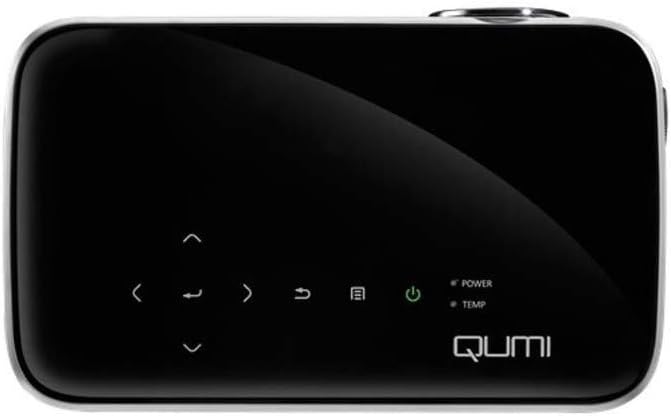
Rajah 1: Atas view of the Vivitek Qumi Q8-BK projector, highlighting the touch-sensitive control panel. This panel includes navigation arrows, menu access, source selection, and power buttons, along with LED indicators for power and temperature.
The top panel features touch-sensitive controls for navigating menus, adjusting settings, and power management. LED indicators show the power status and temperature warnings.
4.2 Side Panel and Ports
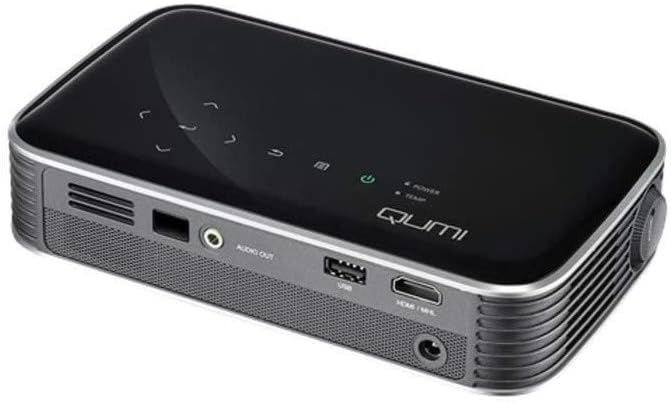
Rajah 2: sebelah view of the Vivitek Qumi Q8-BK projector, displaying its connectivity ports. These include an audio out jack, a USB port, and an HDMI/MHL input, along with ventilation grilles.
The side panel provides essential connectivity options:
- Keluar Audio: Sambungkan pembesar suara atau fon kepala luaran.
- USB: Untuk menyambungkan peranti storan USB untuk memainkan media files atau untuk kemas kini perisian tegar.
- HDMI/MHL: Connect to HDMI-enabled devices such as laptops, Blu-ray players, or MHL-compatible smartphones/tablets.
- Input Kuasa: Sambungkan penyesuai kuasa yang disediakan.
5. Persediaan
Follow these steps to set up your Vivitek Qumi Q8-BK projector.
5.1 Menghidupkan
- Connect the power adapter to the projector's power input port and then to an electrical outlet.
- Press the power button on the projector's top panel or on the remote control. The power LED indicator will illuminate.
- Allow a few moments for the projector to warm up and display the initial screen.
5.2 Adjusting Focus and Keystone
- Fokus: Rotate the focus ring located near the lens until the projected image is sharp and clear.
- Pembetulan Keystone: If the image appears trapezoidal (wider at the top or bottom), use the keystone correction function in the projector's menu to adjust it. This corrects the image geometry to a rectangular shape.
5.3 Menyambungkan Sumber Input
The Qumi Q8-BK supports multiple input sources:
- HDMI/MHL: Connect an HDMI cable from your source device (laptop, game console, Blu-ray player) to the HDMI/MHL port on the projector. For MHL-compatible mobile devices, use an MHL cable.
- USB: Masukkan pemacu kilat USB ke dalam port USB untuk mengakses media filedisimpan di atasnya.
- Wireless (Miracast/AirPlay): The projector features built-in Wi-Fi for wireless content sharing from Android and iOS devices. Refer to the "Operating" section for detailed instructions on wireless setup.
6. Beroperasi
This section covers the basic operation of your projector.
6.1 Menavigasi Menu
Use the navigation buttons on the top panel or the remote control to browse the projector's on-screen menu. Press the "Menu" button to access settings such as image adjustments, source selection, and system configurations.
6.2 Pemilihan Sumber
Press the "Source" button on the remote or the projector to cycle through available input sources (HDMI, USB, Wireless). Select the desired source from the on-screen menu.
6.3 Wireless Content Sharing (Miracast/AirPlay)
The Qumi Q8-BK supports wireless mirroring for compatible devices:
- Ensure the projector's Wi-Fi is enabled and connected to your network (if required for your device's mirroring function).
- Select the "Wireless" input source on the projector.
- On your Android device, enable "Screen Mirroring," "Smart View," or a similar function. On iOS devices, use "AirPlay Mirroring."
- Select the Qumi Q8-BK from the list of available devices on your mobile device.
- Your device's screen should now be mirrored on the projector.
Note: Performance may vary depending on network conditions and device compatibility. Some streaming services may restrict mirrored content.
6.4 Media Playback from USB
Insert a USB flash drive into the USB port. The projector's media player interface will typically launch automatically, allowing you to browse and play supported video, audio, and image files.
6.5 Fungsi 3D
The Qumi Q8-BK supports 3D content. To view 3D content, you will need compatible 3D glasses (sold separately) and a 3D-enabled source device playing 3D content. Refer to the projector's on-screen menu for 3D settings and modes.
7. Penyelenggaraan
Penyelenggaraan yang betul memastikan jangka hayat dan prestasi optimum projektor anda.
- Pembersihan Kanta: Lap kanta projektor dengan lembut menggunakan kain lembut dan tidak berbulu yang direka khas untuk permukaan optik. Jangan gunakan pembersih yang kasar atau daya yang berlebihan.
- Pengudaraan: Regularly check and clean the ventilation grilles to prevent dust buildup, which can lead to overheating. Use a soft brush or compressed air.
- Storan: When not in use for extended periods, store the projector in its carrying case in a cool, dry, and dust-free environment.
- LED Lamp: The projector uses an energy-efficient LED lamp with an estimated operational life of up to 30,000 hours, requiring no replacement under normal usage.
8. Penyelesaian masalah
Jika anda menghadapi masalah dengan projektor anda, rujuk masalah dan penyelesaian biasa berikut.
| Masalah | Penyelesaian yang Mungkin |
|---|---|
| Tiada imej dipaparkan |
|
| Tiada bunyi |
|
| Wireless mirroring issues |
|
| Projektor menjadi terlalu panas atau dimatikan |
|
If the problem persists after trying these solutions, please contact Vivitek customer support.
9. Spesifikasi
Key technical specifications for the Vivitek Qumi Q8-BK projector:
| Ciri | Perincian |
|---|---|
| Jenama | Vivitek |
| Nombor Model | Qumi Q8-BK |
| Resolusi Paparan | 1920 x 1080 (HD Penuh) |
| Kecerahan | Sehingga Lumens 1000 |
| Nisbah Kontras | 30,000:1 |
| Lamp taip | LED |
| Lamp kehidupan | Anggaran 30,000 jam |
| Teknologi Ketersambungan | HDMI, USB, Wi-Fi (Miracast/AirPlay) |
| Ciri Khas | HDMI Connectivity, Portable, USB Connectivity, Wireless, Miracast |
| Dimensi Produk | 1.7 x 4.4 x 7.4 inci |
| Berat Barang | 1.4 paun |
10. Waranti dan Sokongan
Vivitek products are designed for reliability and performance. For warranty information, please refer to the warranty card included in your product package or visit the official Vivitek website. For technical support, troubleshooting assistance beyond this manual, or service inquiries, please contact Vivitek customer support through their official channels.
Please have your product model number (Qumi Q8-BK) and serial number ready when contacting support.


