1. Arahan Keselamatan Penting
Please read all safety instructions carefully before using the Vivitek Qumi Q3 Plus-RD projector. Failure to follow these instructions may result in electric shock, fire, or damage to the device.
- Sumber Kuasa: Use only the supplied AC power adapter. Ensure the voltage matches the projector's requirements.
- Pengudaraan: Do not block ventilation openings. Maintain adequate space around the projector for proper airflow to prevent overheating.
- Kelembapan: Do not expose the projector to rain, moisture, or operate it near water.
- haba: Avoid placing the projector near heat sources such as radiators, heat registers, stoves, or other apparatus that produce heat.
- Pembersihan: Cabut plag projektor daripada soket kuasa sebelum membersihkan. Gunakan kain kering untuk membersihkan. Jangan gunakan pembersih cecair atau pembersih aerosol.
- Servis: Jangan cuba servis produk ini sendiri. Rujuk semua perkhidmatan kepada pegawai perkhidmatan yang berkelayakan.
- Keselamatan Mata: Jangan lihat terus ke dalam kanta projektor apabila lamp sedang dihidupkan. Cahaya terang boleh menyebabkan kerosakan mata.
2. Kandungan Pakej
Verify that all items listed below are included in your Vivitek Qumi Q3 Plus-RD package:
- Vivitek Qumi Q3 Plus-RD Projector
- AC Power Adapter with Cable
- Kabel HDMI
- Documentation Kit (Quick Start Guide, Warranty Card)

Image: The AC power adapter and cable for the Vivitek Qumi Q3 Plus-RD projector.
3. Produk Lebihview
Familiarize yourself with the components and ports of your Vivitek Qumi Q3 Plus-RD projector.
3.1 Depan View

Imej: Depan view of the Vivitek Qumi Q3 Plus-RD projector, showing the projection lens and speaker grille.
3.2 Belakang View (Ports and Connections)

Imej: Belakang view of the Vivitek Qumi Q3 Plus-RD projector, displaying various input/output ports including AV IN, USB 1, USB 2, HDMI, DC IN power input, microSD card slot, and the power button.
3.3 Bahagian View

Imej: Sisi view of the Vivitek Qumi Q3 Plus-RD projector, showing the ventilation grilles and the integrated kickstand for angle adjustment.
3.4 Alat Kawalan Jauh
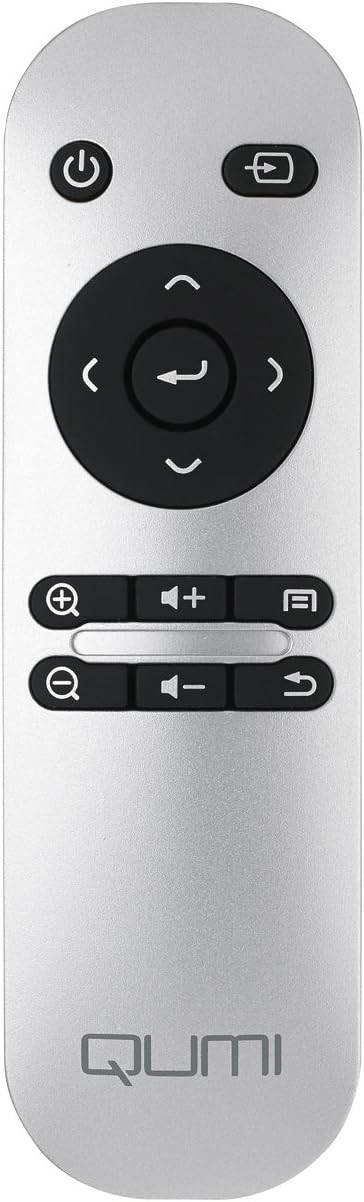
Image: The remote control for the Vivitek Qumi Q3 Plus-RD projector, featuring power, navigation, volume, and focus adjustment buttons.
4. Persediaan
Follow these steps to set up your Vivitek Qumi Q3 Plus-RD projector for first use.
- Sambungan Kuasa: Connect the supplied AC power adapter to the 'DC IN' port on the projector and then plug it into a power outlet. The projector can also operate on its internal battery.
- penempatan: Place the projector on a stable, flat surface. Use the integrated kickstand to adjust the projection angle if needed. Ensure there are no obstructions to the lens or ventilation openings.
- Hidupkan kuasa: Tekan dan tahan butang kuasa pada projektor atau alat kawalan jauh untuk menghidupkan peranti.
- Pelarasan Fokus: Once powered on, use the focus buttons on the remote control to adjust the image sharpness. The Qumi Q3 Plus-RD features motorized focus for precise adjustment.
- Pembetulan Keystone: The projector features digital auto keystone correction. If the image appears trapezoidal, the projector will automatically adjust it. Manual adjustment options may be available in the settings menu.
5. Arahan Operasi
This section details how to operate your Vivitek Qumi Q3 Plus-RD projector.
5.1 Menghidupkan/Mematikan
- Untuk Menghidupkan: Press and hold the power button on the projector or the remote control until the device starts.
- Untuk Mematikan: Press the power button on the projector or the remote control. A shutdown prompt will appear. Select 'Power Off' to shut down the system safely.
5.2 Navigating the Android OS
The Qumi Q3 Plus-RD runs on an Android operating system. Use the remote control's navigation buttons (up, down, left, right, OK) to move through menus and select options. A Bluetooth keyboard/mouse can also be paired for easier navigation.
5.3 Main Semula Media
- Pemacu USB: Insert a USB flash drive into one of the USB ports. The system will typically detect it and prompt you to open the file pelayar atau pemain media.
- Kad MicroSD: Insert a microSD card into the microSD slot. Similar to USB, the system will allow you to access its contents.
- Storan Dalaman: The projector has 5.1 GB of available on-board memory for storing files dan aplikasi.
5.4 Connecting External Devices (HDMI)
To connect an external device such as a laptop, Blu-ray player, or gaming console:
- Connect one end of an HDMI cable to the HDMI port on the projector.
- Connect the other end of the HDMI cable to the HDMI output port on your external device.
- On the projector's home screen, navigate to the input selection and choose 'HDMI'.
6. Ketersambungan
The Vivitek Qumi Q3 Plus-RD offers various connectivity options for seamless integration with your devices.
6.1 Persediaan Wi-Fi
- Dari skrin utama, navigasi ke 'Tetapan'.
- Pilih 'Wi-Fi' dan hidupkannya.
- Choose your desired Wi-Fi network from the list of available networks.
- Enter the network password if prompted and connect.
6.2 Berpasangan Bluetooth
You can pair Bluetooth devices such as external speakers, headphones, or a keyboard/mouse with your projector.
- Dari skrin utama, navigasi ke 'Tetapan'.
- Select 'Bluetooth' and turn it on.
- Masukkan peranti Bluetooth anda ke mod pasangan.
- Select your device from the list of available devices on the projector and confirm pairing.
6.3 Wireless Content Sharing
The projector supports wireless content sharing from Android and iOS devices. Refer to the projector's specific application (e.g., HappyCast or similar pre-installed app) for detailed instructions on mirroring your device's screen.
7. Penyelenggaraan
Penyelenggaraan yang betul memastikan jangka hayat dan prestasi optimum projektor anda.
- Pembersihan Kanta: Gently wipe the projector lens with a soft, lint-free cloth specifically designed for optical surfaces. Do not use abrasive materials or harsh chemicals.
- Pengudaraan: Regularly check that the ventilation openings are clear of dust and debris. Use a soft brush or compressed air to clean them.
- Penjagaan Bateri: For models with an internal battery, avoid fully discharging the battery frequently. If storing the projector for an extended period, charge the battery to approximately 50% to prolong its lifespan.
- Storan: Simpan projektor di tempat yang sejuk dan kering, jauh daripada cahaya matahari langsung dan suhu yang melampau.
8. Penyelesaian masalah
If you encounter issues with your Vivitek Qumi Q3 Plus-RD, refer to the following common problems and solutions.
- No Image Projected:
- Pastikan projektor dihidupkan dan penutup lensa ditanggalkan.
- Check the input source selection to ensure it matches the connected device (e.g., HDMI, USB).
- Verify that the external device is powered on and outputting a signal.
- Tiada Bunyi:
- Adjust the volume on the projector and the connected source device.
- Check if external speakers are connected via Bluetooth or AV IN, and ensure they are powered on and functioning.
- Ensure the audio output settings on the source device are correctly configured.
- Alat Kawalan Jauh Tidak Menjawab:
- Ensure there are no obstructions between the remote and the projector's IR receiver (located at the rear).
- Replace the remote control battery (typically a coin cell battery).
- Isu Kesambungan Wi-Fi/Bluetooth:
- Ensure Wi-Fi/Bluetooth is enabled in the projector's settings.
- Restart the projector and the device you are trying to connect.
- Semak gangguan daripada peranti wayarles lain.
- Imej Kabur:
- Use the remote control's focus buttons to adjust the image sharpness.
- Pastikan permukaan projektor rata dan projektor stabil.
9. Spesifikasi
Key technical specifications for the Vivitek Qumi Q3 Plus-RD projector:
| Ciri | Spesifikasi |
|---|---|
| Nombor Model | Q3 PLUS-RD |
| Jenis Paparan | DLP |
| Resolusi Paparan Asli | 1280 x 720 (HD 720p) |
| Kecerahan | Sehingga Lumens 500 |
| Nisbah Kontras | 5,000:1 |
| Teknologi Ketersambungan | Bluetooth, HDMI, Wi-Fi |
| Ciri Khas | Bluetooth, Portable, Android OS |
| Sistem Operasi | Android V.4.42 |
| CPU | Quad-core CPU at 1.5GHz |
| Storan Dalaman | 5.1 GB available |
| Bateri | 1 bateri Polimer Litium (termasuk) |
| Dimensi Produk | 6.9 x 4 x 1.1 inci |
| Berat Barang | 1 paun |
10. Waranti dan Sokongan
The Vivitek Qumi Q3 Plus-RD projector comes with a standard manufacturer's warranty. For detailed warranty information, please refer to the documentation kit included with your product or visit the official Vivitek webtapak.
For technical support, troubleshooting assistance, or service inquiries, please contact Vivitek customer support through their official channels. Keep your product's model number (Q3 PLUS-RD) and serial number handy when contacting support.


