pengenalan
This manual provides essential information for the safe and efficient operation of your 1byone Bluetooth Record Player. Please read it thoroughly before use and retain it for future reference.
Ciri-ciri Utama:
- Selectable 33, 45, and 78 RPM speed settings, including a 45-RPM adapter.
- Bluetooth connectivity for wireless music playback from smartphones, tablets, and other devices through the turntable's built-in speakers.
- Dynamic, balanced tone arm with soft damping control for gentle record playback.
- RCA output for connecting to external speakers and a headphone jack for private listening.
- Line-in port for connecting external audio sources like MP3 players.
- Portable briefcase-style design with a wooden cabinet and PU leather wrapping for easy storage and transport.
Maklumat Keselamatan
Arahan Keselamatan Penting:
- This appliance is not intended for use by dependents and children. All use by dependents should be supervised by a responsible, capable adult.
- This product must be used only for the purpose for which it has been developed, and in the manner described in these instructions for use. Any improper use can be dangerous.
- Jangan dedahkan unit kepada hujan atau lembapan.
- Jangan sekat sebarang bukaan pengudaraan.
- Lindungi kord kuasa daripada berjalan atau tersepit.
- Cabut palam unit semasa ribut petir atau apabila tidak digunakan untuk tempoh yang lama.
Kandungan Pakej
Sila pastikan semua item yang disenaraikan di bawah disertakan dalam pakej anda:
- 1byone Bluetooth Record Player
- Penyesuai 45 RPM
- Penyesuai Kuasa
- Manual Pengguna (dokumen ini)
Produk Selesaiview
Familiarize yourself with the components of your record player.

Figure 1: The 1byone Bluetooth Record Player in its open position, showcasing the platter, tone arm, and built-in speakers. A vinyl record is placed on the platter, ready for playback.
Depan View (Ditutup):

Figure 2: The record player in its closed, portable briefcase form, showing the front latches, handle, and speaker grilles.
belakang View (Ditutup):

Figure 3: The rear of the record player, displaying the hinges and a product information label with model and power specifications.
Side Panel Controls and Ports:

Rajah 4: Satu terperinci view of the right side panel, featuring the power/volume knob, DC input, headphone jack, RCA output (L/R), and Line-in port.

Figure 5: Visual representation of the connectivity options: headphone jack for private listening, RCA output for external speakers, and 3.5mm line-in for connecting other audio devices.
Komponen Dalaman:
- Pinggan: The rotating surface where records are placed.
- Lengan Nada: Memegang kartrij dan stylus, yang membaca alur rekod.
- Stilus (Jarum): The tip of the cartridge that makes contact with the record. (Protected by a cap).
- Suis Pemilih Kelajuan: Allows selection of 33, 45, or 78 RPM playback speeds.
- Auto Stop ON/OFF Switch: Controls whether the platter stops automatically at the end of a record.
- Pemegang Penyesuai 45 RPM: A dedicated slot for storing the 45 RPM adapter.
- Pembesar Suara Terbina dalam: Located on the front panel for direct audio output.
Persediaan
- Buka bungkus Meja Putar: Carefully remove the record player and all accessories from the packaging.
- Place the Turntable: Position the unit on a stable, level surface away from direct sunlight, heat sources, or excessive dust.
- Sambungkan Kuasa: Insert the DC plug of the power adapter into the DC IN port on the side of the turntable. Plug the other end of the adapter into a suitable wall outlet.
- Tanggalkan Pelindung Stilus: Before playing a record, gently remove the clear plastic protective cap from the stylus (needle).
- Release Tone Arm: Unlock the tone arm clip to release the tone arm.
Arahan Operasi
1. Playing Vinyl Records:
- Hidupkan kuasa: Rotate the ON/OFF/VOLUME knob clockwise until it clicks to turn on the unit. Adjust the volume to a low level.
- Pilih Kelajuan: Set the speed selector switch (33/45/78 RPM) to match the record you are playing. For 45 RPM records, place the included 45 RPM adapter onto the center spindle.
- Rekod Tempat: Letakkan rekod vinil dengan berhati-hati di atas pinggan meja putar.
- Fungsi Auto Stop: The AUTO STOP ON/OFF switch controls whether the record stops automatically when finished.
- Jika ditetapkan kepada ON, the record will stop automatically when it reaches the end. (Note: For some records, it may stop prematurely or not stop at all).
- Jika ditetapkan kepada DIMATIKAN, the record will continue to spin even after the music has ended.
- Mula Main Semula: Gently lift the tone arm using the cueing lever. Position the tone arm over the desired track on the record. Slowly lower the tone arm onto the record using the cueing lever. The music will begin to play.
- Laraskan Kelantangan: Rotate the ON/OFF/VOLUME knob to adjust the sound level.
- Tamat Main Semula: When the record finishes (or you wish to stop), lift the tone arm using the cueing lever and return it to the tone arm rest. Secure it with the tone arm clip. Rotate the ON/OFF/VOLUME knob counter-clockwise until it clicks to turn off the unit.
2. Main Balik Bluetooth:
You can stream music wirelessly from your Bluetooth-enabled devices to the record player's built-in speakers.
- Hidupkan kuasa: Turn on the record player using the ON/OFF/VOLUME knob.
- Aktifkan Bluetooth: The unit will automatically enter Bluetooth pairing mode. An indicator light may flash to show it's ready to pair.
- Pasangkan Peranti: On your smartphone, tablet, or other Bluetooth device, enable Bluetooth and search for "1byone Turntable" (or similar name). Select it to pair.
- Main Muzik: Once paired, you can play music from your device, and it will sound through the record player's speakers. Adjust volume using both your device and the turntable's volume knob.
3. Using the Line-In Port:
Connect external audio devices via the 3.5mm Line-in port.
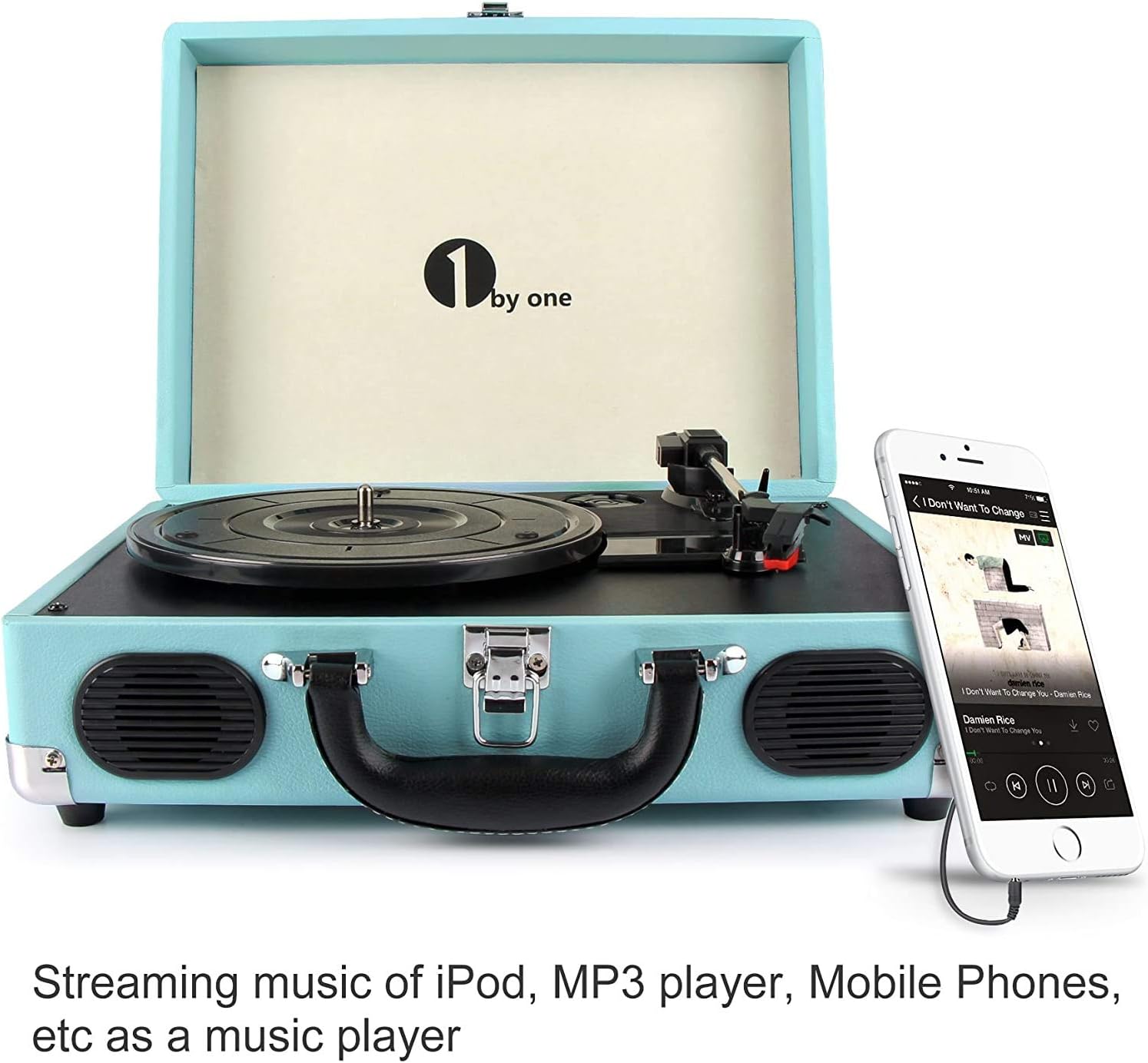
Figure 6: The record player demonstrating a smartphone connected to its 3.5mm Line-in port, allowing external audio playback through the turntable's speakers.
- Sambungkan Kabel: Use a 3.5mm audio cable (not included) to connect your external audio device (e.g., MP3 player, phone) to the LINE IN port on the side of the record player.
- Hidupkan kuasa: Turn on the record player and your external audio device.
- Main Muzik: Start playback on your external device. The audio will be routed through the record player's speakers. Adjust volume using both devices.
4. Using RCA Output:
Connect the record player to an external amplifier or powered speakers for enhanced sound.
- Sambungkan Kabel RCA: Use RCA cables (not included) to connect the L (left) and R (right) RCA OUT ports on the record player to the corresponding audio input ports on your amppembesar atau pembesar suara berkuasa.
- Hidupkan kuasa: Turn on the record player and your external audio system.
- Main Muzik: Play a record on the turntable. The audio will be output through your connected external system. Adjust volume on your external system.
5. Using Headphone Jack:
For private listening, connect headphones to the dedicated jack.
- Sambungkan Fon Kepala: Plug your headphones (not included) into the HEADPHONE jack on the side of the record player.
- Main Muzik: Play a record or stream via Bluetooth/Line-in. The sound will be directed to your headphones, and the built-in speakers will be muted.
- Laraskan Kelantangan: Laraskan kelantangan menggunakan tombol ON/OFF/VOLUME.
Penyelenggaraan
- Membersihkan Unit: Wipe the exterior of the record player with a soft, dry cloth. Do not use abrasive cleaners or solvents.
- Membersihkan Stylus: Use a soft brush (not included) to gently clean the stylus, brushing from back to front. Avoid touching the stylus with your fingers.
- Cleaning Records: Keep your vinyl records clean to ensure optimal sound quality and prolong stylus life. Use a record cleaning brush and solution (not included) as recommended by record care professionals.
- Penggantian Stilus: The stylus has a limited lifespan. If sound quality deteriorates, the stylus may need replacement. Contact 1byone customer support for replacement options.
- Storan: When not in use, ensure the tone arm is secured with its clip and the stylus cap is in place. Close the lid to protect the platter and tone arm from dust. Store the unit in a cool, dry place.
Menyelesaikan masalah
| Masalah | Kemungkinan Punca | Penyelesaian |
|---|---|---|
| Tiada kuasa | Penyesuai kuasa tidak disambungkan atau alur keluar tidak berfungsi. | Ensure the power adapter is securely plugged into the unit and a working wall outlet. Check if the ON/OFF/VOLUME knob is turned on. |
| Tiada suara dari pembesar suara | Volume too low; headphones connected; RCA output connected to external system. | Increase volume. Disconnect headphones. If using RCA output, ensure external system is powered on and correctly configured. |
| Langkauan rekod | Dirty or scratched record; stylus worn or dirty; turntable not level. | Clean the record. Clean or replace the stylus. Place the turntable on a stable, level surface. |
| Record plays too fast/slow | Tetapan kelajuan yang salah. | Adjust the speed selector switch to match the record's RPM (33, 45, or 78). |
| Auto stop not working correctly | Record type; AUTO STOP switch setting. | Some records may not trigger the auto-stop function reliably. Try setting the AUTO STOP switch to OFF if it stops prematurely. |
| Isu berpasangan Bluetooth | Device not in pairing mode; device too far; interference. | Ensure the turntable is in Bluetooth mode. Move your device closer. Turn off other Bluetooth devices to reduce interference. |
Spesifikasi
| Nama Model | Meja putar beg pakaian |
| Nombor Model Item | OEU00-0750 |
| Jenama | 1byone |
| Dimensi Produk | 13.8 x 10 x 5.1 inci |
| Berat Barang | 5.7 paun |
| Kelajuan Putaran Maksimum | 78 RPM |
| bahan | plastik |
| warna | Pirus |
| Peranti Serasi | Headphone, MP3 Player, Speaker, Tablet |
Note: While the primary material is listed as Plastic, the product features a wooden cabinet with PU leather wrapping for its exterior finish.
Waranti dan Sokongan
Maklumat Waranti:
1byone stands by its products. This turntable comes with a 12-month guarantee. If any issues arise, a replacement will be provided. Customer satisfaction is a priority.
Sokongan Pelanggan:
For technical assistance, warranty claims, or general inquiries, please contact 1byone customer support. Refer to the official 1byone webtapak atau pembungkusan produk untuk maklumat hubungan terkini.


