Denso BHT-825Q Handy Terminal Mobile Computer User Manual
Model: BHT-825Q
pengenalan
This manual provides essential information for the safe and efficient operation of your Denso BHT-825Q Handy Terminal Mobile Computer. Please read this manual thoroughly before using the device and keep it for future reference. The BHT-825Q is a robust mobile computer designed for data capture, featuring a 2D imager, a 2.6-inch color screen, and a 27-key keypad, running on a basic operating system.
Produk Selesaiview
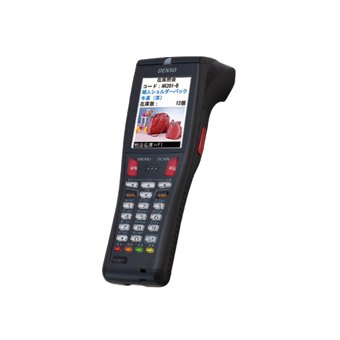
Rajah 1: Denso BHT-825Q Handy Terminal Mobile Computer. This image displays the front view of the device, showing its ergonomic design, the 2.6-inch color screen, and the 27-key alphanumeric keypad. The device is black with red accents on some keys.
The Denso BHT-825Q is engineered for reliable performance in various data collection environments. Its key features include:
Basic OS: Optimized for efficient data processing.
Batch/IrDA Communication: Untuk pemindahan data.
Pengimejan 2D: Capable of reading various 1D and 2D barcodes.
27 Kekunci: A comprehensive keypad for data entry and navigation.
Skrin Warna 2.6 inci: Memberikan paparan maklumat yang jelas.
Persediaan
1. Mengecas Bateri
Before initial use, fully charge the device's battery. Connect the charging cable to the charging port on the device and plug the adapter into a power outlet. The charging indicator light will typically show the charging status.
2. Menghidupkan/Mematikan
Untuk Menghidupkan: Tekan dan tahan butang Kuasa (biasanya terletak di sisi atau atas) sehingga skrin menyala.
Untuk Mematikan: Press and hold the Power button until a power-off menu appears, then select "Power Off" or "Shut Down".
3. Konfigurasi Awal
Upon first power-on, you may be prompted to set basic configurations such as date, time, and language. Follow the on-screen instructions to complete these settings.
Mengendalikan Peranti
1. Menavigasi Antara Muka
Use the directional keys (up, down, left, right) and the Enter key to navigate through menus and select options on the 2.6-inch color screen. The keypad allows for alphanumeric input.
2. Pengimbasan Kod Bar
Point the 2D imager at the barcode you wish to scan.
Press the scan trigger button (typically located on the side of the device).
Ensure the barcode is within the imager's field of view. A successful scan will usually be indicated by an audible beep or a visual confirmation on the screen.
3. Data Entry
Utilize the 27-key keypad for manual data input. The keys include numbers, letters, and function keys. Refer to the on-screen prompts for specific data entry requirements within applications.
4. Data Transfer (Batch/IrDA)
The BHT-825Q supports batch data transfer and IrDA (Infrared Data Association) communication. Consult your system administrator or application guide for specific instructions on how to transfer collected data to a host system.
Penyelenggaraan
1. Membersihkan Peranti
Gunakan kain lembut dan tidak berbulu sedikit dampened with water or a mild, non-abrasive cleaning solution to wipe the exterior of the device.
Jangan gunakan bahan kimia, pelarut atau pembersih yang kasar.
Ensure no liquid enters the device's ports or openings.
For the imager window, use a lens cleaning cloth to avoid scratches.
2. Penjagaan Bateri
Elakkan menyahcas sepenuhnya bateri dengan kerap.
Simpan peranti di tempat yang sejuk dan kering apabila tidak digunakan untuk tempoh yang lama.
Use only Denso-approved charging accessories.
3. Kemas Kini Perisian
Periodically check with your system administrator or Denso support for available software or firmware updates to ensure optimal performance and security.
Menyelesaikan masalah
Masalah
Kemungkinan Punca
Penyelesaian
Peranti tidak dihidupkan.
Bateri lemah atau habis.
Charge the battery for at least 30 minutes. Ensure the charger is properly connected.
Try scanning a different barcode. Clean the imager lens. Adjust the scanning angle and distance. Ensure the barcode symbology is enabled.
Skrin kosong atau beku.
Software error; Device crash.
Perform a soft reset (refer to device documentation for specific key combination, often holding power button for 10+ seconds). If issue persists, contact support.
Isu pemindahan data.
Incorrect settings; Connection problem.
Verify communication settings (e.g., IrDA alignment). Check cables if using a cradle. Consult your system administrator.
If the problem persists after attempting these solutions, please contact Denso customer support.
Spesifikasi
Ciri
Perincian
Nombor Model
BHT-825Q
Sistem Operasi
Basic OS
Imager Type
Pengimej 2D
Papan kekunci
27 Kekunci
Paparan
Skrin Warna 2.6 inci
Komunikasi
Batch/IrDA
Dimensi Pakej
12 x 6 x 4 inci
Berat Barang
1 paun
Pengeluar
Denso
Tarikh Mula-mula Tersedia
14 September 2016
Waranti dan Sokongan
Maklumat Waranti
The Denso BHT-825Q Handy Terminal Mobile Computer is covered by Denso's standard limited warranty. Please refer to the warranty card included with your product or visit the official Denso webtapak untuk terma dan syarat terperinci mengenai perlindungan waranti, tempoh dan prosedur tuntutan.
Sokongan Pelanggan
For technical assistance, troubleshooting beyond this manual, or service inquiries, please contact Denso customer support:
Webtapak: Visit the official Denso webtapak untuk sumber sokongan, Soalan Lazim dan borang hubungan.
telefon: Refer to the Denso webtapak untuk nombor telefon sokongan serantau.
e-mel: Specific email contacts may be available on the Denso support page.
When contacting support, please have your product model number (BHT-825Q) and serial number ready.
Dokumen Berkaitan - BHT-825Q
Palam Pencucuh DENSO: Menemui Teknologi dan Prestasi Pencucuhan Termaju Terokai panduan komprehensif DENSO untuk teknologi palam pencucuh, memperincikan inovasi seperti Iridium Power, Iridium TT dan reka bentuk U-groove. Ketahui cara palam pencucuh DENSO meningkatkan prestasi enjin, penjimatan bahan api dan kawalan pelepasan untuk aplikasi automotif.
Katalog Automotif DENSO: Pemampat & Komponen A/C Temui Katalog Automotif DENSO 2014 yang komprehensif untuk pemampat dan komponen A/C. Panduan ini menawarkan data aplikasi yang luas, nasihat penyelesaian masalah dan butiran produk untuk bahagian kenderaan selepas pasaran. Cari pengganti berkualiti OE daripada DENSO.
Panduan Rujukan Silang Palam Pencucuh DENSO untuk Motosikal Jepun Cari nombor bahagian palam pencucuh DENSO yang betul untuk pelbagai model motosikal Honda, Kawasaki, Suzuki dan Yamaha. Panduan komprehensif ini memudahkan pemilihan bahagian untuk penyelenggaraan dan peningkatan.
Carta dan Panduan Penyelesaian Masalah Sistem A/C Denso Panduan penyelesaian masalah yang komprehensif untuk sistem A/C automotif Denso, meliputi isu biasa seperti bunyi yang tidak normal, masalah pemampat, pincang fungsi klac dan kerosakan injap pengembangan dengan punca dan penyelesaian terperinci.
DENSO N04C-# Engine Common Rail System (CRS) Service Manual: Operation Comprehensive service manual detailing the operation of DENSO's Common Rail System (CRS) for N04C-# engines, applicable to Toyota Dyna, Toyota Coaster, and Hino Dutro vehicles. Includes system overview, component details, and diagnostic information.