pengenalan
This manual provides comprehensive instructions for the setup, operation, and maintenance of your Marathon CL030062WD Slim-Jumbo Atomic Digital Wall Clock. This clock features a large, easy-to-read display, atomic time synchronization, and displays temperature, date, and humidity. Please read this manual thoroughly before use to ensure proper functionality and longevity of your device.

Imej: Depan view of the Marathon CL030062WD Slim-Jumbo Atomic Digital Wall Clock, showcasing its large digital display for time, temperature, date, and humidity, set within a brown frame.
Persediaan
1. Pemasangan Bateri
The clock requires 4 AA batteries (included). Ensure correct polarity when inserting the batteries.
- Cari penutup petak bateri di belakang jam.
- Tanggalkan penutup dengan menggeser atau mengangkatnya.
- Insert 4 new AA batteries, matching the (+) and (-) terminals as indicated inside the compartment.
- Gantikan penutup petak bateri dengan selamat.
2. Initial Power-On and Atomic Time Synchronization
Upon battery installation, the clock will automatically begin searching for the WWVB atomic time signal. This process may take several minutes to up to 24 hours, depending on your location and environmental conditions. For best reception, place the clock near a window and away from electronic devices that may cause interference.

Imej: Dari dekat view of the Marathon CL030062WD clock display, highlighting its self-setting capability, versatile mounting options (table stand and wall-mount), and sleek design with a brushed steel effect frame.
3. Memasang Jam
The clock can be wall-mounted or placed on a flat surface using its built-in stand.
- Pemasangan Dinding: Use a screw (not included) appropriate for your wall material. Hang the clock using the keyhole slot on the back.
- Stand Meja: Extend the integrated stand on the back of the clock to place it on a desk or shelf.

Image: The Marathon CL030062WD clock displayed on a wall in a modern living room setting, demonstrating its suitability as a wall-mounted timepiece.
Arahan Operasi
The clock features several buttons on the back for manual adjustments if needed.
1. Mod Paparan
The clock dynamically displays time, date, day of the week, temperature (in °C or °F), and humidity.

Image: A detailed close-up of the Marathon CL030062WD clock's display, illustrating the clear presentation of AM/PM time, current temperature in Fahrenheit, date (month and day), day of the week, and humidity percentage.
2. Manual Time Setting (if atomic sync fails or is not desired)
While the clock is designed for atomic synchronization, you can manually set the time and date.
- Tekan dan tahan butang MODE butang untuk memasuki mod tetapan masa.
- Gunakan + or - buttons to adjust the flashing digit (e.g., hour, minute).
- Tekan MODE again to confirm and move to the next setting (e.g., year, month, day).
- Tekan MODE repeatedly until you exit the setting mode.
3. Temperature Unit Selection (°C/°F)
To switch between Celsius and Fahrenheit, locate the °C/°F button on the back of the clock and press it. The display will update accordingly.
4. Waktu Penjimatan Siang (DST)
The clock typically adjusts for Daylight Saving Time automatically when synchronized with the atomic signal. If manual adjustment is required, refer to the specific DST setting button or sequence in the manual time setting section.
Penyelenggaraan
1. Pembersihan
Wipe the clock's surface with a soft, dry cloth. Do not use abrasive cleaners or chemicals, as they may damage the display or casing.
2. Penggantian Bateri
Replace all 4 AA batteries when the display dims or the clock stops functioning correctly. It is recommended to replace all batteries at the same time with new ones of the same type.
3. Penyimpanan
If storing the clock for an extended period, remove the batteries to prevent leakage and potential damage to the device.
Menyelesaikan masalah
| Masalah | Kemungkinan Punca | Penyelesaian |
|---|---|---|
| Clock not displaying or dim display | Bateri rendah atau mati; kekutuban bateri yang tidak betul. | Replace all batteries with new ones, ensuring correct (+) and (-) orientation. |
| Time is incorrect or not setting automatically | Poor atomic signal reception; interference; incorrect time zone setting. | Move the clock closer to a window or to a different location away from electronic interference. Allow up to 24 hours for signal acquisition. Manually set the time if atomic sync is consistently unsuccessful. |
| Temperature/Humidity readings are inaccurate | Clock recently moved to a new environment; sensor obstruction. | Allow the clock to acclimate to its new environment for at least 30 minutes. Ensure no objects are blocking the sensor vents. |
Spesifikasi
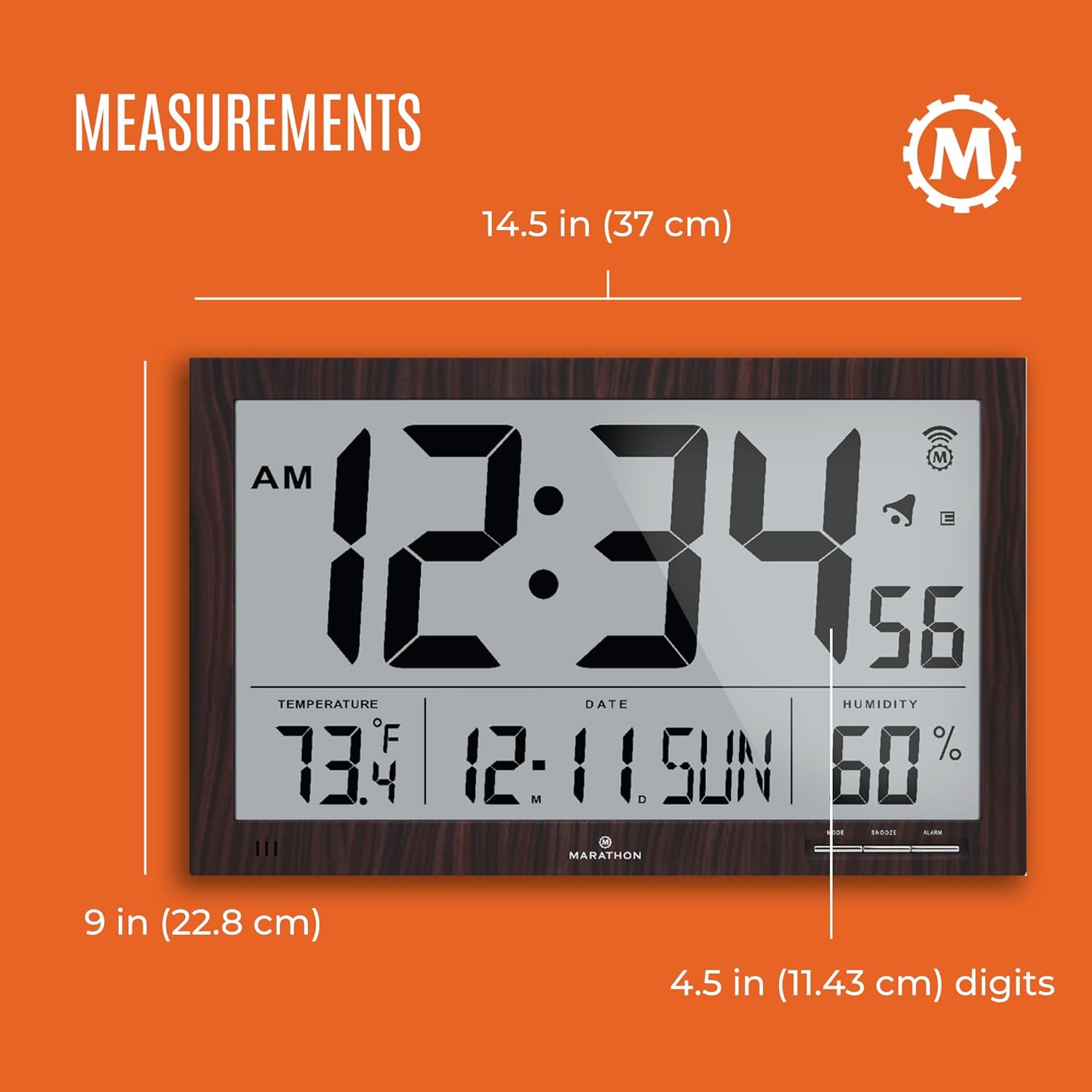
Image: A diagram illustrating the dimensions of the Marathon CL030062WD clock, showing a width of 14.5 inches (37 cm), a height of 9 inches (22.8 cm), and digit height of 4.5 inches (11.43 cm).
- model: CL030062WD
- Jenis Paparan: digital
- Ciri Khas: Atomic Time Synchronization (WWVB)
- Sumber Kuasa: 4 x Bateri AA (termasuk)
- Dimensi (LxWxH): Approximately 5.6 x 25.1 x 40.1 Centimeters (or 14.5 x 9 inches)
- Berat: 850 Gram
- Jenis Pemasangan: Pemasangan Dinding, Penyangga Meja
- Bahan Bingkai: plastik
- warna: coklat
- Fungsi: Time (HH:MM:SS), Date (MM/DD/YY), Day of Week, Indoor Temperature (°C/°F), Indoor Humidity (%)
Waranti dan Sokongan
For warranty information and customer support, please refer to the documentation included with your product packaging or visit the official Marathon brand webtapak. Simpan resit pembelian anda sebagai bukti pembelian untuk sebarang tuntutan waranti.

Image: The Marathon company logo with text indicating its founding in 1939 and its history of manufacturing timing instruments since 1941, signed by Leon Wein and Mitchell Wein.


