1. Pengenalan
Terima kasih kerana membeliasing the ONKYO X-U6(W) CD Receiver System. This manual provides essential information for the safe and efficient operation of your new audio system. Please read it thoroughly before use and keep it for future reference.
The ONKYO X-U6(W) is a versatile CD receiver system featuring Bluetooth with NFC for easy wireless connection to smartphones and tablets, a USB terminal for high-quality digital playback from iPod/iPhone/iPad and MP3 files, a PC IN (USB Type B) terminal for high-quality audio from your computer, and an FM tuner with Wide FM support.
2. Maklumat Keselamatan
Untuk memastikan operasi yang selamat dan mengelakkan kerosakan, sila patuhi langkah berjaga-jaga berikut:
- Bekalan Kuasa: Sambungkan unit hanya kepada volum bekalan kuasa yang dinyatakantage.
- Pengudaraan: Pastikan pengudaraan yang mencukupi di sekeliling unit. Jangan sekat bukaan pengudaraan.
- Kelembapan: Jangan dedahkan unit kepada hujan atau lembapan. Jangan letakkan objek yang diisi dengan cecair, seperti pasu, pada unit.
- Objek Asing: Jangan masukkan sebarang objek asing ke dalam bukaan unit.
- Servis: Jangan cuba servis unit sendiri. Rujuk semua servis kepada kakitangan perkhidmatan yang berkelayakan.
- penempatan: Place the unit on a stable, level surface away from direct sunlight, heat sources, and strong magnetic fields.
3. Kandungan Pakej
Sila pastikan semua barang disertakan dalam pakej:
- ONKYO X-U6(W) CD Receiver System (Main Unit)
- Remote Control (RC-893S)
- Kabel Kuasa
- Speaker Cables (2 pairs)
- Antena FM

Rajah 3.1: Included accessories for the ONKYO X-U6(W) CD Receiver System. This image displays the remote control, power cable, two sets of speaker wires, and an FM antenna, all essential components for setting up and operating the system.
4. Persediaan
4.1 Pembesar Suara Penyambung
- Sambungkan kabel pembesar suara ke PENCERAMAH terminals on the rear panel of the main unit. Ensure that the positive (+) and negative (-) terminals on the receiver match those on your speakers.
- Connect the other end of the speaker cables to your passive speakers.
4.2 Kuasa Penyambung
- Connect the supplied power cable to the AC IN terminal on the rear of the unit.
- Palamkan hujung kabel kuasa yang lain ke salur keluar dinding.
4.3 Menyambungkan Antena FM
- Sambungkan antena FM yang disediakan ke FM ANTENNA 75Ω terminal on the rear panel.
- Panjangkan antena untuk penerimaan optimum.
4.4 Menyambung Peranti Luaran
The X-U6(W) offers several options for connecting external audio sources:
- BARANG DI: Use RCA audio cables to connect analog audio devices (e.g., a turntable with a phono preamp, an older media player) to the BARIS MASUK (K/L) terminal.
- PC IN (USB Type B): Connect your computer to this terminal using a USB cable for high-quality digital audio playback.
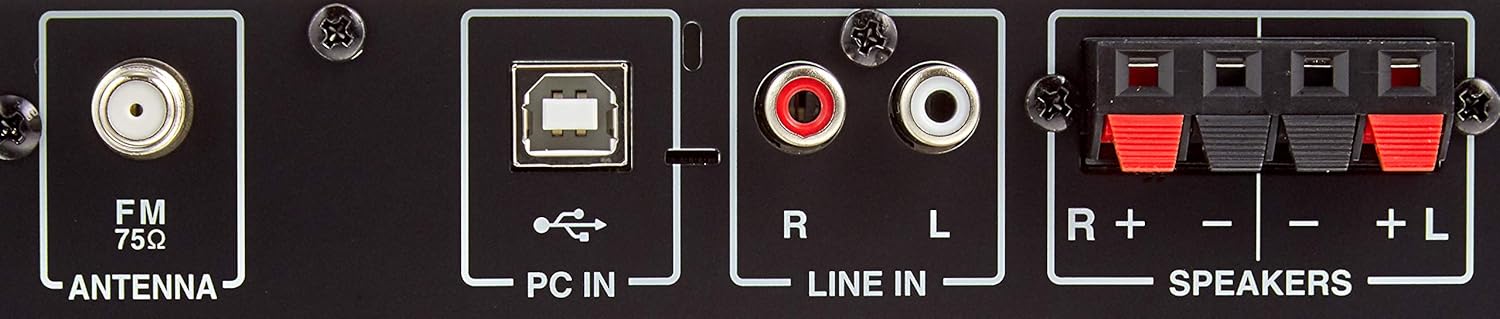
Rajah 4.1: Rear panel connections. This image highlights the various input and output ports on the back of the receiver, including the FM antenna input, PC IN (USB Type B), LINE IN (RCA stereo), and speaker terminals (R+-, L+-).
5. Arahan Operasi
5.1 Hidupkan/Mati Kuasa
Tekan ke KUASA butang pada panel hadapan atau alat kawalan jauh untuk menghidupkan atau mematikan unit.
5.2 Main Semula CD
- Tekan ke CD button on the remote control or front panel to select the CD source.
- Tekan ke BUKA/TUTUP butang untuk membuka dulang CD.
- Letakkan CD dengan bahagian label menghadap ke atas di dalam dulang dan tekan BUKA/TUTUP sekali lagi untuk menutupnya.
- Main balik akan bermula secara automatik. Gunakan MAIN/JEDA, BERHENTI, dan SKIP butang untuk kawalan.
5.3 Main Semula USB
The unit supports playback from iPod/iPhone/iPad and USB memory devices containing MP3 files.
- Connect your iPod/iPhone/iPad or USB memory device to the USB port pada panel hadapan.
- Tekan ke USB button on the remote control or front panel to select the USB source.
- Use the navigation buttons (up/down/left/right) and MASUK on the remote to browse and select files.
5.4 Bluetooth Connection (NFC)
The X-U6(W) features NFC for quick Bluetooth pairing.
- Tekan ke Bluetooth button on the remote control or front panel to select the Bluetooth source. The Bluetooth indicator will flash.
- For NFC-enabled devices: Touch your NFC-enabled smartphone or tablet to the N-Mark on the unit's front panel. Confirm the pairing on your device.
- For non-NFC devices: Enable Bluetooth on your device and search for "ONKYO X-U6". Select it to pair.
- Once paired, the Bluetooth indicator will glow steadily, and you can play audio from your device.
5.5 FM Radio Tuning
- Tekan ke FM button on the remote control or front panel to select the FM tuner.
- Gunakan PENALAAN +/- butang pada alat kawalan jauh untuk menala stesen secara manual.
- Untuk mengimbas stesen secara automatik, tekan dan tahan PENALAAN +/- butang.
5.6 Using PC IN
- Sambungkan komputer anda ke PC IN (USB Type B) terminal on the rear panel using a USB cable.
- Tekan ke PC button on the remote control or front panel to select the PC IN source.
- On your computer, select the ONKYO X-U6 as the audio output device.
5.7 Fungsi Kawalan Jauh
The remote control provides full functionality for the X-U6(W) system.

Rajah 5.1: Remote Control (RC-893S). This image shows the complete layout of the remote control, detailing buttons for power, source selection (CD, USB, Bluetooth, FM, LINE, PC), playback controls, volume adjustment, menu navigation, timer, mute, folder browsing, sound settings, repeat, and shuffle functions.
- Power (Orange button): Menghidupkan / mematikan unit.
- CD/USB/Bluetooth/FM/LINE/PC: Memilih sumber input.
- Kelantangan (+/-): Melaraskan kelantangan induk.
- Play/Pause (►/∥): Memulakan atau menjeda main balik.
- Berhenti (■): Menghentikan main balik.
- Skip (◀◀ / ►►): Skips tracks or files.
- Tuning (◀TUNING / TUNING►): Tunes FM radio frequencies.
- Menu/Enter/Navigation: Untuk menavigasi menu dan mengesahkan pilihan.
- Pemasa: Sets the sleep timer or playback timer.
- Redam: Membisukan output audio.
- paparan: Perubahan memaparkan maklumat.
- Bunyi: Accesses sound settings (e.g., bass, treble).
- Ulang/Kocok: Controls playback modes for CD/USB.
6. Penyelenggaraan
To maintain the performance and appearance of your ONKYO X-U6(W) system, follow these guidelines:
- Pembersihan: Wipe the unit with a soft, dry cloth. For stubborn dirt, use a cloth lightly dampened with water or a mild, non-abrasive cleaner. Do not use harsh chemicals or solvents.
- Pengudaraan: Periksa secara berkala bahawa bukaan pengudaraan tidak disekat oleh habuk atau serpihan.
- Dulang CD: Keep the CD tray clean and free of dust. Avoid touching the lens inside the CD player.
- Storan: Jika menyimpan unit untuk tempoh yang lama, cabut sambungannya daripada salur keluar kuasa dan tutupnya untuk melindungi daripada habuk.
7. Penyelesaian masalah
If you encounter problems with your unit, refer to the following common issues and solutions:
| Masalah | Kemungkinan Punca | Penyelesaian |
|---|---|---|
| Tiada kuasa | Kabel kuasa tidak disambungkan dengan selamat. | Periksa sambungan kabel kuasa ke unit dan soket dinding. |
| Tiada bunyi | Volume is too low or muted. Incorrect input source selected. Speaker cables not connected properly. | Increase volume, check mute status. Select correct input source. Verify speaker cable connections. |
| Penggandingan Bluetooth gagal | Bluetooth not enabled on device. Unit is too far from device. Interference. | Ensure Bluetooth is enabled on your device. Move device closer to the unit. Avoid sources of interference. |
| CD tidak dimainkan | CD kotor atau tercalar. CD dimasukkan dengan salah. | Clean the CD. Insert CD with label side up. Try a different CD. |
If the problem persists after trying these solutions, please contact your ONKYO dealer or authorized service center.
8. Spesifikasi
| Ciri | Spesifikasi |
|---|---|
| Jenama | Onkyo |
| Nombor Model | X-U6(W) |
| warna | putih |
| Dimensi Produk (L x W x H) | 27.3 x 21.5 x 9.9 cm |
| Berat Barang | 1.9 kg |
| Output Audio | 15 Watt |
| Number of Speakers (ch) | 2 |
| Keserasian Tanpa Wayar | Bluetooth |
| Teknologi Ketersambungan | berwayar |
| Jumlah Port USB | 2 |
| Jenis Penala | Wide FM |
| Penggunaan Kuasa | 32 W |
| Aksesori | Alat Kawalan Jauh |
| Bateri Termasuk | Tidak |
| Tahun Keluaran | 2016 |
| Ciri-ciri Produk | Reka Bentuk Mudah |
| Gaya | moden |
9. Waranti dan Sokongan
For warranty information, please refer to the warranty card or documentation included with your product. Keep your proof of purchase for warranty claims.
For technical support, product registration, or service inquiries, please visit the official Onkyo website or contact your local Onkyo dealer. Contact information can typically be found on the manufacturer's webtapak atau dalam pembungkusan produk.
Sokongan dalam talian: www.onkyo.com


