1. Produk Lebihview
The ROBOT COUPE 105268 Drive HUB is a critical replacement component designed for Robot Coupe food processors. This part is responsible for transmitting rotational power from the appliance's motor to the various processing attachments, ensuring efficient and reliable operation.
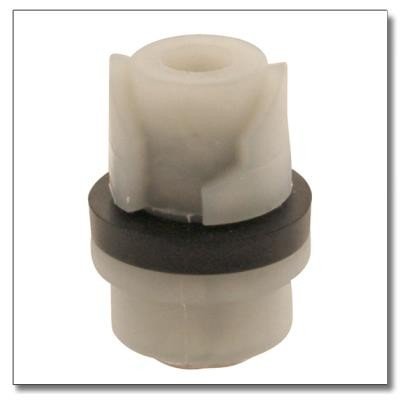
Rajah 1: Image of the Robot Coupe 105268 Drive HUB. This component is primarily white plastic with a black rubber ring around its lower section. The top part features internal grooves designed for secure attachment.
2. Persediaan dan Pemasangan
This section provides general guidelines for replacing the drive hub. Specific disassembly and reassembly procedures may vary depending on your Robot Coupe food processor model. Always refer to your appliance's primary instruction manual for detailed steps.
Langkah Keselamatan:
- Always unplug the food processor from the power outlet before attempting any installation or maintenance.
- Ensure the appliance has cooled down if it was recently in use.
- Wear appropriate protective gear, such as gloves, if necessary.
Langkah Pemasangan:
- Sediakan Perkakas: Unplug the food processor. Remove any bowls, lids, or attachments.
- Access the Drive Hub: Depending on your model, you may need to partially disassemble the appliance to access the existing drive hub. This could involve removing the motor housing or base plate.
- Remove Old Drive Hub: Carefully detach the old drive hub. Note its orientation and how it connects to the motor shaft. Some hubs may be threaded, while others may be press-fit or secured with a pin.
- Install New Drive Hub: Align the new ROBOT COUPE 105268 Drive HUB with the motor shaft. Ensure it is seated correctly and securely. If threaded, tighten it appropriately. If press-fit, apply even pressure until it clicks into place.
- Pasang semula Perkakas: Carefully reassemble any parts of the food processor that were removed during the process. Ensure all screws and fasteners are securely tightened.
- Kefungsian Ujian: Once fully reassembled, plug the food processor back into the power outlet. Perform a test run without any food to ensure the drive hub operates smoothly and attachments can be securely fitted.
3. Arahan Operasi
The ROBOT COUPE 105268 Drive HUB is an internal component that functions automatically once installed. It does not require separate operational controls. Its primary role is to facilitate the connection and power transfer to your food processor's attachments.
For instructions on how to operate your specific Robot Coupe food processor model, including attachment usage, speed settings, and processing techniques, please refer to the comprehensive instruction manual provided with your appliance.
4. Penyelenggaraan
Proper maintenance ensures the longevity and optimal performance of your drive hub and food processor.
- Pembersihan: If the drive hub becomes exposed during cleaning of the appliance, wipe it with a damp cloth. Avoid using abrasive cleaners or submerging the hub in water. Ensure it is completely dry before reassembly or use.
- Pemeriksaan: Periodically inspect the drive hub for any signs of wear, cracks, or damage, especially the rubber ring if present. If any damage is observed, replacement may be necessary to prevent further issues.
- Storan: If the drive hub is purchased as a spare part, store it in a cool, dry place away from direct sunlight and extreme temperatures to preserve its material integrity.
5. Penyelesaian masalah
If you experience issues after installing the new drive hub, consider the following troubleshooting steps:
- Perkakas Tidak Dihidupkan:
- Ensure the food processor is correctly plugged into a functional power outlet.
- Verify that all safety interlocks (e.g., bowl and lid are correctly seated) are engaged.
- Check if the drive hub was installed correctly and is not obstructing any internal mechanisms.
- Attachments Not Spinning or Slipping:
- Confirm the drive hub is fully seated and securely attached to the motor shaft.
- Inspect the attachment itself for any damage or wear that might prevent it from engaging properly with the drive hub.
- Ensure the attachment is correctly placed onto the drive hub.
- Bunyi atau Getaran Luar Biasa:
- Immediately turn off and unplug the appliance.
- Re-check the drive hub installation for proper alignment and secure fitting.
- Inspect for any foreign objects or debris that might be interfering with the drive hub's rotation.
If troubleshooting steps do not resolve the issue, it is recommended to contact Robot Coupe customer support or a qualified service technician.
6. Spesifikasi
| Nombor Bahagian | 105268 |
| Nombor Model Item | 206-1259 |
| Pengeluar | ROBOT COUPE |
| Berat Barang | 0.96 auns |
| ASIN | B01KRIKG4Y |
7. Waranti dan Sokongan
For specific warranty information regarding the ROBOT COUPE 105268 Drive HUB, please refer to the warranty documentation provided with your original Robot Coupe appliance or contact Robot Coupe directly. As a replacement part, its warranty may be subject to the terms of the original product or specific replacement part policies.
For technical assistance, spare parts inquiries, or further support, please visit the official Robot Coupe website or contact their customer service department. You can find more information about Robot Coupe products and support at their official store: Robot Coupe Store.


